Search...Search plugins and themes...
⌘K
Sign in
  • Get started
  • Download
  • Pricing
  • Enterprise
  • Account
  • Obsidian
  • Overview
  • Sync
  • Publish
  • Canvas
  • Mobile
  • Web Clipper
  • CLI
  • Learn
  • Help
  • Developers
  • Changelog
  • About
  • Roadmap
  • Blog
  • Resources
  • System status
  • License overview
  • Terms of service
  • Privacy policy
  • Security
  • Community
  • Plugins
  • Join the community
  • Discord
  • Forum / 中文论坛
  • Merch store
  • Brand guidelines
Follow us
DiscordTwitterBlueskyThreadsMastodonYouTubeGitHub
© 2026 Obsidian

Auto Class

nathoniusnathonius6k downloads

Automatically apply CSS classes to Markdown views based on a note's path.

Add to Obsidian
  • Overview
  • Scorecard
  • Updates15

Development Status: Maintenance Mode

This plugin is now entering maintenance mode for the time being. If interested in taking over this plugin, message me on Discord.

  1. PR's will be reviewed.
  2. Bugs will be reviewed and worked if able.
  3. Feature Requests will not be worked.

Auto Class

Quality Gate Status

An Obsidian plugin to automatically apply CSS classes to the markdown view as if you had added them in a cssClasses YAML key, based on a note's path and tags. Combine this with CSS snippets targeting a CSS class and you can have different snippets applied to different paths in a single vault without having to add any HTML or CSS classes yourself.

Install

Install from the community plugin registry under the name Auto Class, by using the BRAT plugin with repository nathonius/obsidian-auto-class, or manually by copying the release files (main.js, manifest.json, and styles.css) to .obsidian/plugins/auto-class in your vault.

Use

Classes can be applied based on a note's path or tags. In settings, configure a folder path or tag and the classes to apply to the children of that folder or the files with that tag. For advanced use-cases, enable glob matching in settings.
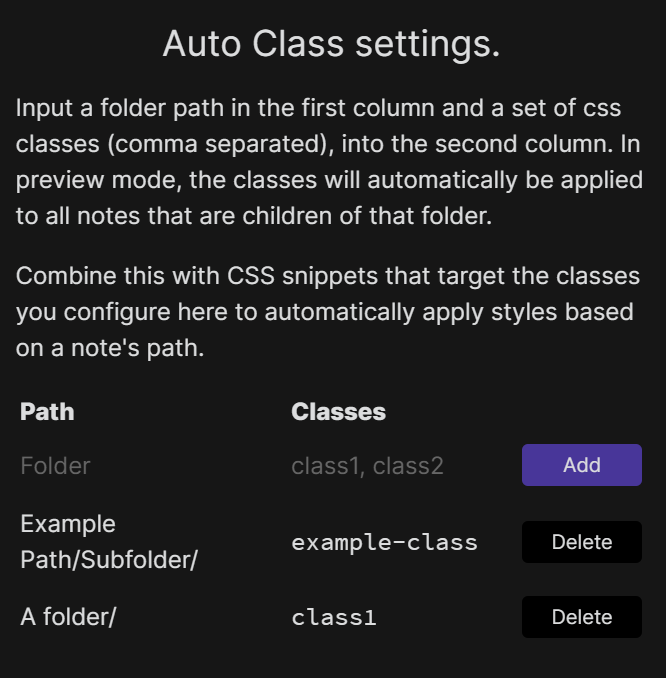
AutoClass

Once configured, the next time the view is updated the classes will be applied.

Contributing

Feel free to raise an issue or open a PR.

62%
HealthFair
ReviewCaution
About
Apply CSS classes to a note's markdown view based on its file path or tags. Target notes with CSS snippets per folder or tag without adding HTML or manual classes, and enable glob matching for advanced path patterns.
CSSThemingFolders
Details
Current version
2.3.0
Last updated
3 years ago
Created
5 years ago
Updates
15 releases
Downloads
6k
Compatible with
Obsidian 0.13.11+
License
OTHER
Report bugRequest featureReport plugin
Author
nathoniusnathonius
nathan-smith.org/
GitHubnathonius
  1. Community
  2. Plugins
  3. CSS
  4. Auto Class

Related plugins

Style Settings

Adjust theme, plugin, and snippet CSS variables.

Contextual Typography

Add a data-tag-name attribute to all top-level divs in preview mode containing the child's tag name, allowing contextual typography styling.

Theme Design Utilities

Some utilities and quality-of-life features for designers of Obsidian themes.

Minimal Theme Settings

Control the colors and fonts in Minimal Theme.

Hider

Hide interface elements such as tooltips, status bar, titlebar, and more.

Lapel

Show the heading levels in the gutter of the editor.

Admonition

Admonition block-styled content.

Waypoint

Easily generate dynamic MOCs in your folder notes using waypoints. Enables folders to show up in the graph view and removes the need for messy tags!

Custom Frames

Turn web apps into panes using iframes with custom styling. Also comes with presets for Google Keep, Todoist and more.

Custom File Explorer sorting

Manual or automatic config-driven reordering and sorting of files and folders in File Explorer.