Attachments MD Indexer
 iinkov3k downloads
Creates searchable metadata notes for Canvas files, PDFs, and images, enhancing graph view visibility and plugin compatibility.
- Overview
- Scorecard
- Updates7
This plugin enhances Obsidian's ability to manage various attachment types by creating searchable index files in Markdown format. This ensures that Canvas files, PDFs, and images are properly represented in graph views, become searchable by content, and are accessible to Obsidian plugins that primarily work with Markdown files.
Key Features
- Improves Attachment Visibility: Makes outgoing links from Canvas files visible in Obsidian's graph view, just like Markdown notes (Requires enabling "Show attachments" in graph view settings).
- Enables Content-Based Search: Extract and index complete text content from PDFs and images, enabling search by keywords like "Flowers" or "Receipt" to find relevant attachments.
- Enables Backlinks and Outgoing Links for Attachments: Allows you to see Canvas files in both outgoing and backlinks panels, treating them more like standard notes.
- Plugin Compatibility: Makes attachment files accessible to other Obsidian plugins that are designed to work with Markdown files, expanding the ecosystem of tools you can use.
- Automatic Synchronization: Automatically creates and updates Markdown index files for your attachments. Changes in the original files are reflected in the Markdown file, and deleting an attachment also removes its corresponding Markdown index file.
- AI Chat Compatibility: Allows AI chat plugins (which typically only understand Markdown) to access and understand the content of your attachments through the generated index files.
- Backup and Conversion: The plugin can be used as a mechanism to backup attachment content in a text-based format (Remember to move the generated Markdown file out of the index folder to prevent accidental deletion if the original attachment is removed).
- Enhanced Compatibility with other Plugins: Works particularly well with plugins like Smart Connections and Copilot, which can now leverage attachment content more effectively.
Supported File Types
This plugin creates and synchronizes searchable markdown index files for various attachment types:
- Canvas files (.canvas): Converts canvas JSON into markdown format with links to nodes and groups
- PDF files (.pdf): Creates markdown files with PDF viewer and extracts complete text content for searching (requires Google API key)
- Image files (.png, .jpg, .jpeg): Creates markdown files with embedded images and extracts all visible text for searching (requires Google API key)
How it Works
This plugin automatically generates a Markdown file for each of your supported attachment files. These Markdown files reside in a designated index folder and contain the content of the associated attachments.
In essence, the plugin:
- Adds a new MD file for every supported attachment file in your vault.
- Extracts and indexes complete text content, enabling both full-text and content-based search.
- Keeps the content of the Markdown file synchronized with the original attachment file.
- Stores all index files in a single, configurable folder with their original extension plus ".md" (e.g., file.canvas → index/file.canvas.md).
- Operates automatically in the background, requiring no manual intervention for synchronization.
- Removes index files when originals are deleted.
Example
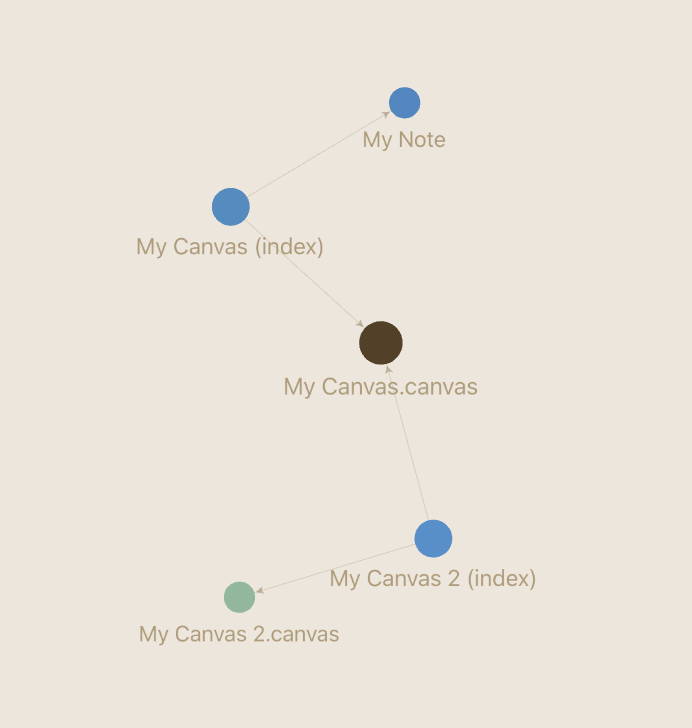
The images below illustrate how this plugin improves the visibility of Canvas files in the Obsidian graph view.
Before using the plugin: Canvas files are isolated in the graph and do not show connections to other notes.

After using the plugin: Canvas files are properly integrated into your graph, showing connections and making them first-class citizens in your knowledge graph.
Google Gemini API Integration
For PDF and image files, the plugin uses Google's Gemini Vision API to extract text content:
- Without a Google API key, only Canvas files will be indexed.
- While Gemini has daily limits, they are usually sufficient for free usage.
- PDFs and images will be indexed gradually over several hours.
- Get your API key here: https://aistudio.google.com/app/apikey
Mobile Usage
The plugin includes a separate setting for mobile devices:
- It is recommended to enable mobile auto-indexing only after initial indexation is complete on desktop.
- Initial indexation can take several days for large vaults and might cause Obsidian to restart when processing big files.
Installation
- Install the "Attachments MD Indexer" plugin from Obsidian's community plugin browser.
- Enable the plugin in your Obsidian settings under "Community plugins".
- (Optional) Configure the index folder location in the plugin settings. By default, it will create a folder named "index" in your vault root.
- (Optional) Add your Google Gemini API key to enable PDF and image indexing.
Enjoy using your attachment files more effectively within Obsidian!
Disclaimer: This plugin is provided as is, and while it aims to enhance your Obsidian experience, always ensure you have backups of your important data.