AmazeComplete
 nout67 downloads
Smart unified autocomplete for natural language dates, Templater templates, and vault file links.
- Overview
- Scorecard
- Updates4

AmazeComplete for Obsidian
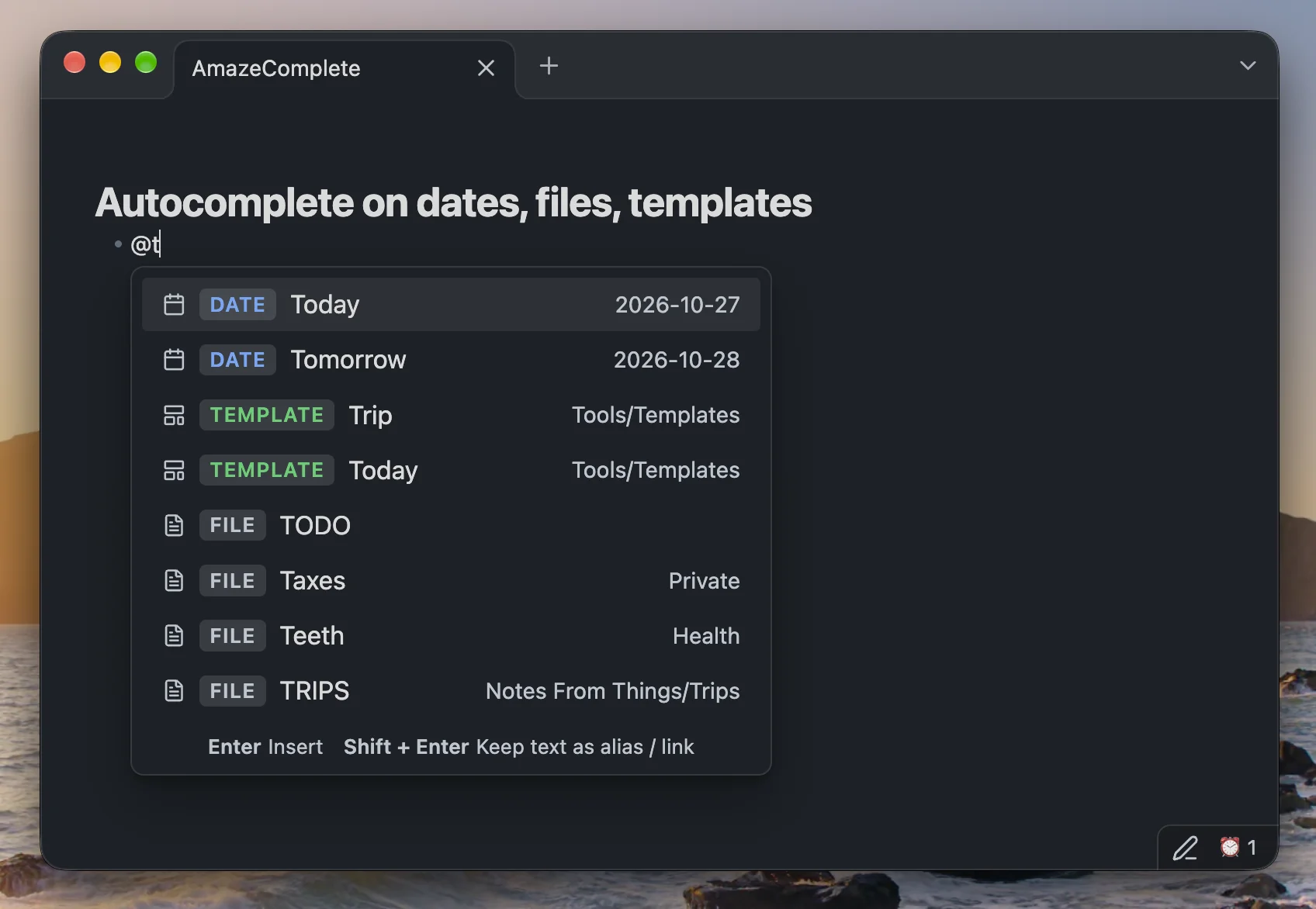
AmazeComplete — unified @ autocomplete for dates, templates, and files
AmazeComplete brings natural language dates, inline Templater template expansion, and vault file linking together under a single configurable trigger character (default @).
Built on the date-parsing foundation of Natural Language Dates (nldates-obsidian), AmazeComplete extends your @ menu so you never have to juggle separate trigger symbols or conflicting autocomplete popups.
Features
- Natural Language Dates (
DATE)- Type
@Today,@Tomorrow,@Yesterday,@next Friday,@in 3 days,@2 weeks ago,@time:now, or any natural language date phrase powered bychrono-node. - Live formatted preview right inside the suggestion menu (e.g.
2026-10-27). - Insert as
[[2026-10-27]]wikilinks or plain text depending on your settings.
- Type
- Inline Templates (
TEMPLATE)- Automatically discovers templates from your Templater template folder (with fallback support for Obsidian's core Templates plugin or a custom folder override).
- Selecting a template (e.g.
@Bookor@Trip) strips the trigger text and executes/expands the template directly at your cursor position.
- Vault Files & Aliases (
FILE)- Fuzzy-searches across markdown files in your vault as well as YAML frontmatter
aliases(e.g.@Taxesor@Trips). - Inserts clean
[[File]]or[[File|Alias]]links while automatically excluding your templates folder from duplicate file suggestions.
- Fuzzy-searches across markdown files in your vault as well as YAML frontmatter
Keyboard Shortcuts in the Popup
| Key | Action on DATE |
Action on TEMPLATE |
Action on FILE |
|---|---|---|---|
Enter |
Inserts formatted date (e.g. [[2026-10-27]]) |
Executes & expands the template inline at cursor | Inserts file link (e.g. [[Taxes]]) |
Shift + Enter |
Keeps natural language text as alias ([[2026-10-27|Today]]) |
Inserts a link to the template file ([[Trip]]) without expanding |
Inserts link with alias |
Installation
From Obsidian Community Plugins
- Open Settings → Community plugins in Obsidian.
- Click Browse and search for AmazeComplete.
- Click Install, then Enable.
Install Manually
- Download
main.js,manifest.json, andstyles.cssfrom the latest release. - Copy them into your vault's plugin folder:
<Vault>/.obsidian/plugins/amazecomplete/. - Reload Community Plugins in Obsidian and enable AmazeComplete.
Development
npm install
npm test
npm run build
Credits
- Natural language date parsing and configuration model based on nldates-obsidian by Argentina Ortega Sainz.
HealthExcellent
ReviewPassed
About
Unify date, template, and file autocompletion under a single trigger character (default @) and get natural-language date parsing with live formatted previews. Insert parsed dates as wikilinks or text, expand Templater templates inline, and fuzzy-search vault files and YAML aliases to insert clean [[File]] or [[File|Alias]] links.Details
Current version
1.0.3
Last updated
4 days ago
Created
2 weeks ago
Updates
4 releases
Downloads
67
Compatible with
Obsidian 1.5.0+
Platforms
Desktop, Mobile
License
MIT