AiDiTing
 DiTIngAI83 downloads
视频转文字. B站视频转文字. Transcribe Bilibili / Douyin links and audio files into timestamped Obsidian notes. Only creates new notes. Free 30 min/month.
- Overview
- Scorecard
- Updates21
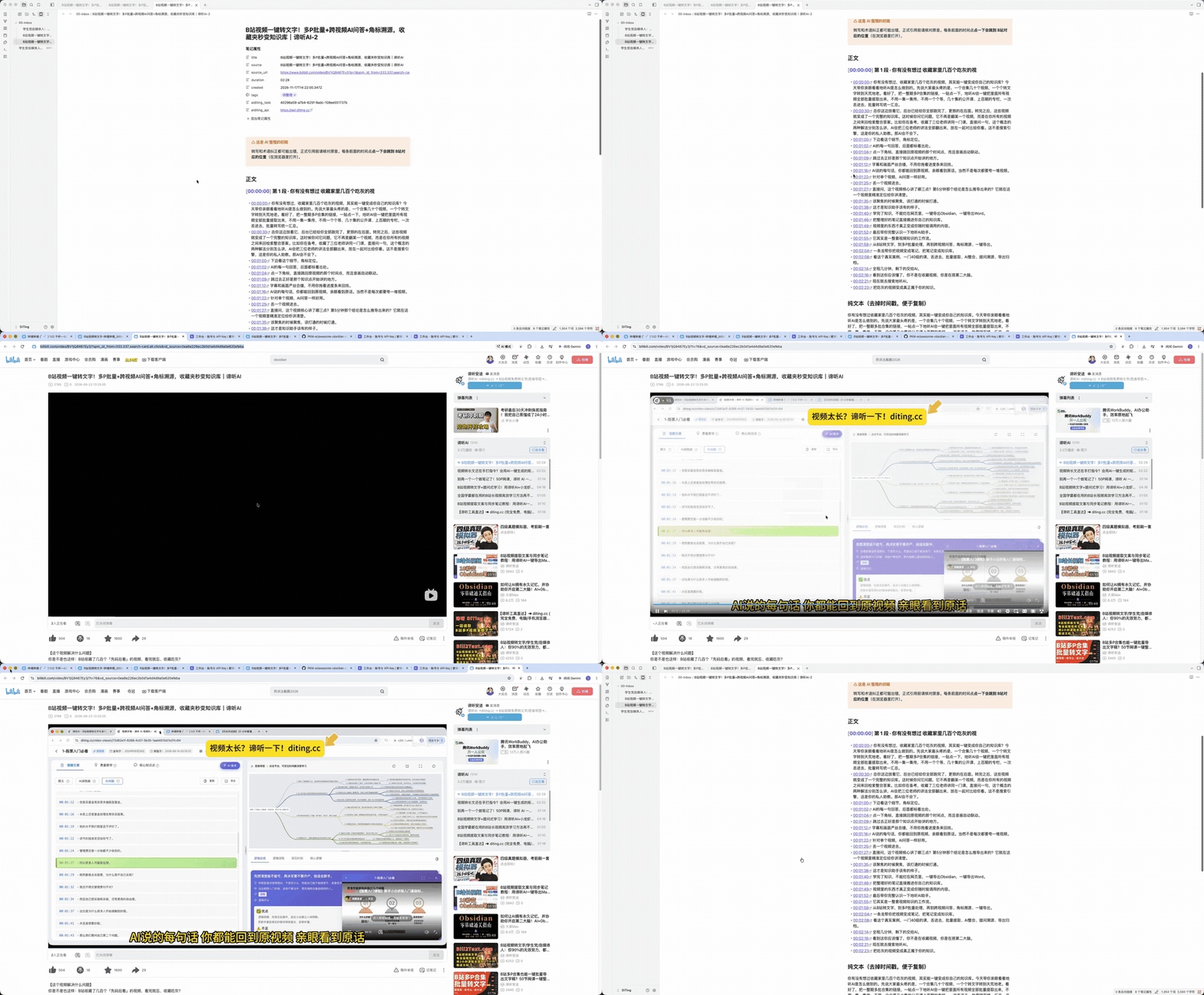
A note the plugin writes into your vault — YAML frontmatter, time-based chapters, per-sentence timestamps. Click a timestamp and the video jumps to that second. 这是插件写进你 Vault 的一篇笔记:YAML 属性、按时间切的章节、逐句时间戳,点一下时间点就跳回原片那一秒。
Turn audio and video files in your vault — or a Bilibili / Douyin / Xiaohongshu link — into timestamped, chaptered Markdown notes. Only creates new notes; never modifies existing ones. Desktop only. Requires an API key from https://aiditing.cn/workspace?from=obsidian&c=github-readme (free tier: 30 minutes / month).
中文说明(速览)
把 Vault 里的音视频,或 B站 / 抖音 / 小红书的链接,转成带时间戳、自动分章节的 Markdown 笔记。
完整中文文档(配置项、命令、隐私说明)见下方「安装」之后的内容。
- 逐句时间点:本地文件点一下就跳到原声(同页播放器跟着走),B站视频跳到网页对应位置
- B站多P 合集整季提交:一次勾选多集,每集生成一篇笔记,标题不会串
- 只新建,不改动:不会碰你已有的任何笔记;重名自动加序号
- 原文可溯源:frontmatter 里记着任务号与源链接,删除笔记也不影响已生成的内容
免费额度 30 分钟/月,API Key 在 https://aiditing.cn/workspace?from=obsidian&c=github-readme 创建(扫码登录,不用注册表单)。
仅支持桌面版 Obsidian(插件需要访问本地文件系统)。
Chinese documentation is further down: 中文说明.
What it does
- Pick an audio or video file in your vault (file menu, or command palette), or run Transcribe from link and paste a video URL. The plugin writes new notes into your target folder (default
00-Inbox). - A multi-part Bilibili video becomes one note per part; you tick which parts you want. You can paste the whole share text copied from the mobile app — the plugin extracts the URL.
- The note contains frontmatter (source file or source URL, duration, task ID), a summary, chapter headings, the transcript with timestamps, and a plain-text body without timestamps.
- It only creates new notes. It never edits, moves, or deletes existing notes. Name collisions get a numeric suffix, for example
x.mdbecomesx-2.md. - Processing time depends on file length, network conditions, and the current queue. There is no fixed time promise — the interface only reports the current status.
What it does not do
- No links outside the three platforms. Bilibili, Douyin and Xiaohongshu only. Anything else (YouTube, course platforms, podcast pages) has to be downloaded and uploaded as a local file.
- No paywall bypass. Only publicly accessible content is processed. Members-only, paid, or private videos will fail.
- No in-place updates. There is no "update the existing note" action.
- No mobile support.
isDesktopOnly: true. - No path confirmation for links. A single link may write a dozen notes, so the plugin does not ask per file; it writes into
00-Inboxand never overwrites.
Privacy
This plugin uploads the file you select (or the platform link you paste) to api.diting.cc for transcription.
- What leaves your machine: the file itself, its name, its duration — or just the URL for link transcription.
- Where it goes:
api.diting.cc, our own server. No third-party storage. - What it is used for: producing the transcript and the note for that one task.
- Not used for model training, not resold, not shared with third parties.
- Without an API key nothing is uploaded at all — the plugin only reads files locally.
- Your API key stays on your machine (plugin settings). It is sent only in the
Authorizationheader to our own API — never in a URL, never logged, never shared with third parties. Our server stores only a hash and a short prefix of it. - No analytics. The plugin sends no telemetry. Our server only sees that a task was submitted from the plugin (the
clientfield on the task row) for quota accounting and troubleshooting; it never records which notes you open. - It never reads the content of your other notes. To list transcribable files it enumerates vault paths (
vault.getFiles) and filters by extension only.
Install
- Settings → Community plugins → Browse → search AiDiTing → Install, then Enable.
- Open the plugin settings and click Create key to open the workspace, sign in, create an API key, and copy it.
- Back in Obsidian, run the command Paste API key from clipboard.
Manual install: copy main.js, manifest.json and styles.css into <Vault>/.obsidian/plugins/aiditing/.
License: MIT (see LICENSE). The main.js in this repository is a build artifact, unminified and unobfuscated so it can be read directly. Source lives in src/, tests in tests/, and the build is reproducible with npm install && npm run build.
中文说明
把 Vault 里的音视频文件,或一个 B站 / 抖音 / 小红书链接,整理成带时间戳与章节的 Markdown,落进你指定的目录。只新增文件,不改动、不移动已有笔记。
对应页面:https://aiditing.cn/connect/obsidian?from=obsidian&c=github-readme
第一次用:两步
- 装好后 Obsidian 会弹一条提示,点它打开工作台(每月 30 分钟免费),登录后创建 API Key 并复制
- 回 Obsidian 运行命令
粘贴 API Key(从剪贴板),Key 自动填好,不用再去翻设置页
没有 Key 时插件不会上传任何文件。
现在能做什么
- 选中(或右键)一个 Vault 内的音频/视频文件 → 生成笔记,写入目标目录(默认
00-Inbox) - 贴链接也能整理:命令面板运行
从链接整理(B站 / 抖音 / 小红书),可直接粘贴 App 里复制出来的整段分享文案;多P 合集可勾选要哪几集,一集一篇 - 本地上传在写入前显示最终路径,路径可改,确认后才落盘
- 重名自动加序号(
x.md→x-2.md),绝不覆盖 - 笔记结构:YAML 前置元数据(来源、时长、任务号)→ 原媒体嵌入 → 摘要 → 按时间切的章节 → 逐句带时间戳的正文 → 去时间戳的纯文本
- 原媒体嵌入(可关):把 Vault 里的原音视频嵌到笔记顶部;点正文里的
00:12直接跳到该秒并播放(阅读模式下)
不做什么(写在这里,免得你试完失望)
- 链接只支持三家:B站 / 抖音 / 小红书。别的站点(YouTube、网课平台、播客页等)请下载后走本地上传
- 不绕过登录与付费墙:只处理公开可访问的内容,充电专属、会员专享、私密视频会失败
- 链接转写不弹路径确认:可能一次写十几篇,逐篇弹窗会烦人;默认写入
00-Inbox,重名自动加序号,不会覆盖 - 不写移动端:
isDesktopOnly: true,手机端 Obsidian 装不上,也没验证过 - 不改已有笔记:没有「更新原笔记」这个操作
- 不承诺耗时:界面只报当前状态(排队中 / 进度百分比),不显示预计完成时间——真实耗时取决于文件时长、网络与队列
- 时间点跳转只在阅读模式生效:Live Preview 下时间点是编辑器文本,不是 DOM 元素,挂不上点击事件——这是技术限制,不是没做。切到阅读模式才能点
- 没有嵌入原媒体就跳不了:笔记里没有
![[原音视频]]时,点时间点会明确提示「找不到原媒体播放器」,不会静默无反应
隐私与数据(上架审核会看这一节)
这个插件会把你选中的文件(或粘贴的平台链接)上传到我们的服务器。 用之前请先确认这一点可以接受:
| 问题 | 回答 |
|---|---|
| 什么数据会离开你的电脑 | 你主动选择的那一个音视频文件本身、它的文件名、时长;链接转写则只有那条链接 |
| 发到哪里 | api.diting.cc(爱谛听自己的服务器)。不经过任何第三方网盘 |
| 用来做什么 | 只用于生成这次的转写文本与笔记 |
| 会不会用来训练模型 | 不会 |
| 会不会转发给别人 | 不会,不做二次分发 |
| 没配 Key 会不会上传 | 不会。没有 Key 时插件一个字节都不发,只在本地读文件 |
| API Key 存在哪、怎么发 | 只存在你本机的插件配置里。请求时放进 Authorization 头发给我们自己的 API,不写进 URL、不写进日志、不发第三方;服务端只存哈希与前后缀,库里没有明文 |
| 会不会统计我的使用行为 | 不做任何行为埋点。插件不向任何第三方发送统计。我们服务器只知道「有一个任务是通过插件提交的」(任务表的 client 字段),用于算额度与排查问题,不记录你打开了哪些笔记 |
| 会不会翻看我的其他笔记 | 不读内容。为了在选文件时列出可转写的音视频,插件会枚举 vault 内的文件路径(Obsidian 的 vault.getFiles),但只按扩展名挑出音视频,不打开、不解析、不上传任何你没选中的文件 |
| 想删掉已经上传的数据 | 联系客服提出,我们处理 |
只想留在本机的操作(读文件、写 Markdown)全部在本地完成,不上传。
安装
从社区插件市场(推荐)
设置 → 第三方插件 → 浏览 → 搜索 AiDiTing → 安装并启用。
目录里的名字是英文 AiDiTing,不是中文「爱谛听」(Obsidian 的 manifest 命名规范只接受 Basic Latin 字符),所以搜中文搜不到。目录清单每小时同步一次,刚上架时可能还搜不到,重启 Obsidian 或稍后再试。
手动安装(备选)
# 1. 把三个文件放进 Vault 的插件目录
<Vault>/.obsidian/plugins/aiditing/
├─ main.js
├─ manifest.json
└─ styles.css
- Obsidian → 设置 → 第三方插件 → 关闭「安全模式」
- 在「已安装插件」里找到「AiDiTing」,启用
- 打开插件设置 → 点「去创建」打开工作台,登录后创建 API Key,复制回来粘贴(免费额度每月 30 分钟)
配置项
| 设置 | 默认 | 说明 |
|---|---|---|
| API Key | 空 | 在工作台登录后创建;为空时不允许执行任务,也不会上传任何文件 |
| API 地址 | https://api.diting.cc |
除非另行通知,不要改 |
| 笔记落库目录 | 00-Inbox |
不存在会自动创建 |
| 章节切分间隔 | 10 分钟 | 填 0 则整篇一节 |
| 写入前确认路径 | 开 | 仅本地上传生效;链接转写不弹窗 |
| 生成后打开笔记 | 开 |
命令
整理当前音视频文件—— 当前编辑区是音视频时可用从 Vault 里选一个音视频整理—— 弹选择框从链接整理(B站 / 抖音 / 小红书)—— 粘贴链接或整段分享文案- 文件列表右键 →
爱谛听:整理成笔记
FAQ / 常见问题
能转 B站多P 合集吗? / Multi-part Bilibili videos? 能。一次勾选多集,每集生成一篇独立笔记,标题不会串。 Yes — one note per part, and you tick which parts you want.
会议录音、网课视频能转成文字吗? / Meeting recordings and online course videos? 能。Vault 里的任何本地音视频都可以(mp3 / mp4 / m4a / wav 等),不限于链接。 Yes — any local audio or video file in your vault.
支持 YouTube、网课平台、播客页的链接吗? / YouTube, course platforms, podcast pages? 不支持链接直转,请下载后走本地上传。 No link support for those platforms. Download the file and upload it locally instead.
会覆盖或改动我已有的笔记吗? / Will it overwrite existing notes?
不会。只新建文件,重名自动加序号(x.md → x-2.md)。
Never. It only creates new notes.
免费吗? / Is it free? 每月 30 分钟免费额度,足够跑完整流程再决定。 Free tier: 30 minutes per month.
文件传到哪儿? / Where is my file uploaded?
传到我们自己的服务器(api.diting.cc),只用于生成这一次的转写结果,不用于模型训练、不转售、不分享给第三方。
To our own server, only to produce that one transcript.
手机端能用吗? / Mobile support?
不能。仅桌面版 Obsidian(isDesktopOnly: true)。
Desktop only.
点时间戳没反应? / Timestamp jumping does not work? 只在阅读模式(Reading view)生效。Live Preview 下时间点是编辑器里的纯文本,不是 DOM 元素,挂不上点击事件;另外笔记里需要有嵌入的原音视频。 Reading view only. In Live Preview the timestamp is plain editor text, not a DOM element.
有行为埋点吗? / Any analytics? 没有。插件不向任何第三方发送统计,服务端只知道「有一个任务来自插件」,用于算额度与排查问题。 No analytics or telemetry.
相关产品 / Related
- 不装 Obsidian,只想把视频转成文字:https://diting.cc/?from=obsidian&c=github-readme
- 想把视频沉淀成可检索的知识库:https://ditingyun.cn/?from=obsidian&c=github-readme