Search...Search plugins and themes...
⌘K
Sign in
  • Get started
  • Download
  • Pricing
  • Enterprise
  • Account
  • Obsidian
  • Overview
  • Sync
  • Publish
  • Canvas
  • Mobile
  • Web Clipper
  • CLI
  • Learn
  • Help
  • Developers
  • Changelog
  • About
  • Roadmap
  • Blog
  • Resources
  • System status
  • License overview
  • Terms of service
  • Privacy policy
  • Security
  • Community
  • Plugins
  • Themes
  • Discord
  • Forum / 中文论坛
  • Merch store
  • Brand guidelines
Follow us
DiscordTwitterBlueskyThreadsMastodonYouTubeGitHub
© 2026 Obsidian

Agent File Pane

philphilphilphilphilphil36 downloads

Hides AGENTS.md and CLAUDE.md from the file explorer and lists them in a dedicated side pane.

Add to Obsidian
  • Overview
  • Scorecard
  • Updates3

Hides AGENTS.md, CLAUDE.md, GEMINI.md (and any other filenames you choose) from the Obsidian file explorer and lists them in a dedicated side pane that mirrors the folder tree.
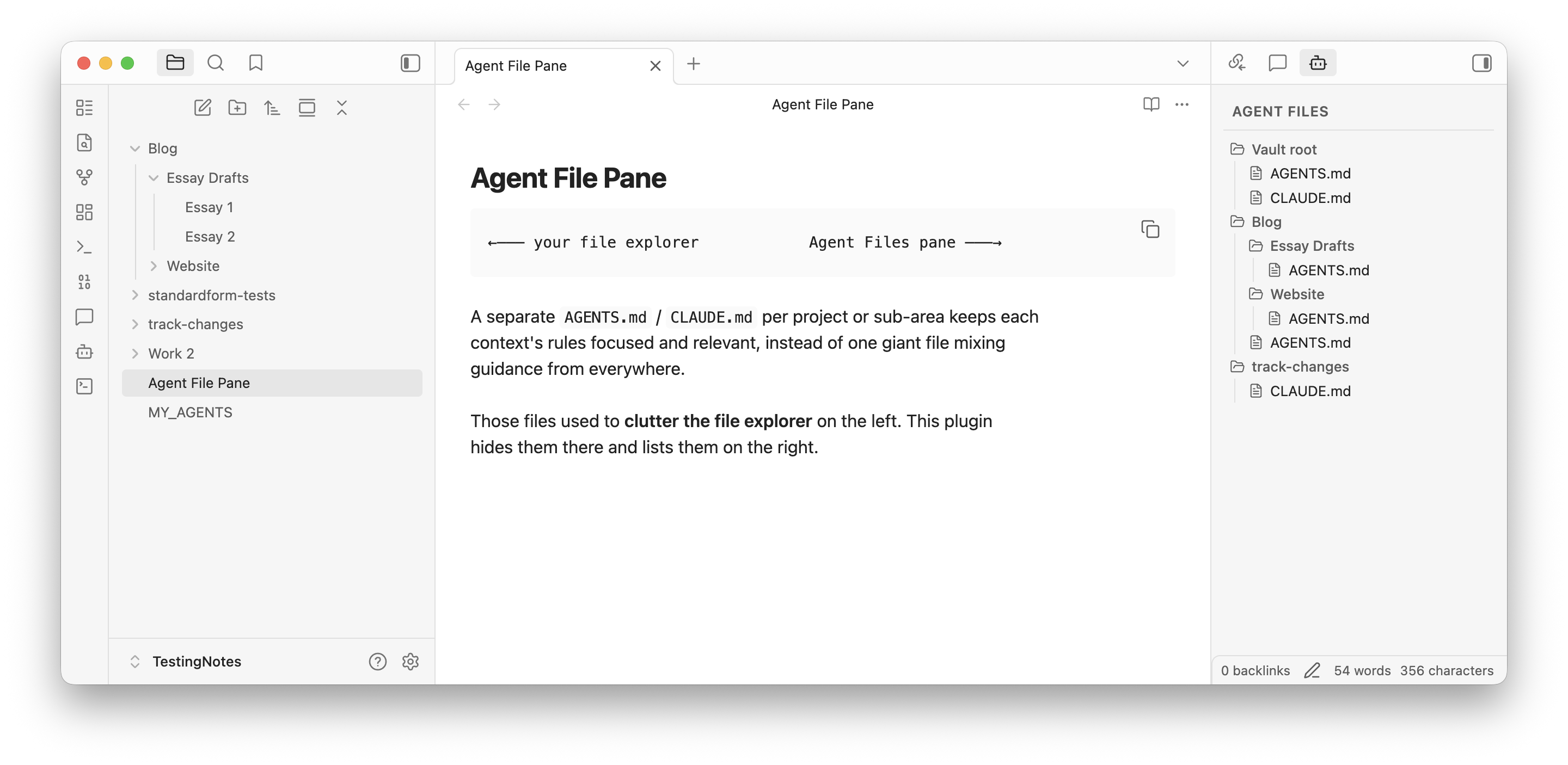
Agent File Pane in action

These instruction files clutter the file explorer when used at multiple folder levels, but you still want them accessible. This plugin keeps them out of the way while making them easy to jump to.

Features

  • Hide files in the explorer. Files matching the tracked filenames are hidden at any depth via a runtime stylesheet. Files like MY_AGENTS.md are not affected — only exact filename matches.
  • Side pane with a folder tree. A right-sidebar view (Agent Files) shows every tracked file in its actual folder hierarchy, so you can orient by location at a glance. Click a file to open it.
  • Configurable filenames. Add or remove tracked filenames from the settings tab. Defaults are AGENTS.md, CLAUDE.md, and GEMINI.md.
  • Stays in sync. The pane re-renders automatically on file create, delete, and rename.

Usage

Open the pane from the ribbon (bot icon) or from the command palette ("Agent File Pane: Open pane"). Cmd/Ctrl-click a file to open it in a new leaf.

Settings

Settings → Agent File Pane:

  • Tracked filenames. Add filenames to track, remove existing ones, or reset to the defaults. Matching is case-sensitive and exact (not pattern- based).

Installation

From the community plugin browser

Once accepted into the community catalog, install from Settings → Community plugins → Browse → search "Agent File Pane".

Manual install

  1. Download manifest.json, main.js, and styles.css from the latest release.
  2. Place them in <vault>/.obsidian/plugins/agent-file-pane/.
  3. Enable the plugin from Settings → Community plugins.

Development

npm install
npm run dev      # esbuild watch mode
npm run build    # type-check + production build

For live testing, symlink the repo into a vault's plugins folder:

ln -s "$(pwd)" /path/to/vault/.obsidian/plugins/agent-file-pane

License

MIT — see LICENSE.

99%
HealthExcellent
ReviewPassed
About
Hide AI instruction files (e.g., AGENTS.md, CLAUDE.md) from the file explorer and list them in a right-side pane that mirrors your folder tree.
FilesSidebarFolders
Details
Current version
1.0.0
Last updated
7 days ago
Created
7 days ago
Updates
3 releases
Downloads
36
Compatible with
Obsidian 1.7.2+
Platforms
Desktop, Mobile
License
MIT
Report bugRequest featureReport plugin
Author
philphilphilphilphilphil
phib.io
GitHubphilphilphil
  1. Community
  2. Plugins
  3. Files
  4. Agent File Pane

Related plugins

Flexplorer

Enhance the file explorer with custom sorting, pinning, and hiding.

Custom File Explorer sorting

Manual or automatic config-driven reordering and sorting of files and folders in File Explorer.

File Explorer Note Count

See the number of notes in each folder within the file explorer.

File Tree Alternative

An alternative file tree view with separate folder and file panes.

Trash Explorer

Restore and delete files from the Obsidian .trash folder.

File Explorer++

Hide and pin files and folders in the file explorer using custom filters.

Notebook Navigator

A better file browser and calendar inspired by Apple Notes, Bear, Evernote and Day One.

Recent Files

Display a list of recently opened files.

Novel word count

Display a word count, page count, creation date, or other statistics for each file, folder and vault in the File Explorer pane.

Multi Properties

Add properties to multiple notes at once. Either right-click a folder or select multiple notes and right-click the selection.