AgentBoard
 Aniruddh Jammoria799 downloads
A visual board synced with a Markdown todo file. Edit tasks on the board or via AI agents — changes reflect instantly on both sides.
- Overview
- Scorecard
- Updates6
An Obsidian plugin that renders a Markdown todo file as a Google Tasks–style board — synced in real time, in both directions.
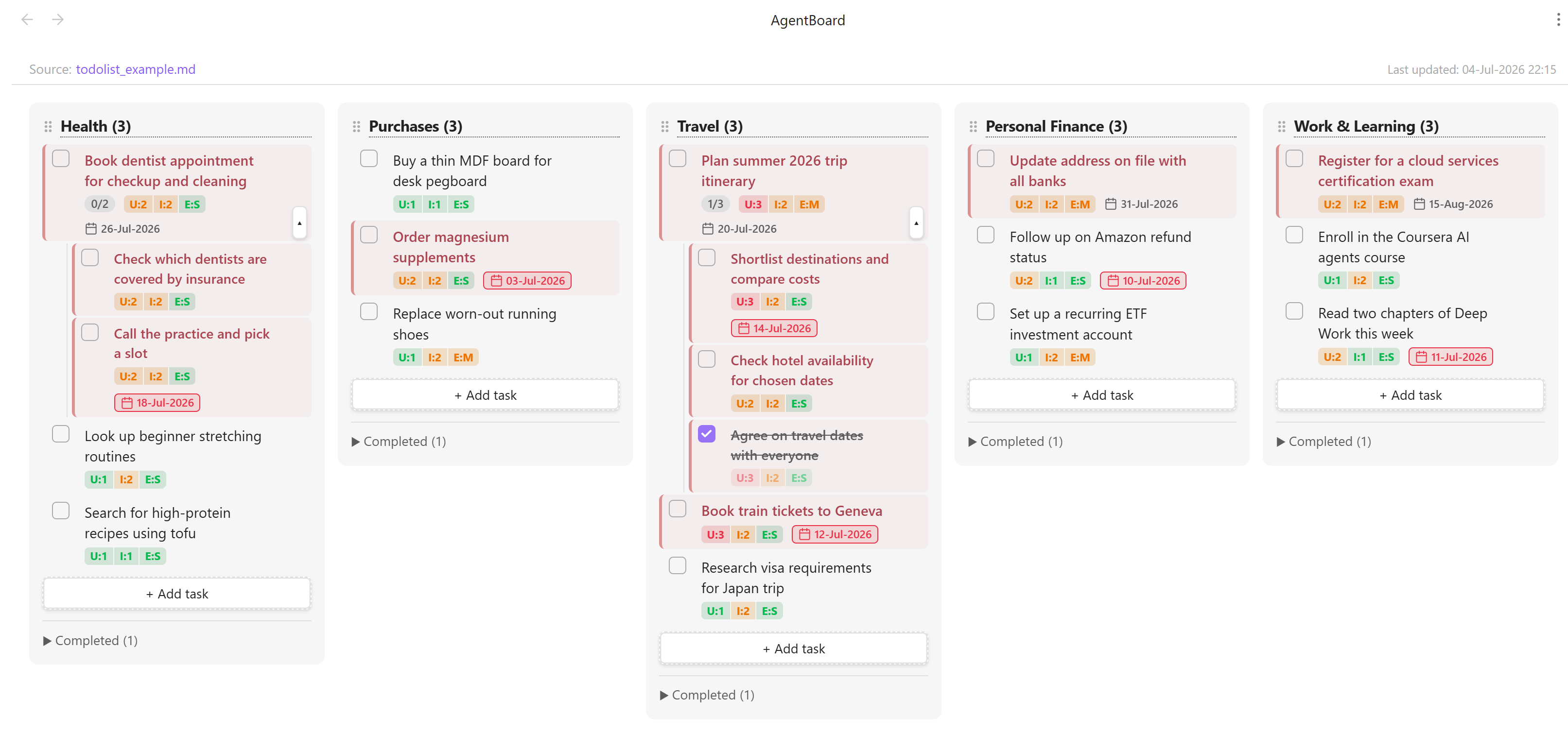
AgentBoard is designed to pair with an agentic skill: an AI agent (for example, a Claude Code slash command) captures your brain-dump of tasks and writes them into a single Markdown file in the format described below, scoring each task for urgency, importance, and effort. AgentBoard then visualizes that file as a prioritized board — and any edit you make on the board is written straight back to the Markdown, so the agent and the board stay in lock-step.
Companion skill:
skills/agentboard-sync/SKILL.mdis a ready-to-use Claude Code skill that produces this format — it scans your vault notes for todos, scores them, and keeps the board file ranked. Copy it into.claude/skills/agentboard-sync/in your vault (or~/.claude/skills/) and edit its Configuration section for your folders. Any other agent (or you, by hand) can maintain the file too, as long as it follows the format below.
How it works
- An agent maintains the file. A skill ingests your tasks and writes/updates the todo Markdown file, assigning each task the attribute block described in Todo file format.
- AgentBoard renders it. Each heading becomes a column; each task becomes a card showing its urgency/importance/effort and due date. Changes to the file appear on the board instantly.
- You refine on the board. Editing a task's score, due date, or critical flag writes back to the file and stamps it
UsrEdit:Y— a signal to the agent to leave that task's values alone on its next run.
Todo file format
This is the contract between the agent skill and AgentBoard. Any file that follows it can be visualized.
This note is a brain dump of things to do, in no particular order.

Last updated on: 04-Jul-2026 22:15

## Health
About: Physical and mental wellbeing.

- [ ] Book dentist appointment for checkup and cleaning [U:2 I:2 T:4 E:S Due:18-Jul-2026 Crit:Y]
- [ ] Look up beginner stretching routines [U:1 I:2 T:3 E:S Due:- Crit:N]
- [x] Start a daily 10-minute walk habit [U:2 I:3 T:5 E:S Due:- Crit:Y]

## Finance
About: Money, banking, and investments.

- [ ] Update address on file with all banks [U:2 I:3 T:5 E:M Due:31-Jul-2026 Crit:Y]
- [ ] Set up a recurring ETF investment account [U:1 I:2 T:3 E:M Due:- Crit:N]

## Travel
About: Upcoming trips and travel planning.

- [ ] Plan summer trip itinerary [U:3 I:2 T:5 E:M Due:20-Jul-2026 Crit:Y]
    - [ ] Shortlist destinations and compare costs [U:3 I:2 T:5 E:S Due:14-Jul-2026 Crit:Y]
    - [x] Agree on travel dates with everyone [U:3 I:2 T:5 E:S Due:- Crit:Y]
Structure
- Columns — every
#,##, or###heading becomes a column. - Tasks —
- [ ]is an open task,- [x]is completed. Completed tasks collapse into a foldable section per column. - Subtasks — an indented task line (4 spaces preferred; any leading spaces or tabs work) belongs to the nearest non-indented task above it. One level of nesting. Subtasks carry the same attribute block as regular tasks.
About:— an optional line directly under a heading; shown as a hover tooltip on the column title.Last updated on:— an optional line anywhere in the file; shown in the board's top bar. Display only — AgentBoard never rewrites it, so the agent should maintain it.[[wiki-links]]— render as clickable links inside task text.
Task attribute block
Each task line ends with a bracketed block of Key:Value tokens, emitted in this order (U I T E Due Crit):
[U:2 I:3 T:5 E:M Due:31-Jul-2026 Crit:Y]
| Key | Meaning | Values | Notes |
|---|---|---|---|
U |
Urgency | 1–3 |
3 = most time-sensitive |
I |
Importance | 1–3 |
3 = most impactful |
T |
Total | 2–6 |
Derived: T = U + I. Used for ranking. |
E |
Effort | S / M / L |
Estimated time to complete |
Due |
Deadline | DD-Mon-YYYY or - |
e.g. 30-Jun-2026; - for none. Year-less DD-Mon is accepted (year is inferred) but DD-Mon-YYYY is preferred. |
Crit |
Critical flag | Y / N |
Derived: Y when U ≥ 2 AND I ≥ 2, otherwise N. |
UsrEdit |
User-edited flag | Y |
Written by AgentBoard when a user edits a task on the board. Not emitted by the agent. |
Rules for the agent skill
- Recompute derived fields.
TandCritare functions ofU/I— always keep them consistent (T = U + I;Crit = YiffU ≥ 2 AND I ≥ 2). - Do not emit
UsrEdit. It is owned by AgentBoard. Its presence (UsrEdit:Y) means the user has manually adjusted that task. - Respect
UsrEdit:Y. When regenerating or re-scoring the file, do not overwrite the U/I/E/Due/Crit values of any task markedUsrEdit:Y— the user's choices win. - Preserve the block order and formatting so diffs stay clean.
- Keep a parent and its subtasks together. They form one block — subtasks stay indented directly under their parent through any re-ordering.
On the board
- The card shows a single
U | I | Epill with each section colored by value — red (U/I= 3,E= L), amber (= 2,E= M), green (= 1,E= S). - The due date appears with a calendar icon; if it has passed, the date is outlined in red.
- Critical tasks are marked with a muted red stripe and slightly emphasized text.
- Subtasks render indented under their parent, which shows a
1/3-style progress pill and a chevron to collapse/expand them. Completing every subtask completes the parent; completing the parent completes all subtasks.
Features
- Board view — headings become columns, tasks become cards
- Real-time two-way sync — file edits (including by an agent) and board edits stay in sync instantly
- On-board editing — click a
U/I/Esection to change it, click the due date to pick a new one; changes (and derivedT/Crit) write back to the file and stampUsrEdit:Y - Due dates — shown with a calendar icon; overdue dates are highlighted
- Critical tasks — derived from
Crit, or toggled manually via the⋯menu - Add / edit / delete / complete tasks directly on the board
- Subtasks — nested one level under a parent, with two-way auto-completion (all subtasks done ⇢ parent done; parent done ⇢ all subtasks done), a progress pill, collapse/expand, and "Add subtask" in the
⋯menu - Rename & reorder columns — double-click a title to rename (writes back); drag the
⠿handle to reorder (board-only, doesn't touch the file) - Wiki-links —
[[note]]links render clickable with[[autocomplete - Hover descriptions —
About:lines become column tooltips - Source & timestamp — the active file and its
Last updated on:line are shown at the top of the board
Installation
From the Obsidian community plugins directory
- Open Settings → Community plugins → Browse
- Search for AgentBoard
- Click Install, then Enable
Manual installation
- Download
main.js,manifest.json, andstyles.cssfrom the latest release - Copy them into
<your vault>/.obsidian/plugins/agent-board/ - Enable the plugin in Settings → Community plugins
Configuration
Open Settings → AgentBoard and set the path to your todo Markdown file, relative to the vault root (e.g. todo.md or notes/todos.md). The field autocompletes from all .md files in your vault.
Usage
- Open the board via the checkbox icon in the left ribbon, or run Open AgentBoard from the command palette
- Add a task — click
+ Add taskat the bottom of a column, type, press Enter - Complete a task — click the checkbox; it moves to the Completed section
- Edit text — double-click the task text
- Change U / I / E — click that section of the score pill and pick a value
- Set / change a due date — click the due date (or the faint calendar icon on a task without one)
- Add a subtask — hover a task, click
⋯, choose Add subtask - Collapse subtasks — click the small chevron at the bottom-right of a parent task
- Critical / Delete — hover a task, click
⋯, choose from the menu - Rename a column — double-click the title
- Reorder columns — drag the
⠿handle - Open the source file — click the filename at the top of the board
Development
git clone https://github.com/aniruddh-jammoria/obsidian-agentic-todolist
cd obsidian-agentic-todolist
npm install
npm run dev   # watch mode
npm run build # production build
Copy main.js, manifest.json, and styles.css into <vault>/.obsidian/plugins/agent-board/ to test. See AGENTS.md for architecture and contributor notes.