Zheng Tally
 yunmin25 downloads
Count with traditional five-stroke Zheng tallies inline in Obsidian and resume them later.
- Overview
- Scorecard
- Updates4
A native-feeling 正 tally counter for Obsidian. Count stroke by stroke, keep it inline, and resume anytime.

Press Alt+Z, tap Space to count, Enter to commit. The tally renders as a
real inline 正 built from canonical stroke vectors, and it stays that way:
committed tallies remain vector chips you can click to resume.
Why Zheng Tally
Counting with 正 tallies in Markdown usually means typing characters by hand and losing count halfway. Zheng Tally turns it into a tight loop: start anywhere in a note, watch each stroke appear, commit a portable plain-text tally, and pick it back up later without retyping. The editor shows vectors; the file stays readable text.
How it works
Alt+Zdrops an inline counter at the cursor.- Each
Spaceadds one canonical stroke (一→ … →正), grouped in fives. Enterwrites正正正·3<!--zt:18-->— visible text plus a count marker.- The note keeps showing a vector chip, derived from that text on every load.
- Click the chip (or caret +
Alt+Z) to resume from 18.Escnever writes.
Features
- Canonical 5-stroke
正vectors at every step — never a substituted character - True inline widget with font-matched size and baseline
- Persistent, resumable tally objects with restart-safe recovery
- Readable storage: notes stay meaningful with the plugin off
- Compact large-count preview that never drops the in-progress group
- Conservative hover/count badge for legacy tallies, zero layout shift
Installation
From a release:
- Download
main.jsandmanifest.jsonfrom Releases. - Place both in
<vault>/.obsidian/plugins/zheng-tally/. - Enable the plugin under Settings → Community plugins.
From source:
git clone https://github.com/yunmin311/zheng-tally-obsidian.git
cd zheng-tally-obsidian
npm install
npm run build
Copy dist/main.js, manifest.json, and styles.css into your vault's
plugin folder. (styles.css carries the chip and hover-badge styling.)
Usage
- Open a Markdown note (Obsidian desktop).
Alt+Zto start tally mode at the cursor.Space/+to count up,Backspace/-to count down.Enterto commit a persistent vector chip.- Click the chip (or caret +
Alt+Z) to resume;Esccancels cleanly.
One session at a time; switching leaves ends it without writing.
Keyboard shortcuts
| Key | Action |
|---|---|
Alt+Z |
Start, or resume the tally under the caret |
Space / + / NumpadAdd / Shift+= |
+1 |
Backspace / - / _ / NumpadSubtract |
−1 (floors at 0) |
Enter |
Commit (single edit) |
Esc |
Cancel, zero document changes |
Ctrl/Alt/Meta chords pass through untouched.
Persistent & resumable tallies
Committed tallies keep rendering as vector chips — same strokes, same metrics,
quieter chrome — across note reopens, plugin reloads, and restarts, derived
purely from the note text. This holds in reading view too (src/reading-tally.ts):
a registerMarkdownPostProcessor pass renders the chip there, because the
editor's CodeMirror decorations never reach Obsidian's MarkdownRenderer.
Reading-view chips are read-only; counting stays an editor action.
- Resume from the stored total (18 → 19), never from zero.
- Resume +
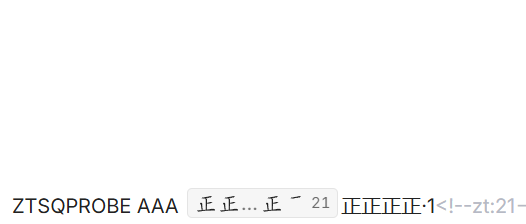
Enterrewrites text + marker in one edit (正正正正·3<!--zt:23-->). - Resume +
Escchanges nothing; the original chip returns. - Resume to 0 +
Enterremoves the tally and its marker. - Ambiguous caret between two adjacent tallies resumes neither.
- The persisted total stays hidden until hover or caret reaches the chip, reserving its space so nothing shifts.
Storage format
| Count | Stored |
|---|---|
| 1 | ·1<!--zt:1--> |
| 5 | 正<!--zt:5--> |
| 18 | 正正正·3<!--zt:18--> |
The <!--zt:N--> comment is the integer source of truth and ownership marker.
A marker counts only when it re-serializes to exactly the visible text;
mismatches fail closed. Unmarked legacy tallies (正正正·3) still get a
conservative hover badge and can be resumed once, upgrading on next Enter.
A lone 正 never auto-resumes.
Large-count behavior
Up to four group slots render in full; beyond that the preview compacts while always keeping the most-recent finished group and the live partial slot:
18 -> 正 正 正 [state3]
20 -> 正 正 正 正
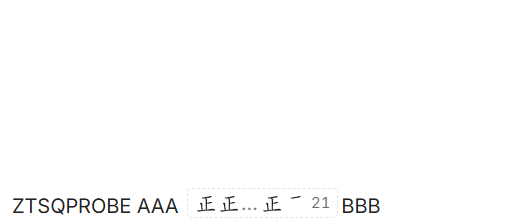
21 -> 正 正 … 正 [state1]
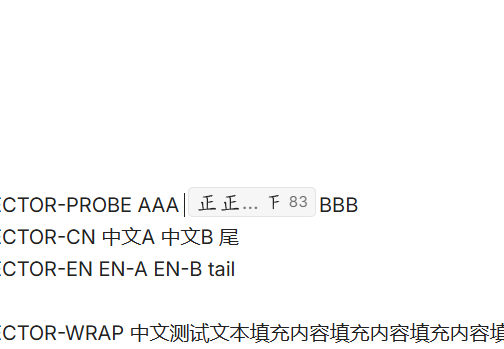
83 -> 正 正 … 正 [state3]
The right-hand total is always exact. Active and persisted chips share one grouping algorithm, so committing never jumps visually.

Architecture
src/zheng-strokes.ts— vendored canonical 5-stroke vectors (Arphic data)src/renderer.ts— native-measured glyph cells + tally chipssrc/cm6-widget.ts— live inlineDecoration.widgetsrc/persistent-tally.ts— marker replace decorations + resume lookupsrc/editor-session.ts— keyboard capture, lifecycle, single-edit commitssrc/tally-hover.ts— legacy parser + transient count badgesrc/tally-state.ts— counts plus stable/marked serializationsrc/editor-host.ts— the single CodeMirror access point
Compatibility / limitations
- Obsidian desktop only; no mobile support.
- One active session at a time; no history or statistics.
- Detection stays conservative by design: in-word matches and lone
正never badge or resume.
Development
npm install       # install dependencies
npm run dev       # watch mode build
npm run build     # production build (dist/main.js + dist/manifest.json)
npm test          # 143 passing
npm run lint      # eslint
npm run typecheck # tsc --noEmit
License & data attribution
- Plugin source code: MIT — see LICENSE.
- Canonical
正stroke vectors: Arphic Public License, not MIT — via Hanzi Writer Data / Make Me a Hanzi, extracted from Arphic Technology fonts. Full text: vendor/ARPHICPL.txt, notes: vendor/README.md.