YAML Properties
 Robert Fleming586 downloads
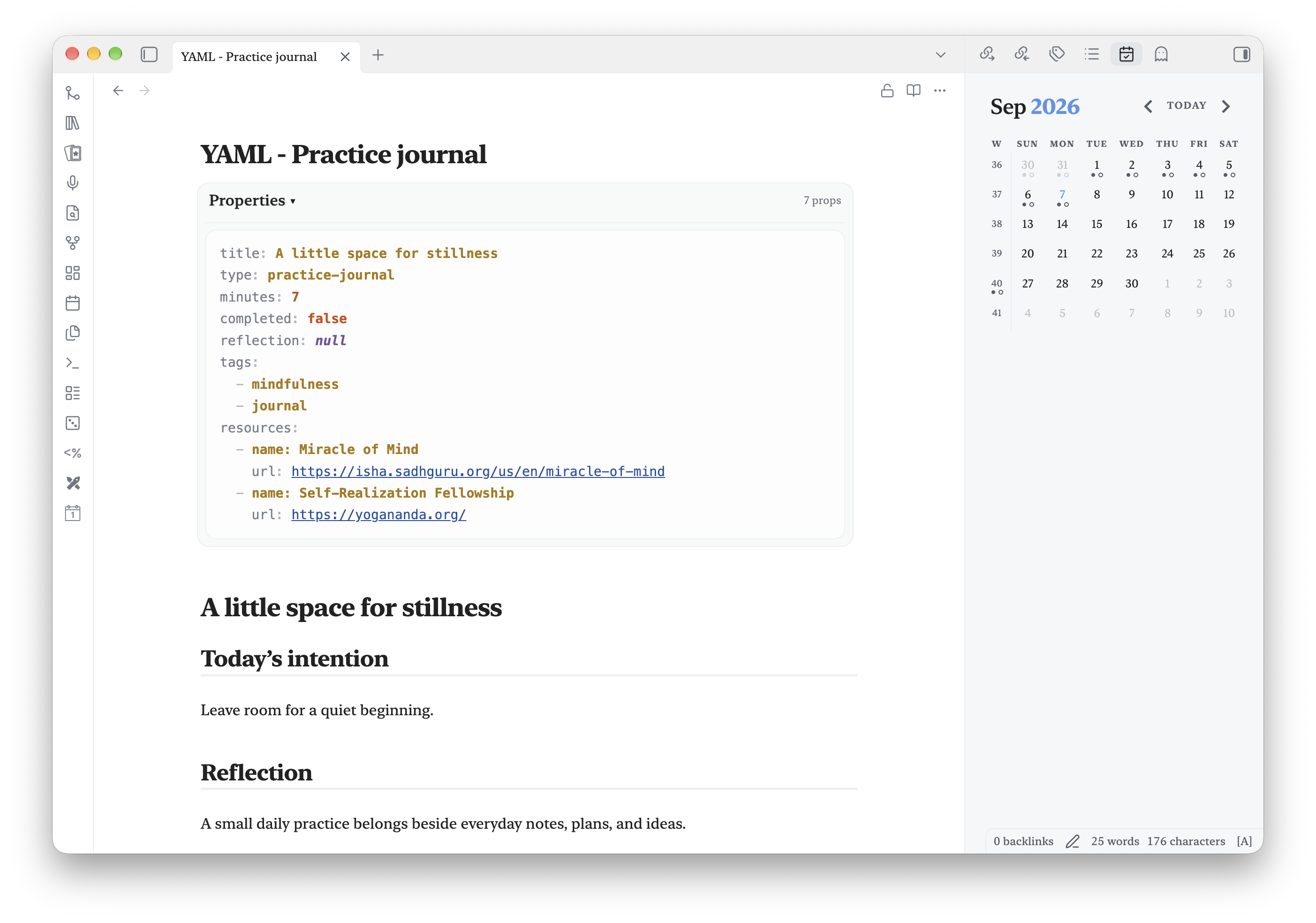
Edit properties as readable, syntax-highlighted YAML frontmatter and collapse them when not needed.
- Overview
- Scorecard
- Updates9
Edit Obsidian Properties as readable, syntax-highlighted YAML frontmatter, then collapse the block when you want it out of the way.
YAML Properties is for people who want the portability and full expressiveness of raw YAML without giving up a clean writing view. It replaces the in-note Properties editor with an editable YAML block in Live Preview, shows a highlighted read-only block in Reading view, and leaves normal Source mode available.
Features
- Edit raw YAML frontmatter directly in Live Preview.
- Syntax highlighting for keys, strings, numbers, booleans, nulls, tags, links, comments, and punctuation.
- Collapse Properties to a compact summary row.
- Choose whether notes start collapsed and whether state is remembered per note.
- Hide the custom YAML block in Reading view.
- Bundled source-mode YAML styling with an optional compact layout.
- Works on desktop and mobile without network access or external services.
Your notes remain plain Markdown. The plugin does not add proprietary metadata or modify YAML unless you edit it.
See it in action
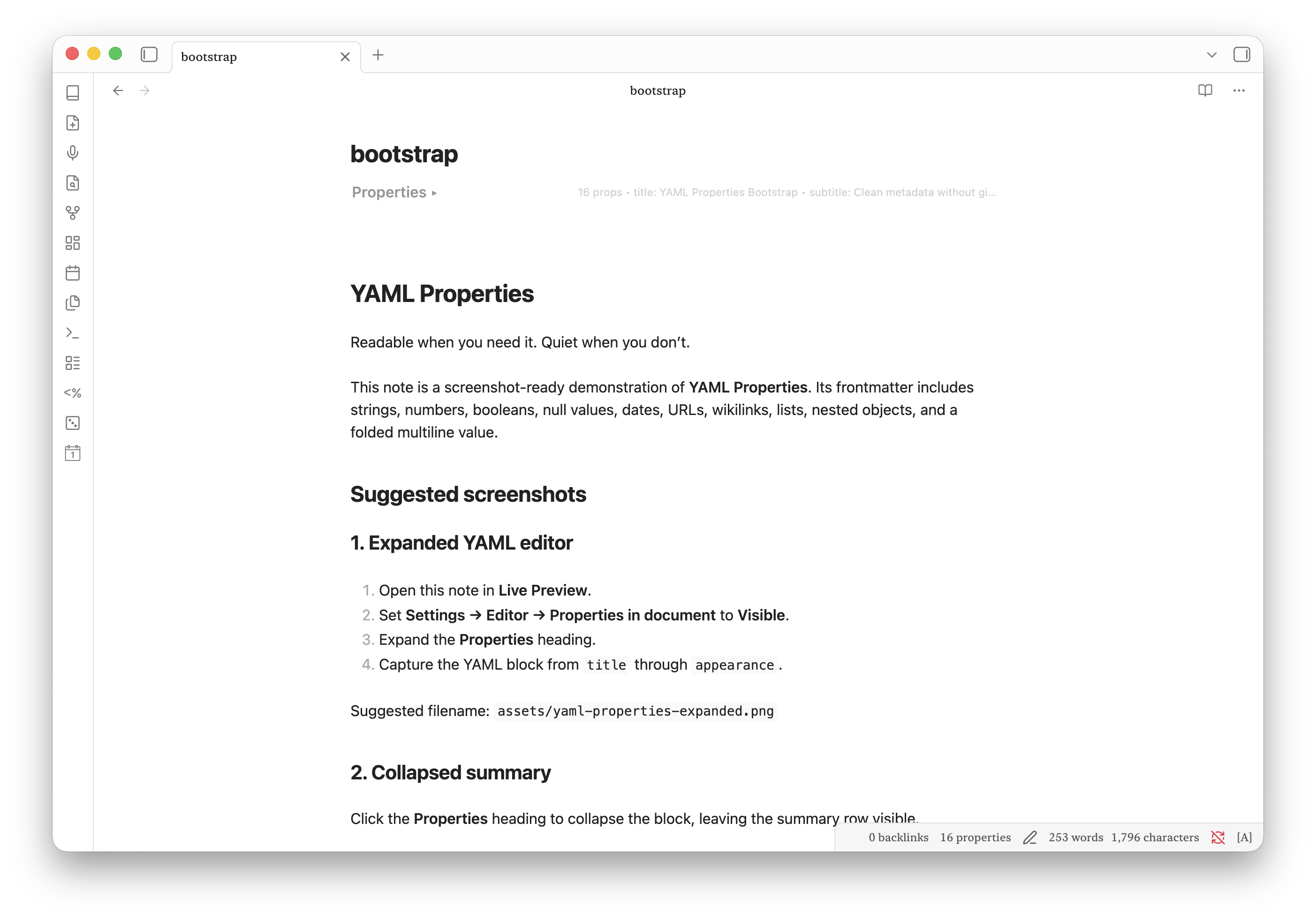
Collapse frontmatter into a quiet summary
Keep useful metadata one click away without letting it dominate the note.
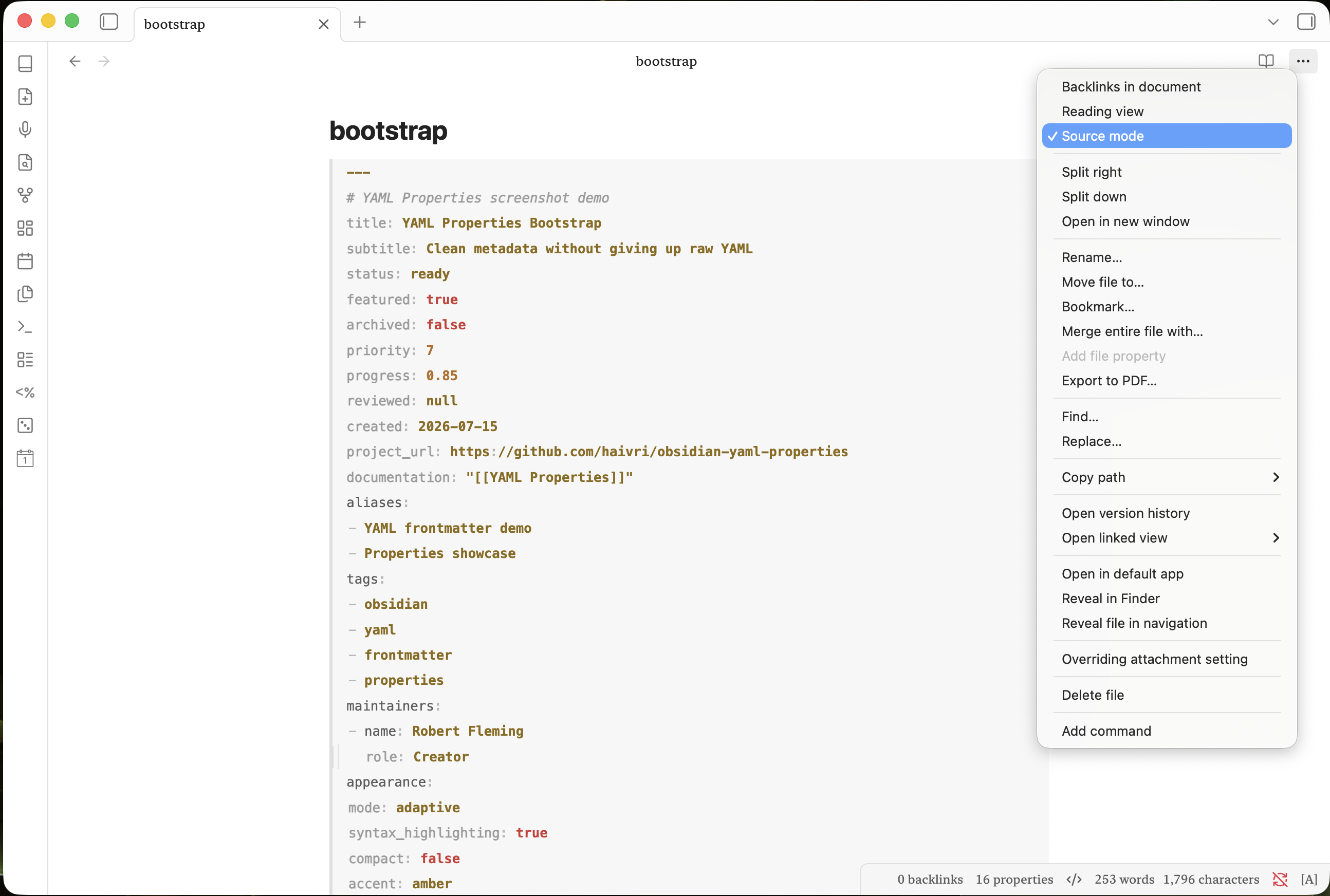
Keep YAML readable in Source mode
The bundled styling makes keys recede while strings, numbers, booleans, dates, links, lists, and nested values remain easy to scan.
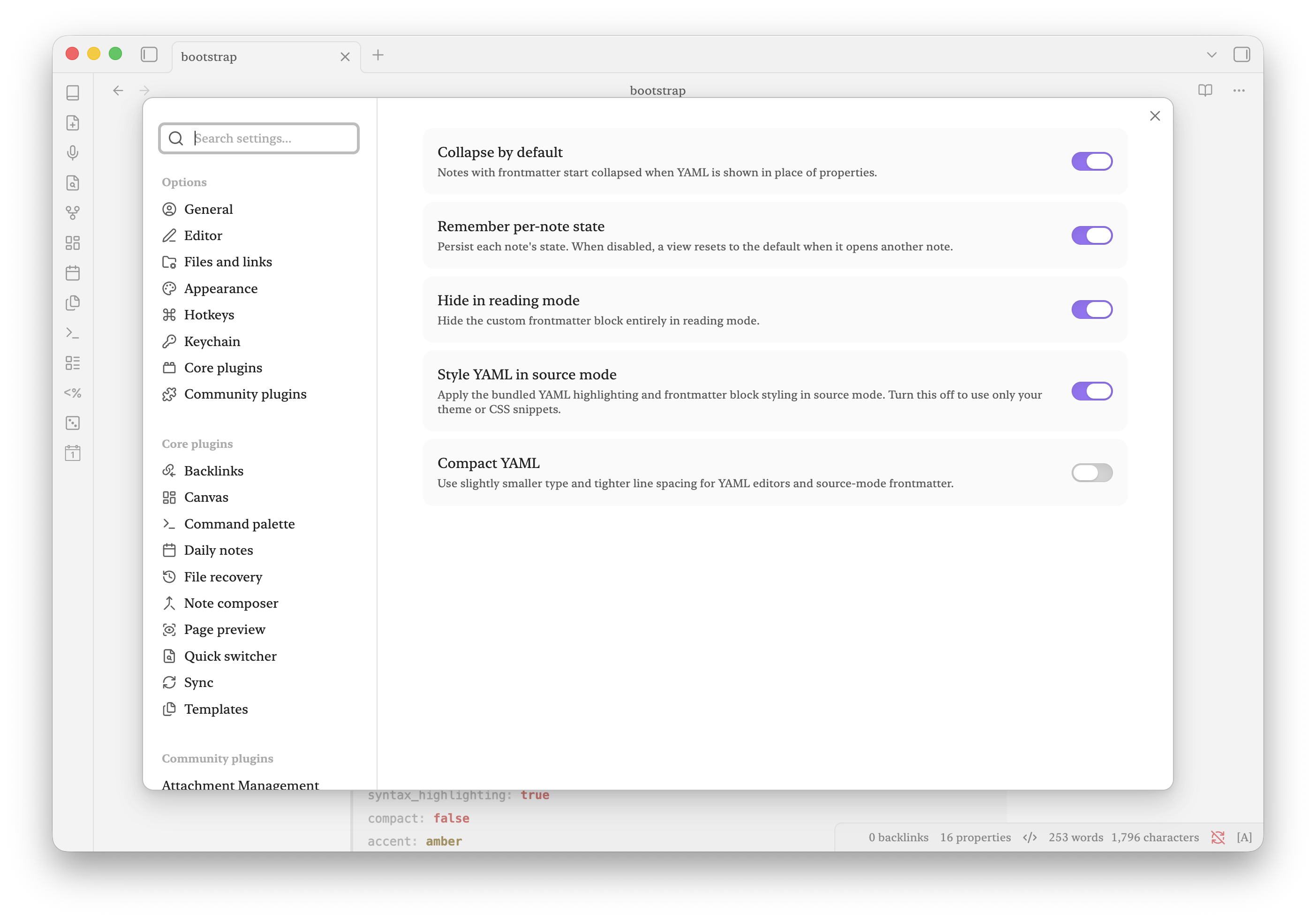
Choose the behavior that fits your vault
Control the default collapse state, remember individual notes, hide frontmatter in Reading view, style Source mode, or switch to a compact layout.
Usage
- Set Settings → Editor → Properties in document to Visible for the collapsible YAML editor. The bundled highlighting also supports the Source option.
- Open a note containing YAML frontmatter.
- Click the Properties heading to expand or collapse the YAML block.
- Edit YAML in Live Preview. Changes save after a short pause, on blur, or with
Ctrl/Cmd+Enter.
Use the command YAML Properties: Toggle frontmatter to toggle the active note from the command palette.
Settings
- Collapse by default — Start frontmatter collapsed.
- Remember per-note state — Restore the last state of each note.
- Hide in reading mode — Hide the custom frontmatter block in Reading view.
- Style YAML in source mode — Enable the bundled source-mode highlighting. Disable this to let your theme or snippets handle Source mode.
- Compact YAML — Use smaller type and tighter line spacing.
- Wrap YAML — Wrap long YAML lines in Live Preview and reading mode. It is off by default so long lines use horizontal scrolling.
Templater support
Frontmatter can contain inline or multiline Templater commands, including setup
commands before its opening ---. Source mode and the YAML panel show template
code in a steady text color with quieter delimiters. The collapsed summary says
Template instead of counting script lines as properties.
The panel saves template text freely, including unfinished commands. It does not execute scripts or validate the YAML they will eventually produce. Ordinary notes still receive YAML validation; template commands in the note body alone do not turn validation off. Removing all commands from the frontmatter and its setup restores normal validation on subsequent saves.
Edits preserve setup code, template whitespace, delimiters, and body text. Template recognition does not require Templater to be installed. The existing Style YAML in source mode setting also controls template source styling.
Customizing the colors
Themes and CSS snippets can override the plugin's public variables. For example:
body {
  --yaml-properties-key: var(--text-muted);
  --yaml-properties-string: #a8d8a8;
  --yaml-properties-number: #e6b566;
  --yaml-properties-boolean: #e06c75;
  --yaml-properties-null: #c678dd;
  --yaml-properties-anchor: #b8a1e3;
  --yaml-properties-link: #61afef;
  --yaml-properties-date: #d19a66;
  --yaml-properties-tag: #c678dd;
  --yaml-properties-comment: var(--text-faint);
  --yaml-properties-punctuation: var(--text-faint);
  --yaml-properties-background: var(--background-secondary);
  --yaml-properties-background-active: var(--background-secondary-alt);
  --yaml-properties-rail: var(--background-modifier-border);
  --yaml-properties-rail-active: var(--interactive-accent);
}
Because these are ordinary CSS custom properties, users have final control without editing the plugin files.
Installation
Community Plugins
Once accepted, install YAML Properties from Settings → Community plugins → Browse.
Manual installation
Copy main.js, manifest.json, and styles.css from a release into:
<vault>/.obsidian/plugins/yaml-properties/
Then reload Obsidian and enable YAML Properties under Community plugins.
Development
Requires Node.js 24 or newer.
npm install
npm run dev
Run npm run build for a production build and npm test for regression checks.
After installing in Obsidian, run tests/visibility.obsidian.js through the
Obsidian CLI eval command for native CSS visibility checks. This check uses
isolated DOM fixtures without creating notes or changing settings.
Settings are grouped into Display, Layout, and Colors. The twelve palettes adapted from the shared theme catalog are: Semaphore, Aizome, ATAS Directional, Japanese Indigo, Kikyō, Kinran, Material, Murasaki, Shippō, Shōchikubai, Sumi, and Gold & Vermilion. Presets follow Obsidian’s light/dark appearance automatically. Custom colors remain editable; Ukiyo-e, Nihonga, and Momiji are also available.
src/theme-catalog.json records the shared palette snapshot and its source hash.
Run node scripts/sync-themes.cjs <canonical-themes.json> to refresh it, or
node scripts/sync-themes.cjs --check to check the generated CSS. The public build
uses the committed snapshot and needs no external theme repository.
Release checklist
- Update
minAppVersioninmanifest.jsonif compatibility has changed. - Run
npm version patch,npm version minor, ornpm version major. The script updatesmanifest.jsonandversions.json; push the numeric tag without adding avprefix. - Push the tag. The release workflow builds the plugin and attaches
main.js,manifest.json, andstyles.cssto a GitHub Release. - For the initial Community Plugins submission, sign in at community.obsidian.md, link GitHub, and submit the repository URL under Plugins → New plugin.
Privacy
YAML Properties does not collect telemetry, make network requests, or send vault data anywhere.
Support
If YAML Properties improves your workflow, you can support its continued development on Buy Me a Coffee.
Acknowledgements
YAML Properties was conceived, directed, and tested by Robert Fleming. Its implementation, refinement, documentation, and release engineering were completed in close collaboration with OpenAI Codex, powered by GPT-5.
Robert provided the vision and product decisions; AI assistance was invaluable in turning that vision into a polished community plugin. YAML Properties would not exist in its present form without that human–AI collaboration.
Robert Fleming directed and reviewed this work. Recent refinements, documentation, and screenshot preparation were developed in collaboration with OpenAI Codex, powered by GPT-6. Thank you to the AI collaborators who helped bring these ideas into a usable community plugin.
License
Screenshot demo
A ready-to-use screenshot kit includes demo notes and capture instructions.
Feedback
Bug reports are welcome in this repository’s issue tracker when available. Include your Obsidian and plugin versions, desktop or mobile, a short reproduction, and expected versus actual behavior. Use a small sample note without personal content. This is a spare-time project; fixes and replies have no guaranteed schedule. Contributions and forks are welcome; donations are optional.