Search...Search plugins and themes...
⌘K
Sign in
  • Get started
  • Download
  • Pricing
  • Enterprise
  • Account
  • Obsidian
  • Overview
  • Sync
  • Publish
  • Canvas
  • Mobile
  • Web Clipper
  • CLI
  • Learn
  • Help
  • Developers
  • Changelog
  • About
  • Roadmap
  • Blog
  • Resources
  • System status
  • License overview
  • Terms of service
  • Privacy policy
  • Security
  • Community
  • Plugins
  • Themes
  • Discord
  • Forum / 中文论坛
  • Merch store
  • Brand guidelines
Follow us
DiscordTwitterBlueskyThreadsMastodonYouTubeGitHub
© 2026 Obsidian

x86 Assembly Flow Graphing

dwolfe884dwolfe8845k downloads

Convert well formatted x86 assembly into appropriate flow graphs using Obsidian canvases.

Add to Obsidian
  • Overview
  • Scorecard
  • Updates3

Obsidian File Color Banner

What is this?

This is a plugin for Obsidian that converts x86 assembly into a flow diagram using Obsidian Canvases

Usage

This plugin adds a command called x86-create-flow-diagram. To use this plugin you must highlight a valid x86 code block (without the ``` at the start and end) and run the command.

This plugin requires a specific format for the assembly in order to properly generate nodes and edges for the flow graph.

The key format features are as a follows:

  1. All instructions must be indeneted
  2. Location for jumps must have no spaces before the location name
  3. jmp instruction must be used for unconditional jumps (1 branch)
  4. any other instruction beginning with a j is treated as a conditional jump (2 branches)
  5. all jump instructions must take only 1 argument and that must be the location name (jmp location1)

This is an example of a valid x86 code block for use with this plugin

    cmp [ebp+var_8], 1
    jz loc_401027
    cmp [ebp+var_8], 2
    jz loc_40103D
    cmp [ebp+var_8], 3
    jz loc_401053
    jmp loc_401058
loc_401027
    Code for case 1
    jmp loc_401058
loc_40103D
    Code for case 2
    jmp loc_401058
loc_401053
    Code for case 3
loc_401058
    Program end

running x86-create-flow-diagram on the above codeblock would result in the following graph being produced in the same directory as the current note:
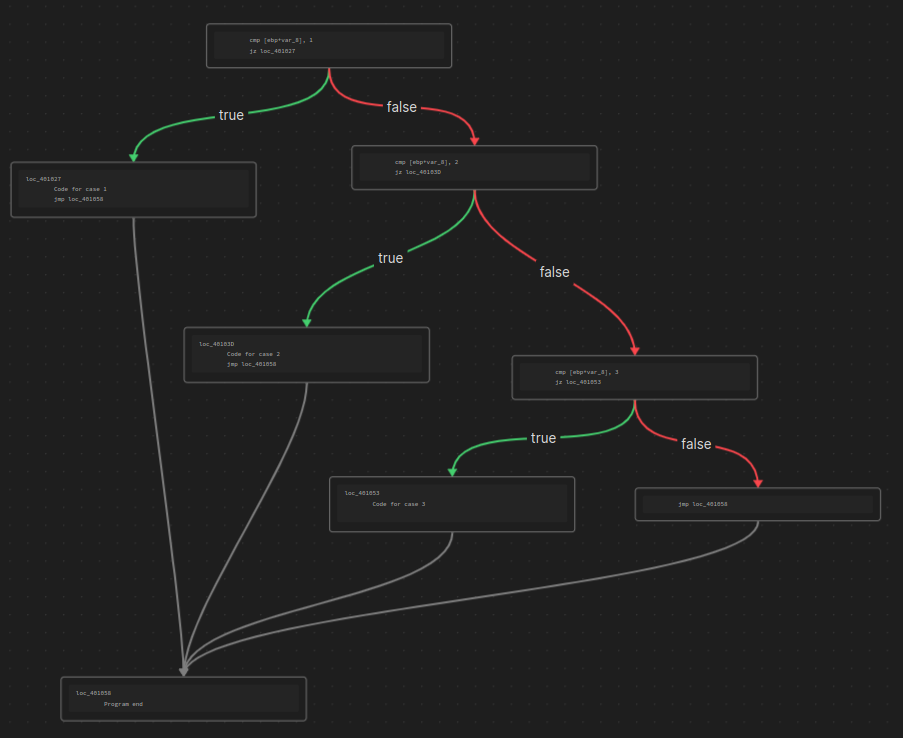
Sample Graph #1

It won't look as nice as this at first, all of the blocks will be mixed up and you'll have to drag them around to make it look pretty. I'm working on doing this a little better...

Plugin in practice

Roadmap

TODO:

  • Add true/false labels to edges
  • Handle ``` characters on both sides of selected text
  • Move nodes to left or right to increase readbility (kinda)
  • Insert Link to graph below codeblock
  • Test, test, test...

I'm on buy meacoffee!

HealthFair
ReviewSatisfactory
About
Convert x86 assembly blocks into flow diagrams on Obsidian Canvases. Highlight a properly formatted x86 code block and run the x86-create-flow-diagram command to generate nodes and edges, treating jmp as an unconditional single-branch jump and other j* instructions as conditional two-branch jumps; require indented instructions and jump labels with no leading spaces.
CanvasCodeVisualization
Details
Current version
1.0.2
Last updated
4 years ago
Created
4 years ago
Updates
3 releases
Downloads
5k
Compatible with
Obsidian 1.1.0+
Platforms
Desktop, Mobile
License
GPL-2.0
Report bugRequest featureReport plugin
Sponsor
Buy Me a Coffee
Author
dwolfe884dwolfe884
github.com/dwolfe884
GitHubdwolfe884
  1. Community
  2. Plugins
  3. Canvas
  4. x86 Assembly Flow Graphing

Related plugins

Advanced Canvas

Supercharge your canvas experience. Create presentations, flowcharts and more.

Mermaid Tools

Improved Mermaid.js experience: visual toolbar with common elements and more.

Kroki

Render Kroki diagrams.

Adamantine Pick

Embeddable Pikchr diagrams renderer.

Excalidraw

Visual PKM powerhouse. Create and edit Excalidraw drawings.

Templater

Create and use dynamic templates.

ExcaliBrain

An interactive, structured mind-map of your Obsidian vault.

Breadcrumbs

Visualise the hierarchy of your vault using a breadcrumb trail or matrix view.

Maps

Adds a map layout to bases so you can display notes as an interactive map view.

ZettelFlow

Turn your Obsidian vault into a visual thinking space for connecting ideas, exploring knowledge, and building your own thinking system.