Search...Search plugins and themes...
⌘K
Sign in
  • Get started
  • Download
  • Pricing
  • Enterprise
  • Account
  • Obsidian
  • Overview
  • Sync
  • Publish
  • Canvas
  • Mobile
  • Web Clipper
  • CLI
  • Learn
  • Help
  • Developers
  • Changelog
  • About
  • Roadmap
  • Blog
  • Resources
  • System status
  • License overview
  • Terms of service
  • Privacy policy
  • Security
  • Community
  • Plugins
  • Themes
  • Discord
  • Forum / 中文论坛
  • Merch store
  • Brand guidelines
Follow us
DiscordTwitterBlueskyThreadsMastodonYouTubeGitHub
© 2026 Obsidian

Wrap with Hotkeys

Omer CooperOmer Cooper12 downloads

Wrap selected text in custom tags, and set each wrapper's hotkey right where you create it.

Add to Obsidian
  • Overview
  • Scorecard
  • Updates1

An Obsidian plugin that wraps the selected text in tags you define, such as <mark>…</mark>, <u>…</u> or <sub>…</sub>, each with its own hotkey. Press the hotkey again to unwrap.

Inspired by Wrap with shortcuts. The difference is that you set each wrapper's hotkey in the same dialog where you create it, and new wrappers work right away, with no restart.
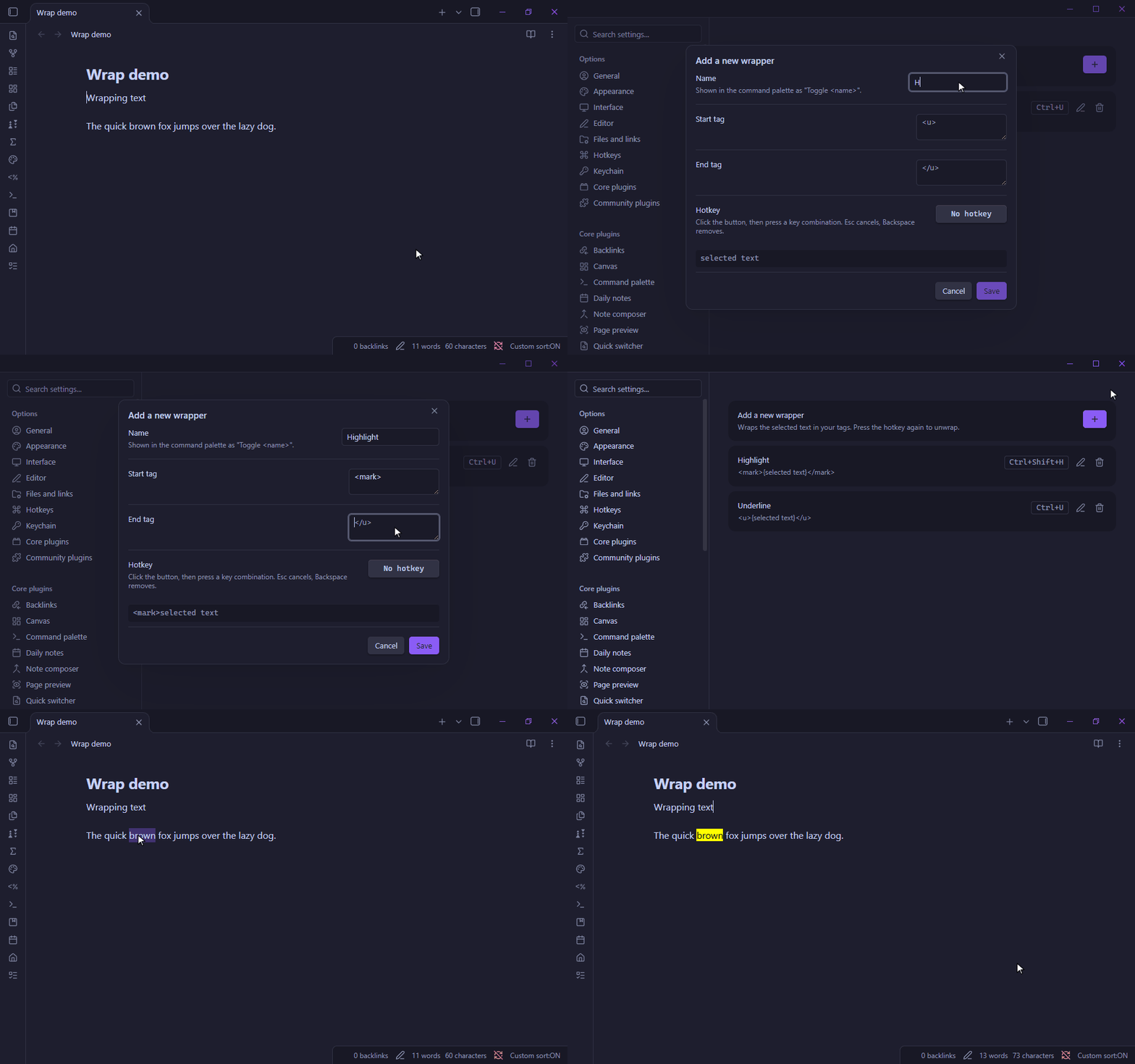
Adding a Highlight wrapper with <mark> tags and the hotkey Ctrl+Shift+H in the settings, then pressing Ctrl+Shift+H in a note to wrap, unwrap and wrap the word "brown"

This plugin was vibecoded: all of its code and this README were written by AI (Claude Code), directed and tested by Omer Cooper.

Using it

Open Settings → Wrap with Hotkeys and click +. In the dialog:

Field What it does
Name Shown in the command palette as "Toggle name"
Start tag / End tag Text put before and after the selection. One of them may be empty, e.g. a start tag of - [I] only
Hotkey Click it, then press a key combination such as Ctrl+Shift+H. Esc cancels, Backspace removes it. If another command already uses the combination, the dialog tells you which one

The dialog shows a preview of the wrapped text. Click Save, then select text in a note and press the hotkey:

  • the selection is wrapped in the tags;
  • if the tags are already right around the selection, or at its edges, they are removed instead.

The pencil and trash buttons edit and delete a wrapper. Each wrapper is also a command, so you can run it from the command palette.

Good to know

  • Hotkeys are Obsidian hotkeys. They are saved in Obsidian's own hotkey list, so they also appear (and can be changed) in Settings → Hotkeys. The plugin reaches that list through an internal Obsidian object (app.hotkeyManager), because the public API can't set a hotkey.
  • Coming from Wrap with shortcuts? On first run, if that plugin is installed in the vault, its wrappers and their hotkeys are copied over. You can then turn the old plugin off.

Install

With BRAT: install BRAT, run BRAT: Add a beta plugin for testing and enter OmerCooper/wrap-with-hotkeys.

Manually: copy main.js, manifest.json and styles.css from the latest release into <vault>/.obsidian/plugins/wrap-with-hotkeys/, reload Obsidian and turn the plugin on under Settings → Community plugins.

License

MIT

HealthExcellent
ReviewPassed
About
Wrap selected text in custom start/end tags (e.g. <mark>, <u>, <sub>) using a single hotkey. Assign each wrapper’s hotkey in the creation dialog so new wrappers work immediately, press the hotkey again to toggle (unwrap), and run wrappers from the command palette.
HotkeysFormattingCommands
Details
Current version
1.0.0
Last updated
2 days ago
Created
2 days ago
Updates
1 release
Downloads
12
Compatible with
Obsidian 1.4.10+
Platforms
Desktop, Mobile
License
MIT
Report bugRequest featureReport plugin
Author
Omer CooperOmer Cooperomercooper
GitHubomercooper
  1. Community
  2. Plugins
  3. Hotkeys
  4. Wrap with Hotkeys

Related plugins

Underline

Add underline with shortcut.

Tab Switcher

Switch your tabs with Ctrl + Tab in recently used order like in a browser.

Sort and Permute lines

Sort and Permute lines in whole file or selection.

Hotkey Helper

Easily see and access any plugin's settings or hotkey assignments (and conflicts) from the Community Plugins tab.

Colored Text

Color the selected texts.

Keyshots

Add classic hotkey/shortcuts commands from popular IDEs like Visual Studio Code or JetBrains Family.

Tray

Run Obsidian from the system tray for customisable window management and global quick notes.

Leader Hotkeys

Add leader hotkey support to any command (like tmux or vim).

Hotkeys for templates

Add commands to insert specific templates with a hotkey.

Code Editor Shortcuts

Add keyboard shortcuts (hotkeys) commonly found in code editors such as Visual Studio Code (VS Code) or Sublime Text.