Search...Search plugins and themes...
⌘K
Sign in
  • Get started
  • Download
  • Pricing
  • Enterprise
  • Account
  • Obsidian
  • Overview
  • Sync
  • Publish
  • Canvas
  • Mobile
  • Web Clipper
  • CLI
  • Learn
  • Help
  • Developers
  • Changelog
  • About
  • Roadmap
  • Blog
  • Resources
  • System status
  • License overview
  • Terms of service
  • Privacy policy
  • Security
  • Community
  • Plugins
  • Themes
  • Discord
  • Forum / 中文论坛
  • Merch store
  • Brand guidelines
Follow us
DiscordTwitterBlueskyThreadsMastodonYouTubeGitHub
© 2026 Obsidian

Word Progress Bar

somenoysomenoy46 downloads

Progress bar in the status bar that shows goal of words.

Add to Obsidian
  • Overview
  • Scorecard
  • Updates2

Track your writing progress with a miniature progress bar in the status bar.

Set a word count goal and watch the bar fill up as you write. When you hit your goal, it turns green.
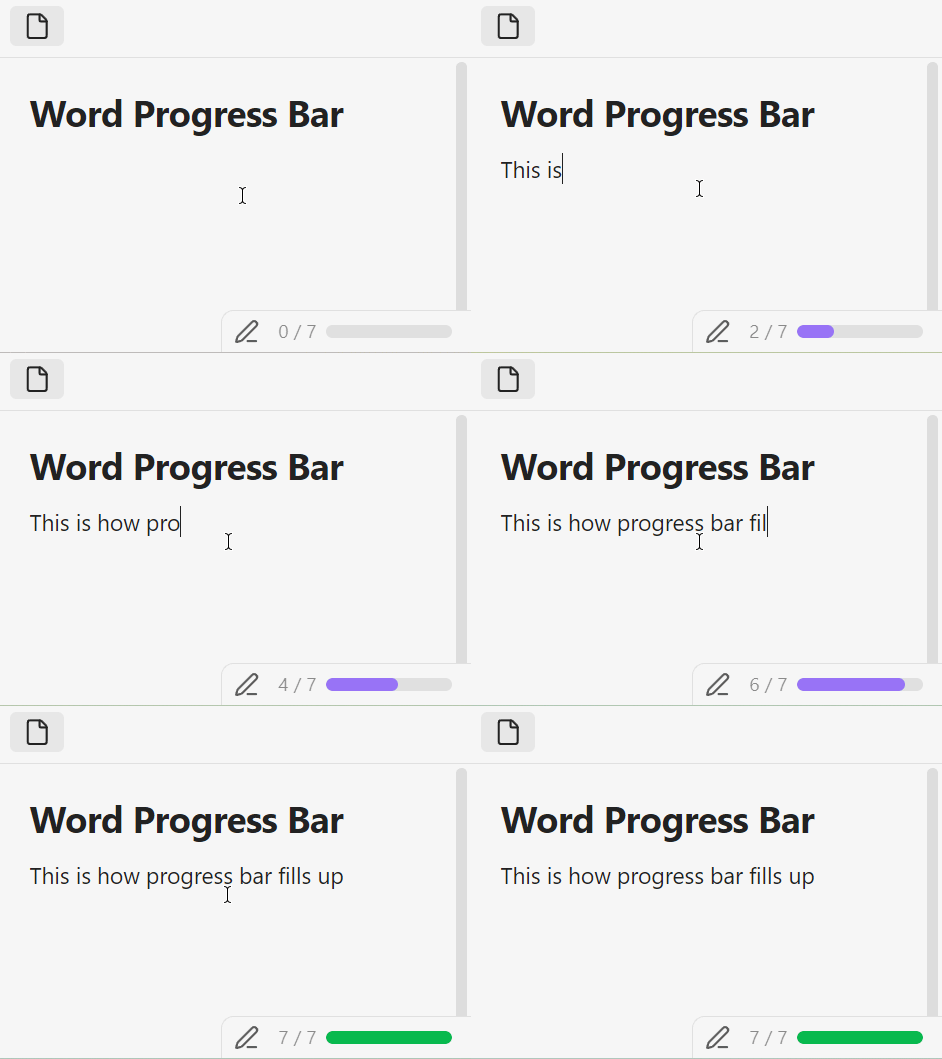
demo

Usage

For all files (default goal)

Toggle on Use default word goal for all files in settings and set a Default word goal. The progress bar will appear on every note using that goal.

For specific files (property)

Add a word-goal property (default) to a note's frontmatter:

---
word-goal: 500
---

The progress bar will show only on notes that have this property. You can rename the property key in settings (Frontmatter key for per-file goal).

Installation

Go to Community Plugins and search for Word Progress Bar

Manual

  1. Download main.js, manifest.json, and styles.css from the latest release
  2. Copy them to <Vault>/.obsidian/plugins/word-progress-bar/
  3. Reload Obsidian and enable the plugin in Settings → Community plugins
95%
HealthExcellent
ReviewSatisfactory
About
Track writing progress with a miniature progress bar in the status bar. Set a word-count goal and watch the bar fill in real time, turning green when you hit your target.
WritingStatus barEditing
Details
Current version
1.1.0
Last updated
6 days ago
Created
2 months ago
Updates
2 releases
Downloads
46
Compatible with
Obsidian 0.15.0+
Platforms
Desktop only
License
MIT
Report bugRequest featureReport plugin
Author
somenoysomenoy
github.com/SomeNoY
GitHubsomenoy
  1. Community
  2. Plugins
  3. Writing
  4. Word Progress Bar

Related plugins

LanguageTool Integration

advanced spell/grammar checks with the help of language-tool.

LanguageTool

Unofficial integration of the LanguageTool spell and grammar checker.

Better Word Count

Count the words of selected text in the editor.

Reading Time

Add the current note's reading time to the status bar.

Advanced Tables

Improved table navigation, formatting, and manipulation.

Meta Bind

Make your notes interactive with inline input fields, metadata displays, and buttons.

Outliner

Work with your lists like in Workflowy or Roam Research.

Various Complements

Complete words similar to auto-completion in an IDE.

Longform

Helps you write and edit novels, screenplays, and other long projects.

Creases

Tools for effectively folding Markdown sections.