WeChat Publish Preview
 ianchen40 downloads
Preview Markdown with WeChat-ready styling and two-way scroll sync. Convert local images to Base64 and copy rich text to the WeChat draft editor—no image host needed.
- Overview
- Scorecard
- Updates7
English | Chinese translation
📝 WeChat Publish Preview
Keep your WeChat formatting workflow inside Obsidian.
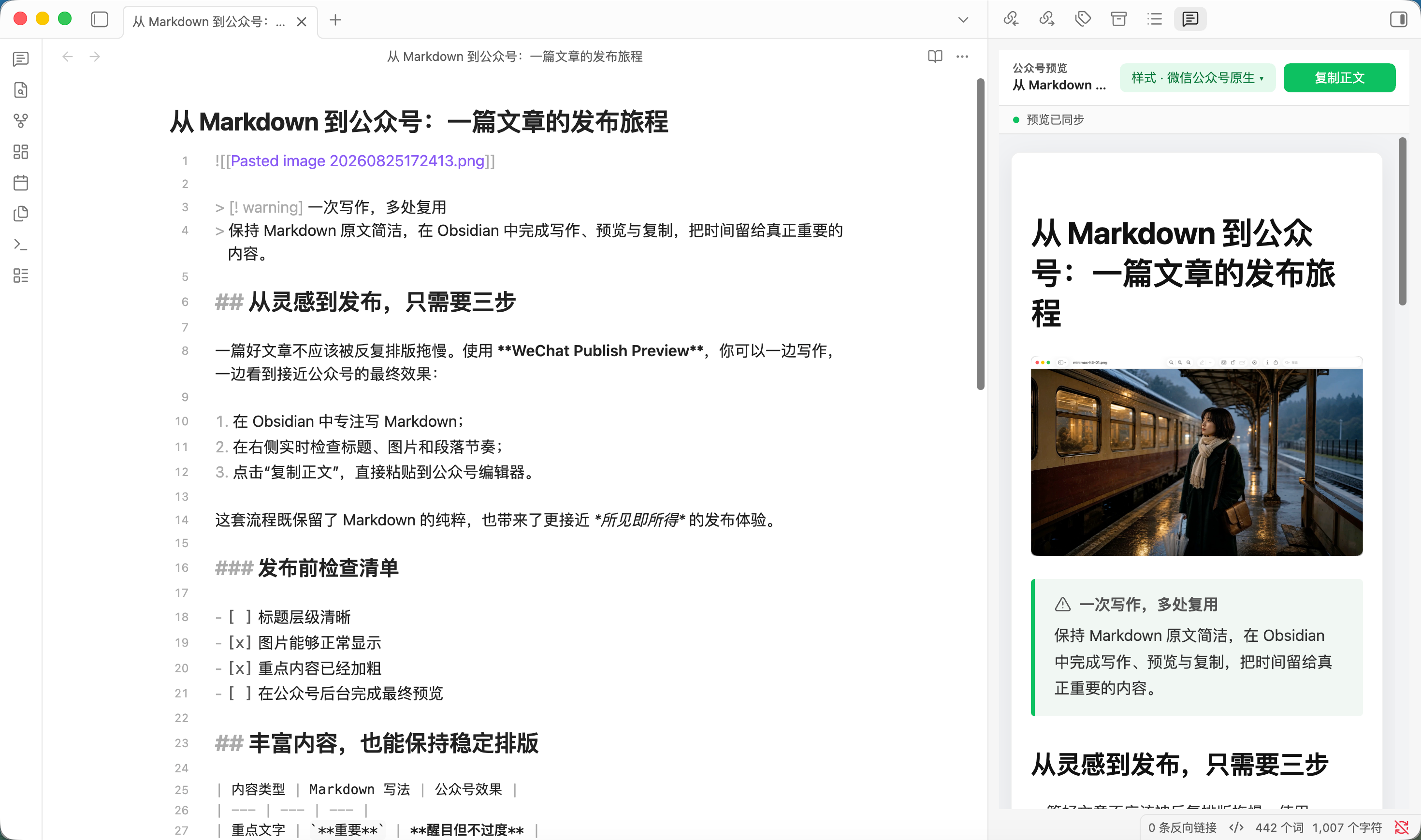
WeChat Publish Preview is a desktop plugin for writers who draft Markdown in Obsidian and publish through the WeChat Official Account editor. It renders the active note with WeChat-ready styling in the right sidebar, keeps the editor and preview aligned with bidirectional scroll sync, and copies the formatted article body in one click for direct pasting into the WeChat draft editor.
During copy, local images are automatically converted to Base64 and embedded with the rich text, so no image-hosting service is required. Remote images, math, and Mermaid diagrams are also converted when possible. All conversion happens in memory: the plugin never writes Base64 data back to your notes and does not require a WeChat AppID or AppSecret.
🚀 Highlights
- Live preview updates shortly after you edit the active note, without requiring a save.
- 30 article themes are available from the style dropdown, grouped into classic, modern, and additional styles; the last choice is remembered.
- Bidirectional scroll sync keeps either pane aligned when you scroll the editor or the preview.
- One-click copy to WeChat drafts produces rich text ready to paste into the WeChat draft editor.
- Base64 images with no image host automatically embeds local images during copy while keeping the Markdown and attachments unchanged.
- Theme-aware callout symbols keep note, warning, and other type symbols visible in the preview while matching the selected theme; copied callouts become stable, static WeChat-compatible blocks.
- Theme-colored task controls replace Obsidian's default purple checkboxes with checked and unchecked markers derived from the selected article theme, including in copied output.
- Obsidian-aware rendering supports wiki-linked images, relative images, callouts, task lists, footnotes, math, and Mermaid.
- Local-first design includes no telemetry, credential access, or automatic draft submission.
📖 Quick start
- Open a Markdown note in Obsidian.
- Click the Open WeChat preview ribbon icon, or run the command from
Cmd/Ctrl + P. - Optionally open the Style dropdown in the preview toolbar and choose a theme.
- Edit and scroll normally; the sidebar preview updates and follows the source position.
- Click Copy article body, then paste into the WeChat Official Account editor.
The preview uses the Markdown filename as the article title. That generated title is removed from the copied body because the WeChat title is a separate input field.
Callouts and tasks
Callout type symbols remain visible in the preview, while their title, body, border, and background inherit the selected theme's blockquote treatment. During copy, folding controls are removed and callouts become static semantic blocks for better WeChat compatibility.
Task controls are drawn by the plugin rather than by Obsidian, so they do not inherit Obsidian's default purple checkbox style. Checked tasks use the selected theme's accent fill, unchecked tasks use its accent border, and the same appearance is retained in copied content.
🧩 Supported content
| Content | Preview | WeChat copy |
|---|---|---|
| Headings, paragraphs, emphasis, links | ✅ | ✅ |
| Ordered, unordered, and task lists | ✅, theme-colored tasks | ✅, state and theme color retained |
| Blockquotes, callouts, footnotes | ✅, callout symbols retained | ✅, converted to static compatible blocks |
| Code blocks and tables | ✅ | ✅ |
| Local and relative Obsidian images | ✅ | Embedded as Base64; no image host needed |
| Remote images | ✅ | Converted to Base64 when possible; otherwise warned |
| Math and Mermaid | ✅ | Converted to images |
The plugin includes 30 Raphael Publish-inspired themes. It does not require WeChat account configuration and does not submit drafts automatically.
🚀 Installation
Obsidian Community Plugins
- Open Settings → Community plugins → Browse.
- Search for
WeChat Publish Preview. - Click Install, then Enable.
BRAT
- Install and enable BRAT.
- Run
BRAT: Add a beta plugin for testingfrom the command palette. - Enter
joahyi-ai/WeChat-Publish-Preview. - Enable WeChat Publish Preview under Settings → Community plugins.
Manual installation
Download main.js, manifest.json, and styles.css from the latest GitHub Release, then place them in:
<Vault>/.obsidian/plugins/wechat-publish-preview/
Reload Obsidian and enable the plugin.
🔐 Privacy
WeChat Publish Preview runs locally, does not collect telemetry, and never submits drafts automatically. It reads only the active note and referenced Vault images. Network requests occur only for remote images, and clipboard access occurs only after an explicit copy action.
🗒 Changelog
1.1.1 — 2026-08-27
- Made the repository's primary
README.mdfully English and moved the Chinese documentation toREADME.zh-CN.mdto satisfy the Obsidian Community directory's English documentation requirement.
1.1.0 — 2026-08-26
- Added 30 grouped Raphael Publish-inspired themes with instant preview, synchronized copy output, and remembered selection.
- Kept callout type symbols visible and theme-colored in the preview, with static WeChat-compatible callout output during copy.
- Replaced native Obsidian task checkboxes with theme-colored checked and unchecked markers that remain consistent in copied content.
- Improved dark-theme code highlighting, callout readability, nested list styling, and preservation of theme typography.
- Refreshed the README screenshot to show the new style selector and theme-aware callouts.
1.0.4 — 2026-08-25
- Refreshed marketplace documentation for bidirectional scrolling, in-memory Base64 image embedding, and the WeChat rich-text copy workflow.
1.0.3 — 2026-08-25
- Updated the plugin description for community-directory compliance and added an English summary to the primary README.
1.0.2 — 2026-08-25
- Reworked the Chinese and English documentation, added a real Obsidian screenshot, and refreshed marketplace presentation.
1.0.1 — 2026-08-25
- Aligned the plugin ID, display name, and minimum Obsidian version with community review requirements; fixed official ESLint findings and expanded English documentation.
1.0.0 — 2026-08-25
- Initial release with live WeChat preview, bidirectional scrolling, rich-text copy, Base64 images, math/Mermaid conversion, tables, code blocks, lists, blockquotes, callouts, and footnotes.
🛠 Development
pnpm install
pnpm verify
🙏 Credits
The article theme library and some compatibility strategies are adapted from the MIT-licensed Raphael Publish. See THIRD_PARTY_NOTICES.md for details.
The README structure and installation flow were inspired by Wechat Converter.