Search...Search plugins and themes...
⌘K
Sign in
  • Get started
  • Download
  • Pricing
  • Enterprise
  • Account
  • Obsidian
  • Overview
  • Sync
  • Publish
  • Canvas
  • Mobile
  • Web Clipper
  • CLI
  • Learn
  • Help
  • Developers
  • Changelog
  • About
  • Roadmap
  • Blog
  • Resources
  • System status
  • License overview
  • Terms of service
  • Privacy policy
  • Security
  • Community
  • Plugins
  • Themes
  • Discord
  • Forum / 中文论坛
  • Merch store
  • Brand guidelines
Follow us
DiscordTwitterBlueskyThreadsMastodonYouTubeGitHub
© 2026 Obsidian

Web Task Dashboard

mbeddedmbedded36 downloads

Integrate tasks from external services directly into your workspace to minimize distractions.

Add to Obsidian
  • Overview
  • Scorecard
  • Updates2

Web Task Dashboard lists tasks in Obsidian, enabling effortless task management without any context switching.

This is a plugin for Obsidian to show tasks from third-party services within your current environment. The official documentation can be found here: https://mbedded.github.io/obsidian-web-task-dashboard/

The dashboard looks like this:
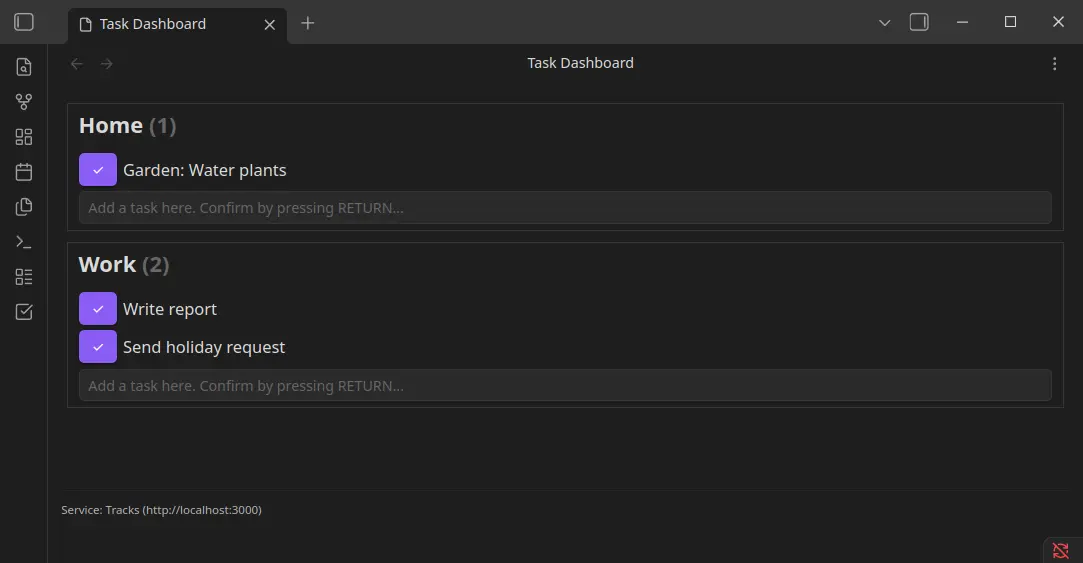
Example dashboard with the contexts "Home" and "Work" and their respective tasks.

Supported services

To use one of these services, you may need to create an account or set up the service independently. Authentication data is required for this plugin to interact with the service.

Currently, the following services are supported:

  • Tracks (https://github.com/TracksApp/tracks)

Installation

Installation via Community Plugins

As of writing, this method is not supported. This plugin is not listed in the official plugin repository yet.

Manual installation

  • Open the latest release of this plugin.
  • Download the files (main.js, manifest.json).
  • Open your vault via file-explorer.
  • Create a plugin folder in like .obsidian/plugins/web-task-dashboard.
  • Copy the downloaded files into the plugin folder (web-task-dashboard).
  • Open the community plugins in Obsidian using Settings > Community plugins.
  • Enable the community plugins if needed. Refresh the plugins and activate Web Task Dashboard.

Have an issue or feature request?

If you encounter an issue, please check the existing issues in this project or create a new one. The same applies if you’re missing a feature. Please review the project and consider contributing to it. Take a look into the contribution guide.

Support this project

If you appreciate my work on this project and want to support its continued development, I would love to hear your contributions or feedback! You can also support me through Ko-fi. Your help makes a difference!

Thank you for considering it!

78%
HealthExcellent
ReviewCaution
About
Show tasks from third-party services inside Obsidian and manage them without switching apps. Connect supported services like Tracks and browse, filter, and update tasks directly in a unified dashboard.
TasksIntegrations
Details
Current version
1.0.1
Last updated
3 months ago
Created
9 months ago
Updates
2 releases
Downloads
36
Compatible with
Obsidian 1.11.0+
Platforms
Desktop only
License
MIT
Report bugRequest featureReport plugin
Sponsor
Ko-fi
Author
mbeddedmbedded
mbuege.com
GitHubmbedded
  1. Community
  2. Plugins
  3. Tasks
  4. Web Task Dashboard

Related plugins

Reminder

Manage Markdown TODOs with reminder.

Todoist Sync

Materialize Todoist tasks within your notes.

Local REST API & MCP Server

Unlock your automation needs by interacting with your notes over a secure REST API.

TaskNotes

Note-based task management with calendar, pomodoro and time-tracking integration.

Day Planner

Day planning from a task list in a Markdown note with enhanced time block functionality.

BRAT

Easily install a beta version of a plugin for testing.

Maps

Adds a map layout to bases so you can display notes as an interactive map view.

Tasks

Track tasks across your vault. Supports due dates, recurring tasks, done dates, sub-set of checklist items, and filtering.

Self-hosted LiveSync

Sync vaults securely to self-hosted servers or WEBRTC.

Zotero Integration

Insert and import citations, bibliographies, notes, and PDF annotations from Zotero.