Search...Search plugins and themes...
⌘K
Sign in
  • Get started
  • Download
  • Pricing
  • Enterprise
  • Account
  • Obsidian
  • Overview
  • Sync
  • Publish
  • Canvas
  • Mobile
  • Web Clipper
  • CLI
  • Learn
  • Help
  • Developers
  • Changelog
  • About
  • Roadmap
  • Blog
  • Resources
  • System status
  • License overview
  • Terms of service
  • Privacy policy
  • Security
  • Community
  • Plugins
  • Themes
  • Discord
  • Forum / 中文论坛
  • Merch store
  • Brand guidelines
Follow us
DiscordTwitterBlueskyThreadsMastodonYouTubeGitHub
© 2026 Obsidian

Vocab Hover

chingchen0119chingchen0119179 downloads

Add hover tooltips to words by right-clicking selected text. Perfect for vocabulary learning.

Add to Obsidian
  • Overview
  • Scorecard
  • Updates3

An Obsidian plugin that lets you add hover tooltips to any word — great for vocabulary learning, annotations, or quick references.

Demo

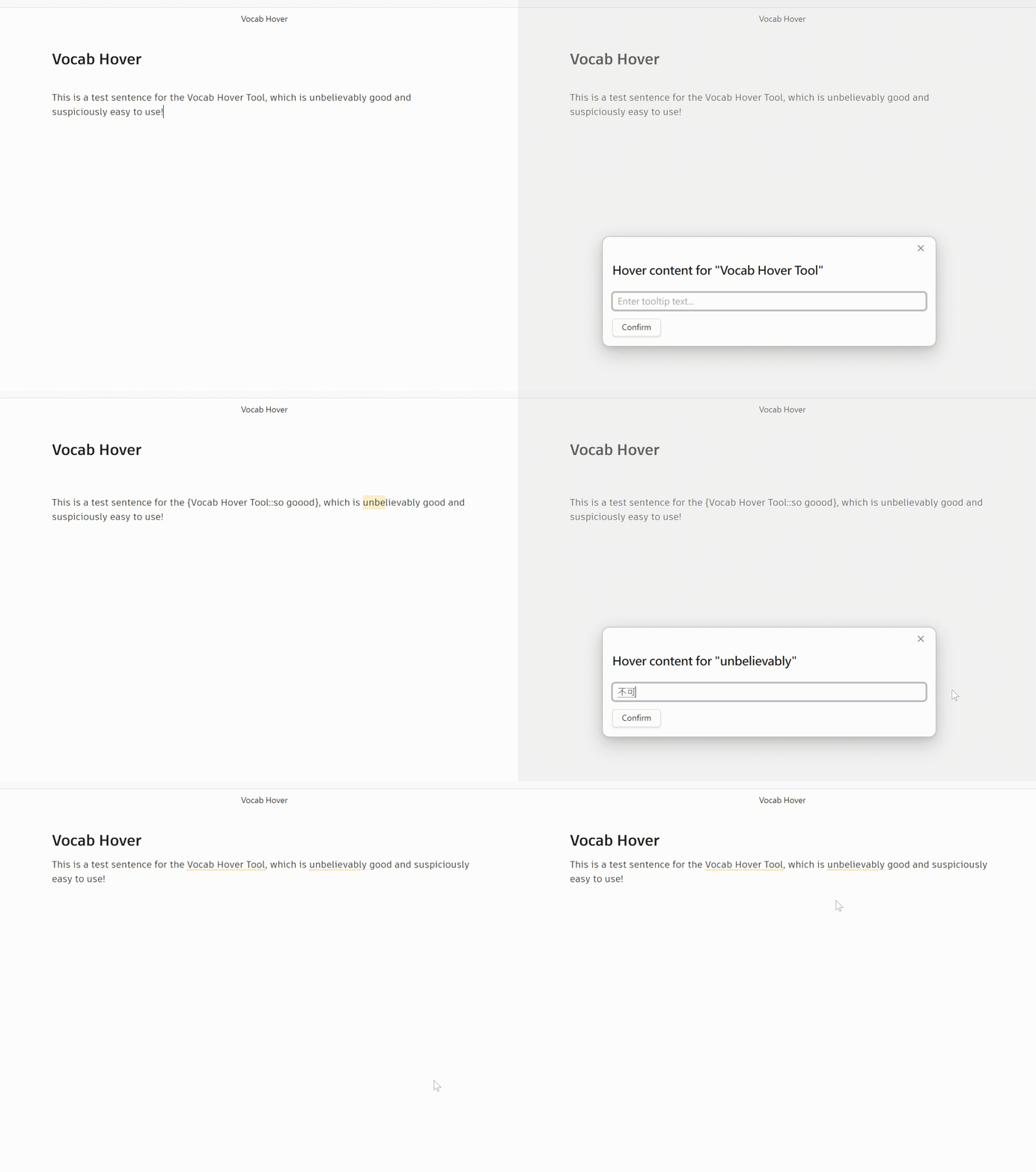
Hover over a marked word to see its tooltip:
demo

How to Use

Adding a tooltip

  1. Select any word or phrase in the editor
  2. Right-click → Add Hover Content
  3. Type the tooltip text (e.g. a translation or definition)
  4. Press Enter or click Confirm

The word is saved as {word::tooltip} in your note.

Viewing tooltips

Switch to Reading View and hover over any underlined word to see its tooltip.

Word highlight style

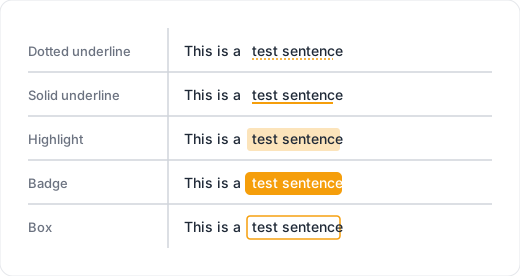
You can choose how marked words appear in Reading View. Open Settings → Vocab Hover → Word highlight style and pick one of the following:
style preview

The style applies instantly — no need to reload.

Vocabulary list

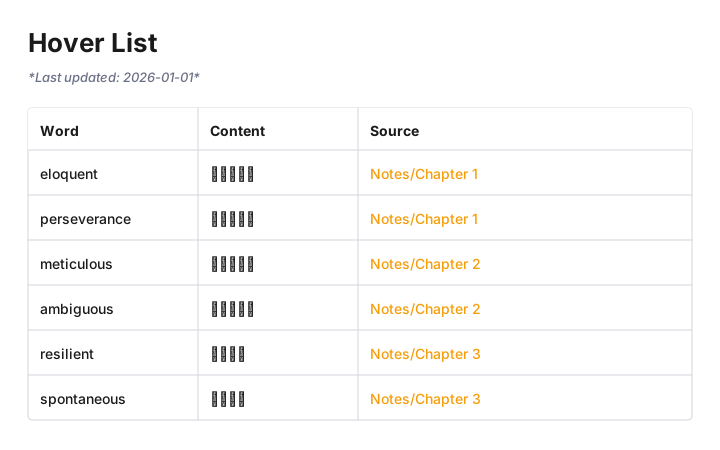
All marked words across your vault can be collected into a single reference note.

  1. Open Settings → Vocab Hover
  2. Click Generate

vocab list preview

A note (default: Vocabulary List.md) will be created with a table of every word and its content, linked back to the source note. Once generated, the list updates automatically whenever you save any note.

The note path can be changed in settings.

Manual syntax

You can also type the syntax directly:

The {diffuse::漫射} map controls the base color.

Installation

From Obsidian Community Plugins

  1. Open Settings → Community Plugins
  2. Disable Safe Mode if prompted
  3. Click Browse and search for Vocab Hover
  4. Click Install then Enable.

Manual Installation

  1. Download main.js, manifest.json, and styles.css from the latest release
  2. Copy them into your vault at .obsidian/plugins/vocab-hover/
  3. Enable the plugin in Settings → Community Plugins

License

MIT

HealthGood
ReviewSatisfactory
About
Add hover tooltips to any word or phrase and save them inline as {word::tooltip} for quick translations, definitions, or annotations. View tooltips by hovering in Reading View, customize highlight appearance, and generate an auto-updating vocabulary list that links back to source notes.
AnnotationEditingAppearance
Details
Current version
1.2.0
Last updated
4 months ago
Created
4 months ago
Updates
3 releases
Downloads
179
Compatible with
Obsidian 0.15.0+
Platforms
Desktop, Mobile
License
MIT
Report bugRequest featureReport plugin
Author
chingchen0119chingchen0119
github.com/chingchen0119
GitHubchingchen0119
  1. Community
  2. Plugins
  3. Annotation
  4. Vocab Hover

Related plugins

Lapel

Show the heading levels in the gutter of the editor.

Ninja Cursor

Enhance cursor visibility.

Show Whitespace

CSS styles and CM6 extensions to highlight whitespace in Source and Live Preview modes.

Advanced Tables

Improved table navigation, formatting, and manipulation.

Minimal Theme Settings

Control the colors and fonts in Minimal Theme.

Hider

Hide interface elements such as tooltips, status bar, titlebar, and more.

Meta Bind

Make your notes interactive with inline input fields, metadata displays, and buttons.

Style Settings

Adjust theme, plugin, and snippet CSS variables.

Outliner

Work with your lists like in Workflowy or Roam Research.

Admonition

Admonition block-styled content.