Visual UI Editor
 echorgi2k downloads
A plugin to help you visually select and modify any UI element.
- Overview
- Scorecard
- Updates3
English 简体中文 繁體中文
A plugin that helps you visually select and modify any UI element.
How to use

Click the icon on the left toolbar to enter selection mode. In this mode, hovering your mouse over any element will select elements of the same type. Left-clicking will then open the editing panel, as shown in the image.
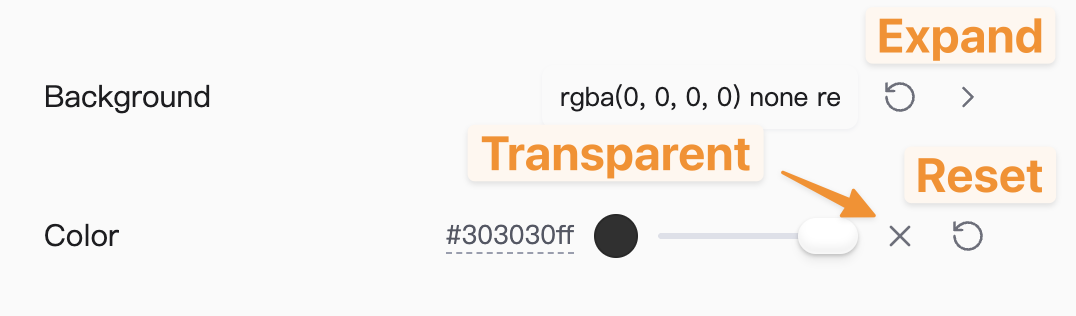


- Override Weight: Used to set the strength of the override; the higher the value, the more likely it is to take effect.
- Force Switch: When enabled, it overrides any styles that are not set as forced (!important). If both are forced, it depends on CSS specificity/priority.
- Erase Styles: Completely erases the modification history of a specific element, restoring it to its original state before any changes were made using this plugin (does not remove styles applied by themes or other methods).
- Reset: Resets any modifications made since the panel was opened in the current session (closing the window has the same effect).
- Document Preview: Temporarily applies the modifications to the document to preview the effect (the effect disappears after closing the window).
- Save: Permanently saves the effects to the snippet folder. You can view the auto-generated style text by opening .snippet/--ui-designer-[your repo/vault name]-default.css.
How to install
- Search for Visual UI Editor in the official community plugins marketplace (Recommended).
- Install via the BRAT plugin: After installing BRAT, enter this repository path: echorgi/obsidian-visual-ui-editor.
Contact
可视化UI元素编辑器
一个帮助你可视化选择并修改任意UI元素的插件
如何使用
点击左侧功能栏的图标,会进入选择模式,此时鼠标移到任意元素即可选中同类元素,左键点击后会打开编辑栏,如图
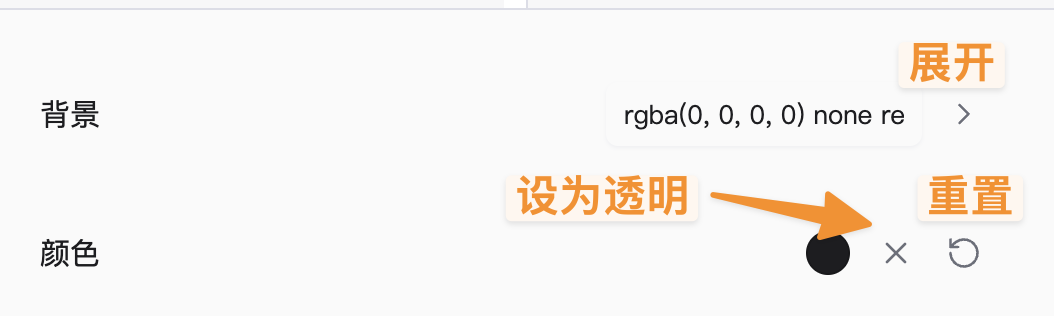


- 覆盖权重:用来设置覆盖的强度,越高越容易生效
- 强制开关:开启后可以覆盖掉任何没有设置强制(!import)的样式,如果都有强制,则看优先级
- 抹除样式:完全抹除某个元素的修改历史,恢复到没有用该插件进行任何修改时的状态(不抹除主题等其他途径导致的样式)
- 重置:重置本次面板打开以来的修改(关闭窗口同理)
- 文档预览:把修改暂时应用到文档,预览效果(关闭窗口后效果消失)
- 保存:将效果永久保存到snippet文件夹下,可以通过打开.snippet/--ui-designer-[你的仓库名]-default.css来查看自动生成的样式文本
如何安装
- 官方插件市场搜索Visual Ui Editor(推荐)
- 使用BRAT插件安装, 安装BRAT插件后输入本仓库路径: echorgi/obsidian-visual-ui-editor
🍠
可視化 UI 元素編輯器
一個幫助你可視化選擇並修改任意 UI 元素的插件
如何使用
點擊左側功能欄的瞄準圖標,會進入選擇模式,此時滑鼠移到任意元素即可選中同類元素,左鍵點擊後會打開編輯欄,如圖
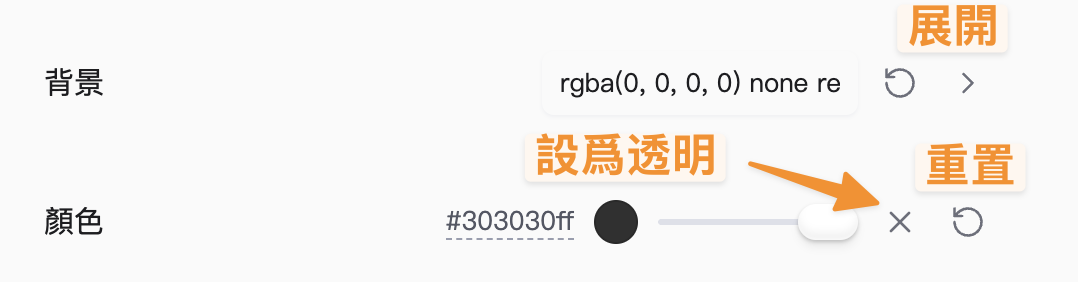


- 覆蓋權重:用來設置覆蓋的強度,越高越容易生效
- 強制開關:開啟後可以覆蓋掉任何沒有設置強制(!important)的樣式,如果都有強制,則看優先級
- 抹除樣式:完全抹除某個元素的修改歷史,恢復到沒有用該插件進行任何修改時的狀態(
HealthExcellent
ReviewSatisfactory
About
Visually select and edit any Obsidian UI element with an on-screen selector; hover to highlight similar elements and click to open an editor. Adjust override strength and force rules, erase or reset edits, preview changes in the document, and save results as a reusable CSS snippet.Details
Current version
1.1.4
Last updated
4 months ago
Created
5 months ago
Updates
3 releases
Downloads
2k
Compatible with
Obsidian 0.15.0+
Platforms
Desktop only
License
0BSD
Sponsor