Vault Path Portability
 theluckystrike1 downloads
Find vault paths that can fail when moved between devices.
- Overview
- Scorecard
- Updates1
Vault Path Portability finds names that can cause trouble when you move an Obsidian vault between Windows, macOS, Linux, iOS and Android. The report groups the paths by the rule they fail.
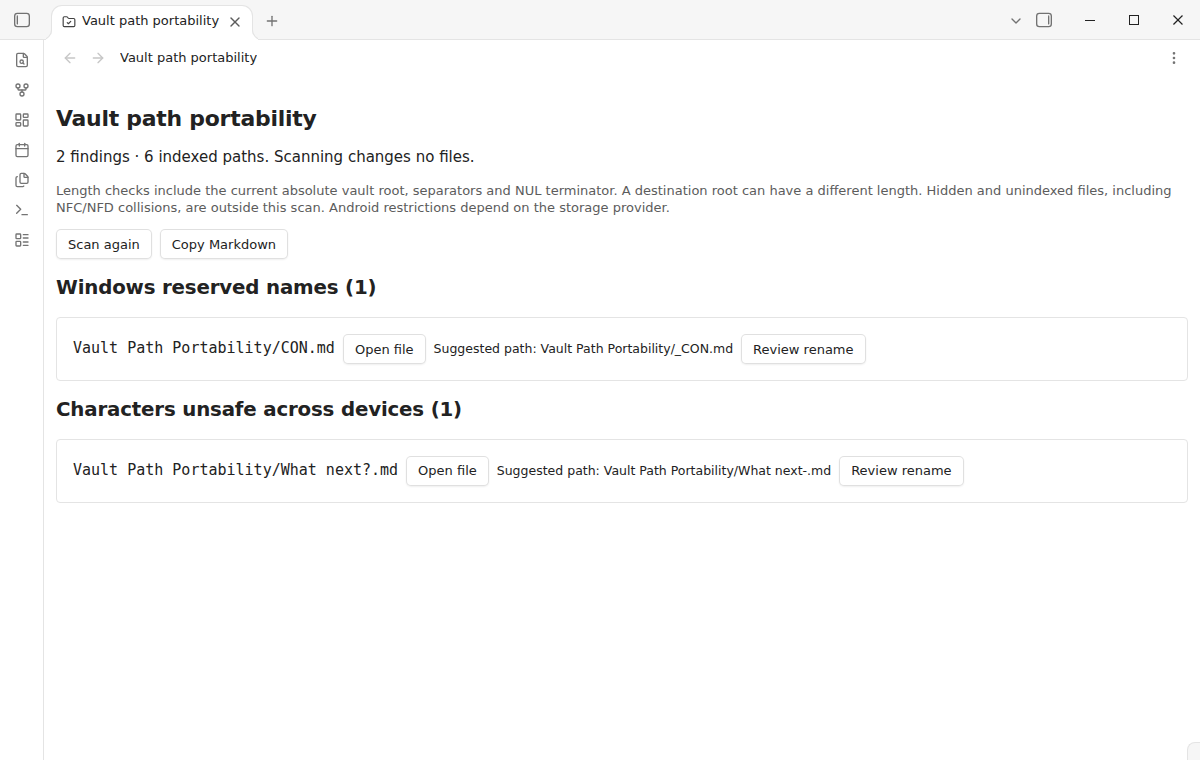
The free tier includes the full scan, file opening and Markdown copying. Pro adds applying rename suggestions, automatic scans with a status count and export to a note, for $15 one time or $5 a month. Get Pro or choose the $15 one-time offer.
Files with distinct names on one file system can collide on another. Review these groups before copying your vault. Scanning never renames, edits or deletes a file.
Features
A report grouped by rule
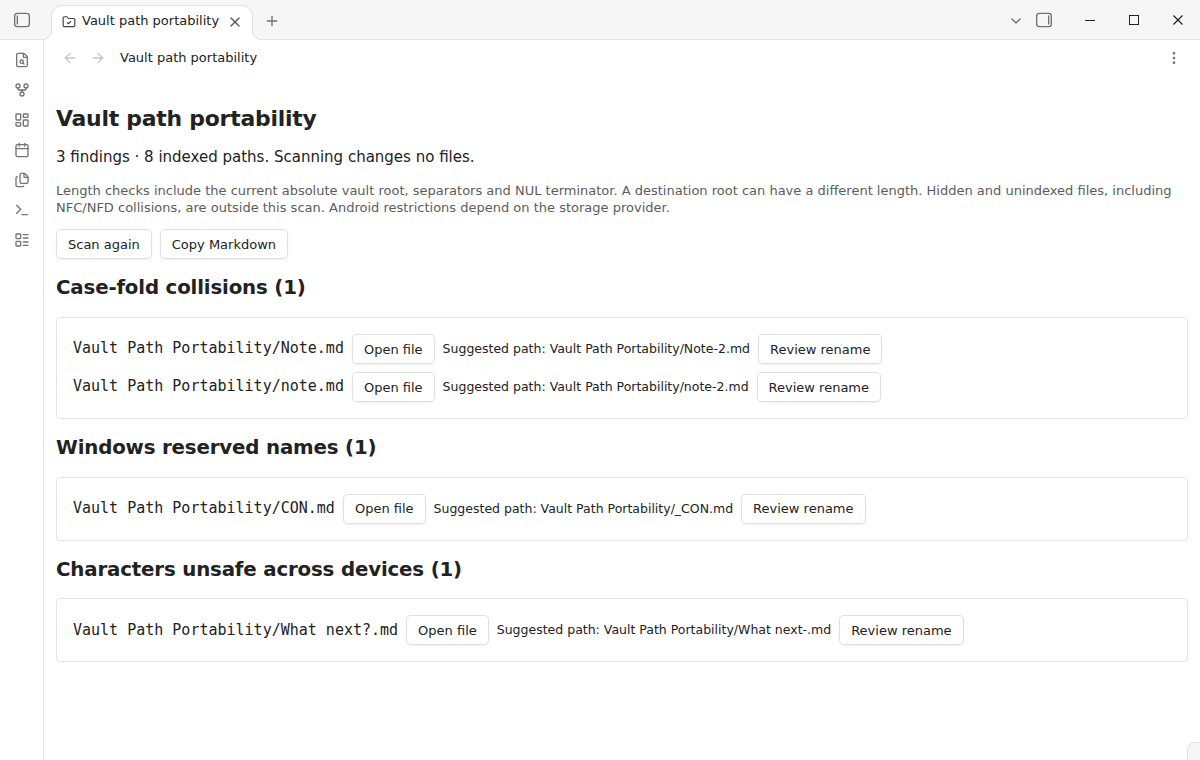
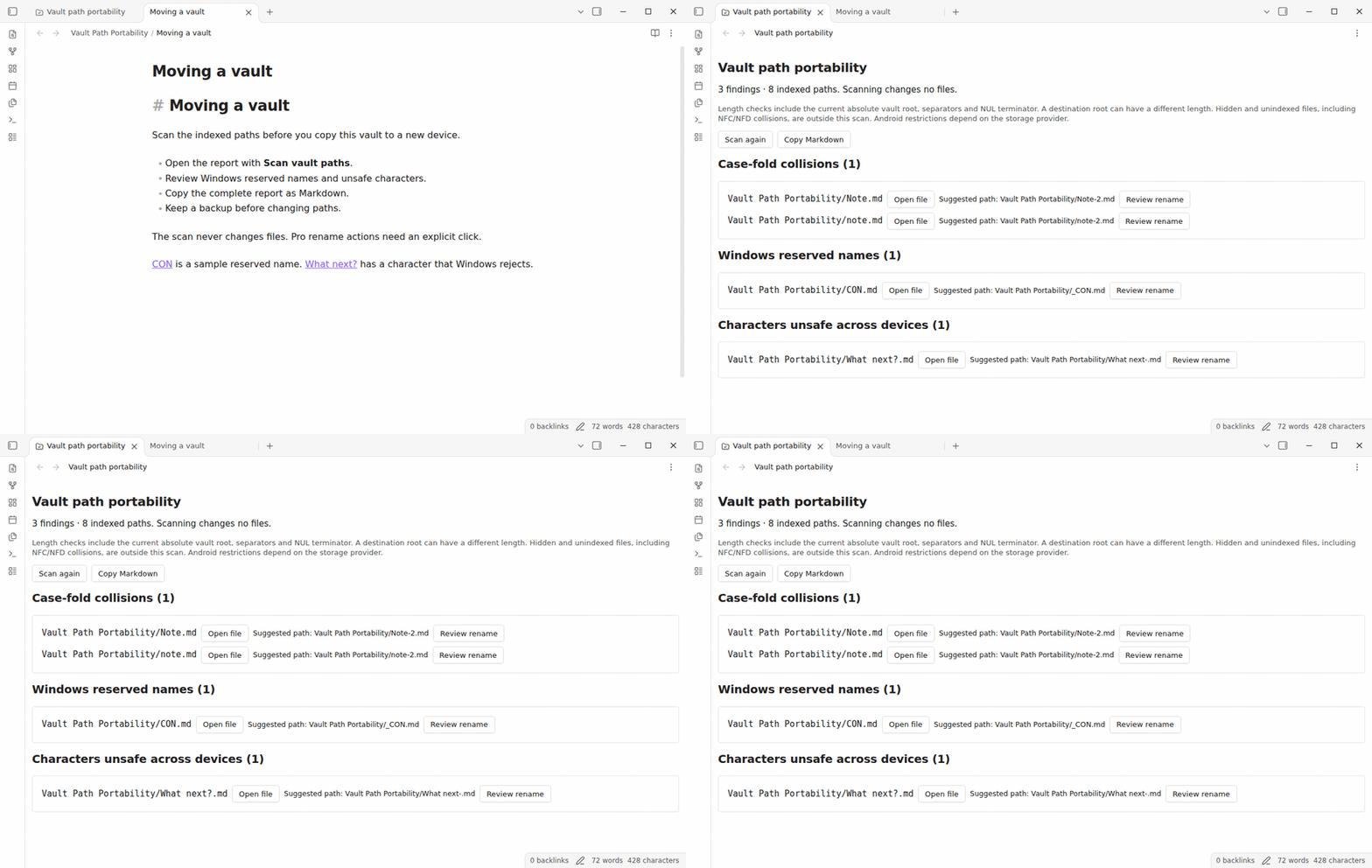
The scanner checks case-fold collisions such as Note.md and note.md, Windows reserved device names, trailing dots or spaces, unsafe characters, Obsidian link delimiters, names over 255 UTF-8 bytes and Windows path length risks. It includes indexed folders and attachments as well as Markdown notes.
Reserved names include CON, PRN, AUX, NUL, COM1 through COM9 and LPT1 through LPT9, even when a name has an extension. Checks ignore case. The conservative character rule covers Windows punctuation and control characters. Android behavior depends on the storage provider and file system, so a finding describes a portability risk rather than a guarantee that every Android device rejects that name.
Safe Filename Linter replaces illegal and link-breaking characters, with automatic and bulk renames available for free. Vault Path Portability offers a read-only report, case-fold collision groups, Windows reserved names and length checks. Applying a rename here is a one-at-a-time Pro action. NFC/NFD collisions are not detected: Obsidian normalizes its index before this plugin can read the names.
Open files and copy the whole report
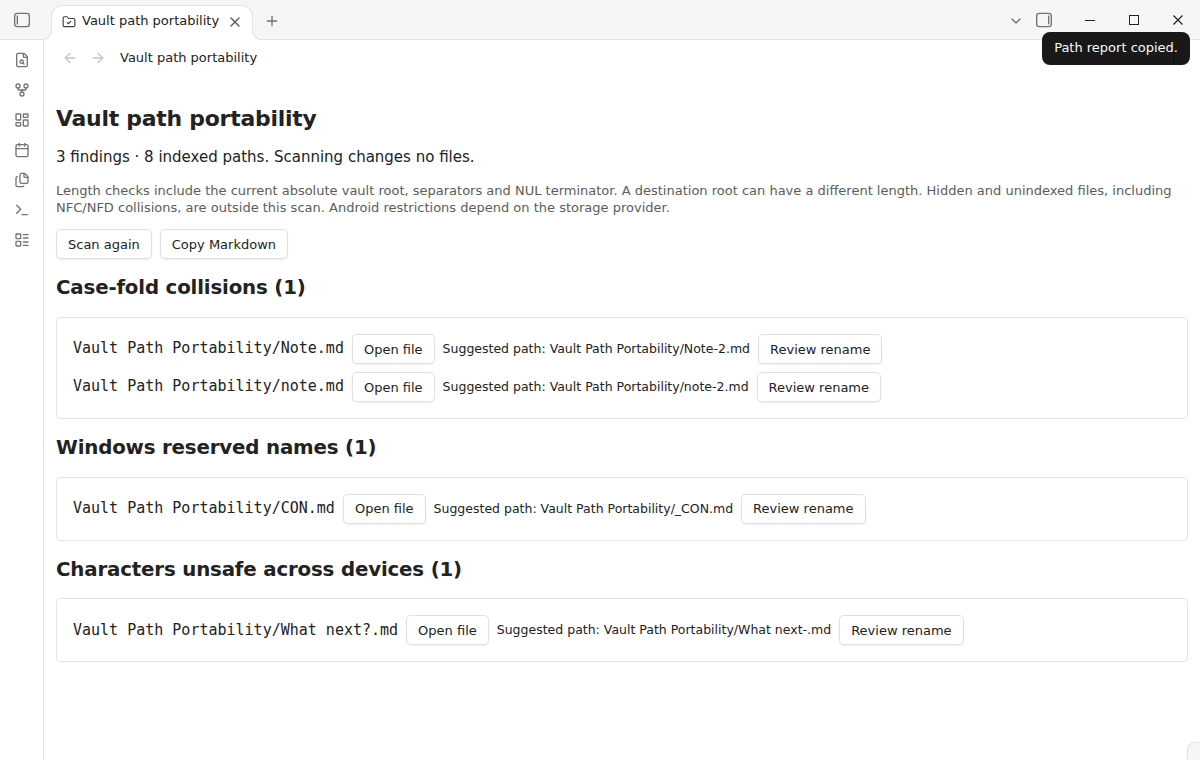
Select Open file beside a result to inspect that note or attachment. Folders appear in the report too, but do not have a file-opening button. Select Copy Markdown to place the full current report on the clipboard. Paste it into a note, a support request or your own migration checklist. All these actions are available without an account or payment.
Copying performs a fresh scan. An empty report explains the scan boundary. It does not certify a sync provider or prove that an archive contains every file.
Rename suggestions after your click
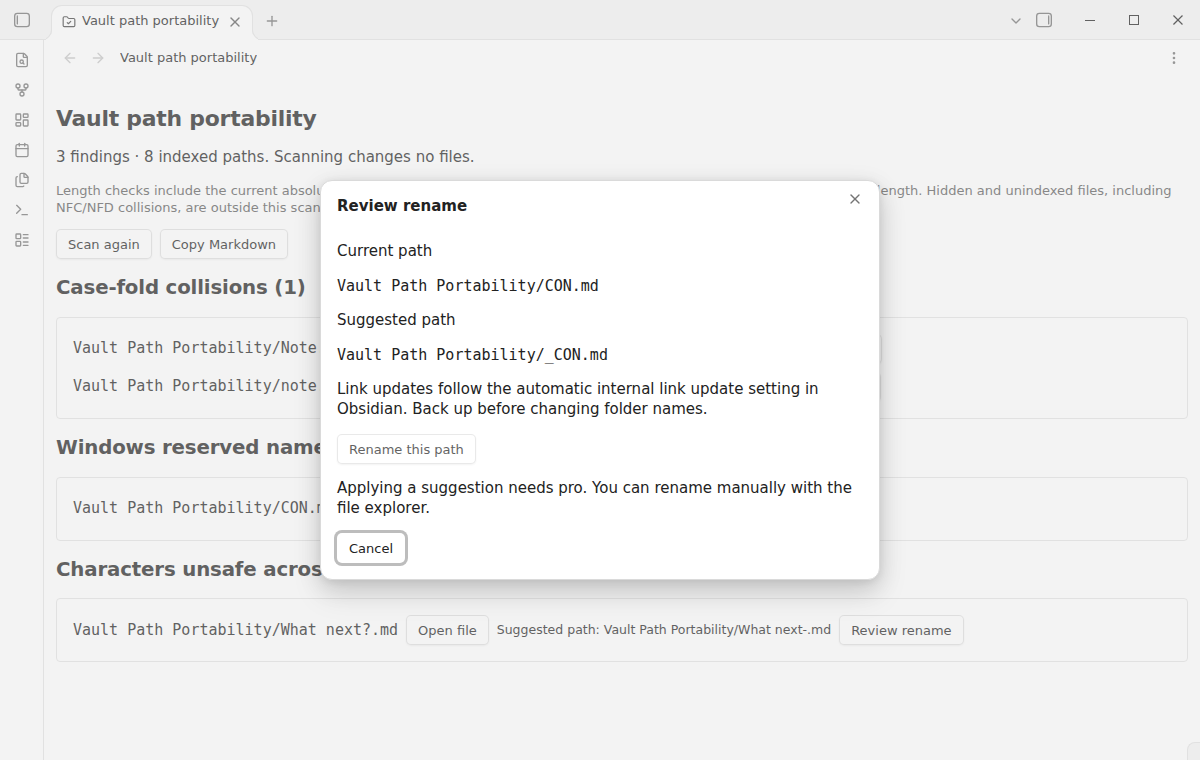
The screenshot shows the free tier: Rename this path is disabled. The report previews a destination beside a flagged path. Select Review rename to compare the current path with its suggestion. Pro adds the action that applies it. The suggestion replaces unsafe characters, prefixes reserved names, removes trailing dots or spaces and adds a numeric suffix when another path occupies the normalized name. File extensions are kept. A folder name is treated as a whole name, even when it contains dots.
Read the destination in the review dialog before selecting Rename this path. That explicit click requests one rename through Obsidian's FileManager API. Obsidian updates internal links according to your Automatically update internal links setting. Links in other programs and external documents are outside that API. If a parent folder is unsafe or too long, fix the parent first. Some paths require a shorter folder structure rather than a leaf rename.
Automatic counts and report notes
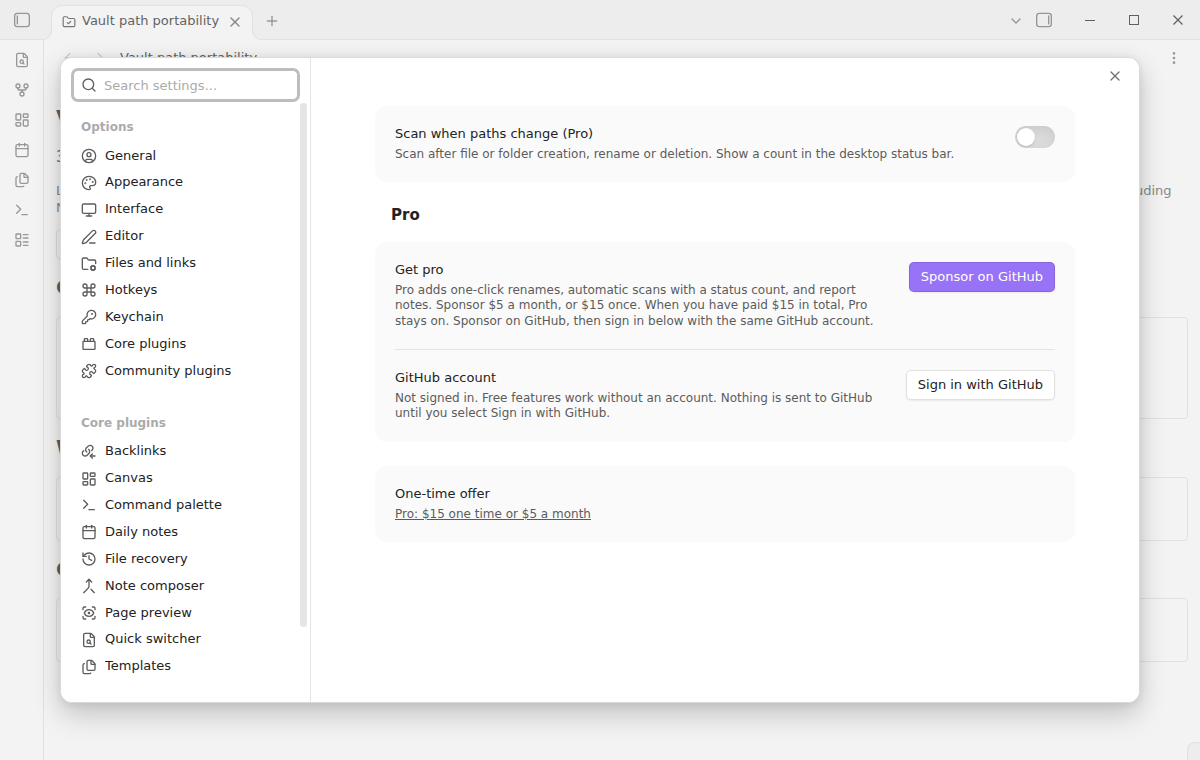
Pro can scan after an indexed file or folder is created, renamed or deleted. Nearby events are combined into one scan. The desktop status bar shows the number of findings. This counts report findings, so one collision group counts once and one path can fail several rules. Mobile layouts may not display a desktop status bar; the report remains available from the command palette.
Export to note creates a new Markdown note in the vault root. If the default name already exists, the plugin chooses a numbered name. Existing report notes are never overwritten. Automatic scans only update the count and open report views; they never apply suggestions or write report notes.
Install
When available in the community directory, open Settings, Community plugins and Browse. Search for Vault Path Portability, install it and enable it. For a manual installation, copy main.js, manifest.json and styles.css from a release into <vault>/.obsidian/plugins/vault-path-portability/, then reload the community plugin list.
The plugin requires Obsidian 1.13.4 or newer. It uses public vault and workspace APIs and works on desktop and mobile. There are no default hotkeys.
Usage
- Back up the vault before a move or folder reorganization.
- Run Scan vault paths from the command palette.
- Review each rule group and open files where you need context.
- Copy the report to keep a checklist of decisions.
- Rename manually, or select a displayed Pro suggestion.
- Scan again before copying to the next device.
Suggestions are checked again when clicked. If a path changed or another file now occupies the proposed name, the rename is refused and you can refresh the report. A failed rename shows a notice. Keep your backup until you have checked the destination vault and its links.
Settings
Scan when paths change is off by default and needs Pro. Enabling it starts a scan and shows a desktop count. Turning it off removes that count. Losing Pro access also stops automatic scans; manual scanning still works.
The GitHub Sponsors controls let you sign in, refresh your sponsorship and sign out. No sign-in prompt or purchase notice appears at startup. The settings tab contains a direct purchase link when Pro is off.
FAQ
How are length limits checked?
On desktop, the check includes the current absolute vault root, separator, relative path and terminating NUL in the Windows 260 UTF-16 unit budget. A destination root can be longer. On adapters without an absolute root, the report states that only a relative lower bound is checked. Each component also has a separate 255 UTF-8 byte check, including the extension. Long-path support varies by application and system configuration.
Why can a visually identical name appear twice?
Case folding catches expansions such as German sharp s and ordinary ss. It uses Unicode 13 exception data with JavaScript lowercase and does not treat all visually similar characters as identical. Composed and decomposed accents are a separate issue: Obsidian normalizes its index, so this scan cannot detect NFC/NFD twins that disappeared from that index. Inspect the source file system separately for those conflicts.
Does this inspect hidden or missing files?
The scan uses paths already indexed by Obsidian. Hidden configuration folders, excluded content and files that failed to enter the index can be absent. Check the source file system separately if you suspect missing data. The plugin does not inspect note content, backups or a remote sync account.
Payment, account and network
The core features are free. Pro features need a GitHub Sponsors sponsorship of theluckystrike: $5 a month or more, or $15 once. A total payment of $15 meets the payment requirement for Pro without further payment. Sign-in and the checks below still apply. Your notes stay readable and editable with or without Pro.
GitHub handles the payment. Sponsor at https://github.com/sponsors/theluckystrike. You need no account for the free features. Pro needs the GitHub account that sponsors.
Until you select "Sign in with GitHub" in the settings, Vault Path Portability makes no network requests. Sign in uses the GitHub device flow. Vault Path Portability sends its public client ID and the scope read:user to https://github.com/login/device/code and shows you a code. While you enter the code at https://github.com/login/device, it asks https://github.com/login/oauth/access_token every few seconds to check the sign-in status. The scope permits profile reads only. GitHub needs this access to show the sponsorship tier. It grants no repository scope and no write access.
After sign in, Vault Path Portability sends one query to https://api.github.com/graphql. It checks if the signed-in account sponsors theluckystrike. It asks for the tier and the total payment to theluckystrike. The plugin reuses a successful check for 7 days. Failed checks can retry after 6 hours. Select Refresh to request an earlier check. It sends no note content, file names or other vault data, and it has no telemetry.
After a successful check, Pro can work offline for up to 14 days. Sign out or a negative sponsorship answer turns Pro off. The plugin stores the GitHub token through the secret storage API of Obsidian. It does not put the token in its saved settings or its local sponsorship data. The local storage of this device keeps your GitHub login, the tier and the time of the last check. Sign out clears the token. You can also revoke the access in your GitHub settings, under Applications.
Support
Use the repository issue tracker for bugs. Include your Obsidian version, device operating systems, the affected rule and an anonymized pair of paths. Do not attach private notes or authentication details. Find other tools and support information at NoteMods.
The exported repository includes build, lint and test scripts for collisions, name rules and rename safety.
MIT licensed.