Search...Search plugins and themes...
⌘K
Sign in
  • Get started
  • Download
  • Pricing
  • Enterprise
  • Account
  • Obsidian
  • Overview
  • Sync
  • Publish
  • Canvas
  • Mobile
  • Web Clipper
  • CLI
  • Learn
  • Help
  • Developers
  • Changelog
  • About
  • Roadmap
  • Blog
  • Resources
  • System status
  • License overview
  • Terms of service
  • Privacy policy
  • Security
  • Community
  • Plugins
  • Themes
  • Discord
  • Forum / 中文论坛
  • Merch store
  • Brand guidelines
Follow us
DiscordTwitterBlueskyThreadsMastodonYouTubeGitHub
© 2026 Obsidian

Vault Badge

Reece W.Reece W.102 downloads

Displays a badge/overlay over vaults to distinguish them.

Add to Obsidian
  • Overview
  • Scorecard
  • Updates3

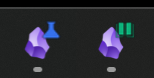
Image showing overlay

This is a basic plugin that lets you add a badge (Windows overlay) to an Obsidian vault, making it slighty easier to distinguish them in the Windows toolbar.

You can set the badge for the current vault with the Vault Badge: Replace badge command (Ctrl + P). The badge is stored in the Obsidian vault.

If you need a source of icons, I recommend Lucide or OpenSVG. Badges must be in ICO format.

Installation

You can install the plugin by going to the plugin's Obsidian page and clicking "Add to Obsidian."

HealthExcellent
ReviewSatisfactory
About
Add a Windows overlay badge to a vault to distinguish it in the Windows taskbar. Store badges inside the vault and set or replace the current vault's badge with the Vault Badge command.
IconsAppearance
Details
Current version
1.1.0
Last updated
4 weeks ago
Created
4 weeks ago
Updates
3 releases
Downloads
102
Compatible with
Obsidian 1.1.0+
Platforms
Desktop only
License
0BSD
Report bugRequest featureReport plugin
Author
Reece W.Reece W.meadow-field
GitHubmeadow-field
  1. Community
  2. Plugins
  3. Icons
  4. Vault Badge

Related plugins

Link Favicons

See the favicon for a linked website.

Inline Callouts

Add inline callouts/badges/icons to notes.

Iconoir Icons

Create and display customized SVG Iconoir icons.

Inline Admonitions

Inline callouts to make text pop.

Typify

Turn plain metadata values into beautiful color-coded pills with icons — for properties, Bases tables, and cards.

Minimal Theme Settings

Control the colors and fonts in Minimal Theme.

Hider

Hide interface elements such as tooltips, status bar, titlebar, and more.

Supercharged Links

Add attributes to internal links with the values of target note's frontmatter attributes.

Note Toolbar

Add customizable toolbars to your notes.

Style Settings

Adjust theme, plugin, and snippet CSS variables.