Search...Search plugins and themes...
⌘K
Sign in
  • Get started
  • Download
  • Pricing
  • Enterprise
  • Account
  • Obsidian
  • Overview
  • Sync
  • Publish
  • Canvas
  • Mobile
  • Web Clipper
  • CLI
  • Learn
  • Help
  • Developers
  • Changelog
  • About
  • Roadmap
  • Blog
  • Resources
  • System status
  • License overview
  • Terms of service
  • Privacy policy
  • Security
  • Community
  • Plugins
  • Themes
  • Discord
  • Forum / 中文论坛
  • Merch store
  • Brand guidelines
Follow us
DiscordTwitterBlueskyThreadsMastodonYouTubeGitHub
© 2026 Obsidian

Ultimate Pomodoro Timer

isgin01isgin01402 downloads

Manage your time without friction

Add to Obsidian
  • Overview
  • Scorecard
  • Updates3

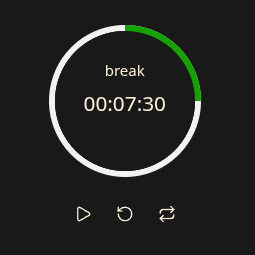
A plugin for Obsidian that offers standard Pomodoro features as well as customization options. Set your own timer modes, their sequence, duration, notification sound, colors, and more.

Installation

There are two ways to install the plugin:

  1. Directly from Obsidian.
  2. Download main.js, styles.css, and manifest.json from Releases to YOUR_NOTE_FOLDER/.obsidian/plugins/ultimate-pomodoro-timer.

Usage

After installation, open the plugin settings and adjust them if needed. You can use the plugin as a status bar or panel widget, as well as from the Command Palette.

Future feature checklist

  • Separate notification sound for each mode
  • Tasks view
  • Logging
  • More predefined shapes and custom shape support
HealthExcellent
ReviewSatisfactory
About
Manage your time without friction.
TasksStatus barCommands
Details
Current version
1.0.2
Last updated
3 months ago
Created
7 months ago
Updates
3 releases
Downloads
402
Compatible with
Obsidian 1.8.7+
Platforms
Desktop, Mobile
License
MIT
Report bugRequest featureReport plugin
Author
isgin01isgin01
isgin01.github.io
GitHubisgin01
  1. Community
  2. Plugins
  3. Tasks
  4. Ultimate Pomodoro Timer

Related plugins

Completed Task Display

Controls for displaying or hiding completed tasks.

Task Collector

Change task status and collect tasks within a document using hotkeys and context menus.

Day Planner OG

Day planning from a simple task list in a Markdown note (bare bones, preserves the features and behavior of the original plugin).

Custom Note Width

Effortlessly change the line width of each note individually. Provides multiple ways to customize the experience, making it both efficient and user-friendly to adjust line widths.

TaskNotes

Note-based task management with calendar, pomodoro and time-tracking integration.

Quick Switcher++

Enhanced Quick Switcher, search open panels, and symbols.

Tasks

Track tasks across your vault. Supports due dates, recurring tasks, done dates, sub-set of checklist items, and filtering. Maintained by Clare Macrae and Ilyas Landikov, created by Martin Schenck.

Copilot

Run AI agents such as Claude Code, Codex, and OpenCode inside your vault. Turn your second brain into a smart assistant that gets knowledge work done.

Day Planner

Turn tasks from daily notes, the Tasks plugin, and calendars into time blocks on an editable timeline, with built-in time tracker.

Note Toolbar

Add customizable toolbars to your notes.