2 Euro Collection
 Wojciech Kasjanowicz68 downloads
2 Euro coin collection with filtered ownership totals, enforced title normalization, owned-card highlighting and complete English documentation.
- Overview
- Scorecard
- Updates18
A mobile-friendly Obsidian plugin for maintaining a structured catalogue of 2 euro coins. The plugin stores every coin as a Markdown note with YAML frontmatter, keeps covers in the vault, can synchronize official issues from Numista, and provides a searchable dashboard with ownership tracking.
Current plugin version: 0.6.2
Minimum Obsidian version: 1.8.0
Desktop-only: No. The plugin also works in Obsidian Mobile.
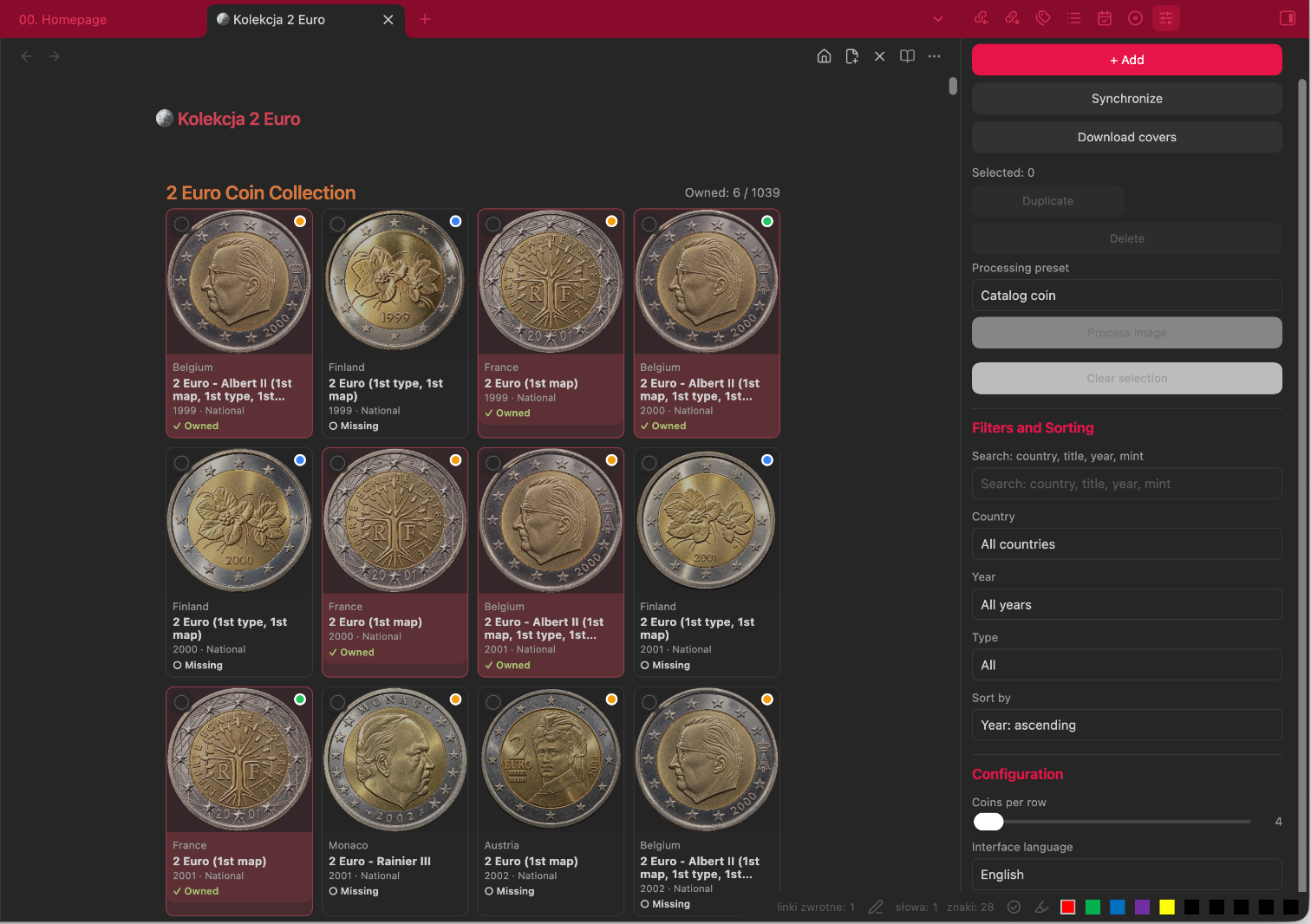
Features
- Generates and maintains a Markdown-based 2 euro coin catalogue.
- Synchronizes official standard-circulation and circulating commemorative 2 euro issues from Numista.
- Stores one note per coin issue and mint variant.
- Downloads coin covers and keeps them inside the Obsidian vault.
- Supports local/custom covers, cover locking, reference covers, and photo attribution fields.
- Tracks ownership, quantity, acquisition date, acquisition price, currency, condition, and notes.
- Filters by free text, country, year, ownership, and coin type.
- Sorts by year or country, ascending or descending.
- Supports batch selection, duplication, deletion, background removal, and the Catalog coin image preset.
- Provides English and Polish user interfaces.
- Works on desktop and mobile.
Installation
Manual installation
Close Obsidian or disable the previous version of the plugin.
In the target vault, create this folder:
.obsidian/plugins/two-euro-collection/Copy the following files into that folder:
main.js
manifest.json
styles.css
Languages/pl.json
Start Obsidian.
Open Settings → Community plugins.
Turn off Restricted mode if required.
Enable 2 Euro Collection.
The final plugin directory should look like this:
.obsidian/plugins/two-euro-collection/
├── main.js
├── manifest.json
├── styles.css
└── Languages/
    └── pl.json
When replacing an existing version, reload Obsidian after copying the files. On mobile, make sure the complete
.obsidian/plugins/two-euro-collectionfolder is synchronized to the device.
First run and initial configuration
After installing the plugin, open Settings → 2 Euro Collection. Before starting, review the collection location settings:
- Root folder – the parent folder where the collection will be stored;
- Collection name – the name of the 2 euro collection folder;
- Coins folder – the folder containing individual coin notes;
- Covers folder – the folder used for local coin images.
The Initial configuration section contains two setup steps.
Step 1: Create collection structure
Select Create structure. The plugin creates the folders required by 2 Euro Collection and the main collection dashboard. Run this step first when configuring a new vault.
Example structure:
2 Euro/
 ├── 🪙 Kolekcja 2 Euro.md
 ├── Coins/
 └── Covers/

The 🪙 Kolekcja 2 Euro.md note contains the code block used by the plugin to render the collection dashboard::

````markdown
```two-euro-collection
Do not remove that code block if the dashboard is to remain visible.

#### Step 2: Install starter collection

This step is optional.

Select **Install starter collection** to add a prepared set of example coins together with their local cover images.

The starter collection is designed to make the initial setup easier. It does not represent the author's collection, and all imported coins initially remain marked as not owned.

During installation:

 -only missing coins are created;
- existing coins are not replaced;
- existing user data is not modified;
- prepared cover images are stored locally;
- starter collection covers are protected from automatic replacement.

Running the starter collection installation again should not create duplicates of existing coins.

After completing the initial configuration, open the collection using the ribbon icon or the **2 Euro Collection: Open collection** command.

#### Adding more coins

After the initial configuration, the catalogue can be expanded in two ways:

**Synchronize with Numista**
- Configure your Numista API key.
- Open the collection dashboard.
- Open the **2 Euro Collection** sidebar if it is not already visible.
- Select **Synchronize**.
- Wait for the synchronization to finish.
- If required, select **Download covers** to download missing local images.

Synchronization creates or updates notes for official 2 euro issues while preserving local ownership data and protected or custom covers.

**Add coins manually**
- Select + Add in the sidebar or run 2 Euro Collection: Add coin.
- Enter at least Country, Year, and Title / design.
- Select National or Commemorative.
- Add a mint mark when the issue has a mint variant.
- Select Save.

Manual entries use `source: manual` and are not removed by the command that cleans unofficial Numista imports.

## Numista API configuration

Numista provides API access to its numismatic catalogue. Sign in to Numista, activate API access, and generate an API key from the Numista API page. See the [official Numista API page](https://en.numista.com/api/index.php) and [API documentation](https://en.numista.com/api/doc/index.php).

To configure the plugin:

1. Open **Obsidian Settings → 2 Euro Collection**.
2. Paste the key into **Numista API key**.
3. Leave the settings page. Obsidian saves the plugin settings automatically.
4. Run **Synchronize**.

> The API key is stored in the plugin's Obsidian settings data. Do not publish or commit the generated `data.json` with a real API key.

### What synchronization reads from Numista

For supported official issues, the plugin can read and store:

- issuer/country;
- year and mint letter;
- title/design;
- standard or commemorative type;
- Numista type and issue identifiers;
- Numista URL;
- mintage;
- obverse image URL;
- photo author/copyright and photo license metadata when supplied;
- numismatic values by grade in EUR when supplied by the API.

The synchronizer filters the results to official 2 euro issuers and standard-circulation or circulating commemorative object types. Entries identified as medals, tokens, patterns, trials, fantasy issues, souvenirs, replicas, or copies are excluded. The command **Remove unofficial Numista imports** can clean older imported entries while preserving owned coins, locked covers, custom covers, and manual entries.

## Reading local coin data

Each catalogue entry is a normal Markdown file in the `Coins` folder. The plugin reads the YAML frontmatter and renders it as a dashboard card.

Example:

```yaml
---
coin_id: coin-12345-67890
denomination: 2
currency: EUR
country: Finland
year: '1999'
coin_type: national
title: 2 Euro (1st type, 1st map)
mint_mark: M
owned: true
quantity: 1
acquisition_date: 2026-01-15
acquisition_price: 4.50
acquisition_currency: EUR
condition: UNC
source: numista
numista_id: '12345'
numista_issue_id: '67890'
cover: '[[11 - Collections/2 Euro/Covers/Finland-1999-National-M.png]]'
reference_year: '1999'
cover_locked: true
own_cover: false
---
You may inspect or edit these notes directly, but using the plugin editor is safer because it normalizes fields and refreshes the dashboard.
Covers and images
Covers are stored in the configured Covers folder and linked from coin frontmatter.
Download missing covers
Use Download covers in the sidebar or run 2 Euro Collection: Download missing covers. The operation:
- processes Numista entries without a local cover;
- skips locked covers;
- downloads the Numista obverse picture;
- saves the image locally;
- updates the Markdown note.
Manage one coin cover
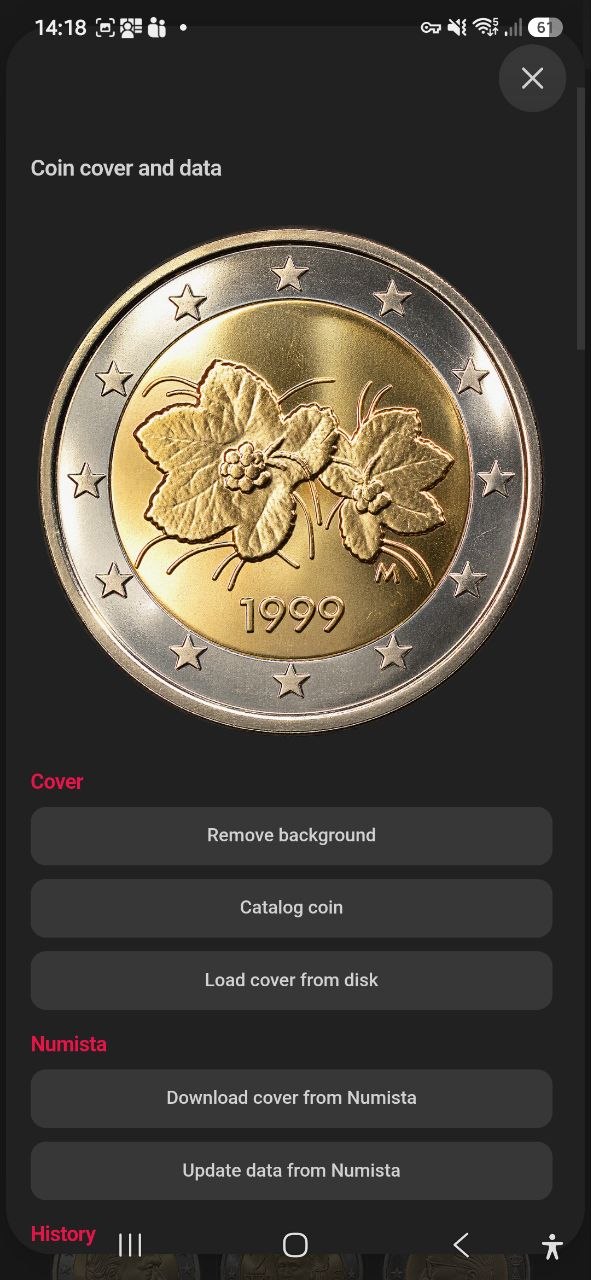
Click the coin image to open Coin cover and data.
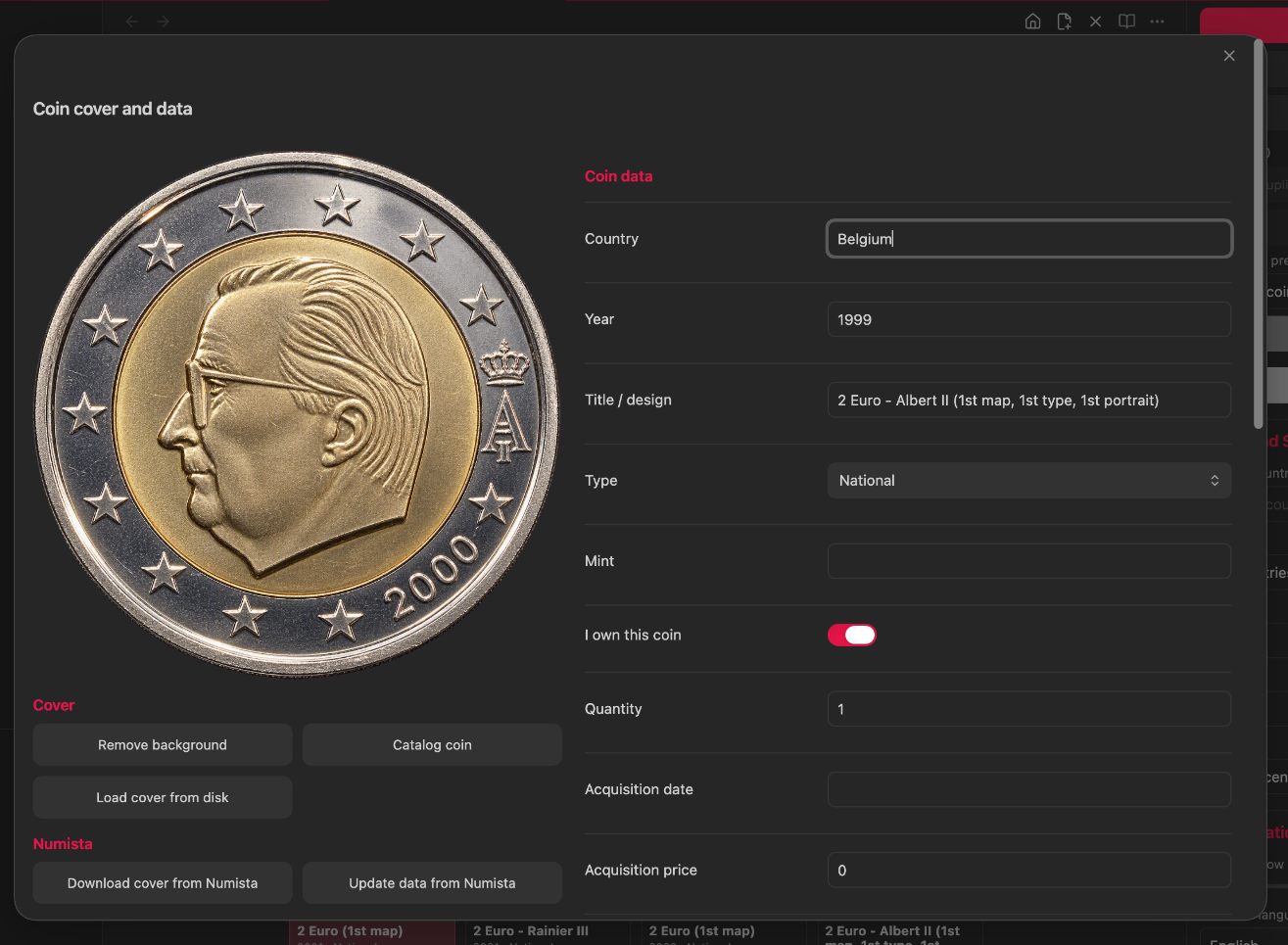
Available cover actions:
- Remove background: removes a light background and saves a protected PNG.
- Catalog coin: removes the background, crops and centers the coin, applies a light contrast/highlight adjustment, saves a PNG, and locks the cover.
- Load cover from disk: imports a local image, marks it as a custom cover, sets the reference year to the coin year, and locks it.
- Download cover from Numista: downloads the Numista image for that coin.
- Update data from Numista: refreshes catalogue data, photo attribution, mintage, and available valuation fields.
- Undo change: restores the last saved note and cover snapshot for that coin.
Cover protection and reference covers
- Lock cover (
cover_locked: true) prevents synchronization and bulk downloading from replacing the image. - Custom cover (
own_cover: true) also activates cover protection. - Cover reference year lets another issue reuse an already available cover from the same country and coin type.
- Reference-year suggestions are taken from locked coins with the same country, title, and type.
Image indicator dots
The dot in the upper-right corner of a coin image describes the cover state:
- Green: the image matches the coin year.
- Orange: the card uses a reference image from another year.
- Red: the reference year is missing or the requested reference image could not be resolved.
- Blue: a custom cover is in use and protected.
These dots indicate image/reference status. They do not indicate whether the coin is owned.
Filtering and sorting
Open the right sidebar with 2 Euro Collection: Open collection panel. The dashboard can be filtered by:
- Search: country, title, year, or mint mark;
- Country;
- Year;
- All;
- Owned;
- Missing;
- Commemorative;
- National.
Available sorting modes:
- Year: ascending;
- Year: descending;
- Country: ascending;
- Country: descending.
The counter above the grid is calculated from the currently filtered list, for example Owned: 6 / 48 after applying filters.
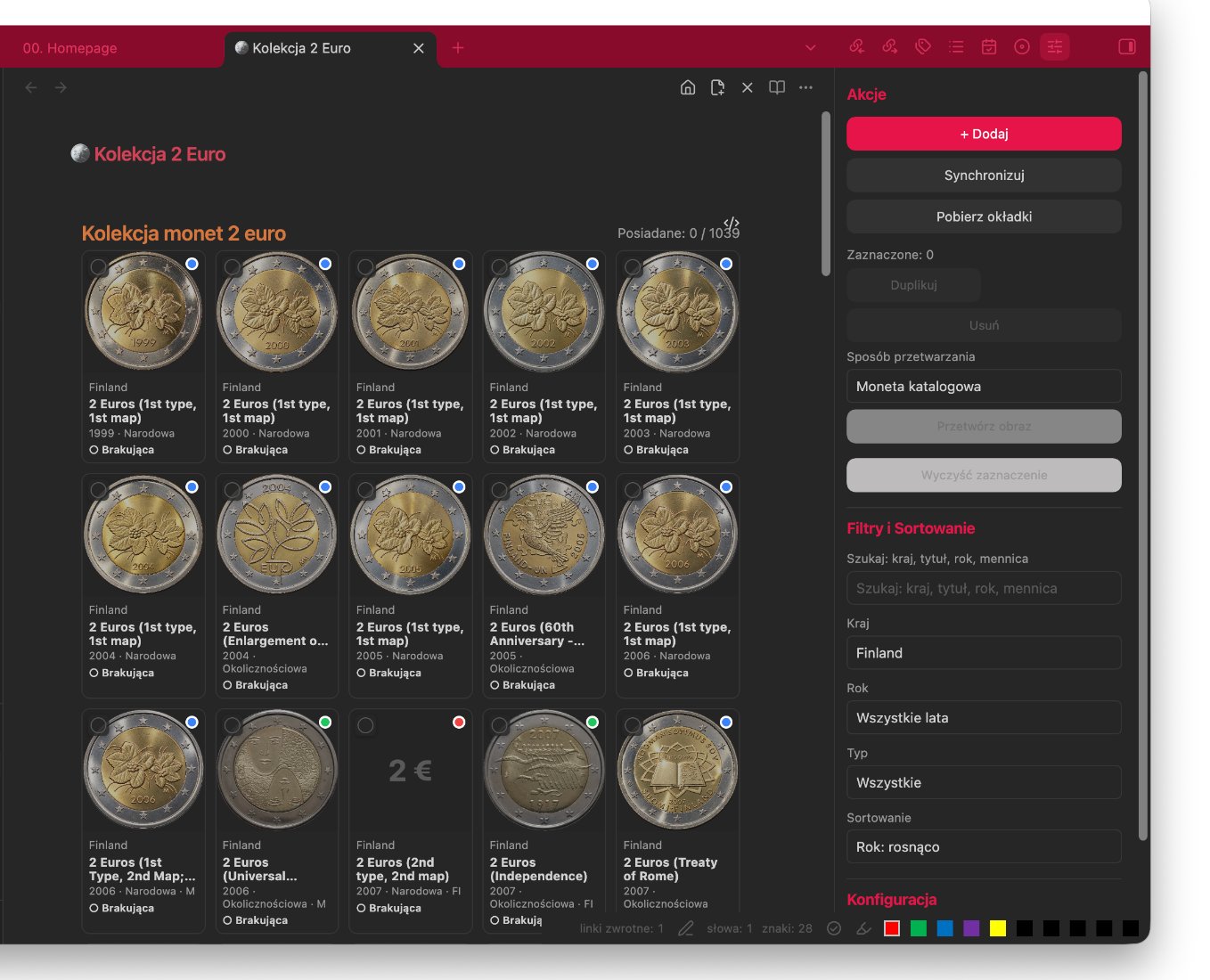
Editing coins and using editing fields
Edit complete coin data
Click the text area below a coin image to open the standard editor. Click the image to open the combined cover-and-data editor.
Editable fields include:
- Country;
- Year;
- Title / design;
- Type;
- Mint;
- I own this coin;
- Quantity;
- Acquisition date;
- Acquisition price and currency;
- Condition;
- Cover URL;
- Cover reference year;
- Lock cover;
- Custom cover;
- Notes;
- Photo author/copyright;
- Photo license.
The numismatic value field is read-only because it is populated from Numista.
Reference-year editing filter
When editing Cover reference year, the plugin proposes years only from coins that satisfy all of these conditions:
- the country is the same;
- the normalized title is the same;
- the coin type is the same;
- the candidate cover is locked;
- the candidate has a local cover.
This prevents unrelated covers from being offered as references.
Batch editing and image processing
- Select cards using the checkbox in the upper-left corner of each card.
- The sidebar displays the number of selected coins.
- Choose Catalog coin or Remove background under Processing preset.
- Select Process image.
- Use Clear selection when finished.
Selected coins can also be duplicated or deleted. Deletion requires confirmation and cannot be undone through the batch action.
Ownership tracking
A coin is owned when I own this coin is enabled, which stores owned: true in frontmatter.
- Owned cards display
✓ Owned. - Missing cards display
○ Missing. - Owned cards use a red-tinted card background in version 0.5.46.
- The top counter shows owned entries versus all entries remaining after active filters.
- Use Quantity when more than one copy is held.
The ownership color is applied to the card background. The green, orange, red, and blue dots on the image describe cover/reference status instead.
Mobile use
The plugin is not desktop-only. Install or synchronize the complete plugin folder to the mobile vault, enable the plugin in Community plugins, and open the collection note.
On a phone:
- the dashboard automatically uses a three-column grid;
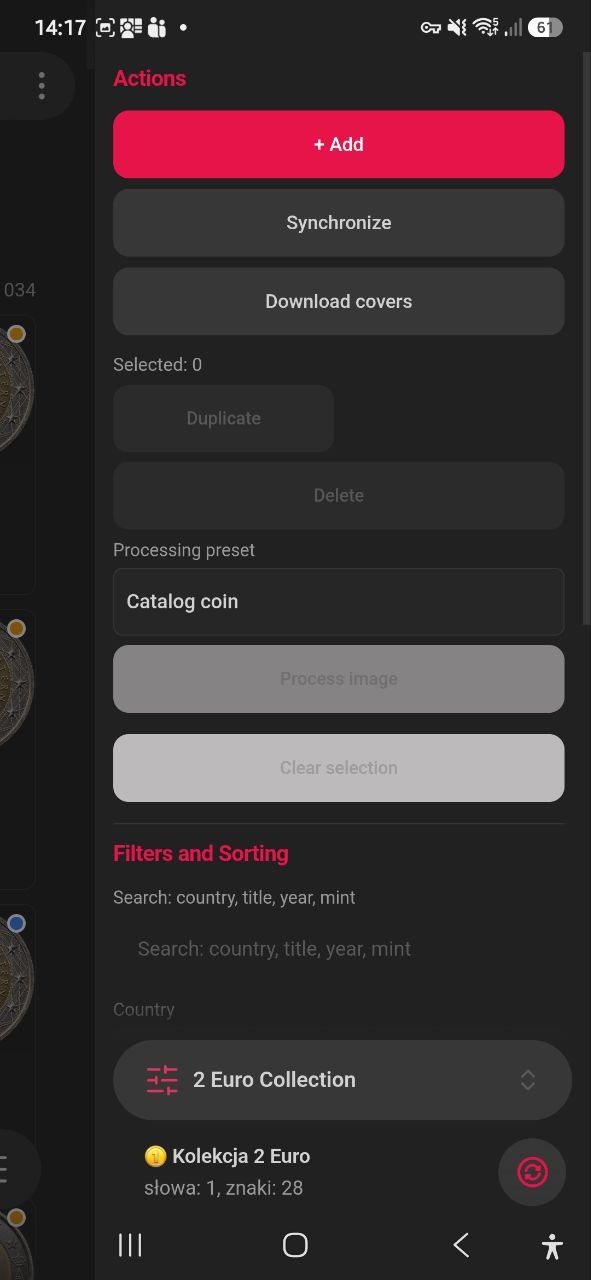
- the collection sidebar can be opened from the plugin panel icon;
- filters, synchronization, cover downloads, and batch actions remain available;
- the coin editor changes to a single-column layout;
- tapping a coin image opens the cover-and-data editor;
- tapping the text below the image opens the standard coin editor.
Mobile dashboard
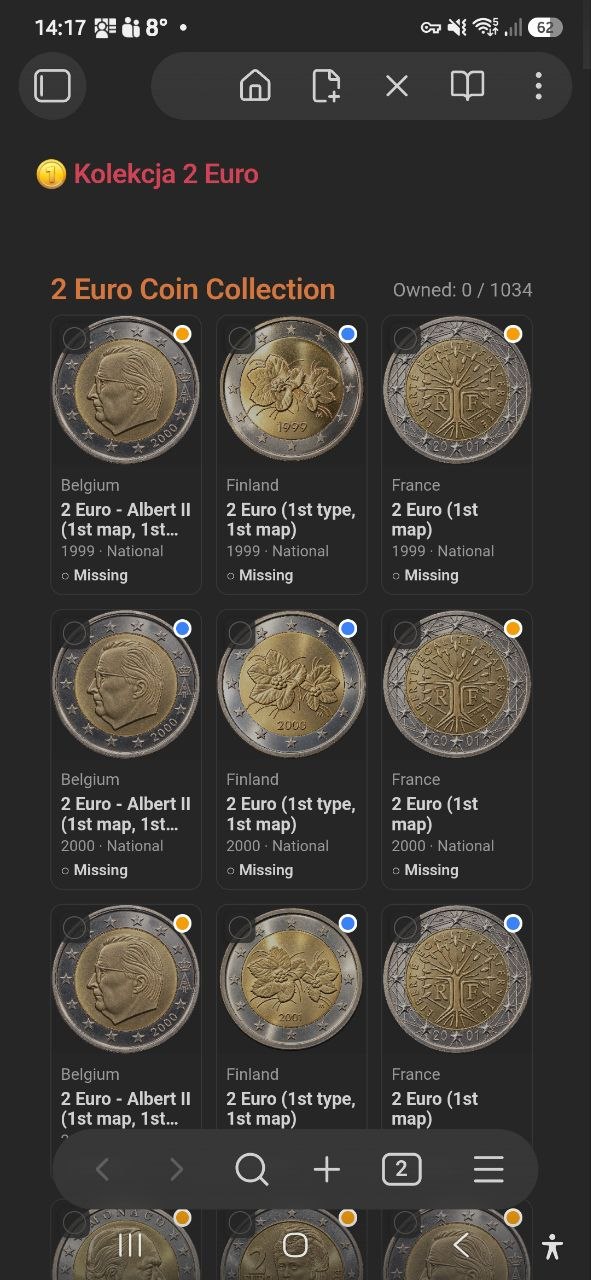
Mobile actions, filters, and sorting
Mobile cover and coin data editor
Interface language and layout
In the right sidebar or plugin settings you can choose:
- Automatic;
- English;
- Polski.
The Coins per row slider supports values from 4 to 10 on desktop. Mobile uses a responsive three-column layout.
Useful commands
Open the Command Palette and search for 2 Euro Collection. Important commands include:
- Open collection;
- Open collection panel;
- Add coin;
- Synchronize catalogue with Numista;
- Download missing covers;
- Remove duplicates;
- Remove background from current coin cover;
- Apply Catalog coin preset to current coin;
- Normalize protected PNG cover names;
- Normalize 2 Euro coin titles;
- Normalize country folder names;
- Migrate cover references;
- Remove unofficial Numista imports.
Backup and safety recommendations
Before a large synchronization, cleanup, title normalization, cover migration, or batch deletion:
- close active coin editors;
- make a backup or Git commit of the vault;
- verify that custom covers have Custom cover or Lock cover enabled;
- test the operation on a small copy of the vault when upgrading from an older version.
Troubleshooting
The plugin is not visible in Community plugins
- Confirm that the folder name is exactly
.obsidian/plugins/two-euro-collection. - Confirm that
manifest.json,main.js, andstyles.cssare directly inside that folder. - Reload Obsidian.
- Check
.obsidian/community-plugins.jsonand confirm thattwo-euro-collectionis listed after the plugin is enabled.
Polish language is not available
Confirm that the file exists at:
.obsidian/plugins/two-euro-collection/Languages/pl.json
The folder name uses a capital L.
Synchronization asks for an API key
Open Settings → 2 Euro Collection, enter a valid Numista API key, and run synchronization again.
Covers do not appear
- Run Migrate cover references for old links containing only a filename.
- Confirm that cover files are inside the configured
Coversfolder. - Use Download missing covers for unlocked Numista entries.
- Verify
cover_locked,own_cover, andreference_yearin the affected note.
Synchronization is slow or reports HTTP 429
The plugin spaces API calls and retries rate-limited requests with increasing delays. Leave Obsidian open until the progress notice completes. Avoid starting multiple synchronization or cover-download operations at the same time.
Data ownership and third-party content
Coin notes and downloaded covers are stored in the user's Obsidian vault. Numista catalogue data and images remain subject to Numista's terms and the license/attribution information supplied with each image. Keep the photo_author, photo_license, and related source information when redistributing images or generated catalogue content.
Screenshots
The screenshots in Assets/ are documentation examples. Desktop screenshots were cropped to show the plugin workspace without the author's personal Obsidian navigation menu.
License
No software license is declared in the current plugin package. Add a LICENSE file before public distribution if the plugin is intended for reuse by others.