Trouble Tags
 Simon Späti349 downloads
Scans the active file for TODO, FIXME, BUG, NOTE, and WARN tags and lists them in a sidebar panel.
- Overview
- Scorecard
- Updates4
A sidebar panel, inspired by todo-comments.nvim, that lists the things you want to come back to: TODO-style keywords, list callouts and open checkbox tasks. It shows the current note by default, or the whole vault, and jumps to the line when you click an entry. It does nothing while the panel is closed and never changes a note unless you press a check button.
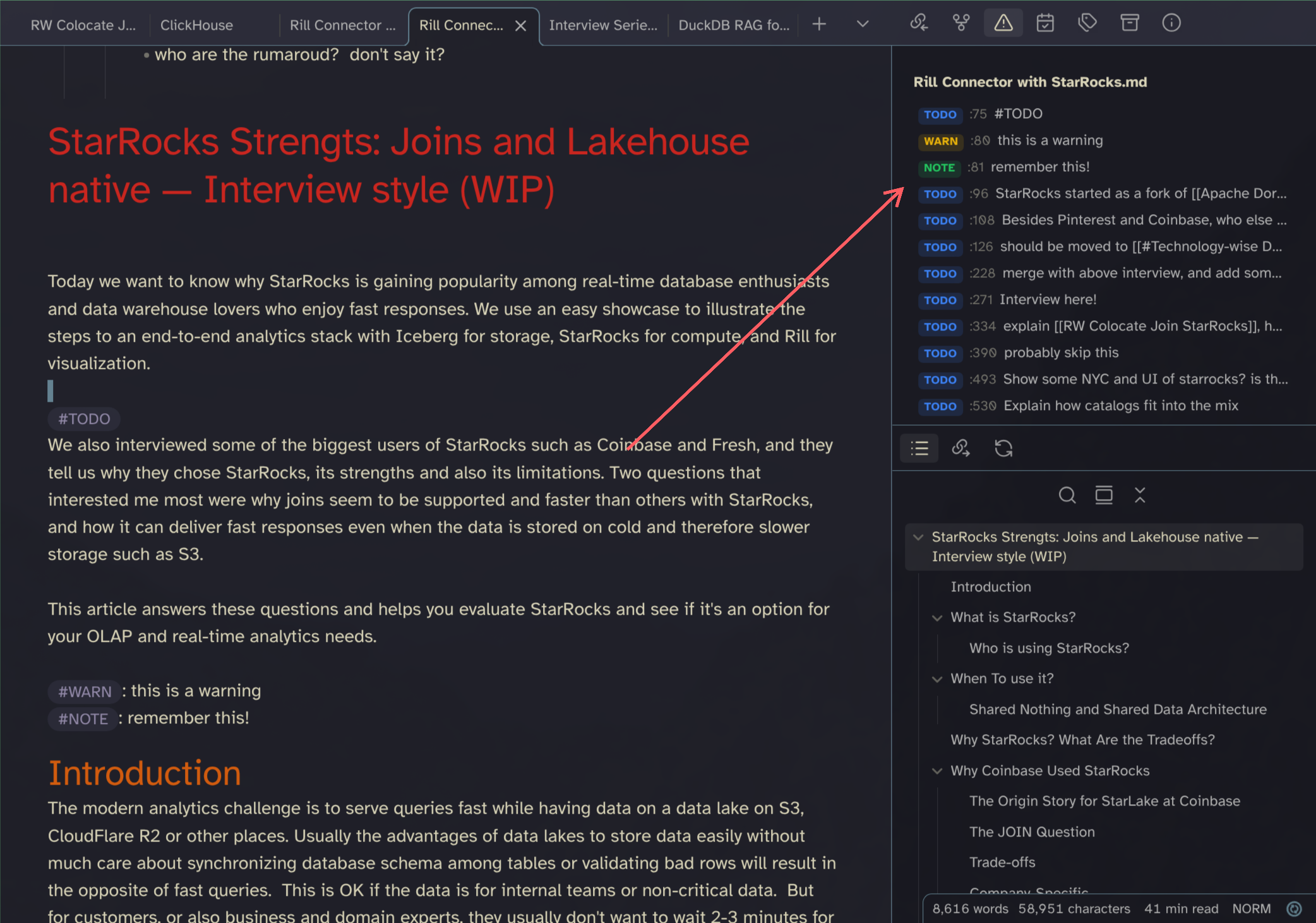
[!NOTE] Why the name "Trouble"? It comes originally from trouble.nvim as I thought the TODO capabilities in Neovim come from there. But it is actually todo-comments.nvim that finds the keywords and feeds them into trouble.nvim. I just kept the name as it's kind of true to the tags/flags/keywords still.
What it finds
| Source | Syntax | Example |
|---|---|---|
| Keywords | Upper case keyword, with or without # |
TODO: call bank, #FIXME, (TODO), ## TODO's |
| List callouts | List item starting with a configured character | - ? question, - ! important, - = idea |
| Tasks | Markdown checkbox | - [ ] buy milk |
- Keywords are case sensitive and need word boundaries:
todo,TODOSandMYTODOdo not match. - Default keywords:
TODO, FIXME, BUG, NOTE, WARN, IDEA, TK. - Callout headers such as
> [!NOTE]and frontmatter are skipped. Code blocks are scanned. - A keyword inside
~~strikethrough~~and a checked task ([x]) count as done and are hidden unless "Show done" is on.
Usage
- Open the panel: click the ribbon icon or run "Trouble Tags: Toggle panel" from the command palette.
- Filter chips: Keywords, Callouts and Tasks switch each source on or off. "Show done" includes finished items. The chips are remembered.
- Scope toggle: the first button in the panel header switches between the current note and the whole vault. The choice is remembered.
- Whole vault: press "Build index" once. After that the panel opens instantly and only rescans notes that changed. Results are grouped by file and each file can be collapsed. Notes with the same name show their parent folder (
folder/note); hover a file header or a row location to see the full path. - Sort: in the whole-vault view the sort dropdown orders files by Modified (newest first, the default), Created (newest first) or Name. In the note view it orders rows by Line (default) or Label (keywords in the order of your keyword setting, then callouts, then tasks). Both choices are remembered.
- Refresh index: the refresh button next to the sort dropdown in the whole-vault view rescans notes that changed since the last pass, for example after Obsidian restored the panel on startup.
- Collapse all / Expand all: the button next to the sort dropdown in the whole-vault view folds every file group, or unfolds them again.
- Click a row to jump to its line. This also works when the note is in reading mode.
- Jump with the keyboard: the commands "Jump to next item in note" and "Jump to previous item in note" move the cursor to the next or previous item in the open note, wrapping around at the end. They respect the filter chips and "Show done". A third command, "Toggle scope (current note / whole vault)", flips the panel and opens it if needed. None of them have a default hotkey; bind them under Settings, Hotkeys.
- Mark done: the check button on a row turns
TODOinto~~TODO~~or[ ]into[x]. On a done row (with "Show done" on) an undo button restores it, including keywords inside a wider~~struck span~~. Callouts have no done state. If the line changed since the last scan, a notice appears and nothing is edited.
Vim motions
With the Vimrc Support plugin you can bind the commands to motions in .obsidian.vimrc, for example ]t and [t. Mapping } and { works too but replaces the paragraph motions.
exmap next_item obcommand trouble-tags:next-item
exmap prev_item obcommand trouble-tags:previous-item
nmap ]t :next_item<CR>
nmap [t :prev_item<CR>
Settings
| Setting | Default | What it does |
|---|---|---|
| Keywords | TODO, FIXME, BUG, NOTE, WARN, IDEA, TK |
Comma separated keywords, matched in upper case. |
| Keyword match | Hashtag and bare | Also "Hashtag only" and "Bare only". |
| Callout characters | & ? ! ~ @ $ % = |
Space separated characters. "Import from List Callouts" copies them from the List Callouts plugin. |
| Show done items | Off | Include completed tasks and struck-through keywords. |
| Status bar count | Off | Shows the number of open items of the current note in the status bar. Click it to toggle the panel. Shows – while the panel is closed. Not available on mobile. |
| Icon | List todo | Icon of the ribbon button and the panel tab. |
| Excluded folders | Empty | One folder path per line, skipped when building the vault index. |
| Vault sort | Modified | Whole-vault file order: Modified, Created or Name. Set from the panel header. |
| Note sort | Line | Row order of the note view: Line or Label. Set from the panel header. |
| Rebuild index | Discards the index and rebuilds it right away if the panel shows the whole vault; otherwise the Build index button appears. | |
| Clear index | Deletes the cached index. |
Changing keywords, match mode, callout characters or excluded folders discards the vault index. The panel then offers "Build index" again; it never rebuilds by itself.
Whole-vault index
- The index is built only when you press "Build index". Opening Obsidian, opening a note or switching to the vault scope never scans the vault by itself.
- It is stored as
index.jsonin the plugin folder, not in your notes. It is a disposable cache: delete it any time (or use "Clear index") and build it again. - With an index present, switching to the vault scope compares modification times and rescans only new or changed notes.
- Notes in excluded folders are left out.
The plugin lists the vault's markdown files only when you build or refresh the index, and reads them through Obsidian's own Vault API. Nothing leaves the vault and no note is written to by scanning.
Install
Settings, Community plugins, Browse, search for "Trouble Tags", install and enable.
Manually: build or download main.js, manifest.json and styles.css, put them in <vault>/.obsidian/plugins/trouble-tags/ (copy or symlink this folder), then enable the plugin in Settings, Community plugins.
Development
npm install
npm run dev     # watch and rebuild main.js
npm run build   # type-check and bundle
npm test        # unit tests (node --test)
npm run lint (or make lint) runs ESLint with the official Obsidian rules.
Releasing: make bump VERSION=x.y.z updates package.json, manifest.json and versions.json, rebuilds and commits. make release runs the tests and lint, tags the version from manifest.json and pushes. The Release workflow in .github/workflows/release.yml then builds main.js from source, attaches GitHub artifact attestations to main.js, manifest.json and styles.css, and publishes the release. make release VERSION=x.y.z does both.
For manual testing, node scripts/make-test-notes.mjs writes fixture notes (all matching forms plus 300 generated notes) into a throwaway vault at ~/git/obsidian/trouble-tags-testvault. It only creates or overwrites its own files.
Credits
- Inspired by todo-comments.nvim.
- List callout characters follow the List Callouts plugin.
Also check out my other plugin: Obsidian Open Specific File