Trade Journal
 wangxiaoqian110 downloads
Local-first trading journal: CSV import, trade log, P&L dashboard, calendar heatmap and equity curve.
- Overview
- Scorecard
- Updates13
A local-first trading journal that lives inside your Obsidian vault. Every trade is a Markdown file you own; every statistic is computed on your machine. No account, no telemetry, no server.
中文说明见 README.zh.md
Why another trading journal
Most journaling tools want your data in their database. This one keeps it in plain Markdown with YAML frontmatter, so your trade log is:
- Portable — sync it, back it up,
gitit, edit it in any text editor - Durable — no vendor, no export button needed, no format migration
- Queryable — grep it, script it, build your own reports on top
The plugin adds the analytics layer: dashboard, calendar, equity curve, drawdown review and filters — all read-only over those files.
Features
Overview tab
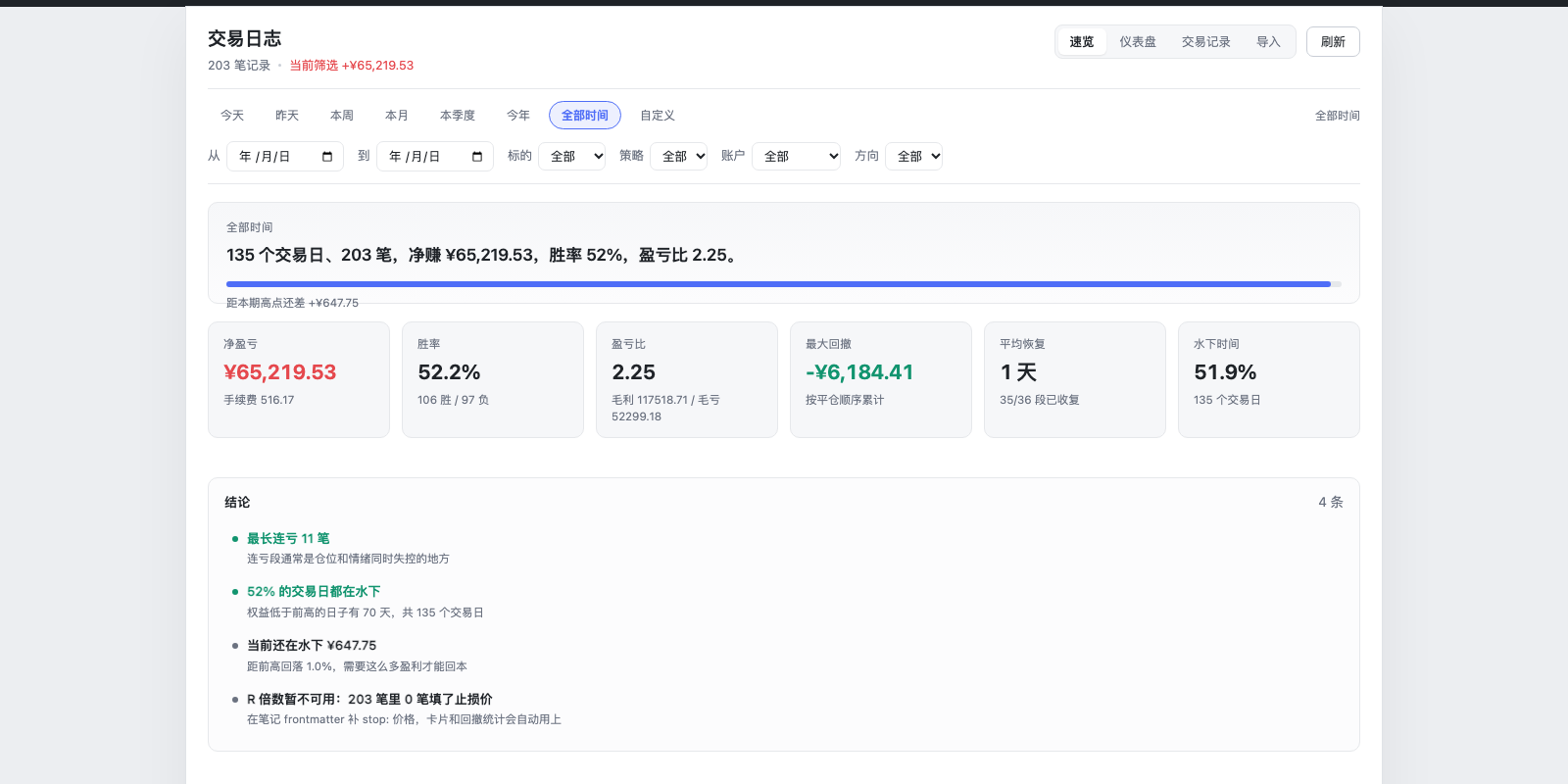
- A one-line summary of the selected period: trading days, trades, net P&L, win rate, profit factor
- Six key cards, a rule-based insight list, and strongest/weakest breakdowns
- Every insight is a threshold check (loss streak length, single loss vs. average win, profit concentration, time underwater, fees as a share of gross profit, stop-loss coverage) — no predictions
Multi-account
- Pick the account at import time; switch accounts from the toolbar (All / each account / Unassigned)
- Dashboard, calendar, drawdown and win rate are computed per account
- Notes are stored under
Trading/<account>/; the account itself comes from theaccountfrontmatter field, so moving files does not change ownership - Duplicate detection is scoped per account, so the same fill in two accounts is not swallowed
CSV import in two shapes
- One row = one completed round trip (the usual export)
- One row = one order/fill (e.g. futures "order history"), automatically FIFO-paired into round trips, with contract multipliers for MNQ / MES / NQ / ES / CL and friends
- Column auto-detection with aliases in English and Chinese, camelCase aware, plus a manual mapping UI with a live preview before importing
- Two independent fee columns (
fees+commissions) are summed, so broker exports that split exchange fees from commission stay accurate - Import preview shows parsed rows, duplicates and errors before anything is written
Dashboard
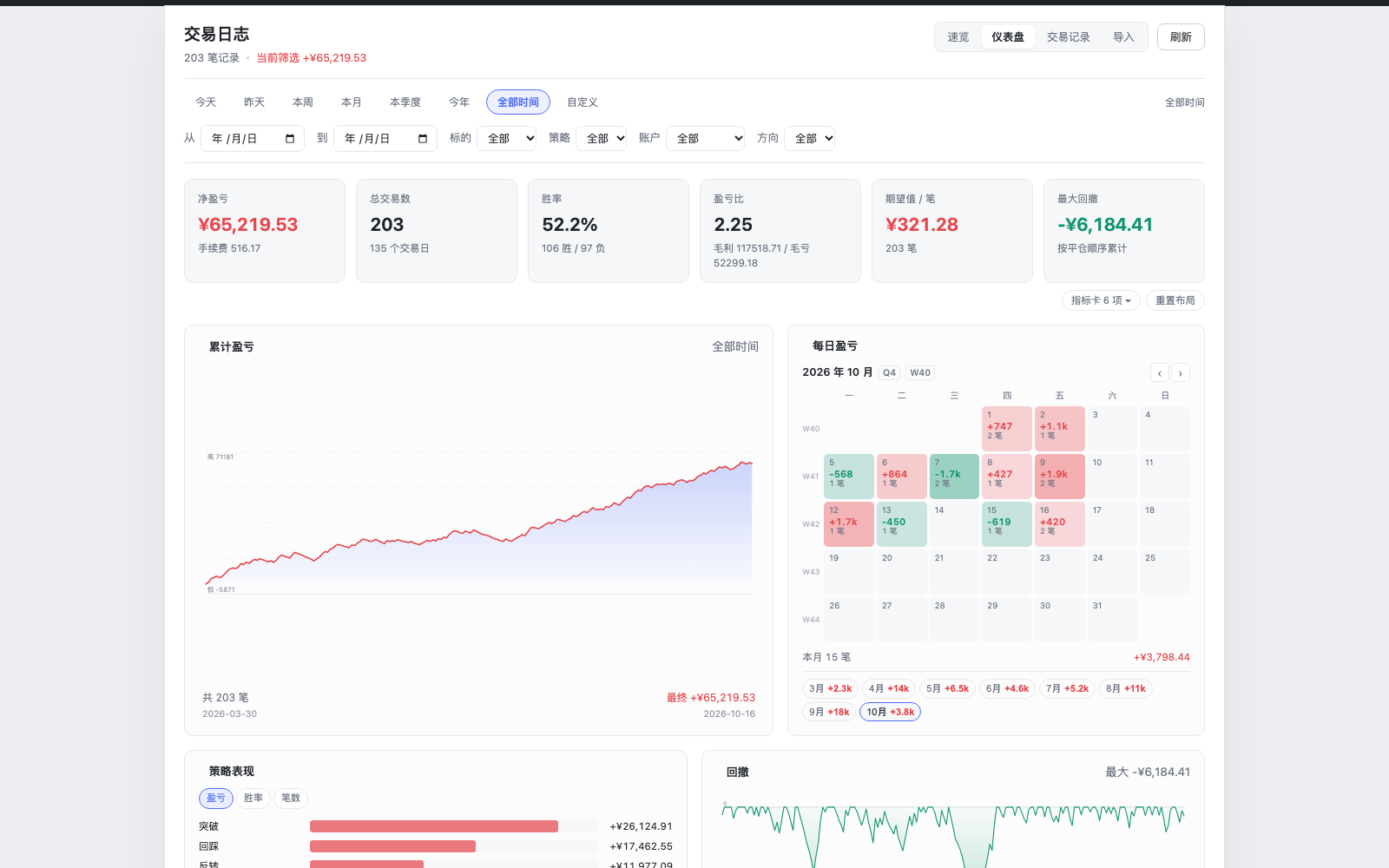
- 25 selectable metrics: net P&L, win rate, profit factor, expectancy, max drawdown, current drawdown, average recovery, longest drawdown, time underwater, streaks, average hold time, and more
- Comparison against the previous equivalent period (vs. yesterday / last week / last month / last quarter / last year)
- 8 presets: today, yesterday, this week, month, quarter, year, all, custom range
- Nine widgets: equity curve, daily P&L calendar, strategy / symbol / weekday breakdowns, long vs. short, drawdown episodes, recent trades
Drawdown review
- The equity curve is split into drawdown episodes: peak, trough, depth, days down, days to recover, whether it has recovered
- Counted in trading days, not calendar days — weekends do not look like recovery time
Layout you control
- Drag cards by their header to reorder, drag the corner handle to resize
- 12-column grid that degrades to 8 / 6 / 4 columns as the pane narrows, so the same layout works in the main area and in a 340 px sidebar
- Layout and card selection persist per vault
Data quality
- A bar above the trade table lists gaps: missing setup, missing stop, missing exit time, missing tags, no written review
- Click a gap to filter to exactly those trades, stack two gaps, click again to clear
- Counts follow the current filters instead of showing a fixed total
Charts and drill-down
- Equity curve, drawdown curve, monthly P&L calendar with ISO week numbers
- Click a calendar day, a breakdown row, or a long/short card to jump to the filtered trade list; click a point on a curve to open that trade's note
Trade log
- Sort, filter by date range / symbol / setup / account / direction
- Multi-select with select-all-over-the-current-filter, then bulk delete (goes to trash, recoverable) or bulk-tag a setup
- Deleting asks for a second click instead of opening a browser confirm dialog
- Double-click a row to open the underlying Markdown file
Install
From the community directory (recommended)
Open Settings → Community plugins → Browse, search for Trade Journal, then install and enable it. Future updates arrive through the same screen via Check for updates.
Manual install
- Download
main.js,manifest.jsonandstyles.cssfrom Releases and put them in<your vault>/.obsidian/plugins/trade-journal/.- Fastest way to find that folder: Settings → Community plugins → the folder icon next to "Installed plugins".
- Restart Obsidian, open Settings → Community plugins, turn off Restricted mode, then enable Trade Journal.
- Click the chart icon in the left ribbon, or run "Trade Journal: Open" from the command palette.
Requires Obsidian 1.7.2+. Works on desktop and mobile. The plugin creates a Trading/ folder on first run (configurable in settings). Nothing is written outside your vault.
Data model
---
date: 2026-10-09
time: "09:41"
exitTime: "10:22"
symbol: NVDA
direction: long
entry: 176.44
exit: 181.88
quantity: 150
fees: 3.5
pnl: 812.5
setup: breakout
account: main
holdSeconds: 2460
session: ny
tags: [trade]
---

Notes you write after the fact go here, in the body.
Missing pnl is fine — it is recomputed as (exit − entry) × qty × multiplier − fees.
Settings
- Default open location — main area or right sidebar
- Trade notes folder — default
Trading - Currency symbol — default
¥ - Break-even range — trades with
|P&L| ≤ thresholdcount as break-even: they stay out of win rate and do not break win/loss streaks. Default0.
Development
npm install
npm run build     # typecheck + bundle to main.js
npm test          # 324 logic and render assertions
npm run demo      # build demo/index.html — open it in a browser to preview the UI
demo/index.html is a self-contained preview with synthetic data; it runs the same React components as the plugin, so UI work does not require launching Obsidian.
Scope and known gaps
Deliberately not implemented: stop-loss / R-multiple analytics, order replay of cancelled or repriced orders, multi-currency, cloud sync. These need order-level tick data that a CSV export usually does not carry, and guessing would produce numbers that look authoritative but are wrong.
Known rough edges:
- UI strings are Chinese only; there is no i18n layer yet
- Column mapping is not remembered between import sessions (auto-detection usually gets it, manual overrides are not persisted)
- Mobile is supported but not battle-tested
License
MIT. Not affiliated with Obsidian. Trading is risky; this tool records what happened, it does not tell you what to do.