Search...Search plugins and themes...
⌘K
Sign in
  • Get started
  • Download
  • Pricing
  • Enterprise
  • Account
  • Obsidian
  • Overview
  • Sync
  • Publish
  • Canvas
  • Mobile
  • Web Clipper
  • CLI
  • Learn
  • Help
  • Developers
  • Changelog
  • About
  • Roadmap
  • Blog
  • Resources
  • System status
  • License overview
  • Terms of service
  • Privacy policy
  • Security
  • Community
  • Plugins
  • Themes
  • Discord
  • Forum / 中文论坛
  • Merch store
  • Brand guidelines
Follow us
DiscordTwitterBlueskyThreadsMastodonYouTubeGitHub
© 2026 Obsidian

Tooltip classic

mathismathis80 downloads

Add inline Markdown tooltips with dotted underlines, info icons, speech bubbles, or highlights.

Add to Obsidian
  • Overview
  • Scorecard
  • Updates2

Tooltip classic is an Obsidian tooltip plugin. Add a short note, explanation, or link to a word, then hover over the word or its icon to see it in a tooltip. 100% customizable, no ads, no login, no paywall.
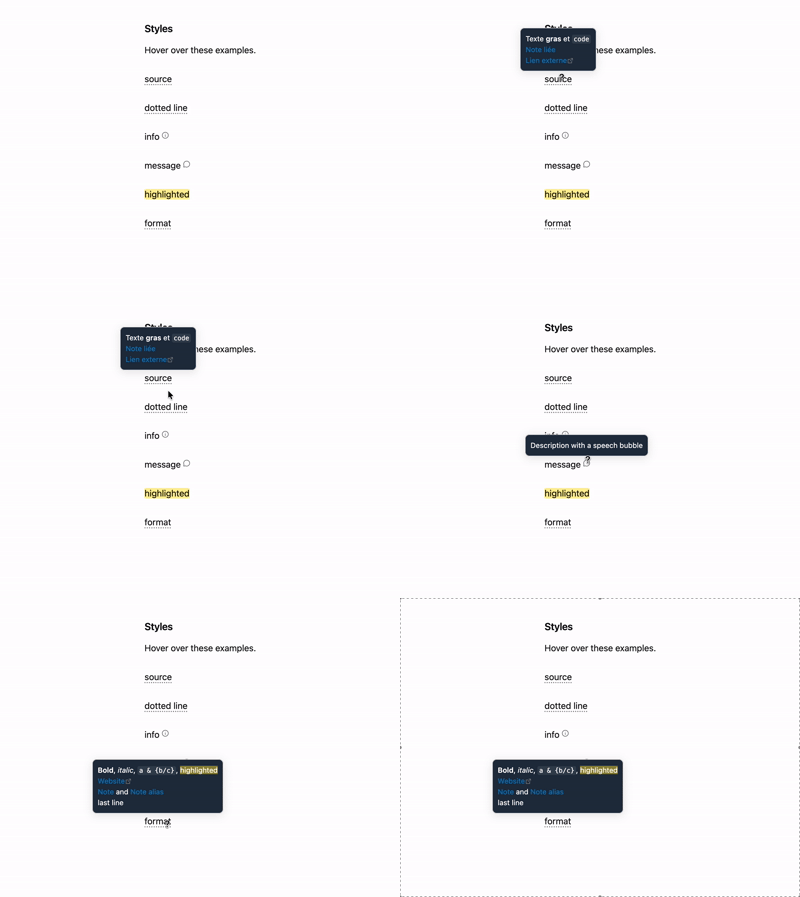
Tooltip classic demo

Install

  1. In Obsidian, open Settings → Community plugins, reload the plugin list, and enable Tooltip classic.
  2. Manual installation: Download the latest release and unzip the tooltip-classic folder into .obsidian/plugins/ inside your vault. On a Mac, press Command + Shift + . in Finder to show hidden folders.

Requires Obsidian Desktop 1.15.0 or later.

Try it

Write this in a note, then hover over hello in Reading view or Live Preview.

{hello/This is a tooltip.}

Open Settings → Tooltip classic to change the default style and colors. To pick a style for just one tooltip, add a prefix.

Example Style
{d/hello/Dotted underline} Dotted underline
{t/hello/Info icon} Circled “i”
{b/hello/Speech bubble} Speech-bubble icon
{h/hello/Highlighted word} Highlight
Tooltip classic format examples

The prefix letters are optional. With the default settings, {source/description} displays the word with a dotted underline.

Use Markdown in the description, including bold, italic, code, highlighting, links, and note links. Put & between parts to show them on separate lines while keeping the annotation on one line in your note.

{t/source/**Read more** & [Website](https://example.com) & [[Note|Open the note]]}

Move your mouse into the tooltip to select text or follow a link. Use Tab to focus its trigger and Escape to close it. In Live Preview, put the cursor on the annotation to edit its source.

Privacy and source

The plugin saves its settings locally and includes no telemetry, ads, accounts, or payments. MIT License · Build and release instructions

HealthExcellent
ReviewSatisfactory
About
Add inline tooltips to words or icons using {source/description} syntax and view them on hover in Reading view or Live Preview. Support Markdown in descriptions, multiple lines with &, selectable text and links, and optional style prefixes for icons, underlines, and highlights.
AnnotationMarkdown
Details
Current version
1.0.1
Last updated
14 hours ago
Created
2 weeks ago
Updates
2 releases
Downloads
80
Compatible with
Obsidian 1.0.1+
Platforms
Desktop only
License
MIT
Report bugRequest featureReport plugin
Author
mathismathis
GitHubm1france
  1. Community
  2. Plugins
  3. Annotation
  4. Tooltip classic

Related plugins

Plugins Annotations

Allows adding personal comments to each installed plugin.

Admonition

Admonition block-styled content.

Linter

Format and style your notes. Linter can be used to format YAML tags, aliases, arrays, and metadata; footnotes; headings; spacing; math blocks; regular Markdown contents like list, italics, and bold styles; and more with the use of custom rule options.

Custom Frames

Turn web apps into panes using iframes with custom styling. Also comes with presets for Google Keep, Todoist and more.

Consistent Attachments and Links

Move note attachments and update links automatically.

Text Format

Format selected text upper/lower/capitalize.

Typewriter Mode

Typewriter scroll, writing focus, current line highlight, paragraph dimming, and more!

Flashcards

Anki integration.

Various Complements

Complete words similar to auto-completion in an IDE.

Image Captions

Add captions to images with inline Markdown and link support. The caption format is compatible with the Commonmark spec and other Markdown applications.