Timestamp Player
 Len513 downloads
Click timestamps in transcription documents to seek and play the embedded audio.
- Overview
- Scorecard
- Updates2
An Obsidian plugin that embeds audio players in your notes with timestamp links for instant seeking — supports multiple audio regions and auto-follow highlighting.
Demo
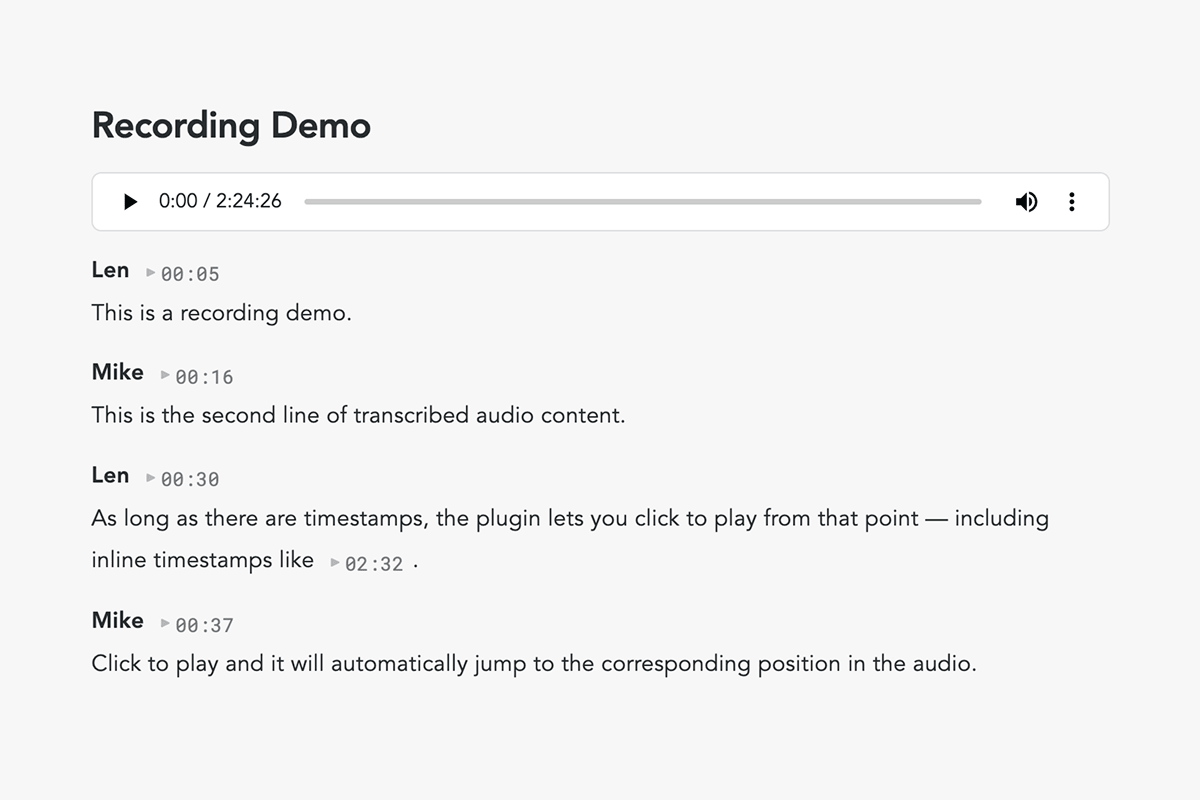
Given a document like this:
![[meeting-recording.ogg]]

Alice 00:27
So the main idea is to build a platform that connects...

Bob 01:02
Right, and we should probably start with the MVP first.
In reading view, each timestamp becomes a clickable ▶ 00:27 button. Click to play from that position; click again to pause.
Features
- Speaker line timestamps —
SpeakerName MM:SSat the start of a line becomes a clickable play button - Inline timestamps —
MM:SSanywhere in text is also clickable - Play / pause toggle — click
▶to play, click⏸to pause, click again to resume - Playback follow-along — the current timestamp auto-highlights and progresses as the audio plays
- Multiple audio files — each audio controls only the timestamps in its own section
- Auto-detection — the plugin only activates on documents that contain embedded audio
Timestamp Format
The plugin recognizes two patterns:
Speaker lines
Timestamp at the end of a line, preceded by a speaker name:
SpeakerName MM:SS
Transcript content on the next line...
Inline timestamps
Timestamp appearing anywhere within text:
As mentioned at 03:15, the proposal was approved.
Note: The document must contain at least one embedded audio file (
![[file.mp3]],![[file.ogg]],![[file.wav]], etc.) for the plugin to activate. Supported formats: mp3, wav, ogg, webm, m4a, flac, 3gp.
Multiple Audio Files
When a document contains more than one audio file, the plugin automatically partitions the document into sections. Each audio file controls the timestamps that appear below it, up until the next audio file (or the end of the document).
![[interview-part1.mp3]]

Alice 00:27
First part of the conversation...

Bob 01:02
Still part one...

![[interview-part2.mp3]]

Alice 00:15
This is the second recording...

Bob 00:45
Also in part two...
| Timestamp | Audio file |
|---|---|
00:27, 01:02 |
interview-part1.mp3 |
00:15, 00:45 |
interview-part2.mp3 |
Sections are fully independent — timestamps can overlap across sections (e.g., both can have 00:00) without conflict. When switching between sections, the previous audio is automatically paused.
Installation
Community plugins (recommended)
Search for Timestamp Player in Settings → Community plugins, or install directly from the plugin page.
Manual
- Download
main.js,styles.css,manifest.jsonfrom the latest release - Create
.obsidian/plugins/timestamp-player/in your vault - Copy the three files into it
- Enable in Settings → Community plugins
Requirements
- Obsidian 1.0.0+
- Reading view (the plugin does not modify edit/live-preview mode)
License
MIT — zhoulianglen