Search...Search plugins and themes...
⌘K
Sign in
  • Get started
  • Download
  • Pricing
  • Enterprise
  • Account
  • Obsidian
  • Overview
  • Sync
  • Publish
  • Canvas
  • Mobile
  • Web Clipper
  • CLI
  • Learn
  • Help
  • Developers
  • Changelog
  • About
  • Roadmap
  • Blog
  • Resources
  • System status
  • License overview
  • Terms of service
  • Privacy policy
  • Security
  • Community
  • Plugins
  • Themes
  • Discord
  • Forum / 中文论坛
  • Merch store
  • Brand guidelines
Follow us
DiscordTwitterBlueskyThreadsMastodonYouTubeGitHub
© 2026 Obsidian

Timelive

annimonannimon1k downloads

Turn a list of dates into a timeline.

Add to Obsidian
  • Overview
  • Scorecard
  • Updates6

Plugin for Obsidian that turns a list of dates into a timeline.

timeline

Usage

The key difference from other timeline plugins is that Timelive doesn't use a code block. It's much easier to format any date event, provide a link or block of code, add an image or a video, etc.

To build a timeline, you need to define a list of dates, enclosed by the | symbol. The date format is automatically detected, but in case of ambiguity, the preferred format can be selected in the preferences. You can also generate a placeholder with the Timelive: New block action (accessible from Ctrl+P Command Palette).

There is also support for time spans. Just define two dates separated by - and they will be turned into a span.

The timeline will be rendered in Reading view, or in Live Editing mode in case you embed a note with a timeline.

Use now, today or present to indicate that the project is live and that today's marker should be added.

Examples

## Demo
- |2011-02-05| Start
- |2021/04/28| Second event
- |21 6 12| Third event
   It's also a valid date
- |2018-07-01 - 2021-11-14| Time span
- |2025-02-05| **bold**, *italic*, ~~strikethrough~~, link to another note [[Welcome]]
- |2025-02-06| Merged events
  Test links and multiline code:
  https://github.com/aNNiMON/obsidian-timelive
   ```css
   .tlv-years {
    display: flex;
    justify-content: space-between;
    margin-bottom: 1rem;
    column-gap: 0.5rem;
    color: var(--text-normal);
   }
   ```
- |now| Dynamic event, means that the timeline (e.g. your project) is **live**
- |2056-05-24| Some future event
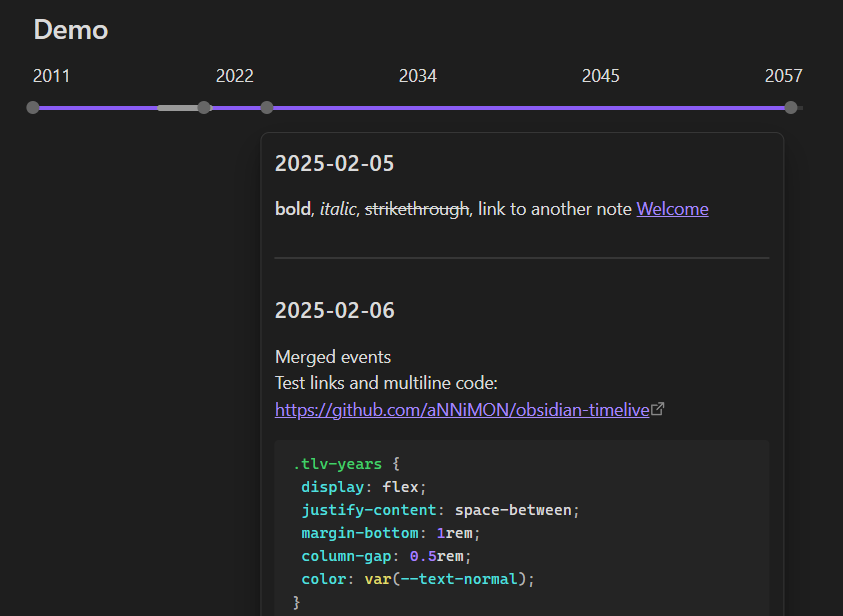
preview

See info.md for a real use case.

Settings

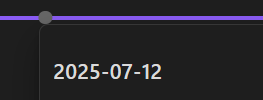
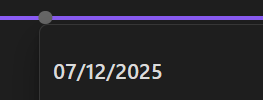
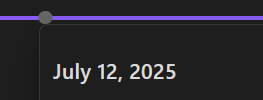
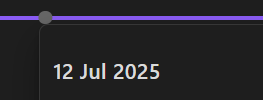
Preview title date format

Date format for titles in the date preview popup. See Date format reference.

Examples:

Value Default? Result
YYYY-MM-DD ✅ YYYY-MM-DD
MM/DD/YYYY MM/DD/YYYY
MMMM DD, YYYY MMMM DD, YYYY
DD MMM YYYY DD MMM YYYY
ddd, DD MMM YYYY ddd, DD MMM YYYY

Calendar month format

Calendar row format for years and months only. See Date format reference.

Examples:

Value Default? Result
YYYY-MM ✅ YYYY-MM
YYYY/MM YYYY/MM
MMM YY MMM YY
MMM YYYY MMM YYYY

Parse date format

Value Default? Matches
Years Months Days ✅ 2008-02-09, 2008/02/09, 08/2/9, 2008/02-09, 8 2 9
Days Months Years 09-02-2008, 09/02/2008, 9/2/08, 09-02/2008, 9 2 8
Months Days Years 02-09-2008, 02/09/2008, 2/9/08, 02-09/2008, 2 9 8
86%
HealthGood
ReviewSatisfactory
About
Turn a list of dates enclosed in | into a readable timeline without requiring code blocks, supporting single dates, ranges (start - end), and dynamic markers like now/today/present. Include links, images, videos, formatted text and code blocks inside events while auto-detecting date formats and rendering in Reading view or embedded live-edit mode.
DatesVisualizationMarkdown
Details
Current version
1.2.0
Last updated
5 months ago
Created
Last year
Updates
6 releases
Downloads
1k
Compatible with
Obsidian 0.15.0+
Platforms
Desktop, Mobile
License
MIT
Report bugRequest featureReport plugin
Author
annimonannimon
projects.annimon.com/
GitHubannimon
  1. Community
  2. Plugins
  3. Dates
  4. Timelive

Related plugins

Markwhen

Create timelines, gantt charts, calendars, and more using markwhen.

AnyBlock

Take any fragment as a block and render it into multiple effects.

April's Automatic Timelines

Simple timeline generator for story tellers.

Prisma Calendar

Prisma turns any note with a date into a flexible planning system inside Obsidian. There are no rigid schemas or predefined structures — just your data, your rules, fully under your control.

Advanced Canvas

Supercharge your canvas experience. Create presentations, flowcharts and more.

Importer

Import data from Notion, Evernote, Apple Notes, Microsoft OneNote, Google Keep, Bear, Roam, and HTML files.

Day Planner

Day planning from a task list in a Markdown note with enhanced time block functionality.

Excalidraw

Visual PKM powerhouse. Create and edit Excalidraw drawings.

Breadcrumbs

Visualise the hierarchy of your vault using a breadcrumb trail or matrix view.

Outliner

Work with your lists like in Workflowy or Roam Research.