TideLog
 enhen3989 downloads
Plan tasks, complete Review loops, and preview weekly, monthly, and AI profile insights from daily notes.
- Overview
- Scorecard
- Updates51

TideLog
让昨天的笔记,推动明天的行动。
在 Obsidian 里把 Daily Notes 连成 Plan → Review → Insights 闭环,
复盘时每答一题就有回应,闭环攒够了,AI 从你自己的记录里读出周报、月报,
和一张带证据的第三视角画像。
写得越久,它越认得出你。
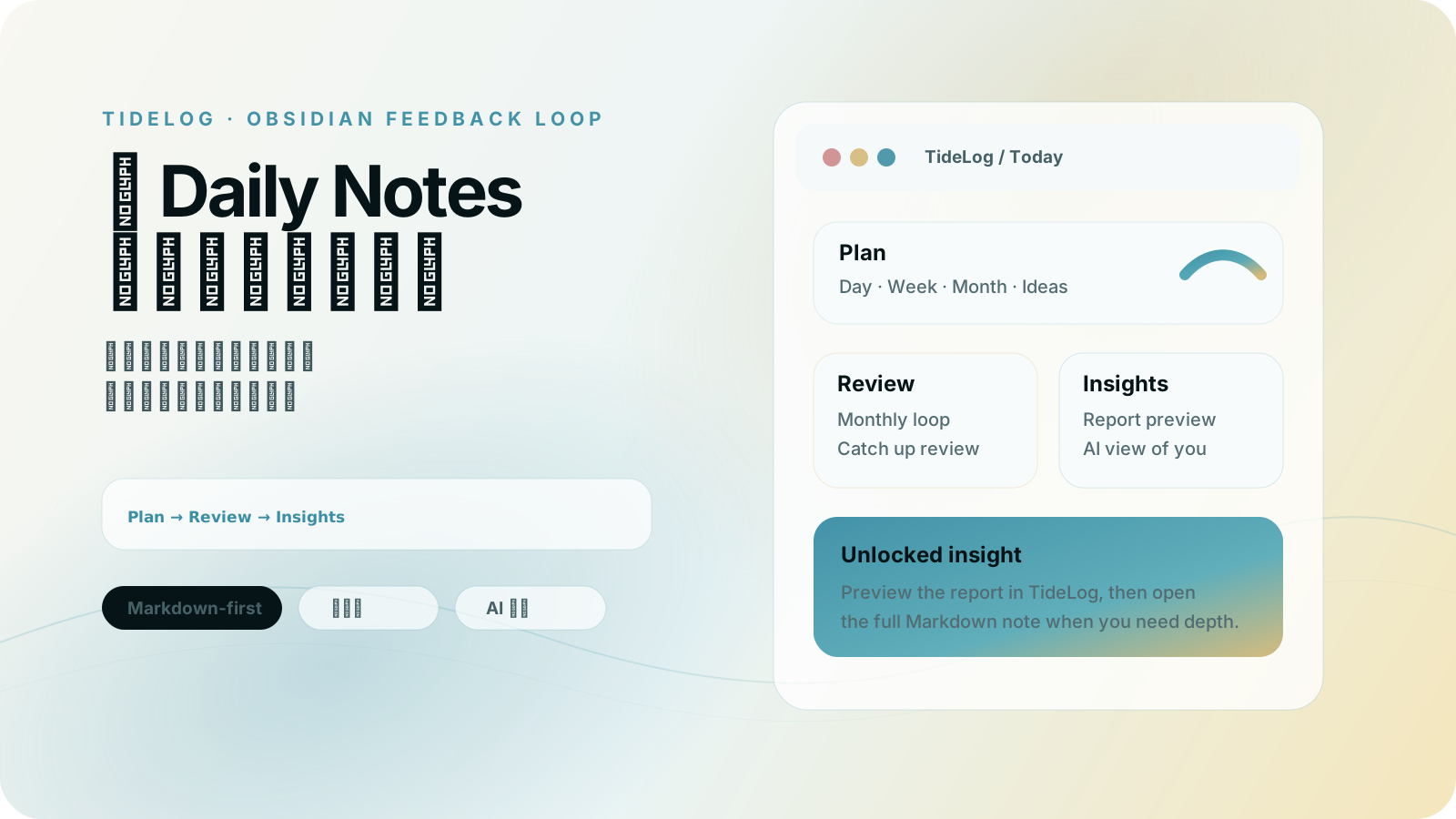
TideLog 是什么
TideLog 是一个 Obsidian 插件,用来把你的 Daily Notes 从「记录存档」变成「行动反馈系统」。
很多人已经每天写日记、计划、复盘,但真正的问题不是没有记录,而是:
记录很多,行动很少改变。
昨天的计划、晚上的复盘、偶尔出现的洞察,常常散落在 vault 深处。写过了,但没有回来提醒你、校正你、推动你。
TideLog 帮你建立的是这个闭环:
Plan 任务 → Review 闭环 → Insights 洞察 → 更新下一步
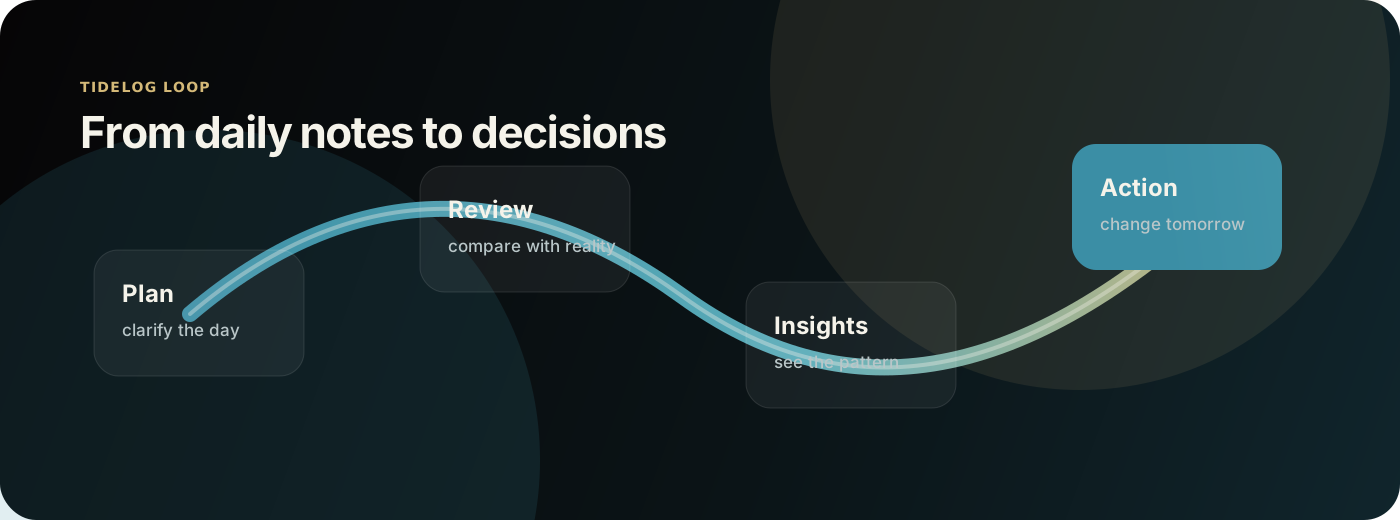
你不用从今天才开始
如果你的 vault 里已经躺着几个月、几年的日记——大多数人写完就再没回去看过—— 指一个文件夹给 TideLog,它会从可分析的日记中选取最多 30 篇,生成一份带证据的第三视角画像: 反复出现的主题、你自己的行为模式、你没注意到的盲点,每一条都能追回到具体是哪几天写的。
不需要先坚持一个月,装上就能看见。
至少需要 3 篇、每篇 60 字以上的记录。超过 30 篇时,优先分析最近 30 天内的日记;原文留在原处,不会被移动或改写。
核心功能
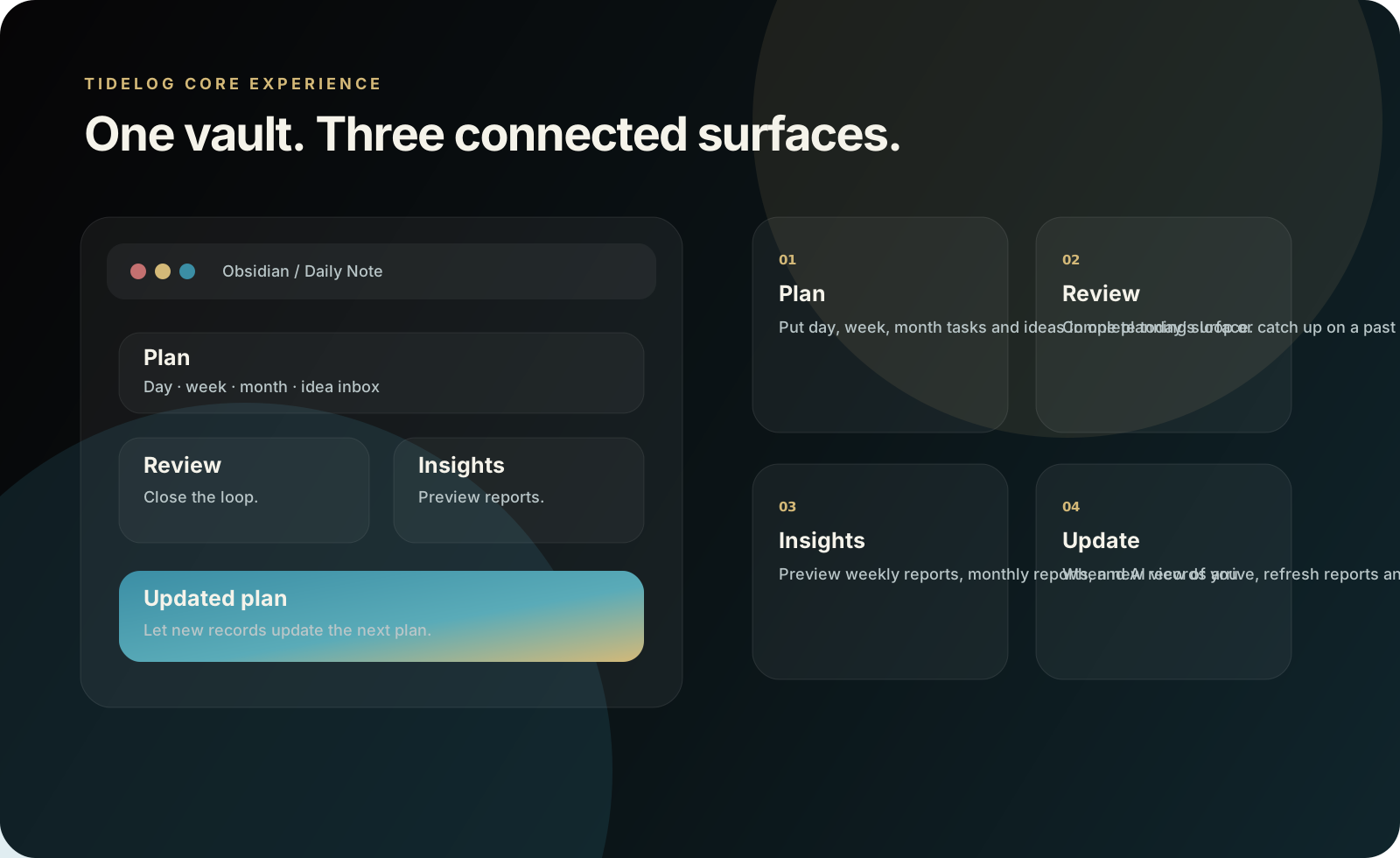
🌅 Plan:把下一步放在最前面
Plan 优先展示今天的 To Do,并支持日 / 周 / 月三个周期:
- 添加、编辑、拖拽、勾选任务和子任务。
- 未完成任务可以顺延到今天。
- 点击日期、周、月标题切换目标周期。
- 用「灵感」收集暂时没有安排到日期的想法。
- 完成 Review 后,可刷新日 / 周 / 月计划建议,让复盘回到下一步行动。
🌙 Review:完成当天或历史日期的复盘闭环
Review 先显示本月闭环徽章:
- 蓝色半环表示当天有计划。
- 金色半环表示当天完成了有效复盘。
- 点击历史日期,可以补做那天的 Daily Review。
- Review 问题可以在设置里编辑、排序、启停。
免费版会使用前 2 个已启用问题;Pro 会使用完整问题流。
🧭 Insights:从足够多闭环里看见长期模式
Insights 不是随时乱读整个 vault 的总结按钮,而是基于足够多的 Plan / Review 闭环生成报告:
- 本周报告:至少 3 次闭环后可生成。
- 本月报告:至少 8 次闭环后可生成。
- AI 眼中的你:从长期记录里生成画像更新。
- 报告预览:已有报告会在插件页内显示摘要。
- 报告更新:如果报告生成后又新增计划或复盘,可以用新记录更新本周期报告。
🤖 AI 不在侧边栏,在闭环里
大多数 AI 笔记插件给你的是一个聊天框——它在第 1 天和第 300 天是同一个东西。
TideLog 的 AI 长在闭环的每一步上,而且会随闭环增加而变准:
- 复盘时:逐题对话,每答一题立刻拿到一次回应,当场把卡点问下去,不用等写完长篇才有反馈。
- 闭环攒够时:3 次解锁周报,8 次解锁月报——门槛不是营销,是证据不够时报告不可信。
- 长期:「AI 眼中的你」从积累的记录里更新画像,每个判断都带得回具体日期。
第 300 天的 TideLog 手里有 300 个闭环的证据。这是聊天框不会有的东西。
🔐 笔记是你的,AI 是你调用的
你的记录始终是本地 Markdown,留在自己的 vault 里,不搬进任何 SaaS。
AI 只在你主动点击时读取:生成或更新报告、生成今日洞察、复盘对话、复盘后刷新计划建议, 以及你指定文件夹的那次首次画像。看什么、什么时候看,由你决定;它把洞察还给你,不留副本,不用于训练。
不含客户端遥测、分析 SDK、动态广告或自动更新机制。
适合谁
TideLog 适合已经在 Obsidian 里生活,并且希望记录真的影响行动的人:
- 📝 每天写 Daily Notes,但希望它们影响明天的优先级。
- 🧑💻 自由职业者、独立开发者、学生、研究者,或正在转型期需要自我管理的人。
- 🧠 正在搭建第二大脑、个人操作系统、复盘系统或长期 AI 记忆工作流的人。
- 🔐 重视 Markdown 所有权,不希望把私人生活锁进另一个 SaaS 工具的人。
如果你只是想偶尔写一篇漂亮日记,TideLog 可能不是必要工具。它更适合想把复盘变成长期反馈系统的人。
安装与新手开始
- 在 Obsidian 里打开 Settings → Community plugins,搜索
TideLog,安装并启用。 - 打开 Settings → TideLog。先不要调太多参数,先完成一次 Plan → Review。
- 到 TideLog 主界面的 Plan,添加今天的 1–3 个任务,也可以把临时想法放进「灵感」。
- 晚上到 Review,完成今日复盘;如果漏掉某天,可以点击历史日期补复盘。
- 积累足够闭环后,再到 Insights 生成、预览或更新本周报告、本月报告和 AI 眼中的你。
最小使用节奏:
早上:Plan 写下今天要推进什么
白天:勾选任务,随时收集灵感
晚上:Review 完成复盘闭环
周末 / 月末:Insights 看报告,并把洞察带回下一步计划
免费版与 Pro
TideLog 可以免费安装和试用。Pro 解锁完整的长期复盘系统。
| 功能 | 免费版 | Pro |
|---|---|---|
| Plan:日 / 周 / 月任务与灵感 | 支持 | 支持 |
| 内置 AI:今日洞察 | 每月 3 次 | 不单独限次* |
| 内置 AI:对话 | — | 每月 200 次 |
| 基础任务记录与 Markdown 写入 | 支持 | 支持 |
| Review 问题流 | 前 2 个已启用问题 | 完整问题流 |
| 历史日期补复盘 | 支持基础闭环 | 支持完整问题流 |
| Insights:本周报告 / 本月报告 / 新数据更新 | — | 支持 |
| AI 眼中的你 | — | 支持 |
| 复盘后的日 / 周 / 月计划建议 | 基础体验 | 更完整长期闭环 |
| 设备数 | — | 每个 License 3 台设备 |
* “不单独限次”不等于无限算力。为防止自动化调用和伪造功能类型绕过配额,AI 还受跨功能总量护栏约束:Pro 每月最多 400 万输入 / 80 万输出 token,单次输出最多 4096 token。正常交互预计远低于该上限;达到后会明确提示重置时间。
- 月付:¥19 / 月
- 年付:¥168 / 年(折合 ¥14/月,比按月买省 ¥60,相当于送 3 个月)
AI 由 TideLog 托管,成本持续发生,因此不提供买断制。两种都是一次性购买一段固定时长,不会自动续费。
- 购买地址:购买 TideLog Pro
购买后,在 Settings → TideLog → Pro 输入 TideLog License 即可激活。
按 Obsidian 开发者政策披露:
- 付费要求:插件可免费安装并使用基础功能;完整 Review、Insights 与 AI 功能需要付费购买 TideLog Pro。
- 账号 / License:无需单独创建 TideLog 账号;完整功能需要购买并激活 TideLog Pro License。
- 服务端数据收集:AI 与 License 功能会连接 TideLog 服务端并记录提供服务所必需的数据,具体字段与处理方式见 PRIVACY.md。
隐私
TideLog 的原则很简单:你的日常记录默认留在你的 vault 里。
- 🔐 Pro License Key 使用 Obsidian SecretStorage 保存。
- 🌐 只有当你主动使用 AI、激活/停用 License 或打开购买/License Portal 时,才会发起相应网络请求。
- 🔁 有一个请求是自动的:如果你已激活 TideLog Pro,插件会在 Obsidian 启动时于后台校验一次 License,只发送 License Key 和一个生成的设备标识。未激活 License 的用户,启动时不产生任何网络请求。
- 📝 AI 功能会把该次生成所必需的提示词和相关笔记内容先发送至 TideLog 服务端,经瞬时内容合规检查后转发给大模型服务商。
- 🧾 TideLog 服务端不存储笔记正文或 AI 响应正文,但会记录配额核算、防滥用与故障排查所必需的数据;完整字段见隐私政策。
- 📁 计划建议和洞察读取相关周期/文件范围,而不是无提示地扫描整个 vault。
- 🚫 TideLog 不包含客户端遥测、分析 SDK、动态广告或自动更新机制。
完整说明见 PRIVACY.md。
支持与协议
- 问题反馈:通过 TideLog GitHub Issues 提交。
- 请不要在公开 issue 中粘贴 License Key、私人笔记内容或其他敏感信息。
- 源码协议:GNU AGPL v3.0。Pro 授权与付费分发遵循商业产品条款,见 LICENSE。
English version
Make yesterday’s notes change tomorrow’s actions.
TideLog turns your Obsidian Daily Notes into a Plan → Review → Insights loop. Every answer in a review gets a response on the spot; once enough loops accumulate, TideLog reads your own records back to you as weekly reports, monthly reports, and an evidence-backed portrait of how you actually work.
The longer you keep writing, the better it knows you.
You don't have to start from today
If your vault already holds months or years of daily notes that you have never gone back to read, point TideLog at that folder. It selects up to 30 analyzable entries and writes an evidence-backed third-person portrait: recurring themes, your own behaviour patterns, the blind spots you did not notice — every claim traceable to the days it came from.
No streak required. It works on the notes you already have.
Needs at least 3 entries of 60+ characters. When more than 30 entries qualify, TideLog prioritizes entries from the latest 30 days. Originals stay where they are and are never rewritten.
Why TideLog exists
Many people write daily notes, plans, and reflections. The harder problem is that the notes rarely return to change what they do next.
TideLog adds the missing loop:
Plan tasks → Review loops → Insights → Update the next action
What TideLog helps you do
- Use Plan for day / week / month tasks, idea capture, carry-forward tasks, and planning suggestions after reviews.
- Use Review to complete today’s review or catch up a past date from the monthly loop view.
- Use Insights to generate and preview weekly reports, monthly reports, and AI profile analysis after enough loops unlock.
- Update reports when new plans or reviews arrive after a report was generated.
- Keep your workflow Markdown-first and inside your own vault.
AI lives in the loop, not in a sidebar
Most AI note plugins hand you a chat box — the same chat box on day 1 and on day 300.
TideLog's AI sits on each step of the loop, and it sharpens as loops accumulate:
- During a review: question by question, each answer gets a response immediately, so you can push on a blocker while you are still in it.
- Once loops accumulate: 3 loops unlock the weekly report, 8 unlock the monthly one. Those thresholds are not marketing — a report built on too little evidence is not worth trusting.
- Over time: the AI portrait updates from your accumulated records, and every judgement traces back to specific dates.
On day 300, TideLog is holding 300 loops of evidence about you. A chat box never is.
Install and start
- Install TideLog from Obsidian Community plugins: search for
TideLog, install, then enable it. - Open Settings → TideLog. Do not tune every setting first; complete one Plan → Review first.
- Use Plan to add 1–3 tasks for today and capture ideas.
- Use Review for today’s review, or select a past date to catch up.
- After enough loops unlock, open Insights to generate, preview, or update weekly reports, monthly reports, and AI view of you.
Access, payment, and server data
- Payment required: TideLog can be installed for free and its basic features remain available, but full Review, Insights, and AI functionality requires a paid TideLog Pro purchase.
- Account / License: no separate TideLog account is required; full functionality requires purchasing and activating a TideLog Pro License.
- Server-side data collection: AI and License features connect to TideLog's server and record data necessary to provide the service. See PRIVACY.md for the exact fields and handling practices.
Privacy
Your records are local Markdown and stay in your own vault. AI reads only when you click: generating or updating a report, today's insight, the review conversation, planning suggestions after a review, and the one-time portrait over the folder you point it at. TideLog sends only the prompt and note content that request needs to the TideLog server, which runs a transient compliance check and forwards it to a model provider. Nothing is kept as a copy, and nothing is used for training.
One request is automatic: if you have activated TideLog Pro, the plugin verifies your license in the background when Obsidian starts. That request sends only your license key and a generated device identifier. If you have not activated a license, TideLog makes no network request on startup.
TideLog stores Pro License keys with Obsidian SecretStorage. Its server does not store note bodies or AI response bodies, but it records the data necessary for quota accounting, abuse prevention, and troubleshooting. Suggestions and insights read the relevant period/file scope. TideLog does not include client-side telemetry, analytics SDKs, dynamic ads, or a self-update mechanism.
Full details: PRIVACY.md.
Support and payment
- Bug reports and feature requests: TideLog GitHub Issues
- Please do not paste License keys, private note content, or other sensitive information into public issues.
- International payment is being prepared. If you want TideLog Pro, please leave a note in GitHub Issues so I can prioritize the setup based on real demand.