ThriftLens
 disparatedan16 downloads
A personal cashflow dashboard: committed spend, actuals, and cost of living shown by year and month.
- Overview
- Scorecard
- Updates3
A plugin for Obsidian: a personal cashflow dashboard built around forward financial commitments – not budgets.
Philosophy
I built ThriftLens for my own needs, to understand – in advance – where my money is already committed. The question I want ThriftLens to answer, at any point in the year, is: what does my ongoing cost of living actually look like right now?
The app is idiosyncratic – I aimed for simplicity and glance-view clarity over 'correct' accounting models. And the app is fatalistic – life is expense – so there's no 'budgeting'! But perhaps you'll find it useful.
Money is committed before it is spent. Rent is owed on the first of every month whether I've paid it or not. Insurance premiums are due every year. Heating oil will be needed in October whether I've planned for it or not. The cost of a holiday earmarked for summer is, in effect, already gone. I want my financial picture to reflect that – not wait for the bank statement to confirm it.
Some costs are only approximately known in advance – so the app earmarks (commits) a figure, drawn from what I actually spent on that category last year (you'll supply figures yourself for the first year). That reservation shows up in the dashboard immediately, because that's the realistic picture. Annual commitments are forward reservations of money I know I'll have to spend.
Apart from commitments, I'm not budgeting or setting aside pots of money here. Unplanned spending simply appears as actual spend records – no judgement. The dashboard shows me what it cost; I draw my own conclusions.
Mental Model
Every entry in ThriftLens is one of four things:
Monthly planned – a recurring cost with a known, fixed monthly amount. Rent, a phone contract, a broadband subscription. These are commitments: the money is as good as spent the moment the month begins. The dashboard shows how much has accumulated to date based on months elapsed, without needing matching transaction records.
Annual commitment – money earmarked for something that will cost roughly a known amount over the year. Heating oil, property tax before the bill arrives, a holiday, a home improvement project. You know roughly what it will cost and you are treating that money as spoken for. Once the actual bill arrives, the actual spend is recorded alongside – the commitment remains as the benchmark. Amount is the full-year figure; the monthly view shows it as a monthly share (÷ 12).
Actual spend – a real transaction that has occurred. This may realise a planned commitment (paying the heating oil bill) or be entirely ad hoc (an unplanned repair, a dinner out). Actual spend records are always taken at face value – no scaling applied.
Exceptional spending – a large one-off item that is neither planned nor ordinary unplanned spend. A roof repair, a major appliance failure. These appear in their own section in the annual view and are called out separately in the Year on Year summary, so they don't distort the normal cost-of-living picture. Exceptional entries are never carried forward.
The three views
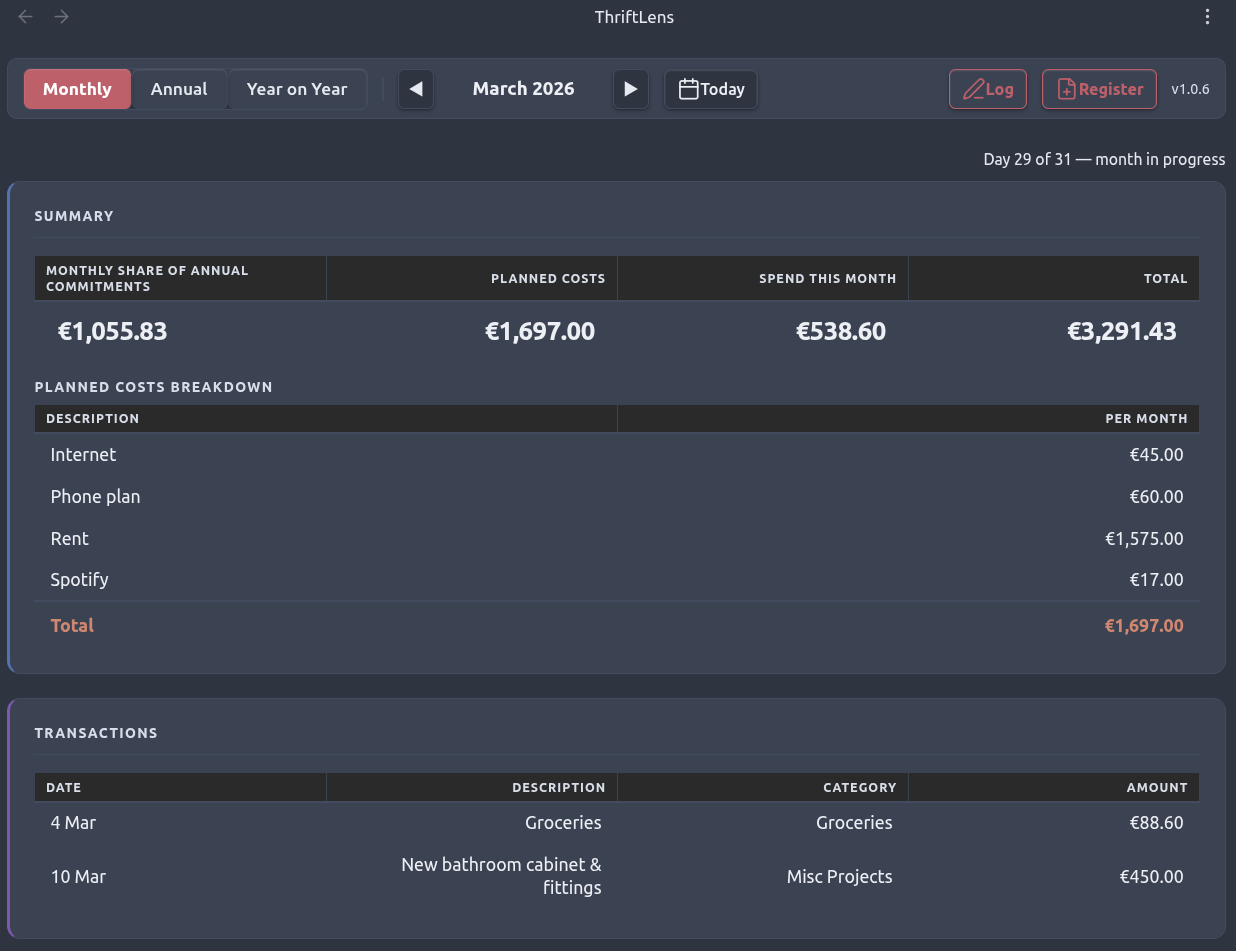
Monthly view shows the current month: what is committed this month (the monthly share of annual commitments, and planned costs for the month), and what has actually been spent. It gives you a running picture of the month – how much is locked in, how much is paid. The monthly share figure is expandable: click it to see how it breaks down across your annual commitment categories.
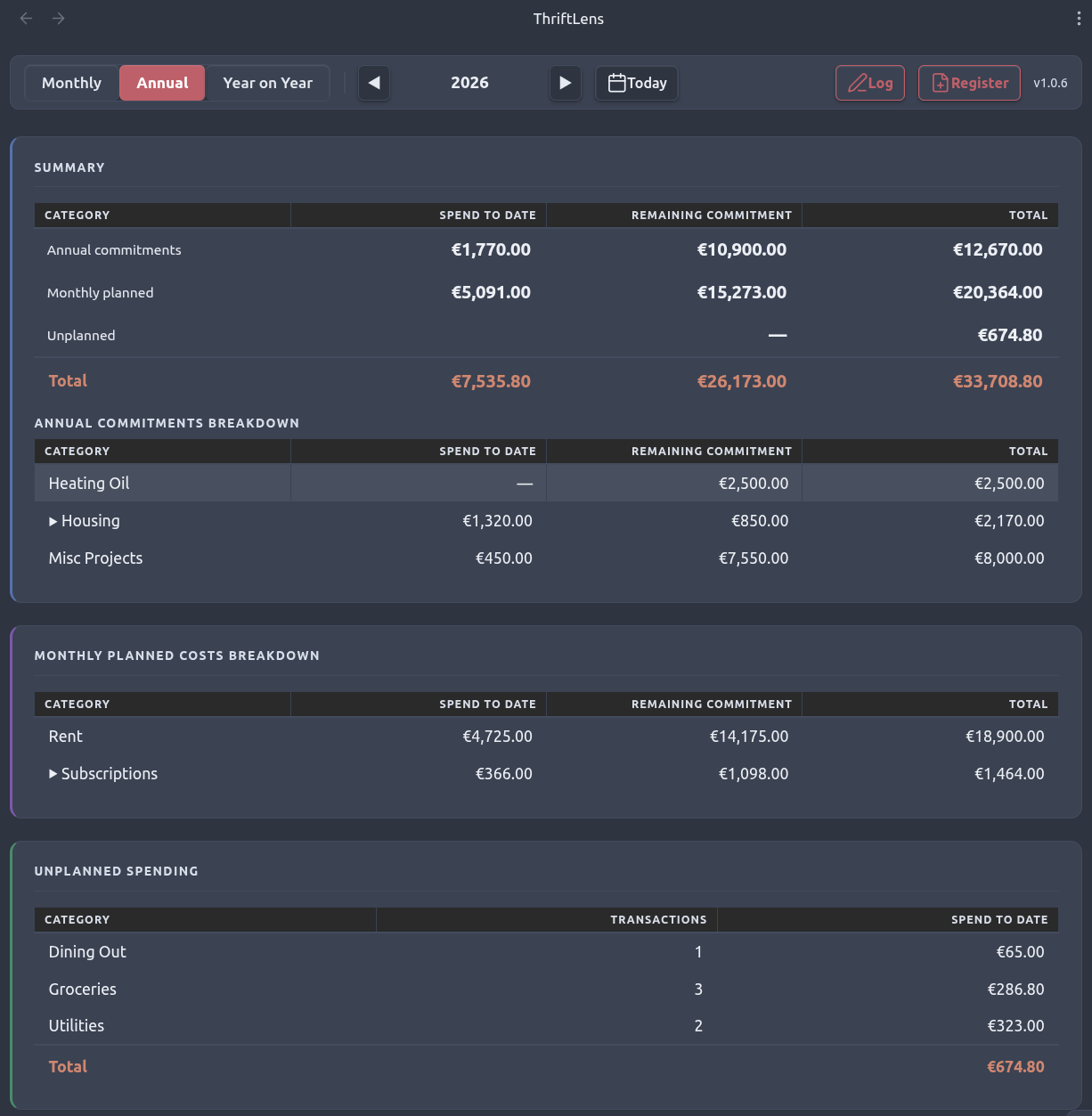
Annual view shows the full year: the total committed baseline versus total actual spend, broken down by category. Annual commitments are matched against actuals by spend_category. Monthly planned spend-to-date is computed as amount × months elapsed – no transaction matching needed. Unplanned spend – actual transactions with no matching annual_estimate entry – appears in its own section and is included in the grand total. This is where you see whether your commitments are holding and how the year is tracking overall.
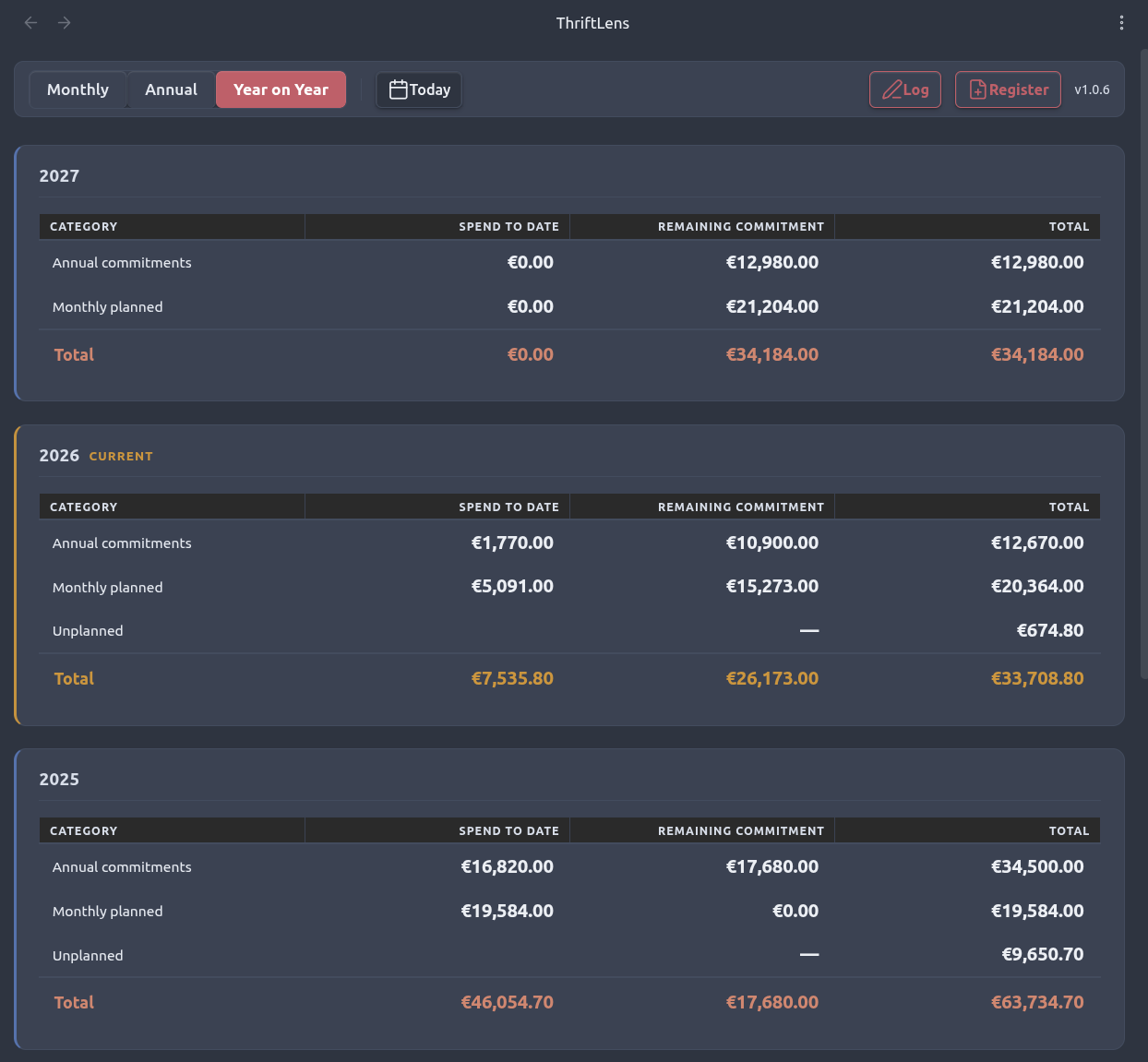
Year on Year view shows the annual summary table for every register in descending order, so you can compare your cost of living across years at a glance. The current year is highlighted. Exceptional spending is broken out separately so it doesn't obscure the underlying trend.
Spend categories
Every entry carries a spend_category (e.g. rent, heating, subscriptions). A category is a planning unit that links similar spending to plans, not a grouping label. It enables the dashboard to:
- Match actual spend against
annual_estimateentries by category to show spend-to-date - Pre-fill next year's annual commitment amounts from this year's actuals for the same category
- Group and subtotal meaningfully without fuzzy description matching
Multiple plan records can share a spend_category — for example, several subscriptions all tagged subscriptions. In the annual view, the group shows a combined total with an expandable row revealing the individual entries underneath.
Only annual_estimate categories absorb actuals into planned tracking. monthly_fixed entries do not — actuals with the same category as a monthly fixed cost still appear in the unplanned averages section. This means a category can appear in both the planned and unplanned sections simultaneously, which is intentional.
Choosing a category: use a category that reflects how you plan for the expense, not just its real-world label. Avoid broad umbrella categories — use them for expenses you would genuinely budget together. The description carries the semantic label; the category carries the planning intent.
Data Model
Registers
Data lives in one Markdown file per year – called a register – stored in the vault's thriftLens/ folder:
thriftLens/
  2024.md
  2025.md
  2026.md
Each register has a small frontmatter block identifying it, then a single fenced YAML block containing all entries for the year:
---
tl_type: register
year: 2026
---

\```yaml
# ── Annual commitment ─────────────────────────────────
- date: 2026-01-01
  amount: 3000
  spend_type: annual_estimate
  spend_category: heating
  description: Heating Oil

# ── Monthly planned ───────────────────────────────────
- date: 2026-01-01
  amount: 1575
  spend_type: monthly_fixed
  spend_category: rent
  description: Rent

# ── Actual spend ──────────────────────────────────────
- date: 2026-03-12
  amount: 94.80
  spend_type: actual_spend
  spend_category: groceries
  description: Groceries
\```
Entry schema
| Field | Type | Notes |
|---|---|---|
date |
YYYY-MM-DD |
For actual_spend and exceptional: the transaction date. For monthly_fixed and annual_estimate: conventionally YYYY-01-01 |
amount |
number | No currency symbol; never negative. For monthly_fixed: the monthly amount. For annual_estimate: the full-year amount |
spend_type |
string | monthly_fixed · annual_estimate · actual_spend · exceptional |
spend_category |
string | Short slug, e.g. heating, rent, driving |
description |
string | Free text label for this entry |
valid_until |
YYYY-MM-DD |
Optional; monthly_fixed only; marks a mid-year expiry |
Amount interpretation
| spend_type | Monthly view | Annual view |
|---|---|---|
monthly_fixed |
amount as-is | amount × months active in year |
annual_estimate |
amount ÷ 12 | amount as-is |
actual_spend |
face value | face value |
exceptional |
shown in transactions list only | face value |
Carry-forward rules
At year-end, next year's register is built from the current one:
| Entry type | Carry-forward behaviour |
|---|---|
monthly_fixed |
Carried over unchanged |
annual_estimate |
Amount pre-filled from the total actual spend for that spend_category this year; falls back to source amount if no actuals found |
actual_spend |
Never carried forward |
exceptional |
Never carried forward |
The Plan next year command presents a review step before writing anything. You adjust amounts, remove entries that no longer apply, add new ones, then confirm. Nothing is written until you do.
Structure
thriftlens/
├── vault/                        Obsidian vault root
│   ├── thriftLens/               Register files (YYYY.md)
│   └── .obsidian/
│       └── plugins/thriftlens/   Built plugin output
└── plugin/                       Plugin source (TypeScript + esbuild)
    └── src/
        ├── main.ts
        ├── logic.ts              Pure business logic – no Obsidian imports
        ├── parser.ts             YAML block parsing and serialisation
        ├── loader.ts             Vault file reading
        ├── renderer.ts           DOM rendering
        ├── exporter.ts           HTML report generation
        ├── carryForward.ts       Carry-forward proposal logic
        ├── csvUtils.ts           Shared CSV parsing utilities
        ├── ThriftLensView.ts     ItemView subclass
        ├── settings.ts
        └── modals/
            ├── AddEntryModal.ts
            ├── CarryForwardModal.ts
            ├── CreateRecordModal.ts
            ├── ImportCsvModal.ts
            └── ExportCsvModal.ts
Using ThriftLens
Install ThriftLens like any Obsidian community plugin, then click the hand-coins icon in the ribbon to open the dashboard.
Navigation
The year label in the monthly and annual nav bars, and each year heading in the Year on Year view, can be clicked to open that year's register file directly in a new tab.
Commands
Log an expense – opens a form to record a new entry in the current year's register. For actual_spend and exceptional entries, enter the date in DD-MM-YYYY format. For monthly_fixed and annual_estimate entries, enter the year only – the date is stored as YYYY-01-01.
New register – creates a fresh register file for a given year, ready to receive entries.
Plan next year – opens a review screen showing a proposed set of entries for the coming year, built from the current year's data. Monthly planned costs carry over unchanged; annual commitments are pre-filled from what you actually spent this year in each category. You can adjust amounts, remove entries that no longer apply, and add new ones. Nothing is written until you confirm.
Import from CSV – imports entries from a CSV file into the appropriate year's register (creating the register if it doesn't exist yet). Columns: date, amount, spend_type, spend_category, description, and optionally valid_until. Actual spend rows are always appended; planned entries are skipped if an entry with the same category and description already exists, to avoid duplicates.
Export to CSV – exports all entries from a register to a CSV file in the data folder.
Export report – generates a self-contained HTML report written to thriftLens/exports/. The month reported is controlled by the Export report month setting.
Settings
| Setting | Default | Description |
|---|---|---|
| Currency symbol | € |
Displayed in the dashboard; not stored in data files |
| Data folder | thriftLens |
Folder within the vault containing register files |
| Default view | Monthly |
Which tab opens when the dashboard is first shown |
| Export report month | Previous month (complete) |
Whether the exported report covers the previous complete month or the current partial month |
Development
The plugin is built with TypeScript and esbuild. The source is in plugin/; the output lands in vault/.obsidian/plugins/thriftlens/.
cd plugin
npm install
npm run dev      # watch mode with sourcemaps
npm run build    # production build
npm run deploy   # build + copy to vault plugins directory
npm run test     # run Vitest unit tests
The core business logic in logic.ts has no Obsidian imports and can be tested independently.