Search...Search plugins and themes...
⌘K
Sign in
  • Get started
  • Download
  • Pricing
  • Enterprise
  • Account
  • Obsidian
  • Overview
  • Sync
  • Publish
  • Canvas
  • Mobile
  • Web Clipper
  • CLI
  • Learn
  • Help
  • Developers
  • Changelog
  • About
  • Roadmap
  • Blog
  • Resources
  • System status
  • License overview
  • Terms of service
  • Privacy policy
  • Security
  • Community
  • Plugins
  • Themes
  • Discord
  • Forum / 中文论坛
  • Merch store
  • Brand guidelines
Follow us
DiscordTwitterBlueskyThreadsMastodonYouTubeGitHub
© 2026 Obsidian

Things3 Today

wudanyang6wudanyang62k downloads

Manage today's tasks with Things3.

Add to Obsidian
  • Overview
  • Scorecard
  • Updates1

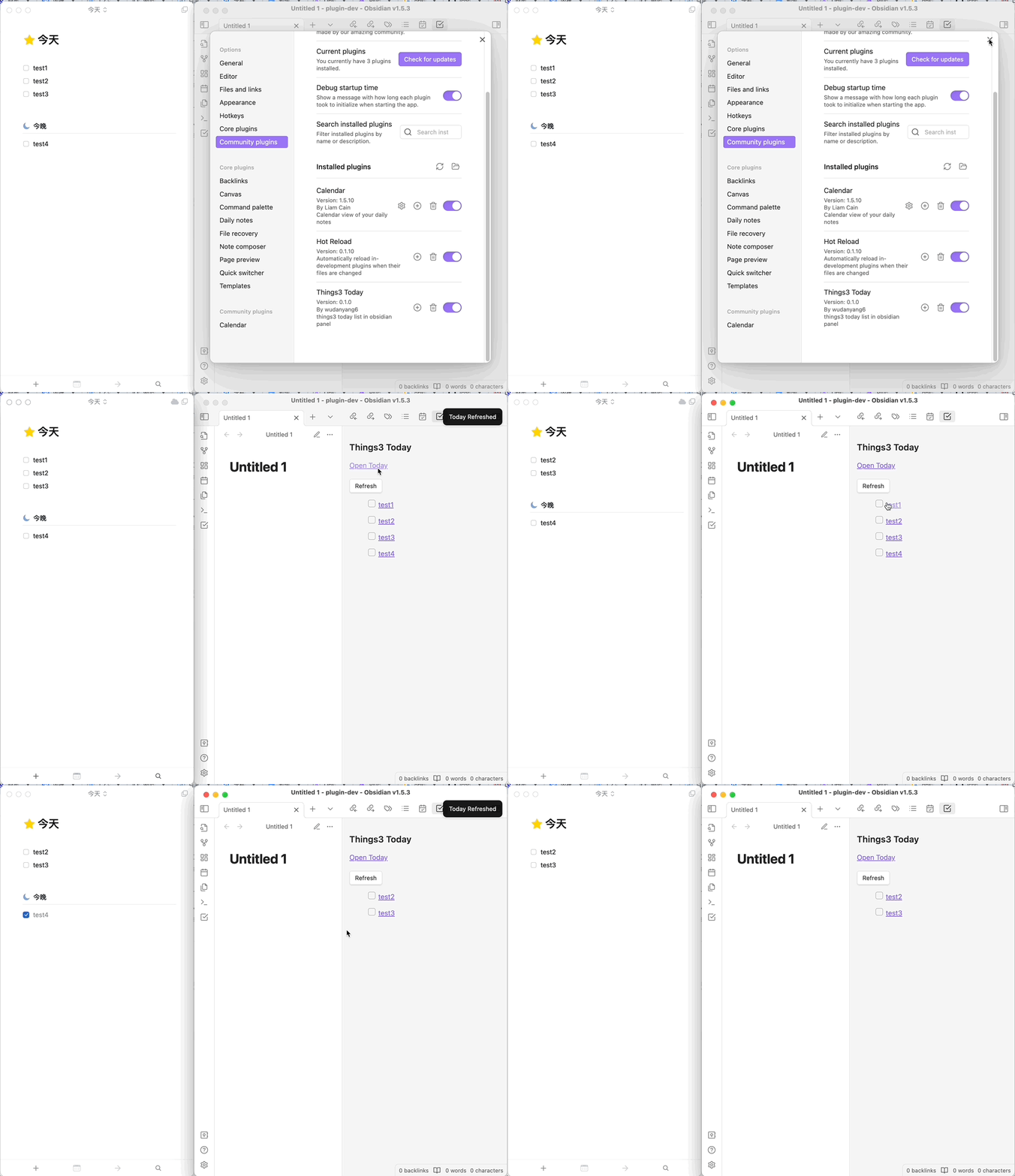
The Things3 Today Plugin allows you to view and manage your today's tasks from the Things3 App directly within an Obsidian pane. This plugin is designed to help you seamlessly integrate task management with your note-taking workflow in Obsidian.

Features

  • Displays your Today list from Things3 within Obsidian
  • Supports marking tasks as complete with a single click
  • Automatically refreshes the task list every 30 seconds to keep your view up to date.
  • Clean and simple user interface for seamless integration

Installation

  1. Open Settings in Obsidian.
  2. Navigate to the "Community Plugins" section.
  3. Click on "Browse" and search for "Things3 Today".
  4. Find the plugin and click "Install".
  5. Once installed, enable the plugin from the list of installed plugins.

Please ensure that you have Things3 installed and running on your Mac.

Usage

Once the plugin is installed and enabled, you can view and interact with your Today tasks by following these steps:

  1. Click on the "Open Things3 Today" button in the side bar.
  2. Your Today task list will be displayed in the pane.
  3. Click the checkbox next to any task to mark it as completed in Things3.
  4. Click the "Refresh" button to refresh your Today task list

When interacting with Things3, a prompt may appear asking for permission to perform operations. You will need to click "Allow" to enable the plugin to communicate with Things3 and perform task updates.

showcase:
Configuration

The current version of the plugin does not require any additional configuration.

Support and Issue Reporting

If you encounter any issues or need assistance, please reach out through:

  • GitHub Issue Tracker: https://github.com/wudanyang6/obsidian-things3-today/issues
  • Email: [email protected]

Feedback and suggestions are always welcome!

Contributing

If you would like to contribute code or suggestions to this plugin, please feel free to submit a Pull Request on GitHub or contact us directly.

License

The Things3 Today Plugin is released under the MIT LICENSE. For more information, please check the LICENSE file.

68%
HealthFair
ReviewSatisfactory
About
View and manage your Things3 Today list directly in an Obsidian pane. Mark tasks complete with one click and keep the view current with automatic 30-second refresh and a clean, simple interface.
TasksIntegrationsSidebar
Details
Current version
1.0.1
Last updated
2 years ago
Created
3 years ago
Updates
1 release
Downloads
2k
Compatible with
Obsidian 0.15.0+
Platforms
Desktop only
License
MIT
Report bugRequest featureReport plugin
Author
wudanyang6wudanyang6
wudanyang6.github.io/
GitHubwudanyang6
  1. Community
  2. Plugins
  3. Tasks
  4. Things3 Today

Related plugins

Reminder

Manage Markdown TODOs with reminder.

Checklist

Consolidate checklists across all files into a single view.

Todoist Sync

Materialize Todoist tasks within your notes.

Dictionary

A multilingual dictionary that shows word definitions in the sidebar and popover synonyms.

Notebook Navigator

A better file browser and calendar inspired by Apple Notes, Bear, Evernote and Day One.

Local REST API & MCP Server

Unlock your automation needs by interacting with your notes over a secure REST API.

Recent Files

Display a list of recently opened files.

TaskNotes

Note-based task management with calendar, pomodoro and time-tracking integration.

Day Planner

Day planning from a task list in a Markdown note with enhanced time block functionality.

BRAT

Easily install a beta version of a plugin for testing.