

Kanban, timeline and weekly-log views for tasks stored in your notes, powered by Bases.
- Overview
- Scorecard
- Updates15
A lightweight task‑management plugin for Obsidian Bases. It only renders — your task data lives in your own markdown frontmatter / note body, and all grouping and filtering is done by Bases. The plugin owns no data model and hard‑codes no field names. Everything uses the tm- prefix.
Requires Obsidian 1.10.2+ (the Bases view API). Desktop only.
Views
| View | Type | What it does |
|---|---|---|
| tm-kanban | Bases view | Columns from a Bases group‑by (or predefined columns), drag cards to change status, right‑click to move/archive. |
| tm-timeline | Bases view | Gantt‑style bars / milestones from start‑end date properties, drag to reschedule, grouped or flat lanes. |
| tm-calendar | Leaf view | Weekly time grid that renders daily‑note log blocks; drag to create, right‑click to delete. |
The plugin is a thin renderer: change frontmatter / Bases config / drag → Bases re‑queries → the view re‑renders. It never keeps a long‑lived reference to the query result.
Features
Kanban (tm-kanban)
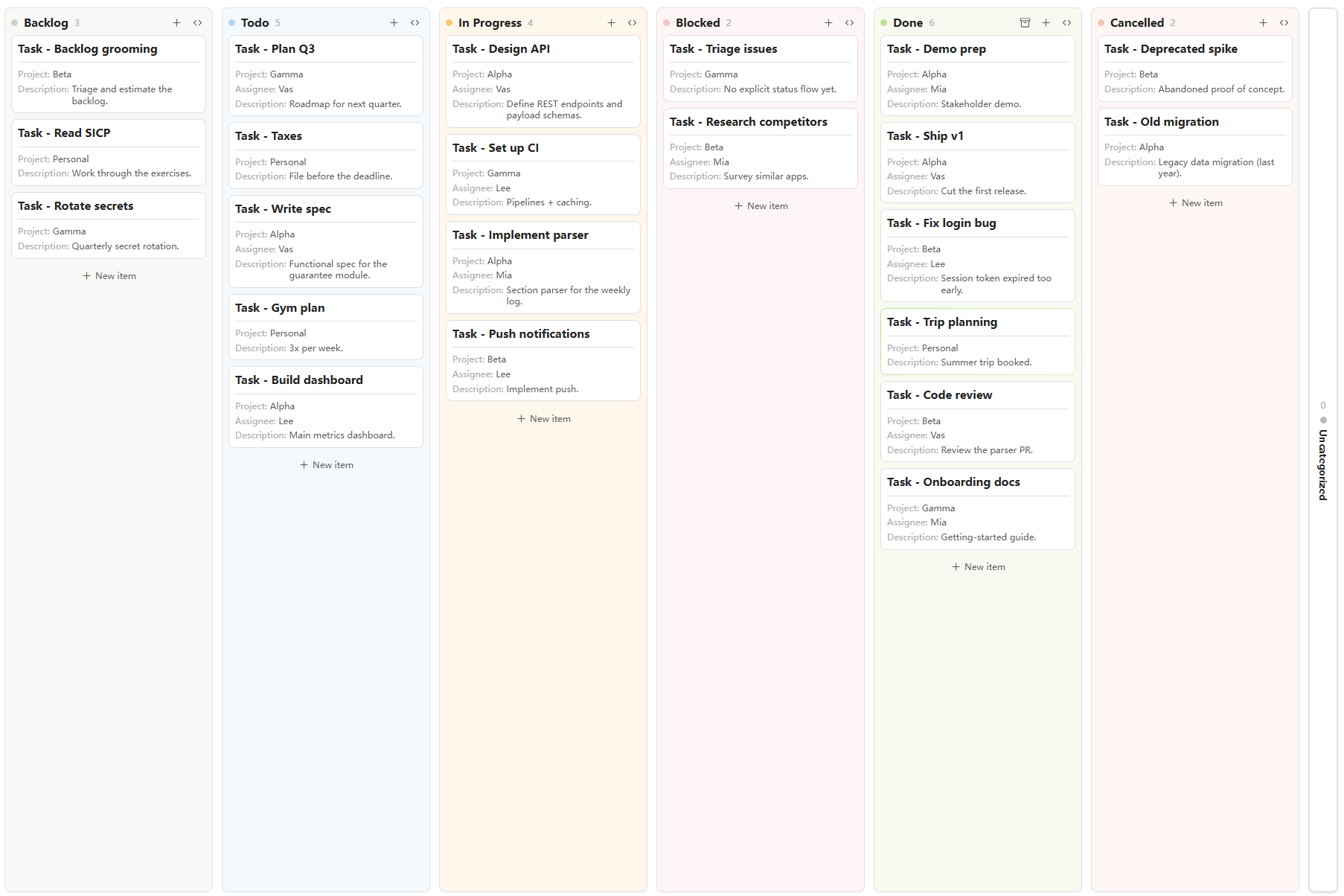
- Grouping is all Bases. Columns come from the Bases group‑by. Filters and sort are Bases' too.
- Predefined columns (view option): list the column values in order, each with an optional colour —
todo|#6b7280,doing|blue, … Values match the Bases group‑by keys; unmatched/empty groups fall into a collapsed Uncategorized column. - Done columns:
doneStatusesmarks which column values count as done; that column gets an Archive‑all button to archive every card in one click. - Drag a card between columns to rewrite its group property (only writable
note.*properties). Click opens the note in a reused right split; mod‑click opens a new tab. Dragging never triggers a click‑open. - Right‑click a card → move to any column, or Archive (writes the configured archive value).
- Record changelog (view option, off by default): when on, moving a card appends a
- yyyy-MM-dd old->newlist item under a configurable body section (Changelog section heading, defaultChangelog), creating the section if absent — so each note keeps a history of its status changes. Unchanged moves write nothing. - Plane‑style columns: full height, header with title + count on the left and add / collapse on the right, columns collapse to a vertical bar, soft per‑column tint, in‑flow “new item” button.
Timeline (tm-timeline)
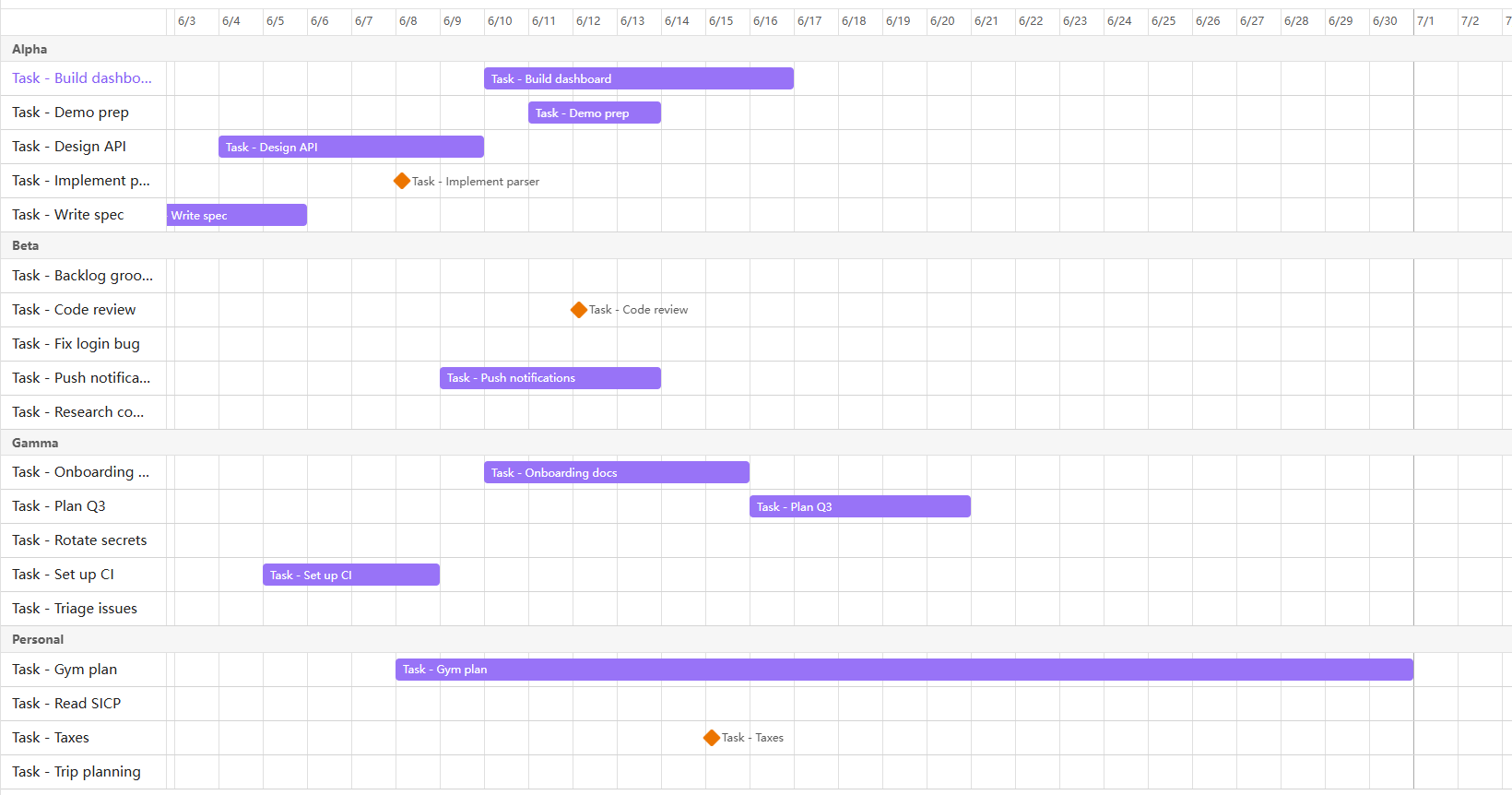
- Start / end date properties chosen in view options;
scale= day / week / month / quarter / year (coarser scales keep multi‑year plans on screen). - Property-based labels (optional): enable Use the visible property as item labels, then select exactly one entry in the Bases Properties menu. Its rendered value — including
file.*,note.*and formula properties — replaces the filename in both the sticky label column and timeline bar. Empty or invalid values stay visible as warnings; use a Bases filter to exclude them when appropriate. Label width adjusts the sticky column per view. - Lanes follow Bases group‑by (one lane per group) or a flat list when ungrouped.
- Bars for start+end and milestone dots for a single date. Items without dates are hidden by default; enable Include items without dates to show them as temporary milestones at the range start, then drag one to assign its start date.
- Multi‑tier header — a stacked, cumulative header (year → quarter → month → week → day, coarsest on top); each cell shows only its own unit, centered, and grid lines follow the finest tier.
- Padding — which time range is shown:
default(unchanged),moderate(one whole scale unit each side), orfit(trim to whole scale units around the items). Partial first/last cells are widened just enough for their header label to fit. - Zoom — how densely that range is drawn (independent of padding). Auto zoom derives the density from the pane width so the whole range fits without horizontal scrolling; with it off, a Zoom slider sets the density as a percentage of the scale's default (100 % = the default look, higher values zoom in).
- Max cells — how many cells a header may draw, a plugin setting (120 by default, 48 the lowest accepted). When a range needs more, the window holding the most items whole is shown, and items beyond it are drawn at the edge with a warning and an arrow, their real date in the tooltip. Raise it for wider — and heavier — timelines, or let a single timeline waive it with Ignore the max cells constraint in its view options.
- Drag the bar to shift both dates, drag an edge to change one end (writeback to
note.*). With Snap to grid (a plugin setting) on, drag/resize snaps to the current scale's unit — drag only; existing dates are never changed otherwise. - Colours (view options): three independent rule lists — Colour rules (bar fill), Text colour rules (label colour) and Text rules (label style). Each line is either
property|value|output(matches when the note's property equals the value; case‑insensitive, list membership) or a bareproperty(the note's own value of that property is the output). Rules are read top→bottom and the first match wins per list. Colour/text‑colour output is a colour name, hex, orrgb(...)(ornonefor the default); text output is any ofstrike underline bold italic, space‑separated (ornonefor plain). Example — bars for closed tasks grey and struck through:status|closed|grayin colours,status|closed|strikein text.
Weekly‑log calendar (tm-calendar)
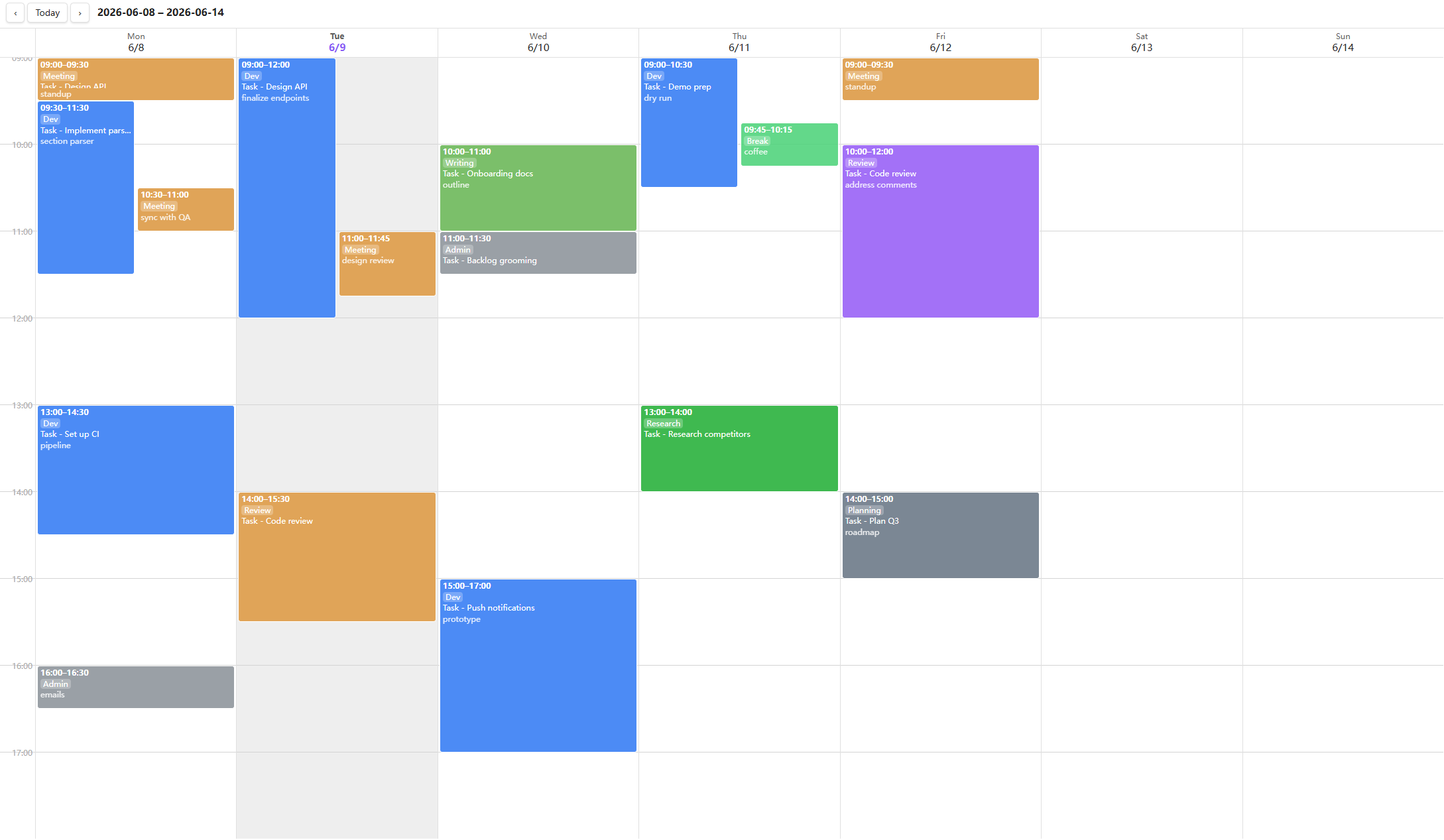
- A 7‑day time grid built from your daily notes. The only body convention is one configurable section (default
Log) whose list items are time blocks:
Format:## Log - 14:00-15:00 (Dev) [[Some task]] notes - 16:00-16:30HH:MM-HH:MM→ optional(Category)→ optional[[wikilink]]→ optional note. - Overlapping blocks render side‑by‑side. Drag (up or down) on empty grid to create a block via a modal — its start/end time is editable (pre‑filled from the drag, so an imprecise drag can be corrected) alongside description + optional
[[task]]link + category. Right‑click a block to delete it. Click opens that day's journal at the log line. - Current‑time indicator: a now‑line is drawn across today's column, updating every minute (hidden when the week has no today or now is outside the day window).
- Jump to date: click the toolbar title to open a date picker and jump to any week (respects the week‑start setting).
- Categories / colours: optional, enabled in settings. Define
name|color(a colour name, hex, orrgb(...)), or put the colour inline in the line —(Dev|blue)— exactly like the kanbanvalue|colorscheme. - Back‑reference (optional): when a block links a task, append a dated record under a heading inside that task's note.
- Custom day window (settings): default
00:00–24:00, but narrow it (e.g.09:00–18:00) to focus on working hours — the grid then splits the visible hours to fill the height, so blocks render larger.
Other
- Click a task → right split. Kanban/timeline items open the note in a reused detail pane (view on the left, note on the right). No custom detail view — the note is the detail.
- i18n: English / 中文 / Deutsch, switchable in settings (in-view strings update live).
Install
Manual
- Download
main.js,manifest.json,styles.cssfrom a release (or build them, below). - Copy them into
<Vault>/.obsidian/plugins/task-manager-bases-view/. - Reload Obsidian and enable the plugin under Settings → Community plugins.
Build from source
npm install
npm run dev      # watch build → main.js
npm run build    # svelte-check + production bundle
Outputs main.js (+ manifest.json, styles.css) in the project root.
Usage
- Create a Bases
.basefile over your task notes. - Add a tm-kanban or tm-timeline view; configure it from the Bases toolbar:
- Kanban: set Group by (e.g.
status); optionally enable Use predefined columns and fill the column values / colours / done statuses / archive value. - Timeline: pick the start / end date properties and a scale.
- Kanban: set Group by (e.g.
- The calendar stores entries in your daily notes, so it needs the core Daily notes plugin enabled (Settings → Core plugins → Daily notes). Run the command Open weekly log (or the ribbon clock icon); you can turn the view off under Settings → Task Manager Bases View.
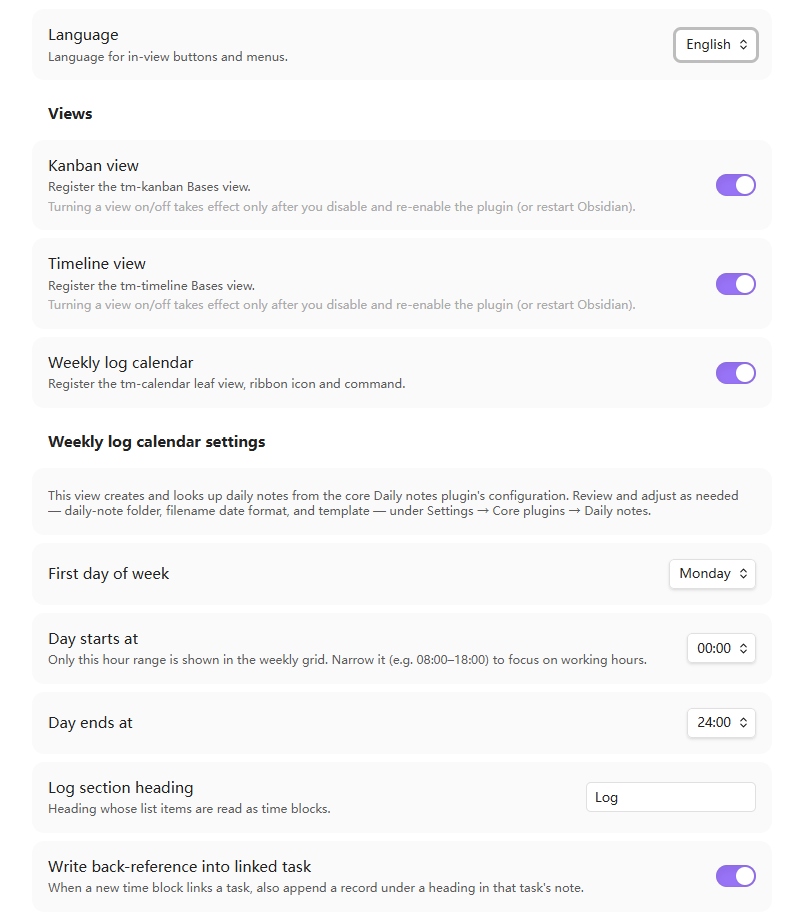
- Global, cross‑file conventions (week start, day window, log section, categories, back‑reference, timeline snap‑to‑grid) live in Settings → Task Manager Bases View. The daily‑note folder, filename format and template are taken from the core Daily notes plugin (Settings → Core plugins → Daily notes) — no duplicate config here.
Toggling a view on/off in settings takes effect only after you disable and re‑enable the plugin (or restart Obsidian) — Bases has no per‑view unregister API.
Each view can be turned off independently, and the calendar's settings appear only while its view is enabled, keeping the page tidy:
View options reference
| View | Option | Meaning |
|---|---|---|
| kanban | usePredefinedColumns |
Use ordered, coloured predefined columns instead of raw Bases groups. |
| kanban | predefinedValues |
value or value|color lines; match the group‑by keys. |
| kanban | doneStatuses |
Column values treated as “done” (gets the archive‑all action). |
| kanban | archiveValue |
Value written by right‑click → Archive / Archive‑all. |
| timeline | startProp / endProp |
Date properties for the bar ends. |
| timeline | usePropertyDisplay / labelWidth |
Use exactly one Bases-visible property for labels and set the sticky label-column width. |
| timeline | includeUndated |
Show otherwise-hidden undated items as draggable milestones at the range start. |
| timeline | scale |
Header tick granularity: day / week / month / quarter / year. |
| timeline | rangePadding |
Empty time around the items: default / moderate / fit. |
| timeline | autoZoom |
Derive density from the pane width so the whole range fits (hides the zoom slider). |
| timeline | zoom |
Density as a percentage of the scale's default (10 – 200, 100 = default). |
| timeline | ignoreMaxUnits |
Draw the whole range regardless of the Max cells plugin setting, at the render cost. |
| timeline | colorRules / textColorRules / textRules |
First-match rules for bar fill, label colour and label style. |
Example vault
A separate, ready‑to‑open demo vault lives in its own repo — obsidian-task-manager-example-vault — with a multi‑project dataset and several .base files (group‑by board, predefined‑colour pipeline, per‑project boards via filters, flat/grouped timeline, archive workflow) plus journals for the calendar.
Development notes
- Svelte 5 + esbuild. Entry
src/main.ts→ rootmain.js(CJS, single file). src/shared/is the three‑view kernel (entry access, frontmatter write, value render, section parser, open‑detail, palette, i18n).- No telemetry, no network requests; everything is local.
Feedback & issues
Found a bug, hit a rough edge, or have an idea? Please open an issue — bug reports, feature requests, and questions are all very welcome. A screenshot and your Obsidian version help a lot. See the changelog for what's new.
License
MIT © vastea