Search...Search plugins and themes...
⌘K
Sign in
  • Get started
  • Download
  • Pricing
  • Enterprise
  • Account
  • Obsidian
  • Overview
  • Sync
  • Publish
  • Canvas
  • Mobile
  • Web Clipper
  • CLI
  • Learn
  • Help
  • Developers
  • Changelog
  • About
  • Roadmap
  • Blog
  • Resources
  • System status
  • License overview
  • Terms of service
  • Privacy policy
  • Security
  • Community
  • Plugins
  • Themes
  • Discord
  • Forum / 中文论坛
  • Merch store
  • Brand guidelines
Follow us
DiscordTwitterBlueskyThreadsMastodonYouTubeGitHub
© 2026 Obsidian

Task list

ted-marozzited-marozzi2k downloads

Enable better task management via lists.

Add to Obsidian
  • Overview
  • Scorecard
  • Updates2

A simple obsidian plugin enabling better task management via lists.

Features

Create lists with task states

Simply start an ordered or unordered list and then add one of the following directives, :to-do, :doing, :paused or :done.

- Supported task states
    - :to-do I need to be done
    - :doing I am being done
    - :paused I am paused
    - :done I am done

These will render the directives as interactive task state boxes like so:
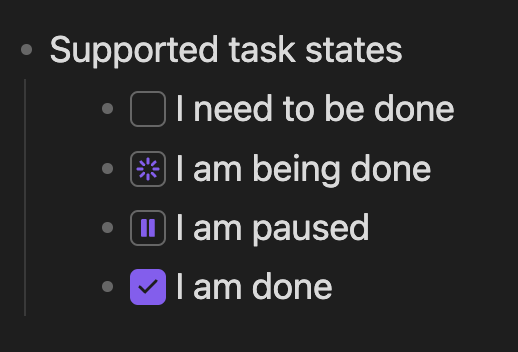
Supported task states

Sort lists according to its status

Sorts can be triggered via the "Sort lists" command, the context menu (Option + click or right click) on a task state box or the context menu on the editor.

Lists will be sorted according to this sort order:

  • :doing First, as your attention is needed
  • :paused Second, as you may need to review it
  • :to-do Third, as you can pick this up when the above is done
  • :done Last, as your attention isn't needed

Change the states of a task list item

  • Click a task state box to cycle to the next state

  • Use the context menu on a task state box to mark a different state

Project values

  • Performance focused, a lot of care is taken to ensure task-list doesn't slow down obsidian

  • Markdown compatability, task-list extends markdown but doesn't break it, your documents will still render outside of this plugin, with a readable task state and easy to remember directives

Installation

Install the lastest release

  1. Click this link and follow the prompts to install

Build from source

  1. Clone this repo to ./vault/.obsidian/plugins
  2. Run npm run build
  3. Start obsidian
  4. Navigate to Settings > Community plugins
  5. Enable the "Task list" plugin

Sponsor me

If you like this software please consider sponsoring me here ❤️

74%
HealthGood
ReviewCaution
About
Create interactive task lists with simple directives like :to-do, :doing, :paused and :done that render as clickable state boxes. Sort lists by state (doing, paused, to-do, done) and click or use the context menu to cycle or set states while keeping plain Markdown readable and fast.
TasksEditingCommands
Details
Current version
1.0.1
Last updated
2 years ago
Created
2 years ago
Updates
2 releases
Downloads
2k
Compatible with
Obsidian 0.15.0+
Platforms
Desktop, Mobile
License
MIT
Report bugRequest featureReport plugin
Sponsor
GitHub Sponsors
Author
ted-marozzited-marozzi
github.com/ted-marozzi
GitHubted-marozzi
  1. Community
  2. Plugins
  3. Tasks
  4. Task list

Related plugins

Task Collector (TC)

Change task status and collect tasks within a document using hotkeys and context menus.

Paste URL into selection

Paste URL "into" selected text.

Vimrc Support

Auto-load a startup file with Vim commands.

Code Editor Shortcuts

Add keyboard shortcuts (hotkeys) commonly found in code editors such as Visual Studio Code (VS Code) or Sublime Text.

Text Block Timer

Add a timer to text block to track task time consumption.

Slash Commander

Customize the slash command list, assign each command an icon.

Advanced Tables

Improved table navigation, formatting, and manipulation.

TaskNotes

Note-based task management with calendar, pomodoro and time-tracking integration.

Day Planner

Day planning from a task list in a Markdown note with enhanced time block functionality.

Quick Switcher++

Enhanced Quick Switcher, search open panels, and symbols.