Tag Counter Dashboard
 nbdev995 downloads
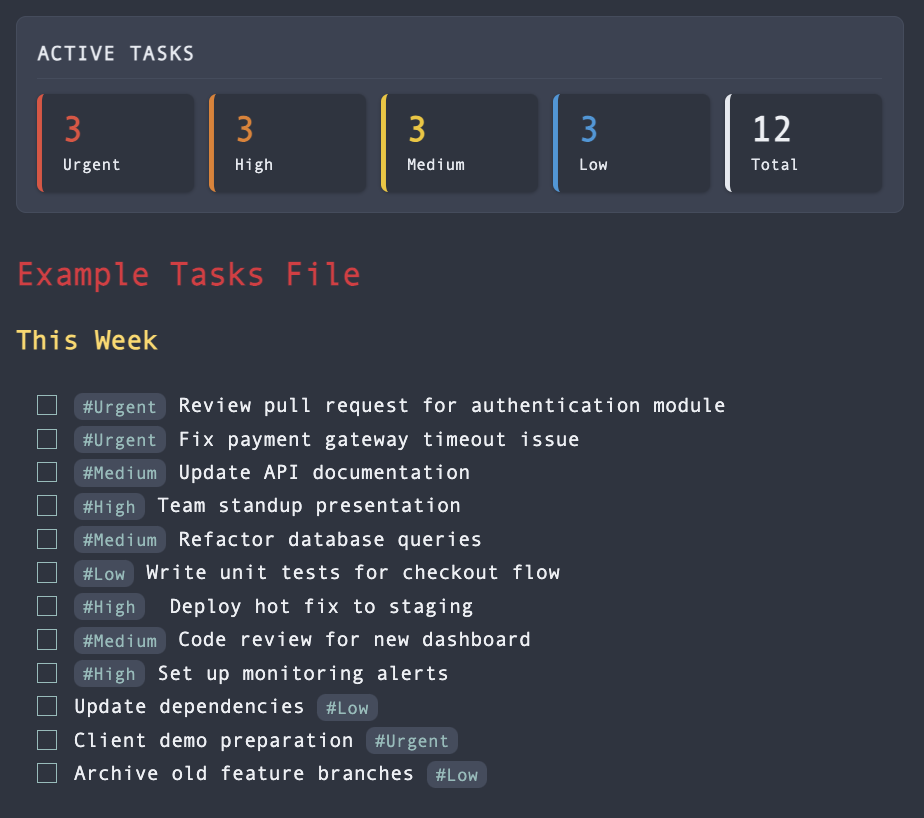
Embed a dashboard in your notes showing counts of priority tags. Perfect for task lists with #Urgent, #Medium, #Low tags.
- Overview
- Scorecard
- Updates1
A plugin that embeds a live dashboard directly within your notes, showing counts of priority tags. Perfect for task lists using tags like #Urgent, #Medium, #Low.
Features
- Embedded Dashboard - Insert a tag counter anywhere in your notes using a simple code block
- Live Updates - Counts automatically refresh when you edit the file
- Status Bar - Optional compact view at the bottom of the window
- Configurable Tags - Track any tags you want, not just priorities
- Customisable Colours - Change colours for each priority level via settings
- Task-Only Mode - Option to count only tags on incomplete checkboxes (
- [ ])
Usage
Add a dashboard to any note by inserting a code block:
```tag-counter
title: Task Overview
```
This renders as a styled dashboard with coloured boxes showing your tag counts.
The status bar also shows a compact view:

Options
You can customise each dashboard:
```tag-counter
title: Sprint Tasks
tags: Todo,InProgress,Done,Blocked
```
| Option | Description |
|---|---|
title |
Optional heading above the dashboard |
tags |
Comma-separated list of tags to count (overrides default settings) |
Example: Task List with Dashboard
# Weekly Tasks

```tag-counter
title: Task Status
```

## Monday
- [ ] Review PR for auth module #Urgent
- [ ] Update documentation #Low
- [x] Fix login bug #High

## Tuesday
- [ ] Team standup #Medium
- [ ] Deploy to staging #High
- [ ] Write unit tests #Medium
Installation
From Community Plugins
- Open Settings → Community Plugins
- Click Browse and search for "Tag Counter Dashboard"
- Click Install, then Enable
Manual Installation
- Download
main.js,manifest.json, andstyles.cssfrom the latest release - Create a folder called
tag-counter-dashboardin your vault's.obsidian/plugins/directory - Copy the downloaded files into this folder
- Reload the app and enable the plugin in Settings → Community Plugins
Configuration
Access settings via Settings → Community Plugins → Tag Counter Dashboard (gear icon)
| Setting | Description | Default |
|---|---|---|
| Tracked Tags | Comma-separated list of tags to track | Urgent,High,Medium,Low |
| Count Only Incomplete | Only count tags on unchecked tasks | Off |
| Show Status Bar | Display counts in the status bar | On |
| Tag Colours | Customise colours for each priority level | Red, Orange, Yellow, Blue |
Commands
Open the command palette (Ctrl/Cmd + P) and search for:
| Command | Action |
|---|---|
| Insert Tag Counter Dashboard | Inserts a dashboard code block at cursor position |
Support
If this plugin has helped you stay organised, consider supporting its development:
Contributing
Contributions are welcome! Please feel free to submit a Pull Request.
Licence
MIT Licence - see LICENSE for details.