Tabula
 pblazh143 downloads
Transform Markdown files using spreadsheet-inspired formulas and cell references. Write scripts to perform calculations, transform data, and automate table processing — all inside your vault.
- Overview
- Scorecard
- Updates6

 Tabula for Obsidian
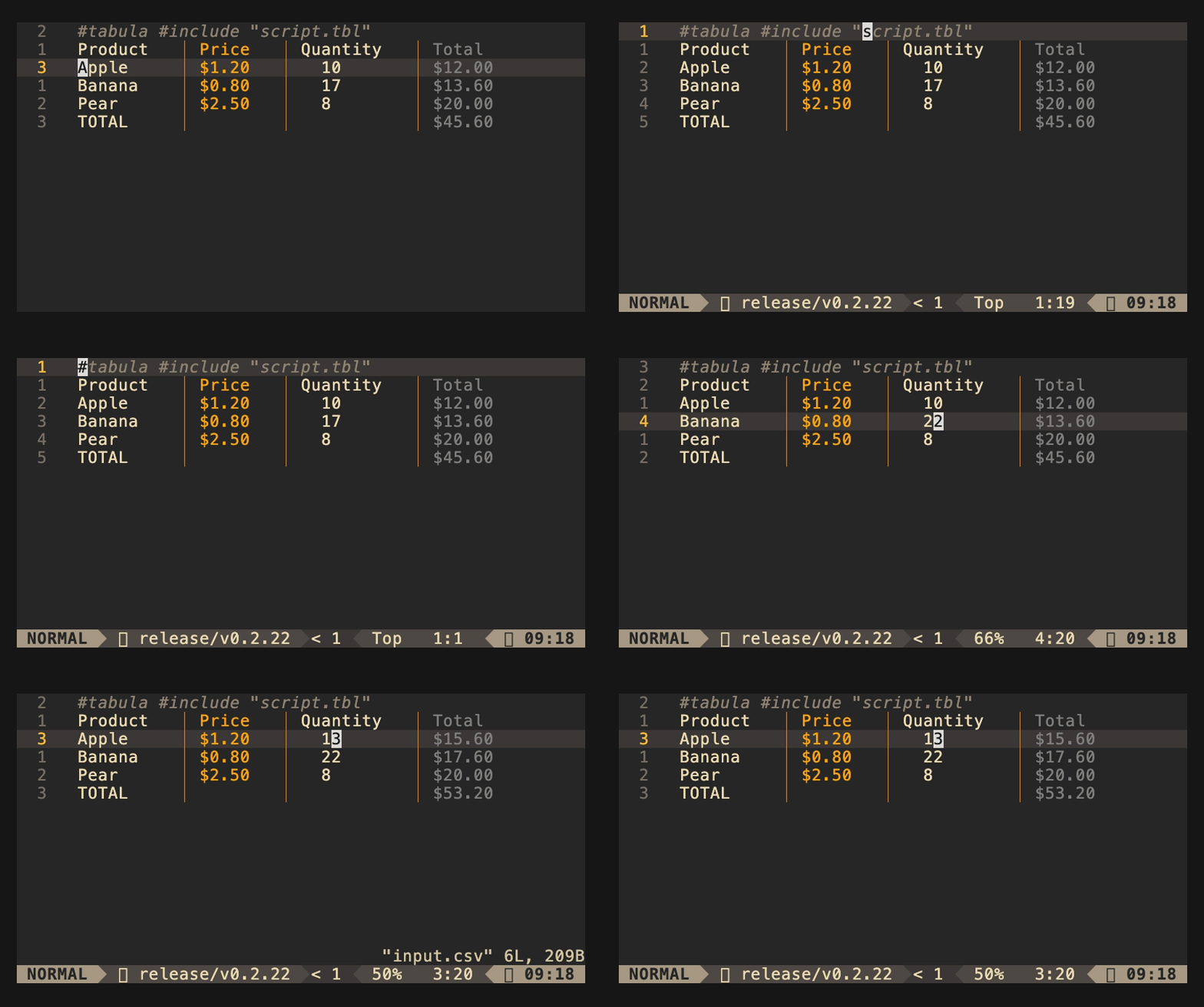
Obsidian plugin for Tabula - a spreadsheet-inspired CSV transformation tool.
Features
- 🔄 Auto-execution - Automatically runs Tabula when you save your markdown files
- ⚡ Instant Updates - See transformations applied immediately after save
- 🎛️ Toggle Control - Enable/disable auto-execution with a command
- 📝 Manual Execution - Execute Tabula on demand via command palette
Prerequisites
- Tabula CLI must be installed See https://pblazh.github.io/tabula for details
Installation
From Release
- Download the latest release from the GitHub releases page
- Extract the files to your vault's plugins folder:
<vault>/.obsidian/plugins/tabula/ - Reload Obsidian
- Enable the plugin in Settings → Community Plugins
Manual Installation
- Clone this repository or download the source code
- Run
npm installto install dependencies - Run
npm run buildto build the plugin - Copy all files from
out/folder to your vault's plugins folder:<vault>/.obsidian/plugins/tabula/mkdir -p <vault>/.obsidian/plugins/tabula cp out/* <vault>/.obsidian/plugins/tabula/ - Reload Obsidian
- Enable the plugin in Settings → Community Plugins
Usage
Auto-Execution on Save
Create or open a markdown file in Obsidian
Add csv directive:
A,B,C
1,2,3
4,5,6
Add a your Tabula script directive immediately after the csv:
// Calculate sum
let D1 = "Total";
let D2 = A2 + B2 + C2;
let D3 = A3 + B3 + C3;
Save the CSV file (Ctrl+S / Cmd+S)
Tabula runs automatically and updates the file!
PS. Tabula also support include directive
#include "caculate-sum.tbl"
For complete documentation visit Tabula Website
Commands
Access commands via Command Palette (Ctrl+P / Cmd+P):
- Tabula: execute - Manually run Tabula on the active markdown file
- Tablua: toggle - Toggles auto-execution on Save** - Enable/disable automatic execution
- Tablua: index - Toggles visibility of column/row names in CSV blocks
Settings
Configure the plugin in Settings → Tabula:
Auto-execute on save
Enable/disable automatic execution of Tabula scripts when saving CSV files.
- Default:
true
Tabula executable path
Path to the tabula executable. Use tabula to use the version in your PATH, or specify an absolute path.
- Default:
tabula - Examples:
- macOS/Linux:
/usr/local/bin/tabula - Custom location:
/Users/yourname/bin/tabula - Windows:
C:\Program Files\tabula\tabula.exe
- macOS/Linux:
Auto format output
Enable/disable the -a flag passed to tabula. When enabled, Tabula will automatically format the output CSV
to make it resemble a table
- Default:
true
How It Works
- File Save Detection - Plugin listens for Markdown file saves
- Extract Code blocks - Plugin extract every table, csv and Tabula code block in a temporal file inside the vault
- Execute Tabula - Runs
tabula [-a] -u <file>on the temporal files (with optional-aflag based on settings) - Reload File - Updates the editor with transformed content
- Delete temporal files
Troubleshooting
"Tabula command not found"
Make sure Tabula is installed and accessible:
Option 1: Add to PATH
which tabula
tabula -v
Option 2: Set custom path in settings
- Open Settings → Tabula
- Set "Tabula executable path" to the full path to your tabula binary:
- macOS/Linux:
/usr/local/bin/tabula - Windows:
C:\path\to\tabula.exe
- macOS/Linux:
Auto-execution not working
- Check if auto-execute is enabled in Settings → Tabula
- Verify the file has
.mdextension - Try manually executing via Command Palette: "Tabula: Execute Tabula on current file"
Changes not appearing
Try manually reloading the file:
- Close and reopen the CSV file
- Or execute the command again manually
Permission errors
On macOS/Linux, ensure the tabula executable has execute permissions:
chmod +x /path/to/tabula
Development
Building
npm install
npm run build
The build outputs to the out/ folder:
out/main.js- Bundled plugin codeout/manifest.json- Plugin metadataout/styles.css- Plugin styles
Development Mode
npm run dev
This will watch for changes and rebuild automatically.
Installation from Build
Simply copy the entire out/ folder contents to your vault:
cp -r out/* <vault>/.obsidian/plugins/tabula/
Links
License
GNU General Public License v3.0
Support
If you find this plugin useful, consider:
- ⭐ Starring the GitHub repository
- 🐛 Reporting issues or suggesting features
- 📖 Contributing to the documentation