Sync Witness
 CyberNative AI LLC18 downloads
Notices when a sync tool silently removes notes or rolls them back to an older version, tells you once, and restores the exact bytes.
- Overview
- Scorecard
- Updates2
Notices when a sync tool silently removes notes or rolls them back to an older version, tells you once, and restores the exact bytes.
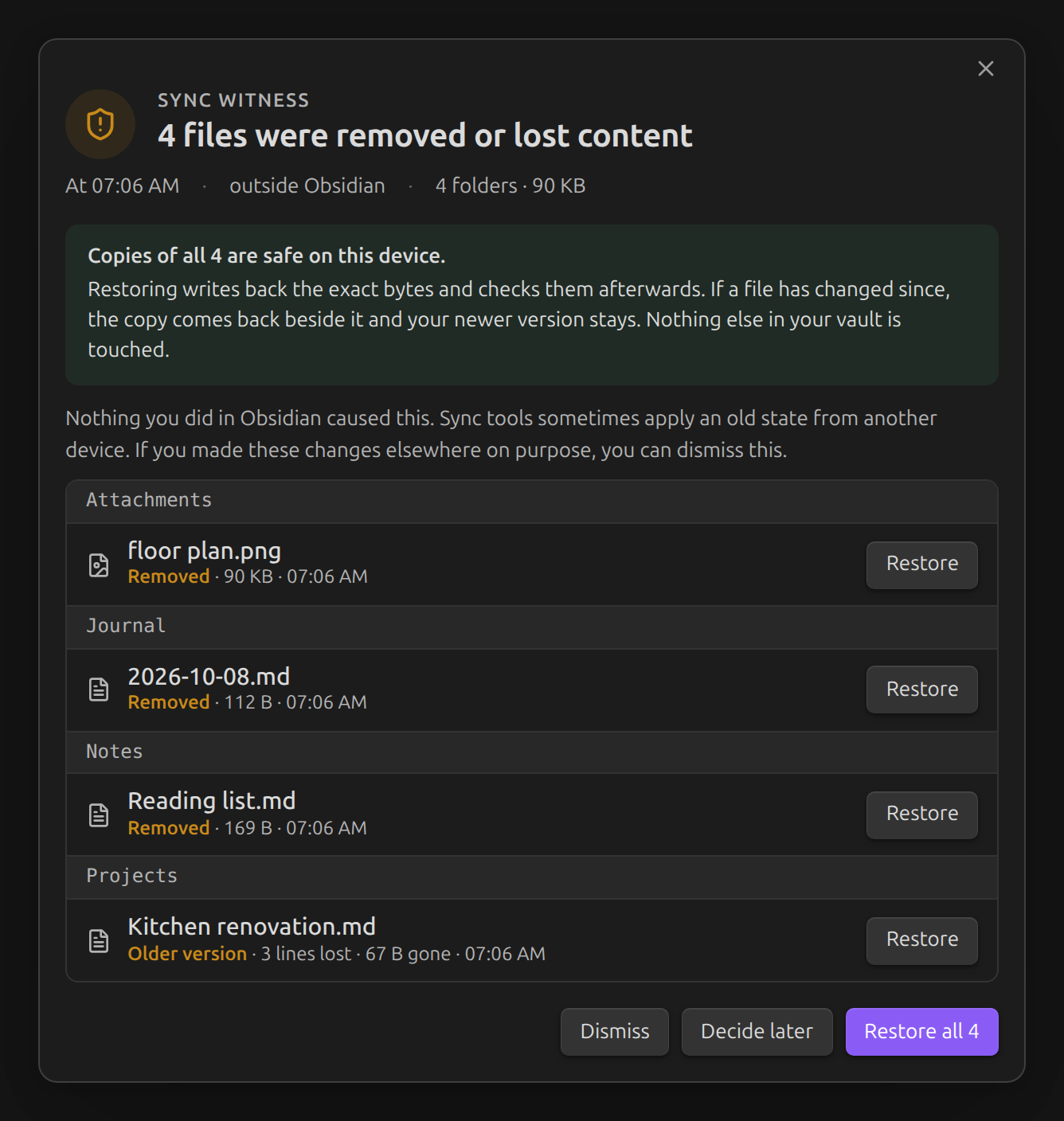
Sync tools sometimes apply an old state from another device: notes disappear, attachments go missing, or a note you just edited goes back to an earlier version. Often nobody notices for days. Sync Witness keeps a local record of your vault. When files vanish, are emptied or roll back without you doing it in Obsidian, it shows one clear alert and lets you restore each file, or the whole incident, byte for byte.
What it does
- Keeps a record. Path, size, SHA-256 and modification time of every file in the vault.
- Keeps copies on this device. Notes (
md,canvas,base,txt,csv,json,yaml,yml,org,tex) are always copied, up to 10 MB each. Attachments are copied up to 20 MB each and 1 GB in total, counting copies kept for incidents. You can change both limits in settings. Larger files are still watched, and the alert tells you when one cannot be restored. - Notices loss while Obsidian is open, and at startup for changes made while it was closed: removed files, emptied files, notes replaced by a version this device saw earlier, and large unexplained cuts.
- Tells you once. Changes that arrive together become one incident with one alert. Renames, moves, your own deletions, typing and find-replace stay quiet. You can see them in the incident log (shield icon in the ribbon).
- Restores the exact bytes. Restore one file or the whole incident. After writing, Sync Witness checks the file's hash again. If the file has changed since the alert, or a removed file's path is taken again, the copy comes back next to it as
name (restored).extand the newer file is not overwritten.
Compared with File Recovery
Obsidian's built-in File Recovery keeps periodic snapshots of notes you have changed. It gives no alert and does not keep attachments. Sync Witness also covers notes you have not opened recently and attachments within its limits, and it tells you when loss happens. They work well together.
Privacy and storage
- No network requests. No telemetry. No account. Nothing leaves your device.
- Copies and the record are stored in Obsidian's app storage on this device (IndexedDB), not in your vault, so sync tools do not copy or delete them. Each device keeps its own.
- Space used: about the size of your notes, plus attachment copies within the total limit. Copies for files waiting for review stay until you restore or dismiss them. Dismissed incidents are deleted after 30 days. When attachment space is full, copies from dismissed incidents are removed first; after that, new attachment versions are watched without a copy.
- Uninstalling the plugin does not touch your vault. To delete the stored copies, use Clear stored copies in settings before you uninstall.
Limits
- Desktop only. Tested on Obsidian 1.14.4 for Linux. Mobile is not supported yet.
- If you delete a file on purpose in another program or on another device, Sync Witness alerts you. Choose Dismiss.
- A file that changed before Sync Witness first recorded it, or that is larger than the limits, cannot be restored.
- An outside edit that removes text without matching an earlier version is flagged only when the text it removes exceeds the text it adds by at least a quarter of the note or by ten lines. If it replaces lines with at least as many new lines, it is not flagged. For example, when another device resolves a git merge conflict by keeping its own text, the lines you typed here can disappear without an alert. Your git history still has them.
- Sync tools that run as plugins inside Obsidian (such as Obsidian Sync or Remotely Save) are treated as plugins: Sync Witness alerts when they empty a note, roll it back or remove at least half of it. Smaller cuts are logged, not alerted.
- A rollback is recognized when the note goes back to one of its last 12 saved versions, or to one of its last 32 versions that stayed unchanged for at least a minute or came from a sync tool or another program. Going back to a version that existed only for seconds while you typed is judged as a cut, by the rules above.
- If another device undoes its own recent changes (unticks a task, removes a line it just typed), the note goes back to the version just before. Sync Witness treats each such step as ordinary editing and judges it only as a cut, by the rules above. A change typed or restored on this device stays protected. As a result, a sync tool that puts back just the previous version of a note last changed on another device is alerted only for a large cut. If another device undoes several changes that had already synced all at once, Sync Witness can still report a rollback. Choose Dismiss.
- A plugin that deletes files through Obsidian's standard trash action is treated as you deleting them.
- Sync Witness is a safety net, not a backup. Keep a real backup of your vault.
Install
In Obsidian, open Settings → Community plugins. If Restricted mode is on, select Exit Restricted mode. Select Browse, search for "Sync Witness", then select Install and Enable.
If it is not listed there yet, install it by hand:
- Download
main.js,manifest.jsonandstyles.cssfrom the latest release of this repository. - In your vault, create the folder
.obsidian/plugins/sync-witness/and put the three files in it. The.obsidianfolder is hidden on most systems. - In Obsidian, open Settings → Community plugins. If Restricted mode is on, select Exit Restricted mode. Next to "Installed plugins", select the reload icon (Reload plugins), then turn on Sync Witness.
Sync Witness records the vault on first start and only protects changes after that.
Feedback
Please open an issue on this repository. Include what your sync tool did and what the alert showed. Do not attach private notes.
License
MIT. Made by CyberNative AI LLC.