Symbat
 iamrecursion123 downloads
Integrates the Numbat scientific calculator into your notes, with comprehensive tooling.
- Overview
- Scorecard
- Updates6
Symbat is a plugin for Obsidian that embeds the amazing unit-aware calculator Numbat into Obsidian. Numbat gives you a statically-typed, scientific calculator language with real physical dimensions, and this plugin wires it into your notes. You can use it in code blocks, frontmatter properties, inline expressions, and the REPL, and it also comes with comprehensive tooling like autocomplete, scope inspectors, and hover.
Everything runs locally, with the entire Numbat standard library compiled into the WebAssembly binary. No network requests are ever made unless you opt into live currency rates. The plugin never reads your clipboard — the one time it touches it is the Copy debug info button in the settings, which writes out version numbers, your platform, and the list of plugins you have installed, so you can paste it into a bug report.
let power = 1.2 kW
let runtime = 3 h
power * runtime -> kWh    # 3.6 kWh
The plugin is Symbat; the language is Numbat. You still write
numbatblocks,.nbtfiles, andnumbat-useproperties. The name Symbat is for the symbolic algebra layer that sits on the roadmap.
Key Features
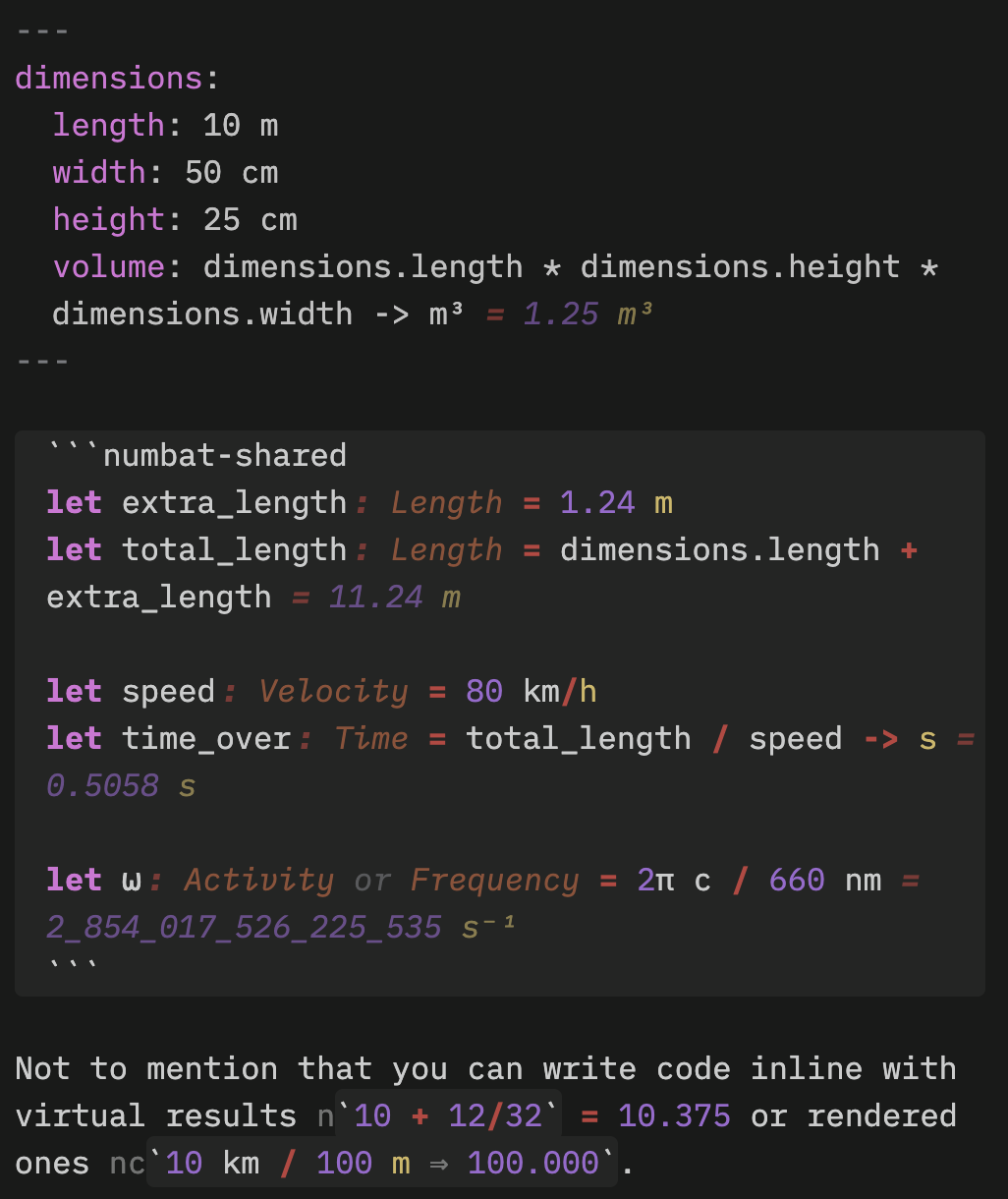
Click to learn more.
Full Numbat Support
Numbat is an amazing scientific calculator with units support, and Symbat is fully compatible with its syntax, semantics, and type system. You can check out the official documentation, as well as the tutorial and syntax reference for more information.
Notebook-Style Evaluation
You can write numbat code in code blocks inside your standard markdown notes that evaluate and
render across source mode, live preview, and reading mode. numbat blocks provide isolated
contexts, while numbat-shared blocks share state with other such blocks. Evaluation is always
replayed in order, so there are no IPython-style evaluation order concerns.
Write Expressions Inline
You can write numbat expressions in the middle of lines, getting live results as you type. An
expression like n`5 km + 3 mi` inlays the result as virtual text, which you can click to bake
the value into your notes. An expression like nc`10 cm + 3 in ...` computes the result
continuously into the note after a ⇒.
Note Properties Integration
Note properties can be given the Numbat type, which turns its value into a fully-interactive
numbat expression bound into the note's scope. A property distance: 21.1 km makes the query
distance -> mi work in any Numbat scope in the note. Nested YAML objects are bound as Numbat
structs, which works very well with
Better Properties.
Imports and Preludes
Symbat lets you numbat-use other notes in your frontmatter to import their properties and shared
blocks into your note. You can also specify custom .nbt files as preludes that will be loaded for
every context.
Interactive Evaluation
Symbat highlights results, errors, and hints inline as you type as inlay hints. You get a truly interactive notebook experience, no matter where you are evaluating Numbat code: it works in properties, inline expressions, blocks, and even Bases cells. Symbat also comes with a REPL that lives in the sidebar, with history, live highlighting, and Numbat's built-in interactive commands.
Unicode Completions
Math tends to make heavy use of unicode symbols, so Symbat has integrated Numbat's unicode completer
to make typing such things far easier. \alpha → α, \pi → π, \_2 → ₂ as you type, without
any need to think, and it even plays nicely with
Typing Transformer and
Shiki.
Built for Power Users
Not just a Numbat notebook, Symbat integrates a whole host of features for the power user. There is completion for identifiers, keywords, units, dimensions, and types, with signature and documentation help shown clearly, and that works in every context where you can write Numbat code. There is comprehensive hover support, showing information for a symbol you point the mouse at or rest the caret on. Syntax highlighting works in every Numbat expression, providing rich semantic highlighting as you work.
This is accompanied by a notebook scope inspector, which shows every binding that the note contains,
allowing you to see its current value and click through to its definition. It has a search box that
both searches the note scope and lets you browse the bundled prelude. Symbat also includes an
editing mode for .nbt files in Obsidian, allowing you to work with Numbat files natively with all
of these power-user tools.
Learn More
For full details on every feature, including the settings that govern their behavior, take a look at the feature reference.
Installation
Symbat is most easily installed via its listing on the Community Plugins Directory.
If you want to install pre-release versions, we recommend using BRAT. You can also install them yourself as follows:
- Download
main.js,manifest.json, andstyles.cssfrom the latest release. - Create
<vault>/.obsidian/plugins/symbat/and put all three files in it. - Reload Obsidian, then enable Symbat under Settings → Community plugins.
Symbat requires Obsidian 1.13.0 or newer as it relies on some newer parts of the Obsidian API.
Basic Usage
Beyond the features described above, Symbat provides a number of commands to make it easier to work with the plugin's features:
- Open REPL — also on the ribbon (calculator icon).
- Open note scope inspector — also on the ribbon (list icon).
- Search the note scope and prelude — focuses the inspector's search box.
- Show info at the cursor — opens the hover card on demand, and says why when there is nothing to show.
- Commit all visible inline evaluations — bakes every on-screen
n`…`result into the text. - Create a
.nbtfile — Obsidian's "New note" only ever makes Markdown.
The settings in Settings → Symbat let you customize the behavior of Symbat. It may seem a bit sparse at first, but most settings are hidden by the master toggles for their corresponding features. Have a play!
Documentation
If you are interested in contributing to Symbat, or simply just building the codebase yourself, please check out our CONTRIBUTING documentation.
For more information on Numbat, the fantastic unit-aware calculator that makes this plugin possible, take a look at:
- The Numbat Home Page, providing key links for learning about Numbat and also an interactive REPL (the same WebAssembly code this plugin is built on).
- The documentation which provides a comprehensive overview of the Numbat language, its features, and even a tutorial to get you started.
- The syntax reference, which describes exactly how Numbat's syntax works.
For more information on Symbat, you can additionally take a look at the following:
- The feature reference, which provides a detailed overview of each plugin feature and the settings that configure it.
- The architecture doc, which describes the various modules that make up the plugin, and how we handle the state of the interpreter.
- The plugin roadmap, which describes the planned features and forward-looking evolution of the plugin.
- The design notes, which work through the two large planned features — symbolic computation and graphing — and what a soft fork of Numbat would buy today, which is where all three of them converge.
Credits
This plugin literally would not exist without the incredible Numbat that it is built on top of. Numbat is by David Peter and its other contributors, and is dual-licensed under Apache-2.0 and MIT.
This plugin is MIT-licensed.