Offline Spell Checker
 sxjeel572 downloads
A fast, offline spell checker using standard .dic and .aff files.
- Overview
- Scorecard
- Updates1
- Add to obsidian: https://community.obsidian.md/plugins/sxjeel-spell-checker
FAQ
1. Does it support languages other than English?
Yes. Any Hunspell-compatible dictionary (.dic + .aff) is supported, allowing spell checking in virtually any language.
2. Does it support medical or specialized dictionaries?
Yes. In addition to standard language dictionaries, you can use specialized dictionaries for fields such as medicine, law, science, engineering, and more, as long as they are provided in Hunspell format (.dic + .aff).
3. Where can I download dictionaries?
You can download Hunspell dictionaries from:
- https://github.com/wooorm/dictionaries/tree/main/dictionaries
- Any other source that provides
.dicand.afffiles.
4. How do I install a dictionary?
- Download the dictionary's
.dicand.afffiles. - Open Settings → Offline Spell Checker → Manage Dictionaries.
- Click Open Folder.
- Paste the files into the opened folder.
- Click Reload Files.
The dictionary will be loaded automatically and ready to use.
The Problem
I love taking notes in Obsidian, but finding a good way to check spelling was incredibly frustrating. Existing plugins like LanguageTool Plugin by clemens e, Harper, or LanguageTool Integration by wrenger are amazingly powerful, but they are also very heavy and consume a lot of computational resources. They often feel like absolute overkill when all you want is a simple, seamless way to quickly catch and correct typos while you type.
I just wanted a seamless auto spell checker that was completely offline, lightning fast, and would not drain my battery or slow down my vault with unnecessary bloat. Since I could find no tool that fit my needs perfectly, I built it myself.
The Solution
This plugin is built to be the exact opposite of those heavy grammar tools. It is a totally offline, deeply optimized spell checker that relies on standard open source dictionary files.
Here is what makes it different:
- Zero Lag: It is wired directly into the modern Obsidian text engine so it only checks the words currently visible on your screen. If you have a massive ten thousand word document open, the plugin completely ignores the text you are not actively looking at. This keeps your system resources completely free.
- Totally Offline: Everything runs locally on your machine. No external APIs, no accounts, no server pings, and complete privacy.
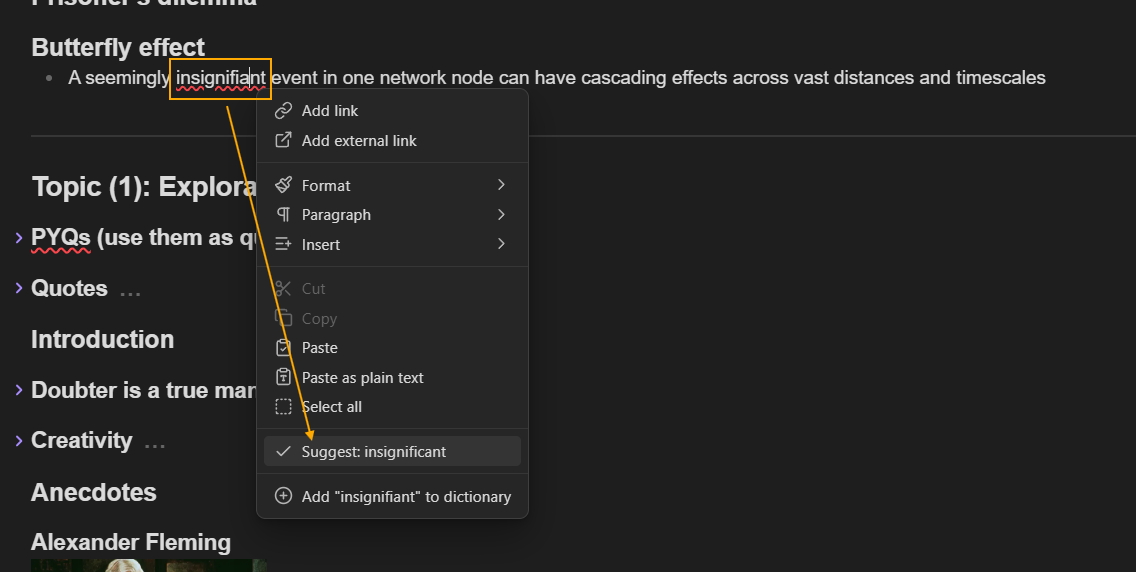
- Seamless Corrections: Just right click any word with a red squiggly line to instantly see the top five correct suggestions, and click to replace it.
- Personalized Vocabularies: You can easily drop in standard dictionary files for English, or even build your own highly specific databases for things like UPSC preparation. Just click "Add to personal dictionary" on any custom word, and it will never be flagged again.
How to Use It
- Enable the plugin in your Community Plugins settings.
- Go to the Offline Spell Checker settings tab and click the Open Folder button.
- Drop your preferred dictionary files (like English US or British English) into that folder. You need both the
.dicand.afffiles, which you can download for free from standard open source repositories. - Click Reload Files in the settings.
- Start typing!
Enjoy a fast, private, and lightweight writing experience.