Supernovae Tab
 sikoso77412 downloads
A galaxy-themed new tab for Obsidian — animated starfield, space aesthetics, and your vault at the center of the universe.
- Overview
- Scorecard
- Updates3
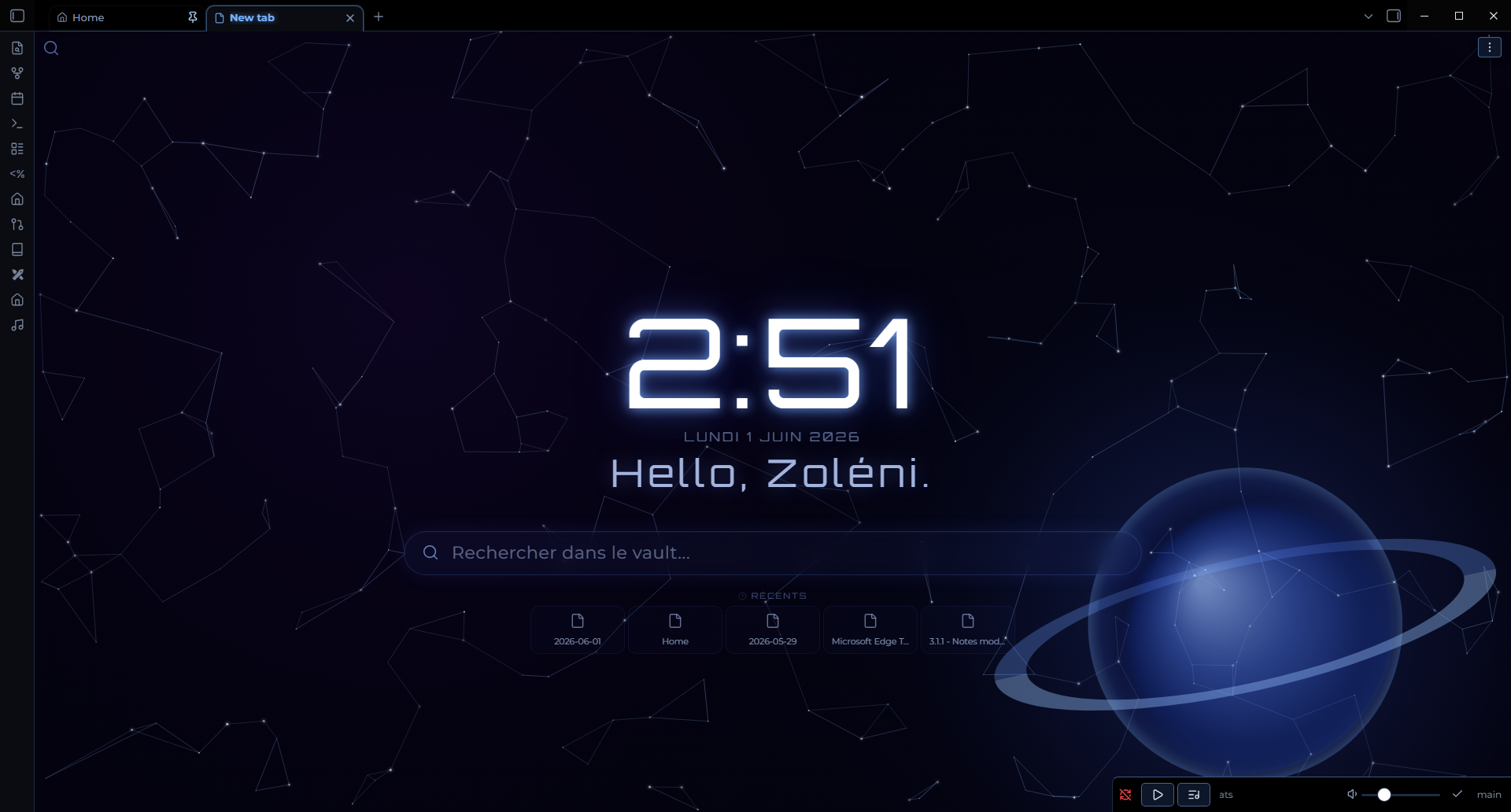
A galaxy-themed new tab experience for Obsidian. Every new tab opens an animated starfield with your time, greeting, search, recent files, and more — all floating in deep space.
Features
New Tab — Galaxy View
Every new empty tab is replaced by the galaxy view:
- Animated starfield — twinkling stars, a shooting star, and color nebulae (violet + blue)
- Constellation lines — stars connected to their nearest neighbors, softly pulsing
- Ringed planet — a blue gas giant with a perspective ring in the corner
- Live clock — large Orbitron display, 12h or 24h format
- Date — displayed below the clock
- Greeting — personalized message with time-of-day and your name
- Search bar — opens your preferred search plugin
- Recent files — your 5 most recently edited notes
- Bookmarks — from all bookmarks or a specific group
- Quote — a random quote from the built-in list or your own custom quotes

Home Dashboard
Create a note named Home.md in your vault. Whenever you open it, Supernovae Tab intercepts the navigation and displays a dedicated Home Dashboard instead:
- Same galaxy background as the new tab
- Navigation buttons — configurable links to your key notes and folders
- Recent files — your 5 most recently edited notes
- Active projects — automatically lists notes with
Type: Projectandstatus: activein their frontmatter - Tab protection — clicking any file from the Home Dashboard opens it in a new tab, preserving the Home view
Tip: Use
{{today}}as a navigation link path to automatically open today's daily note (formatYYYY-MM-DD).
A pencil button (✏️) in the view header lets you edit Home.md directly without leaving the dashboard workflow.
Mobile support
⚠️ Supernovae Tab is not stable on phones and tablets yet (iOS and Android): the animated view can exhaust the mobile app's memory.
Since 1.2.0 the plugin is disabled on mobile by default: it only keeps its settings tab there, and new tabs stay Obsidian's default. You can turn Settings → Supernovae Tab → Disable on mobile off at your own risk (restart the app to apply). Desktop is unaffected.
Installation
Via Community Plugins (recommended)
- Open Obsidian Settings → Community Plugins
- Search for Supernovae Tab
- Click Install, then Enable
Manual
- Download the latest release from GitHub Releases
- Copy
main.js,manifest.json, andstyles.cssinto your vault at.obsidian/plugins/supernovae-tab/ - Enable the plugin in Settings → Community Plugins
Settings
All settings are available under Settings → Supernovae Tab.
| Section | Options |
|---|---|
| Mobile | Disable the plugin on phones and tablets (on by default) |
| Search | Show/hide top-left search button and inline search bar; choose the search provider plugin |
| Time | Show/hide the clock; 12-hour or 24-hour format |
| Greeting | Your name (used via {{name}}); show/hide greeting; custom greeting text |
| Recent files | Show/hide the recent files section |
| Bookmarks | Show/hide bookmarks; display all bookmarks or a specific group |
| Home Dashboard | Edit the navigation links list |
| Quotes | Show/hide quotes; choose between built-in quotes, your own, or both |
Greeting placeholders
| Placeholder | Value |
|---|---|
{{greeting}} |
Time-of-day greeting (e.g. Good morning) |
{{name}} |
Your name from settings (fallback: explorer) |
Supported search providers
- Obsidian Core Quick Switcher
- Omnisearch
- Another Quick Switcher
- Quick Switcher++
Home Dashboard — Active Projects
Supernovae Tab automatically surfaces your active projects without any manual configuration. Just add this frontmatter to a note:
---
Type: Project
status: active
---
It will appear in the Active projects section of your Home Dashboard.
Credits
- Inspired by Beautitab by Andrew McGivery (MIT License) — architecture and plugin structure
- Font: Orbitron via Google Fonts
- Part of the Nebulux visual ecosystem
Reporting Issues
Open an issue on GitHub with as much detail as possible — Obsidian version, plugin version, and a screenshot if relevant.
License
MIT