Subtle TOC Plus
 xzhi410 downloads
EN: Enhanced Subtle TOC fork with search, tag filter, H1-H6 badges, color/opacity customization, panel pinning and more. | 中文: Subtle TOC 增强版,支持搜索、标签过滤、层级徽标、颜色/透明度自定义与面板固定等功能。
- Overview
- Scorecard
- Updates4
本项目基于 xupisco/obsidian-suble-toc 进行修改与扩展。 感谢原作者优秀的开源工作!
This project is modified and extended from xupisco/obsidian-suble-toc. Thanks to the original author for the excellent open-source work!
项目简介 / Overview
Subtle TOC Plus 是一个适用于 Obsidian 的轻量悬浮目录插件。它会在笔记边缘显示细线式标题缩略图,并在弹出面板中展示标题与待办任务(可通过“显示标签栏”开关显示标题/任务标签栏),帮助你快速浏览长文结构、跳转到对应位置,并处理未完成任务。
Subtle TOC Plus is a lightweight floating table-of-contents plugin for Obsidian. It shows a subtle heading minimap on the edge of the note and opens a popover with headings and open tasks (the Headings/Tasks tab bar can be shown with the "Show tab bar" toggle), making it easier to scan long notes, jump to sections, and handle unfinished tasks.
👀 预览 / Preview
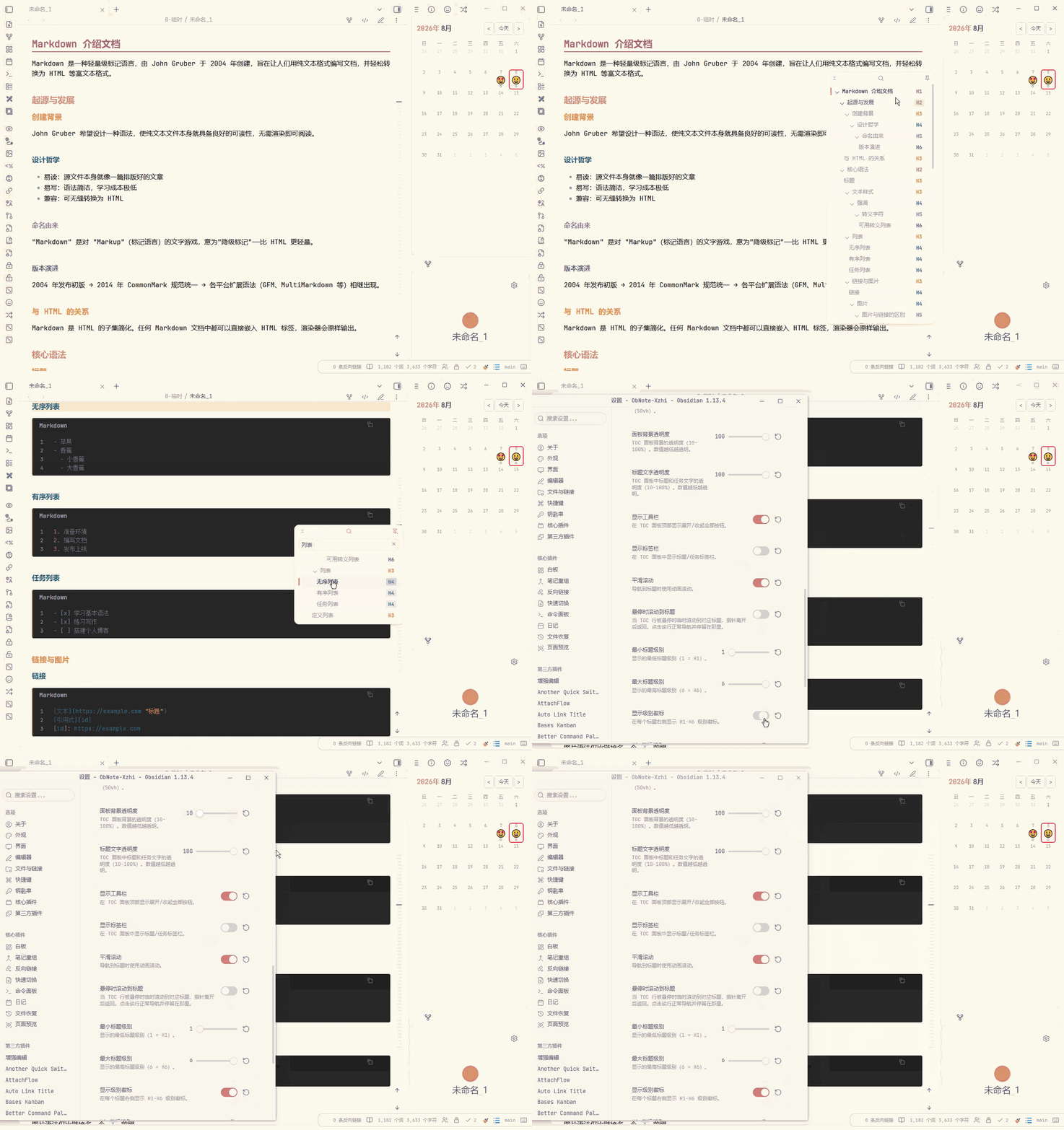
✨ 新增功能 / New Features
| 功能 | 描述 | 默认值 |
|---|---|---|
| 中英文界面 | 目录面板和设置页支持 English / 中文切换。 | English |
| 更干净的标题显示 | 隐藏 Markdown 反斜杠转义字符,例如 1\. 会显示为 1.。 |
始终启用 |
| 面板固定 | 可通过顶部图钉按钮固定或取消固定目录面板。 | 未固定 |
| 标题层级折叠 | 支持折叠/展开单个标题分支,并可一键展开或收起全部目录项。 | 全部展开 |
| 标题搜索 | 新增搜索按钮,可快速筛选标题,并支持一键清空搜索内容。 | 关闭搜索 |
| 面板尺寸与透明度 | 可自定义面板高度、面板背景透明度和标题文字透明度。 | 高度跟随默认值(50vh);背景透明度 100%;文字透明度 100% |
| 工具栏与标签栏显示控制 | 可隐藏顶部工具栏,也可隐藏标题/任务标签栏。 | 工具栏开启;标签栏开启 |
| H1-H6 级别徽标 | 标题右侧可显示层级徽标,默认使用 Rose Pine 配色,并支持分别自定义 6 个级别的颜色。 | 开启;#b4637a、#d7827e、#ea9d34、#286983、#907aa9、#575279 |
| 徽标颜色输入规范化 | 颜色设置支持带或不带 # 的十六进制值,也支持 3 位十六进制值自动展开。 |
始终启用 |
| 设置项恢复默认值 | 每个设置项都提供独立的恢复默认值按钮。 | 可用 |
| 失焦自动隐藏 | 可选择在焦点离开 Markdown 笔记时自动隐藏目录面板。 | 关闭 |
| Feature | Description | Default |
|---|---|---|
| Bilingual UI | Switch the TOC panel and settings page between English and Chinese. | English |
| Cleaner heading text | Markdown escape backslashes are hidden, so 1\. is displayed as 1.. |
Always enabled |
| Panel pinning | Pin or unpin the TOC popover from the toolbar. | Unpinned |
| Heading tree folding | Collapse or expand individual heading branches, with an expand-all/collapse-all toolbar button. | Fully expanded |
| Heading search | Search headings directly from the popover and clear the query with one click. | Search closed |
| Panel size and opacity | Customize panel height, panel background opacity, and heading text opacity. | Default height (50vh); background opacity 100%; text opacity 100% |
| Toolbar and tab-bar visibility | Hide the top toolbar or the Headings/Tasks tab bar when you want a cleaner panel. | Toolbar on; tab bar on |
| H1-H6 level badges | Show heading-level badges on the right side of each heading, with Rose Pine-inspired defaults and six customizable colors. | On; #b4637a, #d7827e, #ea9d34, #286983, #907aa9, #575279 |
| Badge color normalization | Badge colors accept hex values with or without #, and 3-digit hex values are expanded automatically. |
Always enabled |
| Per-setting reset buttons | Every setting can be reset to its default value independently. | Available |
| Auto-hide on blur | Optionally hide the TOC when focus moves away from the Markdown note. | Off |
📦 安装 / Installation
从 Obsidian 社区插件安装(推荐)/ From Obsidian Community Plugins (recommended)
- 打开 Obsidian -> 设置 -> 第三方插件。
- 点击 浏览,搜索 Subtle TOC Plus。
- 点击 安装,然后 启用。
- Open Obsidian -> Settings -> Community plugins.
- Click Browse and search for Subtle TOC Plus.
- Click Install, then Enable.
从 GitHub Releases 安装 / From GitHub Releases
- 从最新 release 下载
main.js、styles.css和manifest.json。 - 放入
<vault>/.obsidian/plugins/subtle-toc-plus。 - 重启 Obsidian,在 设置 -> 第三方插件 中启用 Subtle TOC Plus。
- Download
main.js,styles.css, andmanifest.jsonfrom the latest release. - Place them in
<vault>/.obsidian/plugins/subtle-toc-plus. - Restart Obsidian, then enable Subtle TOC Plus from Settings -> Community plugins.
🚀 使用 / Usage
- 启用插件后,打开包含标题或待办任务的 Markdown 笔记。
- 在笔记边缘找到细线式目录缩略图;根据设置,悬停或点击即可打开目录面板。
- 点击标题可跳转到对应位置;如果开启任务显示,也可以在面板中查看未完成任务。
- 使用顶部按钮搜索标题、固定面板,或一键展开/收起目录层级。
- 在插件设置中调整语言、显示内容、默认标签页、面板尺寸、透明度、工具栏/标签栏、标题级别范围和 H1-H6 徽标颜色。
- Enable the plugin, then open a Markdown note with headings or open tasks.
- Find the subtle minimap on the edge of the note; hover or click it to open the TOC popover, depending on your trigger setting.
- Click a heading to jump to it. If task display is enabled, open tasks are also available in the popover.
- Use the toolbar to search headings, pin the panel, or expand/collapse the heading tree.
- Open the plugin settings to adjust language, displayed content, default tab, panel size, opacity, toolbar/tab-bar visibility, heading level range, and H1-H6 badge colors.