Search...Search plugins and themes...
⌘K
Sign in
  • Get started
  • Download
  • Pricing
  • Enterprise
  • Account
  • Obsidian
  • Overview
  • Sync
  • Publish
  • Canvas
  • Mobile
  • Web Clipper
  • CLI
  • Learn
  • Help
  • Developers
  • Changelog
  • About
  • Roadmap
  • Blog
  • Resources
  • System status
  • License overview
  • Terms of service
  • Privacy policy
  • Security
  • Community
  • Plugins
  • Themes
  • Discord
  • Forum / 中文论坛
  • Merch store
  • Brand guidelines
Follow us
DiscordTwitterBlueskyThreadsMastodonYouTubeGitHub
© 2026 Obsidian

Store

shimeokishimeoki282 downloads

Manage your notes within a single store.

Add to Obsidian
  • Overview
  • Scorecard
  • Updates13

Manage your notes within a single folder. Almost.
banner

Usage

[!WARNING] Though the plugin should be safe to the data, it's almost impossible to revert the changes to the vault's structure made by this plugin. You should make a backup of the vault before the first use.

It's recommended to read the documentation before installing the plugin. It's hard to describe in a few words why this plugin is even needed and what it does, so a separate usage "book" is needed.

See docs.

Versioning

This plugin follows Semantic Versioning.

  1. Each major version signifies a breaking change in settings format, so a manual intervention can be needed after an update;
  2. Each minor version signifies a new feature;
  3. Each patch signifies a fix.

While the major version is zero, each minor version bump is a breaking change instead, and each patch is a new feature.

Installation

Community plugins

This plugin is available to install from Community tab.

  1. Visit Community site and click "Add to Obsidian" to search this plugin inside of the app.
  2. Just search for the plugin manually in Community plugins after disabling restricted mode.
  3. Copy this link and open it in your browser: obsidian://show-plugin?id=store.

BRAT

You can install BRAT to install/update the plugin automatically. Add the repository URL in "Beta plugin list" section. It's recommended to not use the "latest version" tag right now, because the plugin is not stable yet. Use a specific version (like 0.7.0).

GitHub releases

This repository has automatic GitHub releases, so you can manually install the plugin in vault/.obsidian/plugins/store by copying main.js and manifest.json there.

Nix

This repository is a Nix flake and contains a package for the plugin. You can either:

  1. Use package for obsidian module in home-manager.
  2. Manually install the package contents in vault/.obsidian/plugins/store.

Contributing

See Contributing.

License

Unless otherwise noted, the source files are distributed under the BSD-3-Clause license.

HealthExcellent
ReviewSatisfactory
About
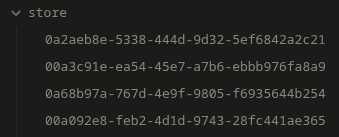
Are you tired of managing deep nested folders and filenames? Store uses UUIDs as the filenames to effectively flatten your vault. This comes with it's own set of drawbacks, so the plugin automatizes the process of daily usage with this kind of workflow. Make sure to backup your vault before the first use.
FilesFoldersAutomation
Details
Current version
0.8.1
Last updated
4 days ago
Created
11 months ago
Updates
13 releases
Downloads
282
Compatible with
Obsidian 1.13.0+
Platforms
Desktop, Mobile
License
BSD-3-Clause
Report bugRequest featureReport plugin
Author
shimeokishimeokishimeoki
GitHubshimeoki
  1. Community
  2. Plugins
  3. Files
  4. Store

Related plugins

Advanced URI

Control everything with URI.

QuickAdd

Quickly add new notes or content to your vault.

Waypoint

Easily generate dynamic MOCs in your folder notes using waypoints. Enables folders to show up in the graph view and removes the need for messy tags!

Quick Explorer

Perform file explorer operations (and see your current file path) from the title bar, using the mouse or keyboard.

Custom File Explorer sorting

Manual or automatic config-driven reordering and sorting of files and folders in File Explorer.

Multi Properties

Add properties to multiple notes at once. Either right-click a folder or select multiple notes and right-click the selection.

Flexplorer

Enhance the file explorer with custom sorting, pinning, and hiding.

Vault Changelog

Maintain a changelog of recently edited notes.

GridExplorer

Browse and organize note files visually in a flexible grid layout.

File Explorer Note Count

See the number of notes in each folder within the file explorer.