Split Groups
 Fuad Laguda827 downloads
A Bases view that puts a note in every group its list property names, instead of one combined group.
- Overview
- Scorecard
- Updates10
A view for Obsidian Bases that puts a note in every group its list property names.
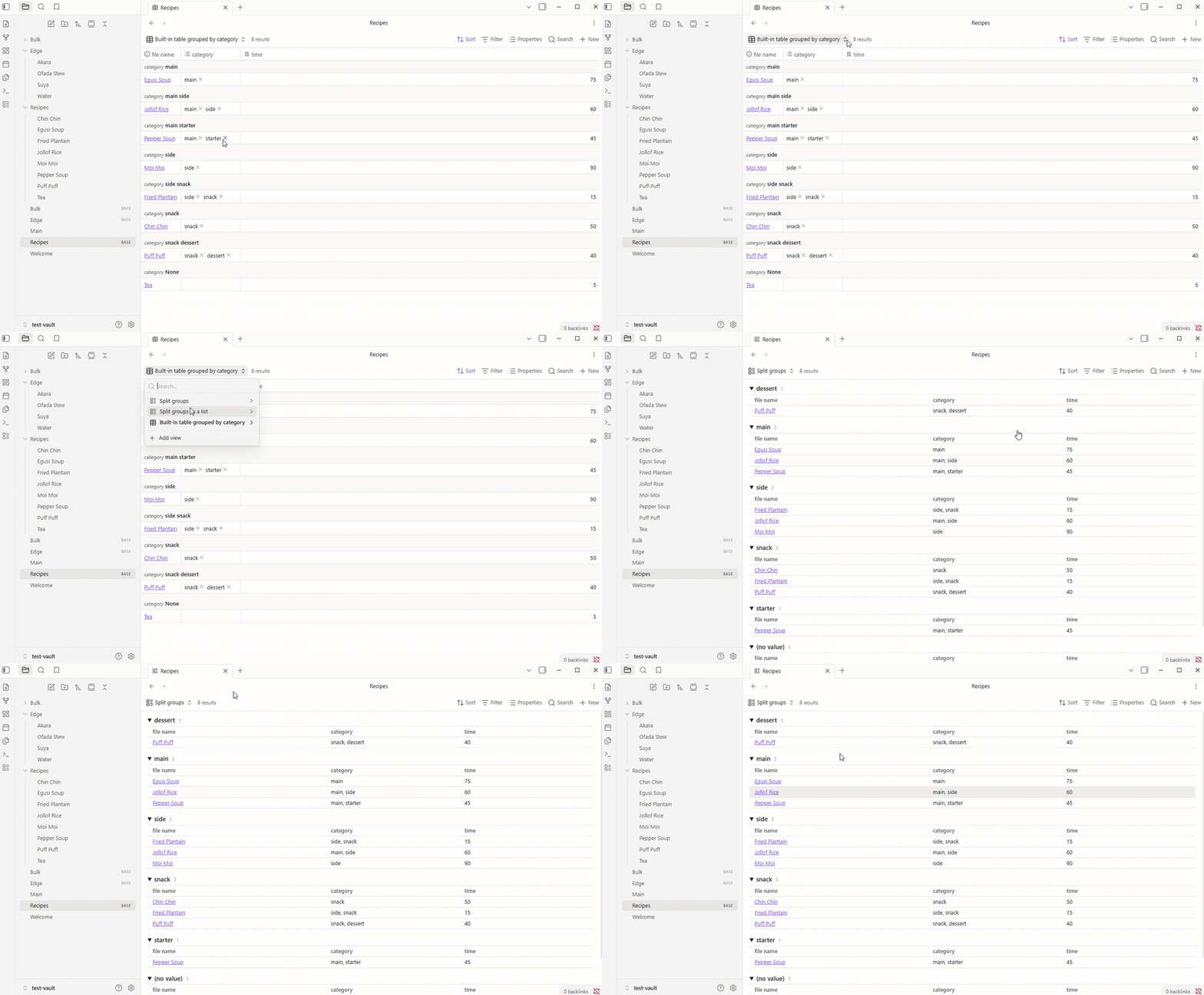
Group a Base by a list property today and a recipe with category: [main, side] lands in one combined group called "main, side". With Split Groups it appears under main and again under side, which is what most people expect. This is the behaviour asked for in the forum thread Make a note fall into multiple groups.
Use it
- Open a Base, open the view menu and add a view of type Split groups.
- In the view options, set Split by to the list property to group on.
- Pick Table or List under Layout. Columns come from the view's properties, as in any Base.
- Optional: set Then split by to a second list property, and every group splits again inside (for example Genre, then Status).
- Optional: pick a note under Template for +, and new notes made in this view (with a group's + or the toolbar's New) start from it.
How values are grouped
- Every item in a list gets its own group. A single value works too.
Main,mainandmainare one group, shown with the spelling seen first.- Links group by the note they point to:
[[Main]],[[Recipes/Main.md]],[[Main|Main dish]]and plainmainshare a group. - A tag's leading
#is dropped. - The same value twice in one note counts once.
- Notes with nothing in the property go to (no value) at the end. Turn that off with Show notes with no value.
- Groups sort by name, numbers naturally (2 before 10). Notes inside a group keep the Base's own sort.
- Sort groups in the view options: A → Z, Z → A, Most notes first or Fewest notes first (ties go by name). (no value) stays last either way.
- Click a group's heading to fold it. Folded groups stay folded when notes change, and each view remembers its own. Collapse all and Expand all sit above the groups.
- The + on a heading makes a new note with that group's value filled in. On a sub-group it fills in both values. With a template chosen, the note is made from it (see below).
- Until a property is chosen under Split by, the view shows all its notes in one list.
- Obsidian's own Group by (under Sort) has no effect on a Split groups view. Use Split by instead.
If you turn the plugin off, Split groups views show "Unknown view type" until you turn it back on or switch that view to Table. Your notes are never changed.
Click a note to open it, Ctrl or Cmd click (or middle click) for a new tab, and Ctrl or Cmd hover for a preview.
New notes from a template
Pick a note under Template for + in the view options. The + on a group heading then makes the new note from that template, with the group's value filled in. The toolbar's New in that view uses the same template, without a group value. This is the ask in the forum thread Bases: New With Template, for Split groups views.
- The template's properties are added to the note. For the property you split by, the group wins: a template with
category: [uncategorised]under main givescategory: [main]. Values the Base fills in from its filters are kept. - The template's body goes in under the properties.
{{title}},{{date}}and{{time}}are filled in like Obsidian's own Templates, and so are{{date:FORMAT}}and{{time:FORMAT}}. - If the template uses Templater (
<% %>) and Templater is installed, Templater fills it in. - Each view has its own template, so one Base can have a different one per view.
- Only Split groups views use the template. New in a Table, Cards or List view is not changed.
- If the template note has been moved or deleted, the note is made blank and a message says so.
Try it
test-vault is a small vault with recipes and edge cases (links, case, duplicates, empty lists, numbers). Open it in Obsidian, build the plugin, and open Recipes.base or Edge.base. The Category then diet view uses Templates/Recipe.md for its +. npm run bulk adds 3,000 generated notes and Bulk.base for a speed check.
Build
npm install
npm run build   # type checks, bundles main.js, copies it into test-vault
npm test        # unit tests for the grouping rules
Licence
MIT, Fuad Laguda.