Spider
 huangtao606 downloads
AI chat branches as an interactive knowledge map. Tab to drill down, arrow keys to navigate, structured exports.
- Overview
- Scorecard
- Updates12
🌏 Other languages: 中文文档
AI conversations that branch like a spider's web — press Tab to spin off a deep-dive from any answer. Explore, compare, and trace back without losing context.
An Obsidian plugin that turns ChatGPT / Claude / DeepSeek / any OpenAI-compatible API into a branching knowledge map. Read an AI answer, hit an unfamiliar term, select the text, press Tab — a child node appears, ready for the next question. Infinite depth, instant backtrack, one-click export to Obsidian Canvas / Markdown / Mermaid mindmap.
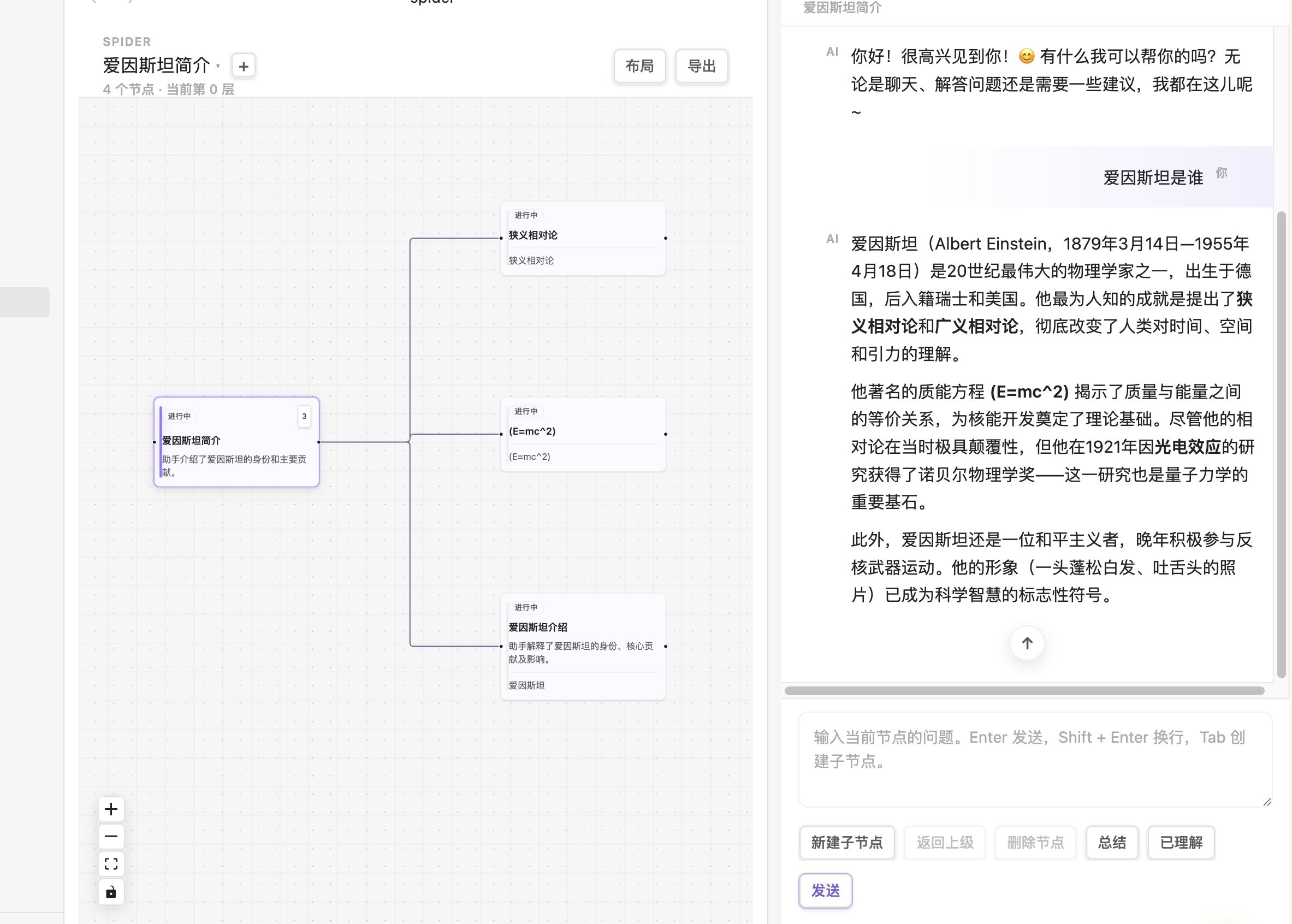
The screenshot shows the Chinese interface. Spider follows Obsidian's language on first install, and you can switch between Chinese and English at any time.
🤔 Why Spider?
| Scenario | Plain AI chat | Spider |
|---|---|---|
| Mid-answer, want to drill into a term | Copy-paste → new window → lose the original thread | Select text → Tab → child node carries the context |
| Want to compare 3 phrasings of the same question | Open 3 tabs and alt-tab | Same parent, 3 children, side-by-side |
| Done exploring, want it as notes | Copy-paste into a note, links break | Add personal node notes, then export Markdown + Canvas |
| Want AI to live inside your docs, not a separate tab | Constant window switching | Stay in Obsidian the entire time |
⚡ 30-Second Quick Start
- Install: Settings → Community plugins → Browse → search
Spider→ Install → Enable - Configure your API key: Settings → Spider → fill in
apiBaseUrl+apiKey+model(any OpenAI-compatible endpoint) - Create your first map: Click the Spider ribbon icon (or run command
Spider: New Spider map) → start chatting - Try Tab-branching: Select any text in an AI response, press
Tab— that's it
✨ Features
🌳 Infinite-Depth Branching Chat
- No depth limit: drill down as deep as you need; the graph grows with you
- Optional parent context: child node requests automatically include parent title / summary / anchor
- Streaming responses: typewriter-style real-time rendering with Markdown & code-block highlighting
- Select-to-branch: highlight any text in an AI response →
Tab→ the child's "anchor" is that exact highlight - Selection hint: selecting AI answer text shows a clickable “Tab Create branch” hint; clearing the selection hides it
- Return to source: parent and breadcrumb navigation restore your reading position and briefly highlight the source passage; other node switches retain their position for this session
- Auxiliary actions: retry, summarize, AI auto-title
🕸️ Interactive Knowledge Graph
- Full-tab canvas powered by React Flow
- Click a node to switch context; the chat panel follows automatically
- Collapse / expand subtrees to keep large maps clean
- Auto-layout via Dagre algorithm with active-path highlighting
- Drag nodes — positions persist, the canvas looks the way you left it
- Personal node notes — hover the pencil for a preview, click to pin and edit with autosave
📦 One-Click Structured Export
Spider Maps/
  ├── index.md                  # Obsidian entry-point note
  ├── brief.md                  # Findings, open questions, and progress
  ├── nodes/                    # One Markdown file per node
  ├── map.canvas                # Editable knowledge map
  └── map.svg                   # Sharp, shareable knowledge map image
- Canvas nodes are color-coded by state (purple = root / green = understood / gray = archived / blue = open)
- Canvas cards show concept titles, short previews, and links to full notes, with generous spacing
- Follow arrows to explore branches; source anchors stay in the notes instead of overlapping the graph
- SVG keeps card titles and previews visible at any zoom, with the same spacious layout
- Repeated exports create numbered snapshot folders, preserving earlier exports and handwritten additions
- Markdown files cross-link parent / child / index — backlinks wire up the full thinking chain
🔌 Works with Any OpenAI-Compatible API
- Official OpenAI (
https://api.openai.com/v1) - DeepSeek / Moonshot / Qwen / GLM (OpenAI-compatible mode)
- OpenRouter / Together / Groq (aggregator APIs)
- Local LLMs: Ollama, vLLM, LM Studio — all expose OpenAI-compatible endpoints
- Anthropic Claude via proxy
💡 Because it's the OpenAI Chat Completions spec, you just need a base URL + key + any model name that endpoint supports.
🔐 Privacy & Network Disclosure
- The plugin requires network to call AI, but you fully control which endpoint
- API key stays local (Obsidian's plugin data.json); never uploaded
- Never reads unrelated vault notes — AI requests only include the current branch plus the context options you enable
- Maps are 100% local: stored as
.spider/maps/*.json, syncable via Obsidian Sync - Offline-capable: knowledge graph, navigation, export, history — everything works offline. Only "send message" needs network.
🌐 Bilingual UI
Spider follows Obsidian's language on first install. You can switch between Chinese and English at any time, and newly generated export artifacts use the current Spider interface language.
⌨️ Keyboard Shortcuts
| Key | Action |
|---|---|
Tab |
With text selected in an AI response → create a branch from that source. On the focused map canvas → create an empty branch. |
Shift + Tab |
On the focused map canvas → go to the parent branch |
← → |
On the focused map canvas → parent ↔ first child |
↑ ↓ |
On the focused map canvas → move between sibling nodes |
Enter |
Send message (inside composer) |
Shift + Enter |
Newline (inside composer) |
Esc |
Clear current selection |
Delete / Backspace |
On the focused map canvas → delete the current non-root node |
⚙️ Settings
| Setting | Description | Default |
|---|---|---|
| API Base URL | OpenAI-compatible endpoint | https://api.openai.com/v1 |
| API Key | Your API key (password input, stored locally) | — |
| Model | Any model name your endpoint supports | gpt-4o-mini |
| Interface Language | Chinese / English | Follows Obsidian |
| Include parent context | Send parent title/summary/anchor with child requests | ✅ on |
| Include full context | Also send other map branches as reference (more tokens) | ❌ off |
| Stream responses | Stream tokens as they arrive | ✅ on |
| Tab to create child nodes | Enable the Tab shortcut | ✅ on |
| Auto-summarize nodes | AI auto-summarizes each node | ❌ off |
| Default export folder | Where export packages go | Spider Maps |
📥 Installation
From Community Plugins (recommended)
Open Settings → Community plugins → Browse, search for Spider, then select Install → Enable. Configure your API key and model under Settings → Spider.
From GitHub Release (manual installation)
- Download
main.js,manifest.json, andstyles.cssfrom the latest release - Create
<vault>/.obsidian/plugins/spider/ - Copy the three files into that directory
- Restart Obsidian, enable Spider under Settings → Community plugins, then configure your API key and model
From Source (development)
git clone https://github.com/111pointer111/spider
cd spider
npm install
npm run build
# Copy main.js, manifest.json, styles.css into
# <vault>/.obsidian/plugins/spider/
# Then enable the plugin in Obsidian
Or use npm run link to symlink the build output to your vault and pair with npm run dev for live-reload during development.
🛠 Development
npm install        # install dependencies
npm run dev        # watch mode (esbuild)
npm run build      # production build (runs tsc --noEmit first)
npm test           # run vitest tests
npm run test:browser # open the local URL and click Run source navigation checks (mock Obsidian API, no vault access)
npm run link       # symlink build output into your vault
Project Structure
src/
  ai/          OpenAI-compatible API provider (streaming + sync + summarize)
  domain/      ChatMap immutable factories + tree ops + guards + Dagre layout
  export/      Markdown / Mermaid / Canvas / SVG / JSON exporters
  state/       Multi-view session store + per-session ViewState
  storage/     Vault JSON persistence (backward-compatible with old directory)
  ui/          React components (graph, chat panel, gallery, modals)
  utils/       ID generation, path handling, activeDocument shim
tests/         vitest unit tests (domain + export + AI layers)
__mocks__/     Obsidian API stub for vitest
🧭 Roadmap (running list)
- Multi-select nodes + batch operations
- Node backlinks (auto-track "which nodes reference me")
- Custom system prompts
- Optional AI summary attached to export package
📜 License
🙏 Credits
- Obsidian — the endlessly extensible note app
- React Flow (@xyflow/react) — canvas engine
- @dagrejs/dagre — auto-layout
- Feynman Technique — the pedagogical idea: if you can't explain it simply, you don't understand it