Search...Search plugins and themes...
⌘K
Sign in
  • Get started
  • Download
  • Pricing
  • Enterprise
  • Account
  • Obsidian
  • Overview
  • Sync
  • Publish
  • Canvas
  • Mobile
  • Web Clipper
  • CLI
  • Learn
  • Help
  • Developers
  • Changelog
  • About
  • Roadmap
  • Blog
  • Resources
  • System status
  • License overview
  • Terms of service
  • Privacy policy
  • Security
  • Community
  • Plugins
  • Themes
  • Discord
  • Forum / 中文论坛
  • Merch store
  • Brand guidelines
Follow us
DiscordTwitterBlueskyThreadsMastodonYouTubeGitHub
© 2026 Obsidian

Spellcheck Toggler

julzerinosjulzerinos6k downloads

Toggle spellchecking for types of text blocks in the editing view.

Add to Obsidian
  • Overview
  • Scorecard
  • Updates14

A plugin for Obsidian which gives you more control over the red-underline spellcheck behaviour.

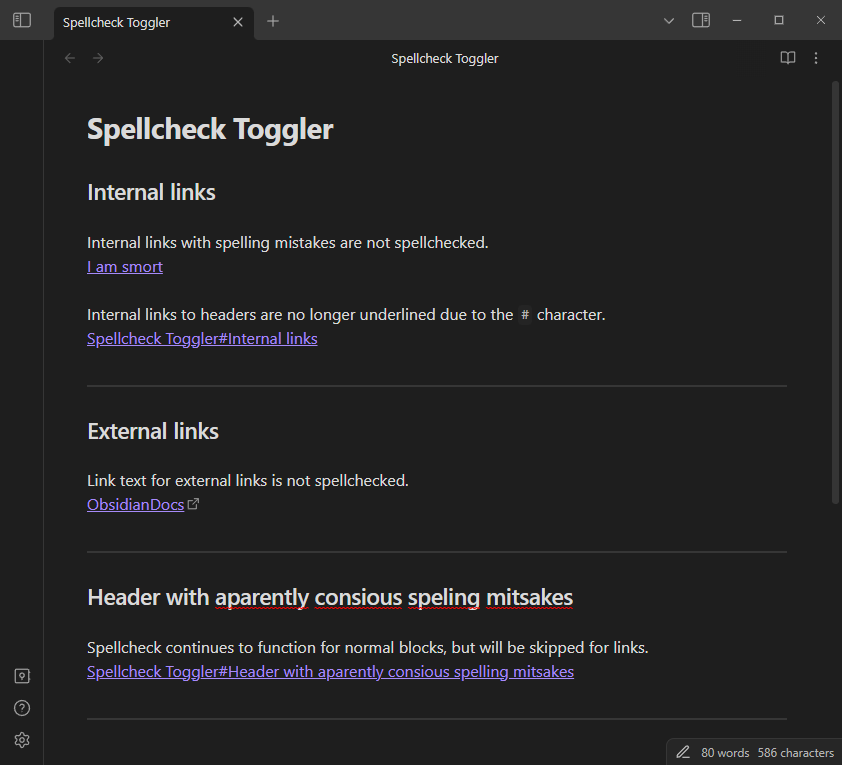
If you spend most of your time in the editing view and find yourself annoyed by the red spellcheck underline, you might find this plugin handy to toggle spellchecks for select types of blocks in your notes.

Originally created to disable spellcheck underlining for links in the editing view, but can easily be expanded to support other types of blocks.

Features

  • Feature toggles
    • External links
    • Internal links
    • HTML comments
    • Block quotes
    • Emphasis (italic)
    • Strong (bold)
    • Entire-file toggle
  • Robust behaviour per-file toggle control, with user-set frontmatter properties
  • Modules - each toggle can be controlled from the plugin setting tab to customize for your use case.
  • Open to requests - you can create an issue to request spellcheck toggling for a specific type of block.

Examples
Settings

Configure the spellcheck options with precise control.

You can tweak each spellcheck option individually, either entirely ignoring that option or applying it to your use case with the behaviour dropdown.

Configure spellchecking options. The behaviour of a spellcheck option is defined as follows:

  • "Always spellcheck": the editor default behaviour will be applied (the plugin is not active for the option).
  • "Frontmatter": explicitly use the defined frontmatter override property to toggle spellchecking in a given file, otherwise use a fallback behavior in files without the property.
  • "Never spellcheck": do not use spellcheck in any file for the option.`
77%
HealthExcellent
ReviewCaution
About
Toggle spellcheck for specific block types (external/internal links, HTML comments, block quotes, emphasis/italic, strong/bold) to remove distracting red underlines in edit view. Control each option globally or per-file via frontmatter overrides and choose always/frontmatter/never behaviors.
EditingWritingProperties
Details
Current version
1.4.4
Last updated
3 months ago
Created
2 years ago
Updates
14 releases
Downloads
6k
Compatible with
Obsidian 1.5.3+
Platforms
Desktop, Mobile
License
MIT
Report bugRequest featureReport plugin
Author
julzerinosjulzerinos
github.com/julzerinos
GitHubjulzerinos
  1. Community
  2. Plugins
  3. Editing
  4. Spellcheck Toggler

Related plugins

Meta Bind

Make your notes interactive with inline input fields, metadata displays, and buttons.

LanguageTool Integration

advanced spell/grammar checks with the help of language-tool.

LanguageTool

Unofficial integration of the LanguageTool spell and grammar checker.

MetaEdit

Manage your metadata.

Advanced Tables

Improved table navigation, formatting, and manipulation.

Advanced Canvas

Supercharge your canvas experience. Create presentations, flowcharts and more.

Outliner

Work with your lists like in Workflowy or Roam Research.

Various Complements

Complete words similar to auto-completion in an IDE.

Longform

Helps you write and edit novels, screenplays, and other long projects.

Creases

Tools for effectively folding Markdown sections.