Search...Search plugins and themes...
⌘K
Sign in
  • Get started
  • Download
  • Pricing
  • Enterprise
  • Account
  • Obsidian
  • Overview
  • Sync
  • Publish
  • Canvas
  • Mobile
  • Web Clipper
  • CLI
  • Learn
  • Help
  • Developers
  • Changelog
  • About
  • Roadmap
  • Blog
  • Resources
  • System status
  • License overview
  • Terms of service
  • Privacy policy
  • Security
  • Community
  • Plugins
  • Themes
  • Discord
  • Forum / 中文论坛
  • Merch store
  • Brand guidelines
Follow us
DiscordTwitterBlueskyThreadsMastodonYouTubeGitHub
© 2026 Obsidian

SoftMatcha Search

Yuiga WadaYuiga Wada39 downloads

Fast, powerful local vector search. Find passages beyond exact words, with highlighted matches. English & Japanese, desktop & mobile. No API key or server.

Add to Obsidian
SoftMatcha Search screenshot
  • Overview
  • Scorecard
  • Updates11

Find the passage—even when you forget the exact words.

Fast, powerful local vector search for Obsidian. English & Japanese · Desktop & mobile · No API key or server.

Powered by SoftMatcha 2: match similar words and phrase variations, highlight the passage, and jump straight to it.

Install from Community Plugins
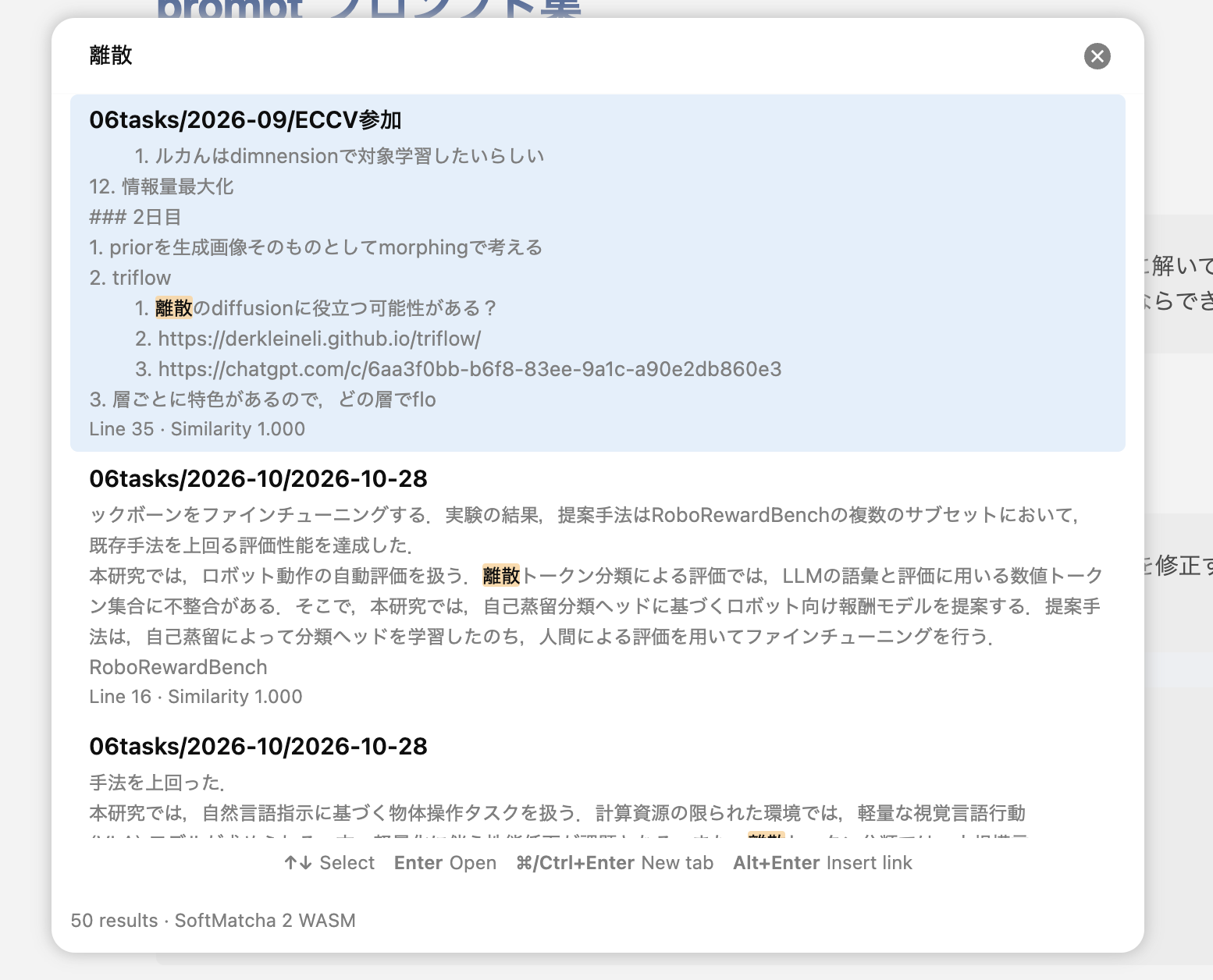
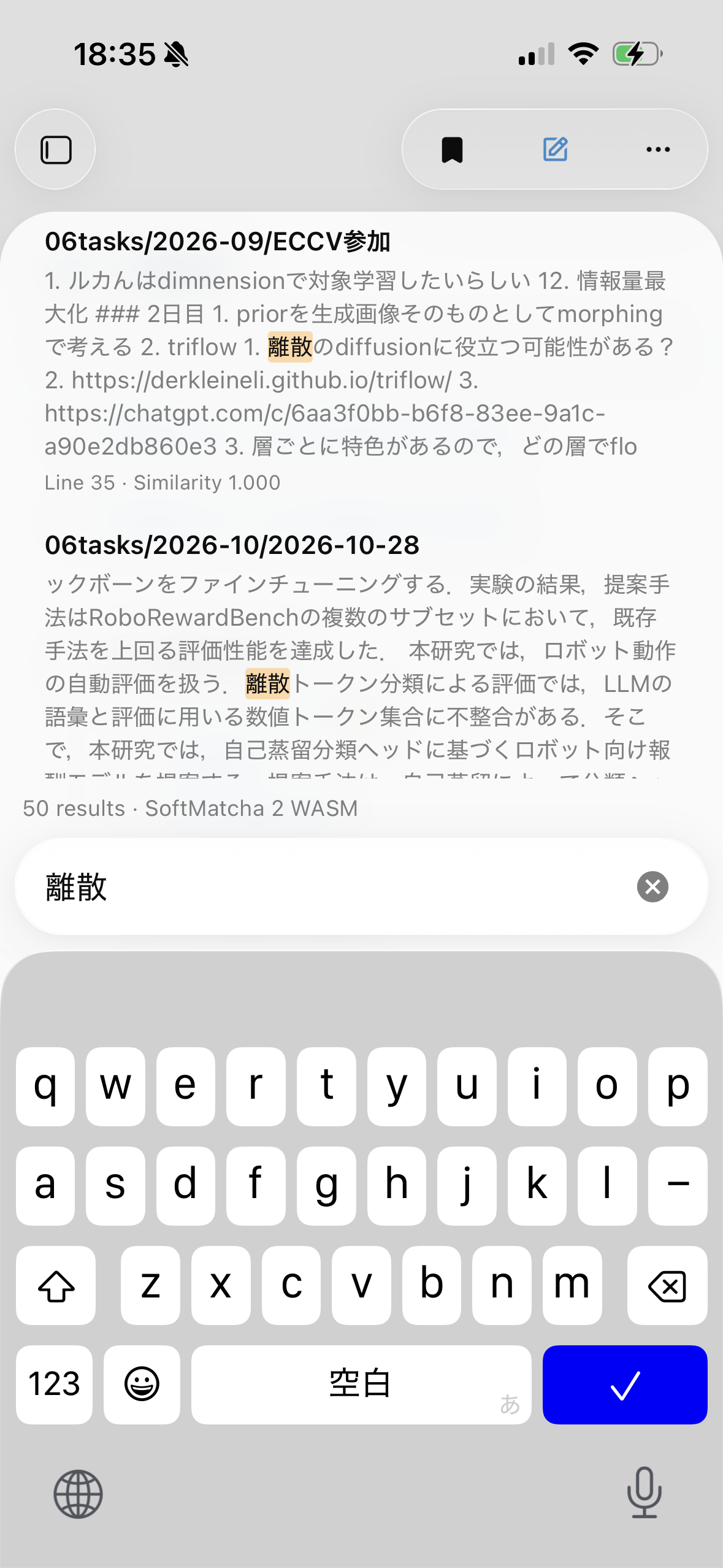
SoftMatcha-Search on macOS with highlighted search results SoftMatcha-Search on iOS with highlighted search results

Find. Open. Keep writing.

  • Built for speed. Rust + WebAssembly, with search running in a background worker.
  • Search beyond exact words. Combine exact matching with similarity-based phrase search.
  • See the match. Highlighted excerpts with direct navigation to the source line.
  • Stay in flow. Open results in a new tab or insert a [[link]] from the keyboard.
  • Choose your footprint. Enable English and Japanese models independently; exact search works without either.

Open SoftMatcha Search: Search vault from the command palette or tap the search ribbon icon. Set your shortcut in Settings → Hotkeys; try Cmd/Ctrl + Shift + O.

Local vector search. Your notes stay yours.

Search runs on your device. Missing models for enabled languages download automatically from GitHub Releases in the background; opt out in settings. After setup, search works offline. Notes and search queries are never uploaded. Privacy details

License

Original code and documentation: MIT. SoftMatcha 2 port: Apache-2.0 with MIT portions. fastText models: CC BY-SA 3.0. Japanese dictionary: upstream terms. Third-party notices · License texts

HealthExcellent
ReviewPassed
About
Find the passage—even when you forget the exact words. Fast, powerful local vector search powered by SoftMatcha 2. Combine exact matching with similar words and phrase variations in English and Japanese. Rust + WebAssembly runs search in a background worker. See highlighted matches, jump straight to the source line, open notes in a new tab, or insert a [[link]]. Works on desktop and mobile, with no API key or server. Search stays on your device. Optional language models download automatically from GitHub; opt out in settings. Works offline after setup. Notes and queries are never uploaded.
SearchAI
Details
Current version
0.3.6
Last updated
6 days ago
Created
Last week
Updates
11 releases
Downloads
39
Compatible with
Obsidian 1.8.7+
Platforms
Desktop, Mobile
License
MIT
Report bugRequest featureReport plugin
Author
Yuiga WadaYuiga Wadayuigawada
yuiga.dev/
GitHubyuigawada
  1. Community
  2. Plugins
  3. Search
  4. SoftMatcha Search

Related plugins

Smart Connections

Find related notes and excerpts while writing. Your AI link building copilot displays relevant content in graph + list view. A local embedding model powers semantic search. Zero setup. No API key.

Local LLM Helper

Use a local LLM server to augment your notes

Smart Second Brain

Chat with an agent that knows your notes, search by meaning, and see your vault grouped into topics. Runs on Ollama, OpenAI, Anthropic, and more.

Vault Curate

A local-first second brain for Obsidian , Desktop / Mobile ok, semantic search · relation graph · semantic paths · Hot/Cold rediscovery · strong Chinese/CJK · WebGPU on-device · no API keys. RAG LLM.

AI image analyzer

Analyze images with AI to get keywords of the image.

Smart Lookup

Semantic search for your vault. Ask in natural language, find notes by meaning when exact words fail, preview matching notes, and turn forgotten ideas into links, context, and next steps.

Similarity

Search, explore and see related notes based on their meaning (semantics). Using a tiny AI running fully on-device: data never leaves your machine, no API keys needed. Especially great for journaling.

Claudian

Embeds Claude Code/Codex and other local Agents as AI collaborators in your vault.

Quick Switcher++

Enhanced Quick Switcher, search open panels, and symbols.

Fast Note Sync

Real-time sync of your vaults across server, mobile, and web; shareable with anyone; supports REST and MCP integrations to build your personal AI knowledge base.