Search...Search plugins and themes...
⌘K
Sign in
  • Get started
  • Download
  • Pricing
  • Enterprise
  • Account
  • Obsidian
  • Overview
  • Sync
  • Publish
  • Canvas
  • Mobile
  • Web Clipper
  • CLI
  • Learn
  • Help
  • Developers
  • Changelog
  • About
  • Roadmap
  • Blog
  • Resources
  • System status
  • License overview
  • Terms of service
  • Privacy policy
  • Security
  • Community
  • Plugins
  • Themes
  • Discord
  • Forum / 中文论坛
  • Merch store
  • Brand guidelines
Follow us
DiscordTwitterBlueskyThreadsMastodonYouTubeGitHub
© 2026 Obsidian

Simple Disguise

ctxinfctxinf293 downloads

disguise/obscure/hide the markdown content in a very simple way.

Add to Obsidian
  • Overview
  • Scorecard
  • Updates1

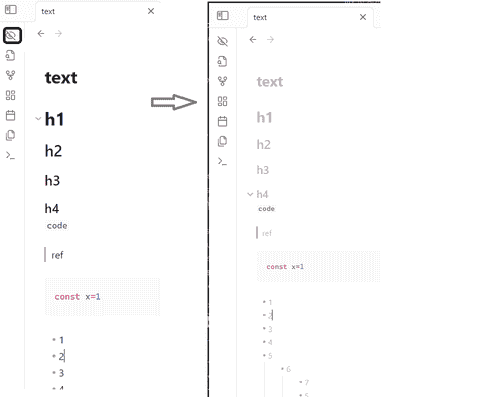
Disguise/obscure/hide the content in a very simple way. Prevent your editing content from being seeing clearly too easily by others passing by in public spaces.
intro.png

Implementation Principle

This feature is implemented using minimal code.
Modifying the styles of the editing area via CSS.

Usage

After installing and activating the plugin:
Click the button in the sidebar to toggle between disguise mode and normal mode.

Not Supported:

  • Reading view.
  • Command-based control.
  • Defining styles in settings (styles can only be adjusted directly by editing the styles.css file in the plugin directory).

功能简介

一键切换编辑内容的背景颜色和文本颜色, 防止在公共空间中编辑内容时, 被路过的人过于容易的看清楚正在编辑的内容

实现原理

使用最简单的方式实现这个功能 通过css修改编辑框中的样式

使用方式

安装并开启插件后, 点击侧边栏中的按钮, 控制伪装/恢复正常

不支持:

  • 阅读视图
  • 命令方式控制
  • 在setting中定义样式(只能直接修改插件目录中的styles.css进行样式调整)
84%
HealthGood
ReviewSatisfactory
About
Toggle a disguise in the editor to obscure content by swapping background and text colors, preventing passersby from easily reading your notes. Apply only in edit mode; reading view remains unchanged.
AppearanceCSSEditing
Details
Current version
1.0.0
Last updated
Last year
Created
Last year
Updates
1 release
Downloads
293
Compatible with
Obsidian 0.15.0+
Platforms
Desktop, Mobile
License
MIT
Report bugRequest featureReport plugin
Author
ctxinfctxinf
GitHubctxinf
  1. Community
  2. Plugins
  3. Appearance
  4. Simple Disguise

Related plugins

Lapel

Show the heading levels in the gutter of the editor.

Show Whitespace

CSS styles and CM6 extensions to highlight whitespace in Source and Live Preview modes.

Style Settings

Adjust theme, plugin, and snippet CSS variables.

CSS Editor

Edit CSS snippet files.

Snippetor

Create and tweak common snippets.

Advanced Tables

Improved table navigation, formatting, and manipulation.

Minimal Theme Settings

Control the colors and fonts in Minimal Theme.

Hider

Hide interface elements such as tooltips, status bar, titlebar, and more.

Meta Bind

Make your notes interactive with inline input fields, metadata displays, and buttons.

Outliner

Work with your lists like in Workflowy or Roam Research.