Search...Search plugins and themes...
⌘K
Sign in
  • Get started
  • Download
  • Pricing
  • Enterprise
  • Account
  • Obsidian
  • Overview
  • Sync
  • Publish
  • Canvas
  • Mobile
  • Web Clipper
  • CLI
  • Learn
  • Help
  • Developers
  • Changelog
  • About
  • Roadmap
  • Blog
  • Resources
  • System status
  • License overview
  • Terms of service
  • Privacy policy
  • Security
  • Community
  • Plugins
  • Themes
  • Discord
  • Forum / 中文论坛
  • Merch store
  • Brand guidelines
Follow us
DiscordTwitterBlueskyThreadsMastodonYouTubeGitHub
© 2026 Obsidian

Simple Code Formatter

wiop93256wiop932563k downloads

Format the code block where the cursor is.

Add to Obsidian
  • Overview
  • Scorecard
  • Updates5

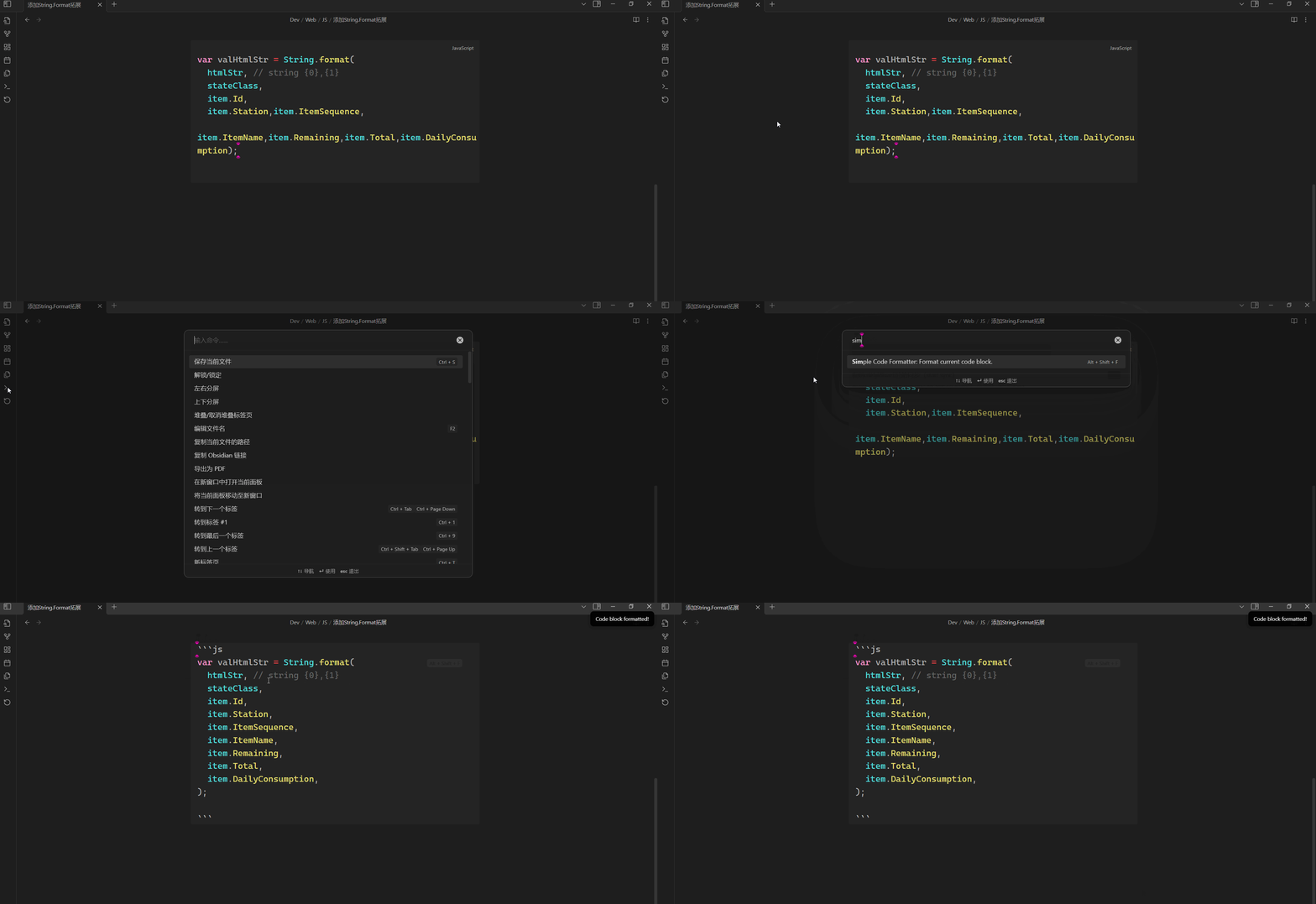
Format the block of code where the cursor is located

Direction for use

  • Place the cursor in the block of code you want to format.
  • Search "Simple Code Formatter" in Command Palette. alt text

  • Execute it.

Example

alt text

Supported Languges

Language Formatter(JS Module)
C(C++) js-beautify
csharp js-beautify
java prettier
xml xml-formatter
sql sqlformatter
html prettier
vue prettier
css prettier
javascript prettier
typescript prettier
json5 prettier
scss prettier
less prettier
graphql prettier
markdown prettier
yaml prettier

Questions

1. Markdown syntax of the code block

Make sure the Markdown syntax of the code block you want to format is correct.

2. Code syntax in a code block

The plugin will check your code syntax which use prettier of Formatter(JS Module).

Example of Code syntax
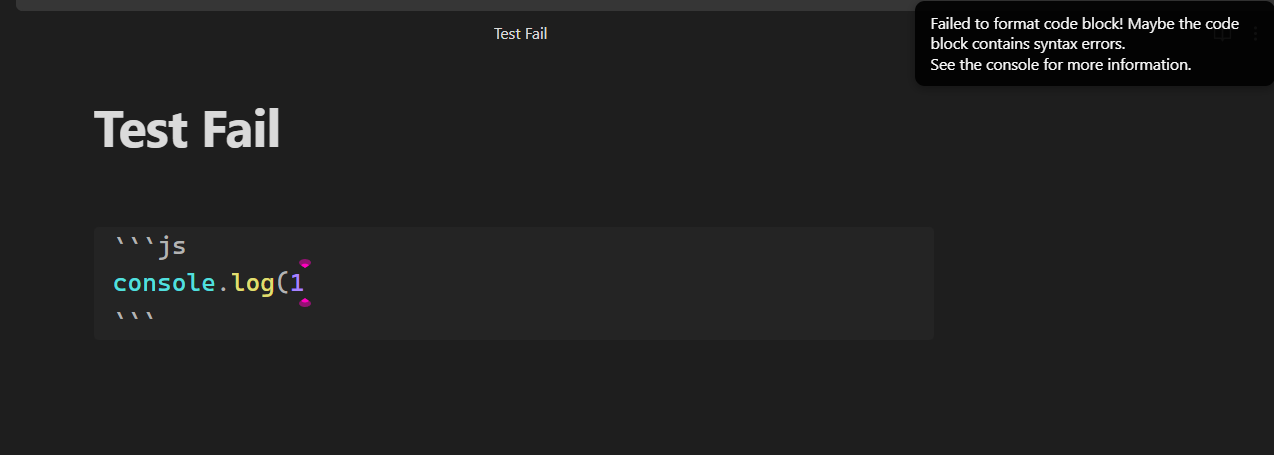
alt text

3. If your code doesn't conform to syntax, but you still want to beautify it?

You should bypass the syntax check. You can use a language powered by js-beautify instead of the current language.

After formatting, change it back.

65%
HealthGood
ReviewCaution
About
Format the code block under the cursor using language-specific formatters like Prettier, js-beautify, xml-formatter, and sqlformatter for languages such as JavaScript, TypeScript, Java, HTML, CSS, JSON, Markdown, YAML, SQL, and XML. Check code syntax with Prettier before formatting; switch to a js-beautify language to bypass strict syntax checks and still beautify malformed code.
CodeFormattingMarkdown
Details
Current version
1.2.2
Last updated
Last year
Created
2 years ago
Updates
5 releases
Downloads
3k
Compatible with
Obsidian 0.15.0+
Platforms
Desktop, Mobile
License
MIT
Report bugRequest featureReport plugin
Author
wiop93256wiop93256
github.com/wiop93256
GitHubwiop93256
  1. Community
  2. Plugins
  3. Code
  4. Simple Code Formatter

Related plugins

Linter

Format and style your notes. Linter can be used to format YAML tags, aliases, arrays, and metadata; footnotes; headings; spacing; math blocks; regular Markdown contents like list, italics, and bold styles; and more with the use of custom rule options.

Blur

Create obfuscated blocks of text.

JS Engine

Run JavaScript from within your notes.

Columns

Create columns in Markdown.

Image Captions

Add captions to images with inline Markdown and link support. The caption format is compatible with the Commonmark spec and other Markdown applications.

Markdownlint

Use markdownlint to make the contents of your files more consistent.

Templater

Create and use dynamic templates.

Importer

Import data from Notion, Evernote, Apple Notes, Microsoft OneNote, Google Keep, Bear, Roam, and HTML files.

Outliner

Work with your lists like in Workflowy or Roam Research.

Mermaid Tools

Improved Mermaid.js experience: visual toolbar with common elements and more.