Search...Search plugins and themes...
⌘K
Sign in
  • Get started
  • Download
  • Pricing
  • Enterprise
  • Account
  • Obsidian
  • Overview
  • Sync
  • Publish
  • Canvas
  • Mobile
  • Web Clipper
  • CLI
  • Learn
  • Help
  • Developers
  • Changelog
  • About
  • Roadmap
  • Blog
  • Resources
  • System status
  • License overview
  • Terms of service
  • Privacy policy
  • Security
  • Community
  • Plugins
  • Join the community
  • Discord
  • Forum / 中文论坛
  • Merch store
  • Brand guidelines
Follow us
DiscordTwitterBlueskyThreadsMastodonYouTubeGitHub
© 2026 Obsidian

Show Diff

ivan-lednevivan-lednev4k downloads

Render Git diffs in your notes.

Add to Obsidian
  • Overview
  • Scorecard
  • Updates1

🐞 Create issues, feature requests, share your ideas

  • Purpose
  • Usage
    • dates
    • commits
    • path
    • exclude
    • Command: Generate diff code block for today
  • Contributing
  • Acknowledgements

Purpose

This plugin lets you render Git diff output in your notes that looks like this:
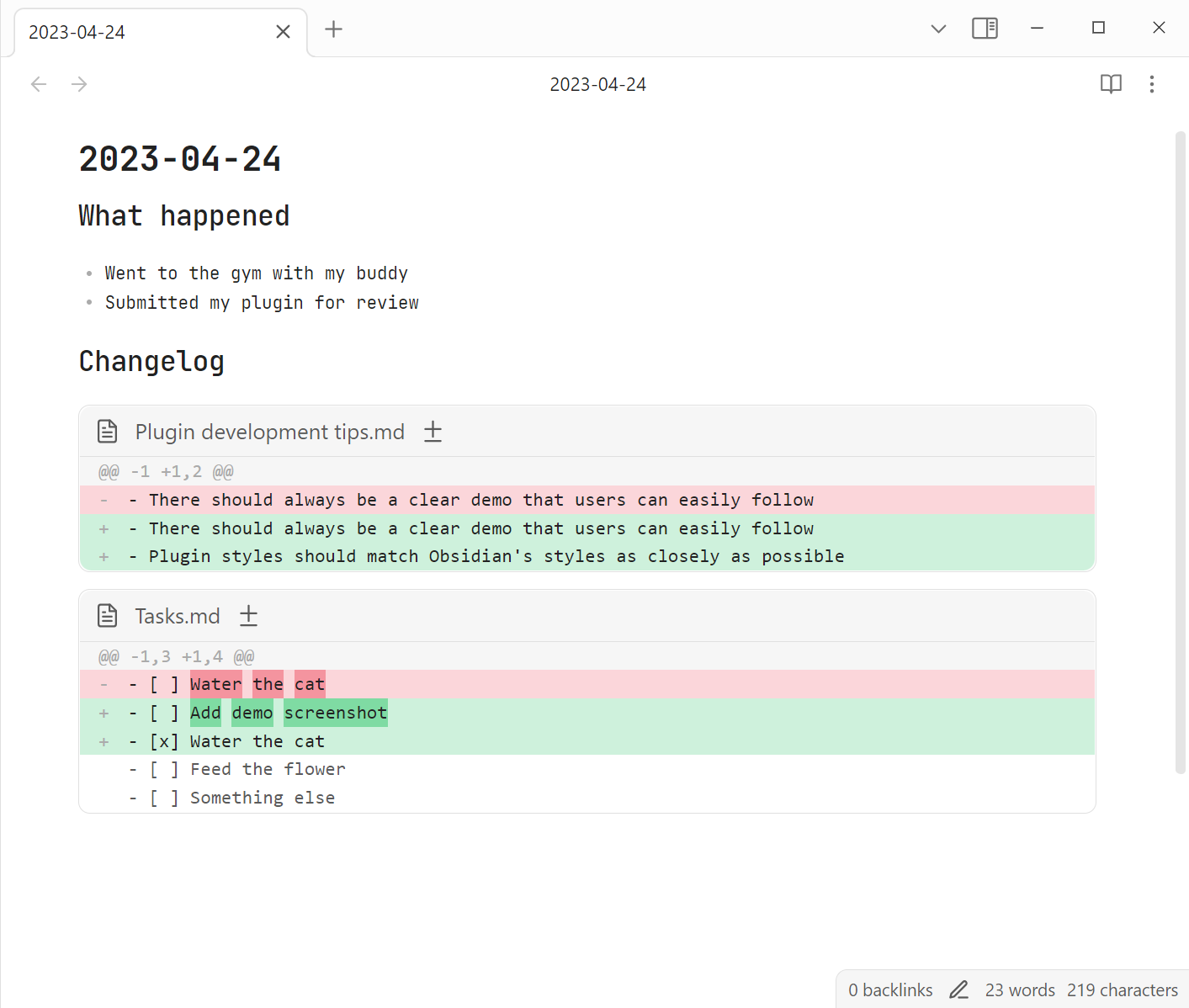
I personally use it in a combo with obsidian-git to revise what I've been working on a given day, like an automatic changelog, but you can point it to any repo in your file system.

Usage

For the plugin to work on your vault, it should be a git repository. You can add automatic git backups to your vault with obsidian-git.

The plugin renders Markdown code blocks with the show-diff language tag. An empty code block will show a diff between today and yesterday:

```show-diff
```

dates

With dates you can specify a date range to show changes for:

```show-diff
dates:
  from: 2021-01-01
  to: 2021-01-02
```

commits

With commits you can specify a commit range to show changes for:

```show-diff
commits:
  from: HEAD^
  to: HEAD
```

path

This defaults to the vault you're in, but you can point the plugin to any repository in your file system:

```show-diff
path: /path/to/my-pet-project
```

exclude

.obsidian (Obsidian's settings & cache) is excluded by default. You can override this with a single path:

```show-diff
exclude: trash
```

or with a list of paths:

```show-diff
exclude:
  - trash
  - archive
  - .obsidian
```

Command: Generate diff code block for today

The plugin provides a command to quickly insert in a note a code block like this:

```show-diff
dates:
  from: 2023-04-23
  to: 2023-04-24
```

Contributing

If you noticed a bug or thought of some way to improve the plugin, feel free to create an issue: https://github.com/ivan-lednev/obsidian-automatic-changelog/issues.

Pull-requests are also welcome! If you want to contribute but don't know where to start, you can create an issue or write me an email: [email protected].

You can also support me by buying me a coffee:

Acknowledgements

I've used the following plugins as a reference:

  • denolehov/obsidian-git: Backup your Obsidian.md vault with git
  • kometenstaub/obsidian-version-history-diff: Get a diff view of your Obsidian Sync, File Recovery and Git version history
65%
HealthFair
ReviewCaution
About
Render Git diffs as readable Markdown code blocks inside notes. Point to your vault or any repo, specify date or commit ranges and path exclusions, or insert a ready-made code block showing today's changes.
GitCodeCommands
Details
Current version
0.1.0
Last updated
3 years ago
Created
3 years ago
Updates
1 release
Downloads
4k
Compatible with
Obsidian 0.15.0+
License
MIT
Report bugRequest featureReport plugin
Sponsor
Buy Me a Coffee
Author
ivan-lednevivan-lednev
github.com/ivan-lednev
GitHubivan-lednev
  1. Community
  2. Plugins
  3. Git
  4. Show Diff

Related plugins

Open in Terminal

Open your vault in a new terminal window or launch Claude Code, Codex CLI, or Gemini CLI directly from a terminal.

Templater

Create and use dynamic templates.

Commander

Customize your workspace by adding commands everywhere, create macros and supercharge your mobile toolbar.

PlantUML

Generate PlantUML diagrams.

Task Collector (TC)

Change task status and collect tasks within a document using hotkeys and context menus.

Paste URL into selection

Paste URL "into" selected text.

Tray

Run Obsidian from the system tray for customisable window management and global quick notes.

Fit

Minimalist File gIT (FIT) to sync your files across mobile and desktop devices using GitHub.

GitHub

GitHub Sync

Sync vault to personal GitHub.

Shell commands

Define system commands that you want to execute via command palette, hotkeys, URI links or automated events. E.g. open external applications or perform automated file modifications.