Session Log
 Walker Brown18 downloads
A quick log for tabletop sessions. Type what happened and it lands in your session note with the time, tags and links. Logs Quick Initiative fights by itself.
- Overview
- Scorecard
- Updates5
A quick log for tabletop sessions in Obsidian. Type what just happened and it lands in your session note with the time, tags and links, so the recap is written by the end of the night.
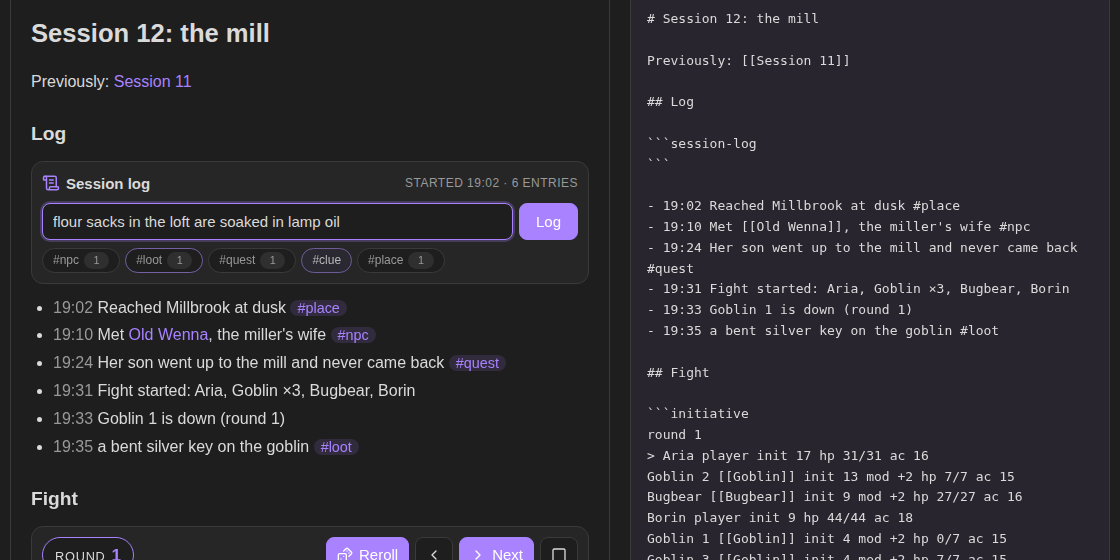
Try it in your browser before installing: https://bulkhead.bananafest-destiny.com/press/session-log/ runs the real plugin code over a sample session note, together with Quick Initiative.
Start a log
Put a session-log block in your session note:
## Log

```session-log
```
In reading view (or live preview) the block becomes a box. Type a line and press Enter:
- 19:10 Met [[Old Wenna]], the miller's wife #npc
Each entry goes at the end of the list under the block. It is an ordinary Markdown list, so [[links]] show up as backlinks on the linked note and #tags show up in tag search. Click a quick tag under the box to add it to the next entry; the number on each tag counts this session's entries with it.
Commands
| Command | What it does |
|---|---|
| Add log entry | opens the same box from anywhere. Give it a hotkey and you can log without leaving the map or the statblock you are reading |
| New session note | makes Session 13 in your session folder, with today's date, a link to Session 12, and a log ready to go |
| Insert log block | puts a session-log block at the cursor |
Add log entry writes to the open note if it has a log, otherwise to the last log you used.
Fights
With Quick Initiative installed, fights log themselves:
- 20:14 Fight started: Aria, Borin, Goblin ×3, Bugbear
- 20:15 Bugbear takes 9 (18/27)
- 20:16 Borin is poisoned
- 20:17 Round 2
- 20:19 Goblin 1 is down (round 2)
- 20:22 Aria heals 7 (31/31)
- 20:31 Fight over after 4 rounds. Down: Goblin ×3
Every hit and heal is noted with the hit points left, and conditions going on and off. Turn off Log the whole fight in settings and only the start, who goes down, and the end are noted.
A fight in the session note goes into its log. A fight in another note (a dungeon room, say) goes into the last log you used. Turn this off in settings.
Rolls
With Dice Tray installed, a roll you click goes into the log with the dice it showed:
- 20:16 Rolled 1d20 + dex -> [17] + 3 -> 20
- 20:17 Rolled [[Encounters#Forest]]: Wolves
Rolls go where fights go: the log in the same note, or the last log you used. Turn this off in settings.
Clocks
With Tabletop Clocks installed, every clock you tick goes into the log too:
- 21:02 The watch closes in: 3/6
- 21:15 The watch closes in: full (6/6)
- 21:40 [[The Red Hand]]: back to 2/8
They go where fights and rolls go. Turn this off in settings.
Settings
- Quick tags: the tags under the box, separated by commas. Default
npc, loot, quest, clue, place. - Add the time and 24-hour clock:
20:14,8:14pm, or no time at all. - Log fights, Log the whole fight, Log rolls and Log clocks: on by default.
- Session folder: where New session note puts notes. Default
Sessions.
Privacy
Session Log does not use the network, has no accounts, collects nothing and sends nothing. It only adds lines under the session-log block, and makes notes when you run New session note.
Install
From Obsidian: Settings → Community plugins → Browse → search "Session Log".
By hand: copy main.js, manifest.json and styles.css from the latest release into <your vault>/.obsidian/plugins/session-log/, then enable it under Community plugins.
Also from this maker
- Quick Initiative: an initiative tracker that keeps the fight as plain text in your note and reads Fantasy Statblocks creature notes.
- Dice Tray: rolls dice, random tables and note sections inline, and reads Dice Roller's
dice:syntax. - Encounter Builder: plan fights against the 5E XP budget, then start them in Quick Initiative.
- Tabletop Clocks: segmented clocks for danger, plans and factions, ticked with a click and kept as text in the note.
Source
On your players' phones
DM Screen, from the same maker, puts the table on your players' phones: the turn order, the battle map, the clocks and the rolls. They open a link or a QR code in any phone browser, with nothing to install. DM Screen is paid ($12 once, on itch.io) with a free one-hour trial. Session Log stays free.
Playing alone
Solo Oracle, from the same maker, is for games with no GM: ask it yes or no, frame scenes, keep threads and people, and roll on your own tables, with every answer written into the note. It's free.
https://github.com/walkertbrown/session-log
Build
npm install
npm test
npm run build
MIT licensed.