Search...Search plugins and themes...
⌘K
Sign in
  • Get started
  • Download
  • Pricing
  • Enterprise
  • Account
  • Obsidian
  • Overview
  • Sync
  • Publish
  • Canvas
  • Mobile
  • Web Clipper
  • CLI
  • Learn
  • Help
  • Developers
  • Changelog
  • About
  • Roadmap
  • Blog
  • Resources
  • System status
  • License overview
  • Terms of service
  • Privacy policy
  • Security
  • Community
  • Plugins
  • Themes
  • Discord
  • Forum / 中文论坛
  • Merch store
  • Brand guidelines
Follow us
DiscordTwitterBlueskyThreadsMastodonYouTubeGitHub
© 2026 Obsidian

Selection to Dida

divadiva62 downloads

Right-click selected text in an editor to add it as a Dida365/TickTick task, reusing the DidaSync plugin connection.

Add to Obsidian
  • Overview
  • Scorecard
  • Updates2
  • 联动obsidian 笔记 和 滴答清单的任务。
  • Obsidian 插件:在编辑视图/阅读视图选中文字后右键,即可把选中内容添加为 Dida365 / TickTick 任务。

功能

  • 编辑器右键菜单(编辑视图)与全局右键兜底(阅读视图)均可触发;
  • 任务标题自动清理书名号等装饰符号(《我们为什么要睡觉》 → 我们为什么要睡觉);
  • 选择目标清单(收集箱 / 学习安排 / 生活日常…);
  • 建任务前弹出理由输入框:可填写"为什么加入",也支持一键插入右键时的笔记选中文字;
  • 任务备注自动附带来源笔记链接:来源:[[笔记路径]];
  • 复用 DidaSync 插件的连接与同步管线(app.plugins.plugins["didasync"]),不自行管理 OAuth/token。

使用流程

  1. 在笔记中选中文字(如《我们为什么要睡觉》);
  2. 右键 → 「添加任务『我们为什么要睡觉』」;
  3. 选择清单 → 填写理由(可留空)→ 回车 / 点「添加任务」;
  4. 到 Dida / TickTick 查看任务。

无备注版。

obsidian笔记中选中文字,直接新建滴答清单任务
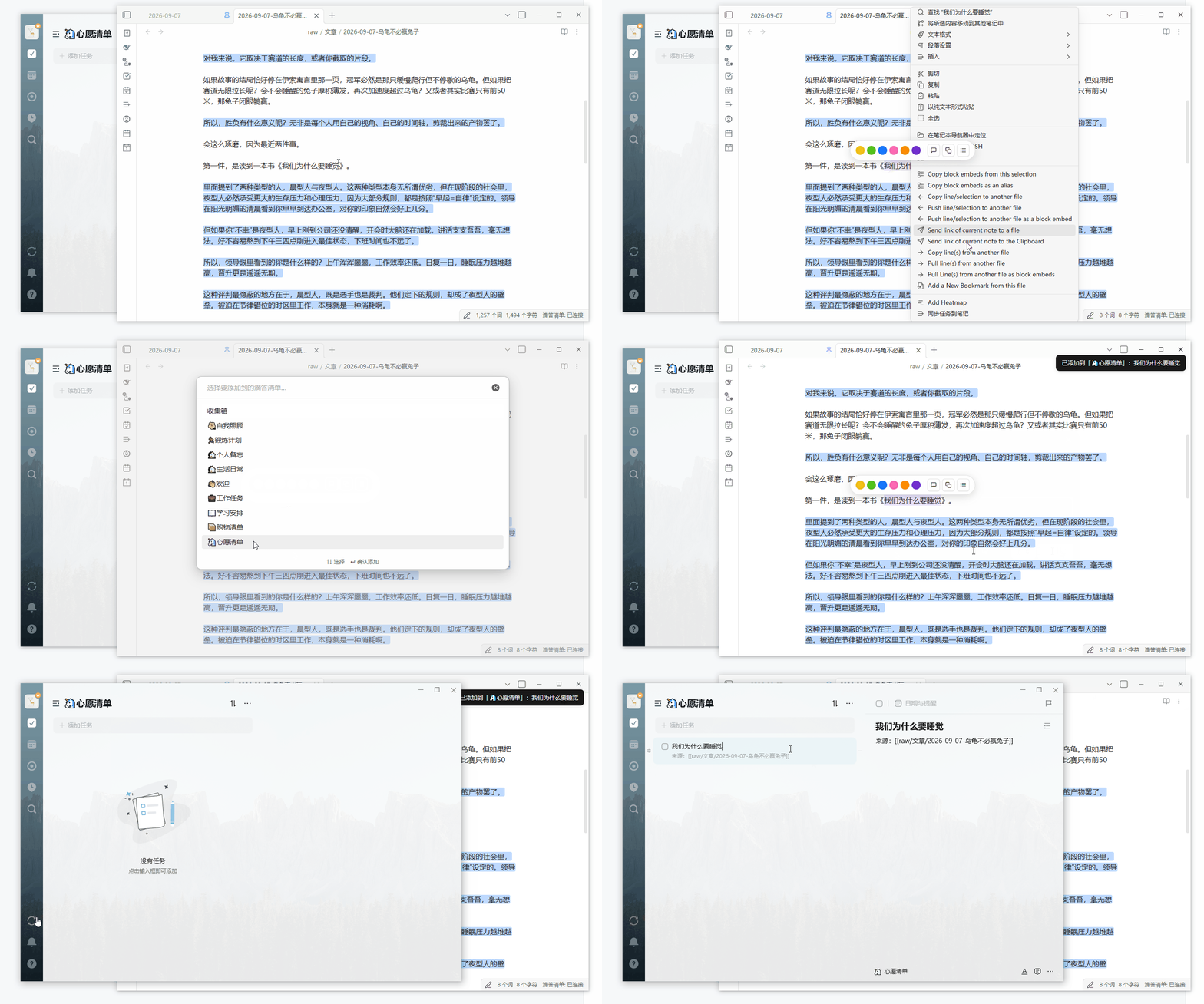
演示

有备注版。

先在剪贴板复制好备注,然后obsidian笔记中选中文字,新建滴答清单任务,在理由输入框粘贴,即在任务描述中看到备注。
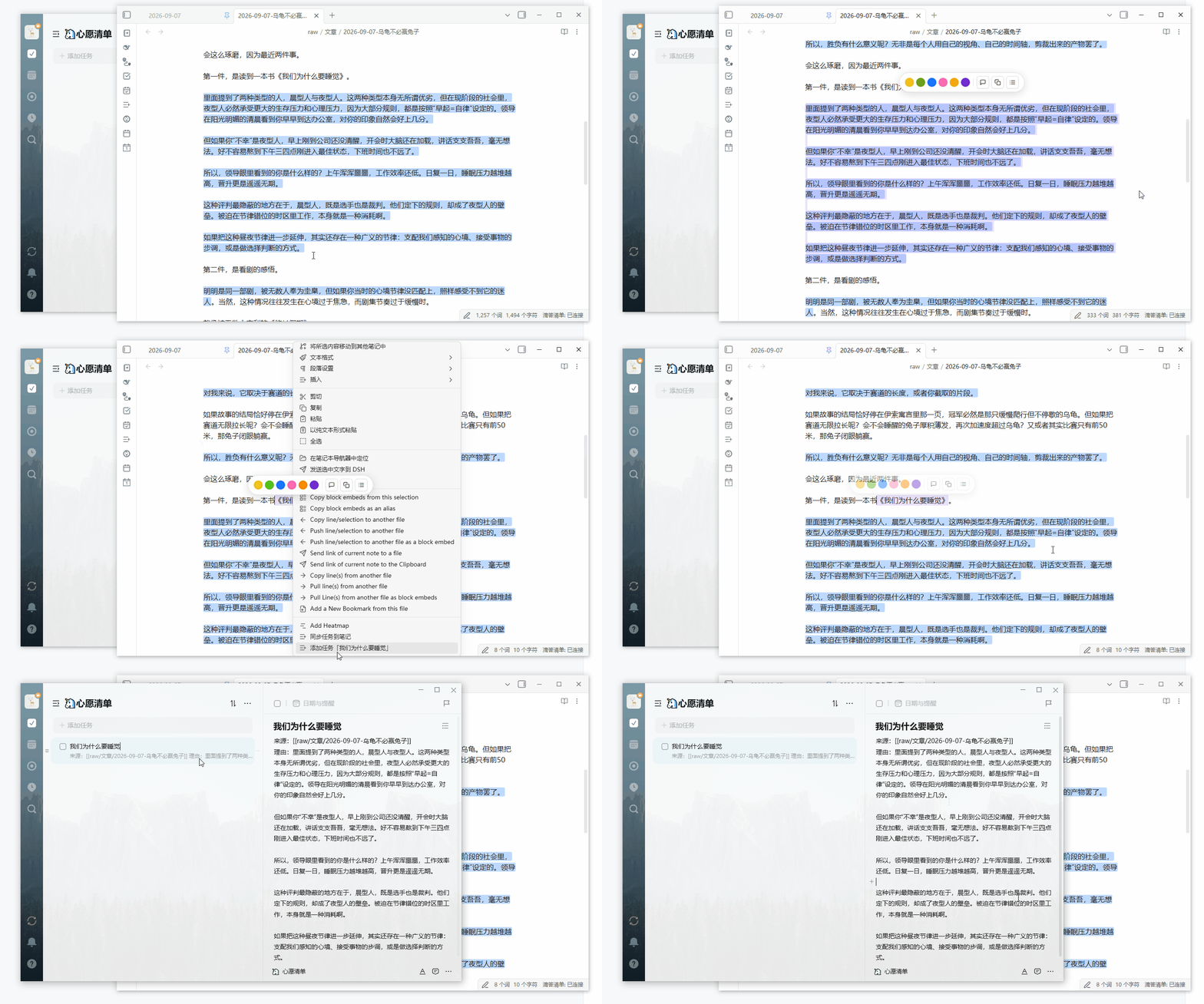
演示

依赖

  • DidaSync 插件需已安装、启用并完成 OAuth 登录(本插件调用其实例方法建任务)。

安装(开发/手动)

把 main.js、manifest.json 放入 <vault>/.obsidian/plugins/selection-to-dida-task/, 在 Obsidian「设置 → 第三方插件」中启用。

从源码构建

本插件为无构建依赖的手写 CommonJS,修改 main.js 后无需打包,直接生效; 重新加载插件(设置里关闭再开启)即可。

联系我

  • 邮箱:mail: [email protected]

License

MIT

HealthExcellent
ReviewSatisfactory
About
把编辑或阅读视图中选中的文字通过右键添加为 Dida365 或 TickTick 任务。自动清理标题装饰符、选择目标清单并填写理由,备注自动附带来源笔记链接;复用已安装的 DidaSync 完成授权与同步。 本插件在 Obsidian 编辑视图/阅读视图选中文字后右键,即可添加为 Dida365/TickTick 任务。 **带备注演示:** ![演示](https://github.com/divaliu1408/selection-to-didaTask/raw/main/assets/with-note.gif) **无备注演示:** ![演示](https://github.com/divaliu1408/selection-to-didaTask/raw/main/assets/without-note.gif)
TasksIntegrations
Details
Current version
0.1.1
Last updated
6 days ago
Created
2 weeks ago
Updates
2 releases
Downloads
62
Compatible with
Obsidian 1.7.2+
Platforms
Desktop, Mobile
License
MIT
Report bugRequest featureReport plugin
Author
divadivadivaliu1408
GitHubdivaliu1408
  1. Community
  2. Plugins
  3. Tasks
  4. Selection to Dida

Related plugins

TickTickSync

Sync TickTick tasks.

Todoist Sync

Materialize Todoist tasks within your notes.

Things3 Sync

Sync between Obsidian and Things3. Supports multi-language, tags and dates.

TaskNotes

Note-based task management with calendar, pomodoro and time-tracking integration.

BRAT

Easily install a beta version of a plugin for testing.

LanguageTool Integration

Advanced grammar and spell checking, powered by LanguageTool.

Self-hosted LiveSync

Sync vaults securely to self-hosted servers or WEBRTC.

Fast Note Sync

Real-time sync of your vaults across server, mobile, and web; shareable with anyone; supports REST and MCP integrations to build your personal AI knowledge base.

Custom Frames

Turn web apps into panes using iframes with custom styling. Also comes with presets for Google Keep, Todoist and more.

Local REST API with MCP

Unlock your automation needs by interacting with your notes over a secure REST API.