Search...Search plugins and themes...
⌘K
Sign in
  • Get started
  • Download
  • Pricing
  • Enterprise
  • Account
  • Obsidian
  • Overview
  • Sync
  • Publish
  • Canvas
  • Mobile
  • Web Clipper
  • CLI
  • Learn
  • Help
  • Developers
  • Changelog
  • About
  • Roadmap
  • Blog
  • Resources
  • System status
  • License overview
  • Terms of service
  • Privacy policy
  • Security
  • Community
  • Plugins
  • Themes
  • Discord
  • Forum / 中文论坛
  • Merch store
  • Brand guidelines
Follow us
DiscordTwitterBlueskyThreadsMastodonYouTubeGitHub
© 2026 Obsidian

Select word

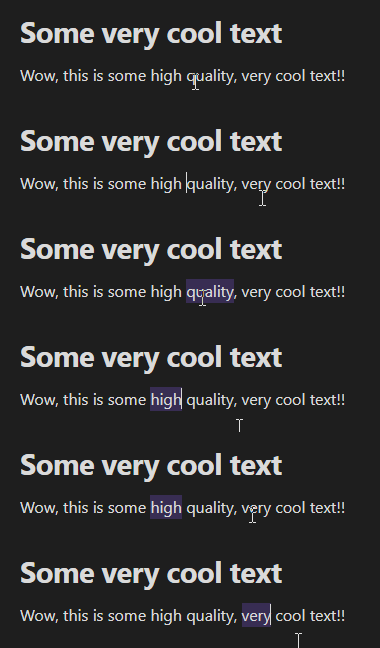
connorespinoconnorespino463 downloads

Selects the word that is closest to the caret.

Add to Obsidian
  • Overview
  • Scorecard
  • Updates1

This is a simple plugin for Obsidian (https://obsidian.md) that selects the word that is closest to the Text Editor's caret.

There is no default hotkey.

  • To change the hotkey, open the Settings dialog, go to the Hotkeys panel and search for "Select word".
  • Alternatively, you can click the + icon next to the plugin's on/off switch in the Community Plugins panel.

This is a very basic solution - I might improve it later.

Open Issues

Plugin doesn't work on title text

Might be handy to add an option to select whole hyperlinks rather than words inside the hyperlink

71%
HealthFair
ReviewSatisfactory
About
Select the word nearest the editor caret with a single command. Quickly highlight the word under or closest to the cursor for fast editing or replacement.
EditingCommandsHotkeys
Details
Current version
1.0.0
Last updated
2 years ago
Created
2 years ago
Updates
1 release
Downloads
463
Compatible with
Obsidian 0.15.0+
Platforms
Desktop, Mobile
License
GPL-3.0
Report bugRequest featureReport plugin
Author
connorespinoconnorespino
GitHubconnorespino
  1. Community
  2. Plugins
  3. Editing
  4. Select word

Related plugins

Code Editor Shortcuts

Add keyboard shortcuts (hotkeys) commonly found in code editors such as Visual Studio Code (VS Code) or Sublime Text.

Emoji Toolbar

Quickly search for and insert emojis into your editor.

Paste URL into selection

Paste URL "into" selected text.

Tray

Run Obsidian from the system tray for customisable window management and global quick notes.

Leader Hotkeys

Add leader hotkey support to any command (like tmux or vim).

Vimrc Support

Auto-load a startup file with Vim commands.

Slash Commander

Customize the slash command list, assign each command an icon.

Doubleshift

Open the command palette by pressing Shift (or any other key) twice like in IntelliJ and create your own shortcuts.

Advanced Tables

Improved table navigation, formatting, and manipulation.

Quick Switcher++

Enhanced Quick Switcher, search open panels, and symbols.