Search...Search plugins and themes...
⌘K
Sign in
  • Get started
  • Download
  • Pricing
  • Enterprise
  • Account
  • Obsidian
  • Overview
  • Sync
  • Publish
  • Canvas
  • Mobile
  • Web Clipper
  • CLI
  • Learn
  • Help
  • Developers
  • Changelog
  • About
  • Roadmap
  • Blog
  • Resources
  • System status
  • License overview
  • Terms of service
  • Privacy policy
  • Security
  • Community
  • Plugins
  • Join the community
  • Discord
  • Forum / 中文论坛
  • Merch store
  • Brand guidelines
Follow us
DiscordTwitterBlueskyThreadsMastodonYouTubeGitHub
© 2026 Obsidian

Emoji Toolbar

oliveryholiveryh462k downloads

Quickly search for and insert emojis into your editor.

Add to Obsidian
  • Overview
  • Scorecard
  • Updates11

This plugin for Obsidian allows you to quickly search for and add emojis to your editor.
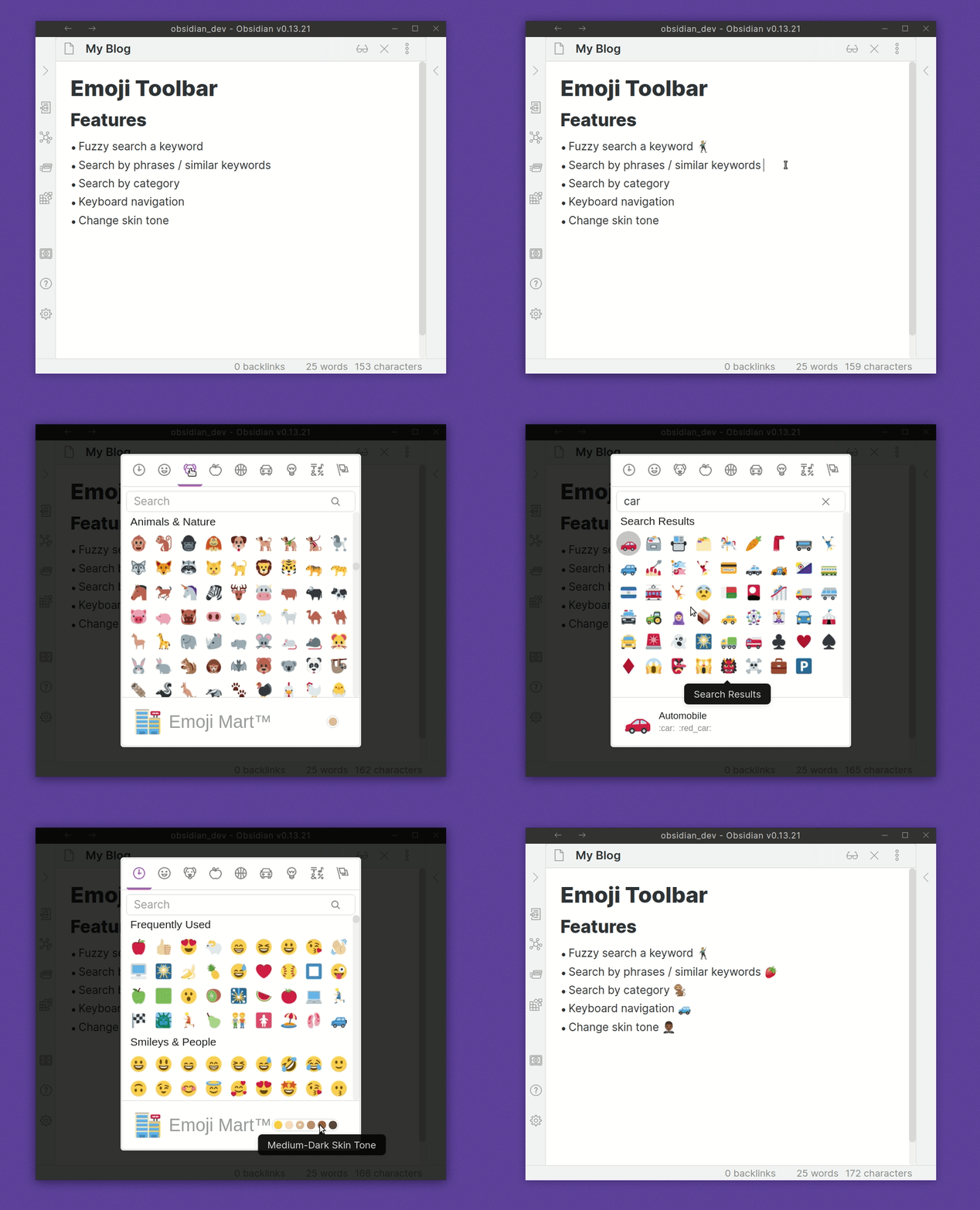
Emoji Toolbar Plugin

Usage

After enabling the plugin, you'll find a new hot key setting called Emoji Toolbar: Open emoji picker. Set this to whatever you like. Once clicked it will allow you to search through a list of emojis.

Start typing a word to filter through the list. You can insert the emoji into the editor by either clicking on it, or use the arrow keys and then press enter to insert the emoji.

Features

  • Skin Tone Support
  • Fuzzy / Semantic Search Matches
  • Select Recently Used Emoji
  • Twitter emoji formatting for preview and insert modal for improved emoji support. This can be toggled on/off in the Emoji Toolbar settings tab.

Install

Within Obsidian

  1. Click Settings | Third Party Plugins
  2. Ensure that Safe mode is turned off
  3. Click on Community plugins "Browse"
  4. Look for Emoji

Thanks

  • A big thanks to liamcain for producing the obsidian-react-starter which the basis of v0.3.0+ is made from
  • Also to Emoji Mart
76%
HealthGood
ReviewSatisfactory
About
Search and insert emojis directly into the editor. Filter results with fuzzy/semantic matching, skin tone support, and a recently used list. Preview and insert Twitter-style emoji formatting when preferred.
EmojiEditingHotkeys
Details
Current version
1.0.0
Last updated
6 months ago
Created
5 years ago
Updates
11 releases
Downloads
462k
License
BSD-3-Clause
Report bugRequest featureReport plugin
Author
oliveryholiveryh
github.com/oliveryh/obsidian-emoji-toolbar
GitHuboliveryh
  1. Community
  2. Plugins
  3. Emoji
  4. Emoji Toolbar

Related plugins

Code Editor Shortcuts

Add keyboard shortcuts (hotkeys) commonly found in code editors such as Visual Studio Code (VS Code) or Sublime Text.

Text Transporter

Advanced text tools for working with text in your vault.

Unicode Search

Search and insert Unicode characters into your editor.

Advanced Tables

Improved table navigation, formatting, and manipulation.

Outliner

Work with your lists like in Workflowy or Roam Research.

Meta Bind

Make your notes interactive with inline input fields, metadata displays, and buttons.

Various Complements

Complete words similar to auto-completion in an IDE.

Datacore

An even faster reactive query engine for the data obsessed.

LanguageTool Integration

advanced spell/grammar checks with the help of language-tool.

Iconic

Customize your icons and their colors directly from the UI, including tabs, files & folders, bookmarks, tags, properties, and ribbon commands.