Search...Search plugins and themes...
⌘K
Sign in
  • Get started
  • Download
  • Pricing
  • Enterprise
  • Account
  • Obsidian
  • Overview
  • Sync
  • Publish
  • Canvas
  • Mobile
  • Web Clipper
  • CLI
  • Learn
  • Help
  • Developers
  • Changelog
  • About
  • Roadmap
  • Blog
  • Resources
  • System status
  • License overview
  • Terms of service
  • Privacy policy
  • Security
  • Community
  • Plugins
  • Themes
  • Discord
  • Forum / 中文论坛
  • Merch store
  • Brand guidelines
Follow us
DiscordTwitterBlueskyThreadsMastodonYouTubeGitHub
© 2026 Obsidian

Scribble Mode

nickparkes7nickparkes71 downloads

Turn note text into squiggles so you can write freely without stopping to reread or edit.

Add to Obsidian
  • Overview
  • Scorecard
  • Updates2

Turn your note text into squiggles so you can write without stopping to reread or edit.
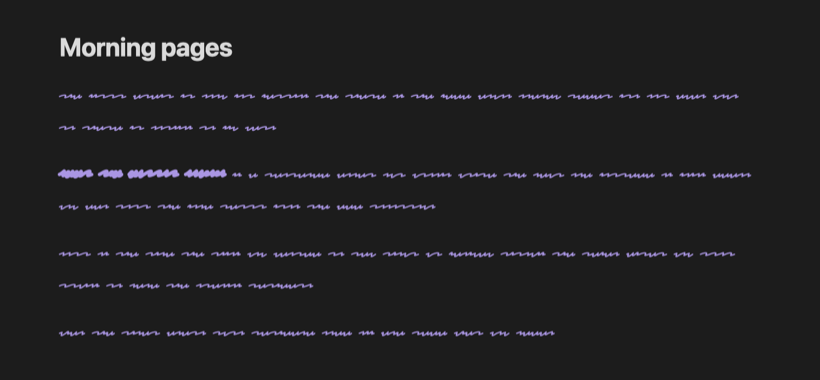
A note in scribble mode: the title is readable and the body text is drawn as squiggles

When you can read what you just wrote, it's hard not to fix it. Scribble Mode hides your words as you type, which makes it useful for writing sprints, morning pages and first drafts. Turn it off when you're done and everything is back to normal. Your notes are never changed.

Usage

Everywhere: run Scribble Mode: Toggle on or off from the command palette, or click the pen icon in the ribbon. While it's on, 〰 Scribble shows in the status bar; click it to turn scribble mode off. You can give the command a hotkey in Settings → Hotkeys.

One note: add scribble to the note's cssclasses property and that note always shows as squiggles:

---
cssclasses: scribble
---

Only the note body turns into squiggles. The note title, properties and the rest of Obsidian stay readable, so you can still find your way around. Word count, the cursor and selection all work as usual.

Installation

Search for Scribble Mode in Settings → Community plugins → Browse.

To install it manually, download main.js, manifest.json and styles.css from the latest release and put them in <your vault>/.obsidian/plugins/scribble-mode/.

Development

npm install
npm run dev

npm run dev rebuilds main.js and styles.css as you edit. npm run build makes a production build, and npm run lint runs the Obsidian ESLint rules. The stylesheet is built from src/styles.css, with the fonts in fonts/ inlined as data URLs so the plugin works offline.

Credits

Scribble Mode uses Redacted Script by Christian Naths, licensed under the SIL Open Font License 1.1. Inspired by the scribble font in Ellipsus.

License

MIT. The bundled font keeps its own license (see above).

HealthExcellent
ReviewPassed
About
Hide note body text as squiggles while you write to avoid rereading and self-editing during sprints or first drafts. Toggle Scribble Mode on/off from the command palette or ribbon; note titles, properties and UI stay readable, and cursor, selection and word count keep working while your notes remain unchanged.
WritingAppearanceStatus bar
Details
Current version
1.0.1
Last updated
4 hours ago
Created
4 hours ago
Updates
2 releases
Downloads
1
Compatible with
Obsidian 1.0.0+
Platforms
Desktop, Mobile
License
MIT
Report bugRequest featureReport plugin
Author
nickparkes7nickparkes7
GitHubnickparkes7
  1. Community
  2. Plugins
  3. Writing
  4. Scribble Mode

Related plugins

WebNovel Assistant

An all-in-one writing studio for novel and story writers. Features accurate word count tracking, daily goals, story timeline board, plot foreshadowing manager, chapter corkboard, and character lore gr

Custom Note Width

Effortlessly change the line width of each note individually. Provides multiple ways to customize the experience, making it both efficient and user-friendly to adjust line widths.

Better Word Count

Count the words of selected text in the editor.

Reading Time

Add the current note's reading time to the status bar.

Minimal Theme Settings

Control the colors and fonts in Minimal Theme.

Hider

Hide interface elements such as tooltips, status bar, titlebar, and more.

LanguageTool Integration

Advanced grammar and spell checking, powered by LanguageTool.

ChatGPT MD

A seamless integration of ChatGPT, OpenRouter.ai and local LLMs via Ollama into your notes.

Supercharged Links

Add attributes to internal links with the values of target note's frontmatter attributes.

Note Toolbar

Add customizable toolbars to your notes.