Search...Search plugins and themes...
⌘K
Sign in
  • Get started
  • Download
  • Pricing
  • Enterprise
  • Account
  • Obsidian
  • Overview
  • Sync
  • Publish
  • Canvas
  • Mobile
  • Web Clipper
  • CLI
  • Learn
  • Help
  • Developers
  • Changelog
  • About
  • Roadmap
  • Blog
  • Resources
  • System status
  • License overview
  • Terms of service
  • Privacy policy
  • Security
  • Community
  • Plugins
  • Join the community
  • Discord
  • Forum / 中文论坛
  • Merch store
  • Brand guidelines
Follow us
DiscordTwitterBlueskyThreadsMastodonYouTubeGitHub
© 2026 Obsidian

Reverse Complement

Björn JohanssonBjörn Johansson27 downloads

Right-click menu to convert selected DNA to its reverse complement.

Add to Obsidian
  • Overview
  • Scorecard
  • Updates2

This is a plugin that adds a reverse complement function to obsidian. Look here for installation.
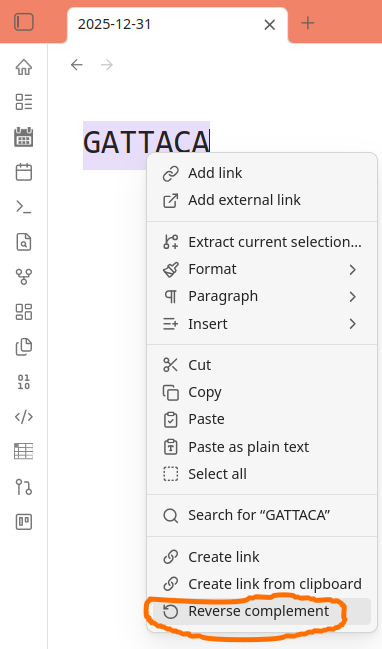
This plugin was made following these instructions.

How to make a release

Create a local tag that matches the version in the manifest.json file.

git tag -a 1.0.1 -m "1.0.1" # tag and name has to be the same
git push origin 1.0.1

-a creates an annotated tag. -m specifies the name of your release.

When the workflow finishes, Publish the newly created draft release.

82%
HealthExcellent
ReviewSatisfactory
About
Convert selected nucleotide sequences into their reverse complement directly inside notes. Generate or replace sequence text inline for quick sequence editing and analysis.
ScienceEditingCommands
Details
Current version
1.0.1
Last updated
4 months ago
Created
Last year
Updates
2 releases
Downloads
27
Compatible with
Obsidian 0.15.0+
License
0BSD
Report bugRequest featureReport plugin
Author
Björn JohanssonBjörn Johanssonbjornfjohansson
github.com/BjornFJohansson
GitHubbjornfjohansson
  1. Community
  2. Plugins
  3. Science
  4. Reverse Complement

Related plugins

Paste URL into selection

Paste URL "into" selected text.

Vimrc Support

Auto-load a startup file with Vim commands.

Code Editor Shortcuts

Add keyboard shortcuts (hotkeys) commonly found in code editors such as Visual Studio Code (VS Code) or Sublime Text.

Slash Commander

Customize the slash command list, assign each command an icon.

Heading Shifter

Easily Shift and Change Markdown headings.

Advanced Tables

Improved table navigation, formatting, and manipulation.

Outliner

Work with your lists like in Workflowy or Roam Research.

Meta Bind

Make your notes interactive with inline input fields, metadata displays, and buttons.

Commander

Customize your workspace by adding commands everywhere, create macros and supercharge your mobile toolbar.

Various Complements

Complete words similar to auto-completion in an IDE.